
大家好,我最近在協助公司測試 iPhone / iPad 連線 FortiGate 的 IPsec VPN,但始終無法成功建立連線。
我已嘗試依照 FortiGate Phase 1 / Phase 2 的標準設定,並在 iOS 端輸入 Server、Account、Secret 等必要資料,但仍然顯示「伺服器溝通失敗」。目前最大問題是:
iOS 內建 VPN 介面找不到可對應 FortiGate 的設定項目(例如:EAP 啟用、Phase 2 設定等)。
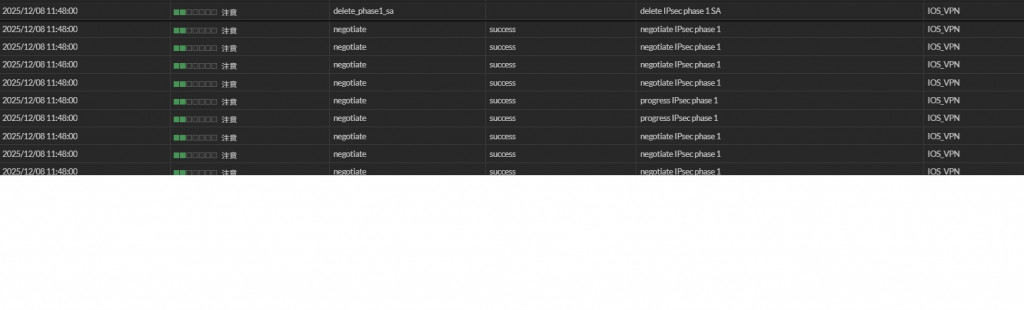
FortiGate Log 顯示 Phase1 有時 success,但 iOS 仍連不上。
想確認 iOS 目前是否仍支援 FortiGate 這種標準 IPsec(IKEv1/IKEv2)模式?是否需改用 SSL VPN 才能成功?
想請問有成功讓 iOS 連入 FortiGate IPsec VPN 的前輩們:
是否有哪個環節是我可能忽略的?
以下這是我參考的文件及照片
https://video.fortinet.com/watch/236
 ]
]
感謝各位,最近被這問題困住比被主管盯著還緊,希望有人能拉我一把。
已邀請的邦友 {{ invite_list.length }}/5





根據訊息 negotiate IPsec phase 1 = success 後出現 delete_phase_1_sa,推斷異常成因:
建議:

使用wizard的缺點
就是出現狀況時,不容易找問題出在哪
已經蠻多先進提供設定方法
在下建議樓主查找兩個方向
1.路由設定:特別是Phase 2網段
2.防火牆政策:相關介面是否有通過的政策
需仔細檢查是否能通過
如果一直都搞不通
會建議用SSLVPN比較簡單
較少路由與政策的狀況
這邊靜態路由設定0.0.0.0/0,然後政策是全部設定為all全部打開,所以基本上設定應該是沒有問題的,然後很奇怪的是Windows系統(包括三星平板、Windows電腦)可以連線,但是ios系統不行,不過還是謝謝大大,我這邊測試也是覺得如果不行也是往SSL VPN的方向去設定,只是擔心後續官方後續未來很快就不在支援SSL VPN,所以還是希望往IPSEC VPN去著手。
只有一條:靜態路由設定0.0.0.0/0 嗎?
這樣怪怪的
沒有client的那一端網段嗎?
其實不用擔心官方後續未來很快就不支援 SSLVPN
除了可以用到2027年之外
如果不是上市櫃公司被稽核要求
大可將舊防火牆放到新防火牆後面
繼續使用sslvpn到天荒地老
前方有合規的防火牆防護著
而舊的防火牆留做sslvpn用
多符合經濟效益?
老闆一定喜歡

以下是我的測試環境:
預先需要有的 iOS VPN client 知識:
(1)要先知道 iOS 18.7 IKE 會送甚麼 proposal
因為 Forigate 內建的 IPSec tunnel template, 沒有可以直接用來接 iOS IKEv2 PSK 的.
(個人的推測)這部份 Fortinet 似乎沒有想要演進改善, 更新可以適用於新版 iOS 的 template.
所以不要想用Web管理介面設這條IPSec規則了, 只能先用 CLI 長出來.
後續才有辦法在Web管理見面作變更.
下列為 CLI 設定的 IPsec 規則, 供大家參考.
情境: iOS VPN client 撥上 Fortigate, 可以存取 LAN (192.168.1.0/24).
config vpn ipsec phase1-interface
    edit "IKEv2_PSK"
        set type dynamic
        set interface "wan1"
        set ike-version 2
        set peertype any
        set net-device disable
        set mode-cfg enable
        set ipv4-dns-server1 192.168.1.10
        set proposal aes256gcm-prfsha256
        set localid "fgt60e"
        set dpd on-idle
        set dhgrp 19
        set ipv4-start-ip 172.16.1.1
        set ipv4-end-ip 172.16.1.10
        set psksecret heremypsk
        set dpd-retryinterval 60
    next
end
config vpn ipsec phase2-interface
    edit "IKEv2_PSK_P2"
        set phase1name "IKEv2_PSK"
        set proposal aes256gcm
        set pfs disable
        set src-subnet 192.168.1.0 255.255.255.0
    next
end
最後要加一條防火牆規則, 讓 VPN client 可以存取 LAN.
iOS 設定:
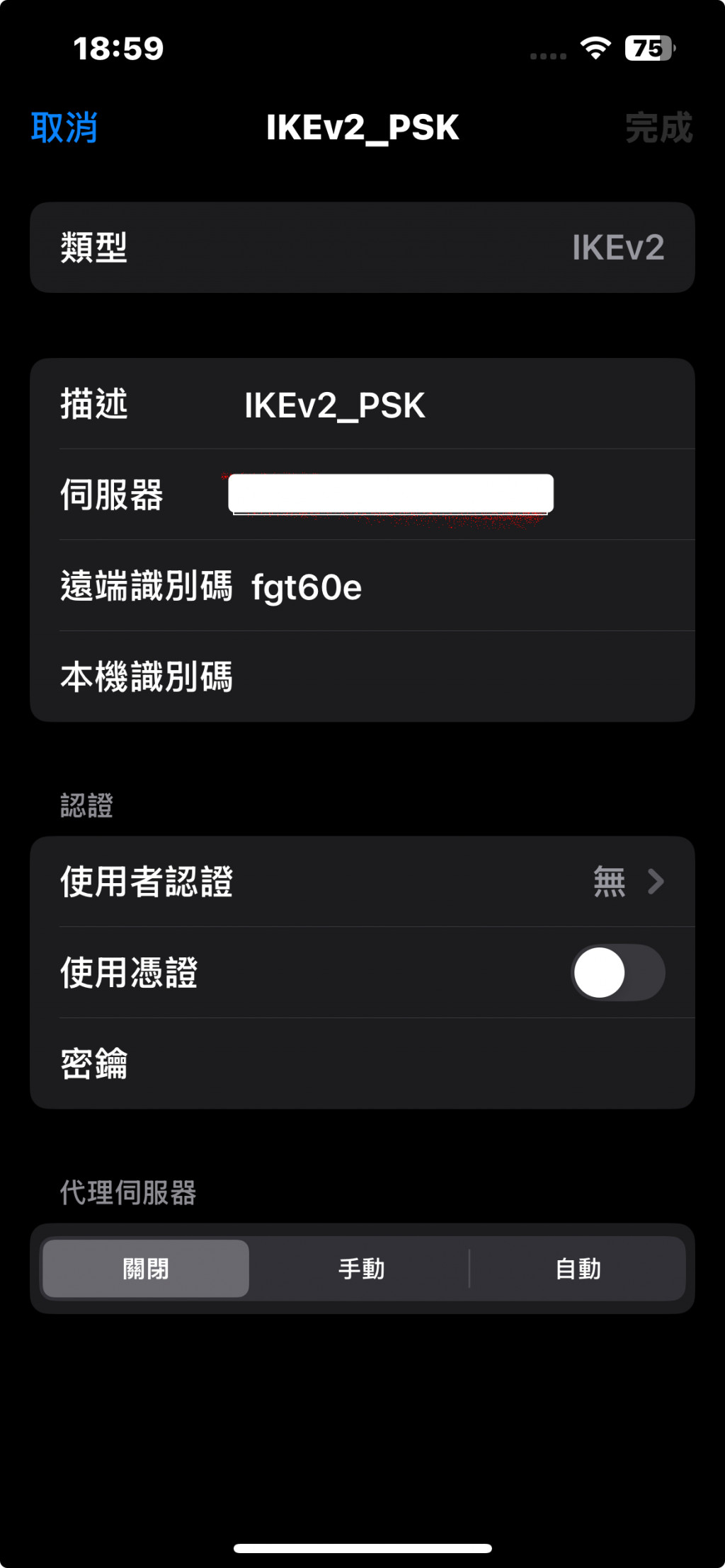
Fortigate IKE negotiation debug 方式:
開 CLI console, 輸入
diagnose debug application ike -1
diagnose debug enable
記得結束前把 debug 關掉.
diagnose debug disable

我是用 FortiClientVPN 這個APP
環境:
FortiGate-91G V7.2.11
iOS 26.1 + FortiClient 7.4.10.0196
特別為 iOS 設定一個IPSec
config vpn ipsec phase1-interface
    edit "IPSec_iOS"
        set type dynamic
        set interface "wan1"
        set mode aggressive
        set peertype one
        set net-device enable
        set mode-cfg enable
        set proposal aes128-sha256 aes256-sha256 aes128-sha1 aes256-sha1
        set dhgrp 14 5 2
        set xauthtype auto
        set peerid "ios"
        set ipv4-start-ip 192.168.99.171
        set ipv4-end-ip 192.168.99.180
        set ipv4-netmask 255.255.255.0
        set dns-mode auto
        set ipv4-split-include "IPSec_VPN_split"
        set unity-support disable
        set psksecret yourpsk
        set dpd-retryinterval 60
    next
end

config vpn ipsec phase2-interface
    edit "IPSec_iOS"
        set phase1name "IPSec_iOS"
        set proposal aes128-sha1 aes256-sha1 aes128-sha256 aes256-sha256 aes128gcm aes256gcm chacha20poly1305
        set pfs disable
        set keepalive enable
    next
end
IPSec_VPN_split 這個是位址群組,就把允許VPN存取的網段加進來
然後防火牆規則也加上存取各網段的規則
iOS 設定: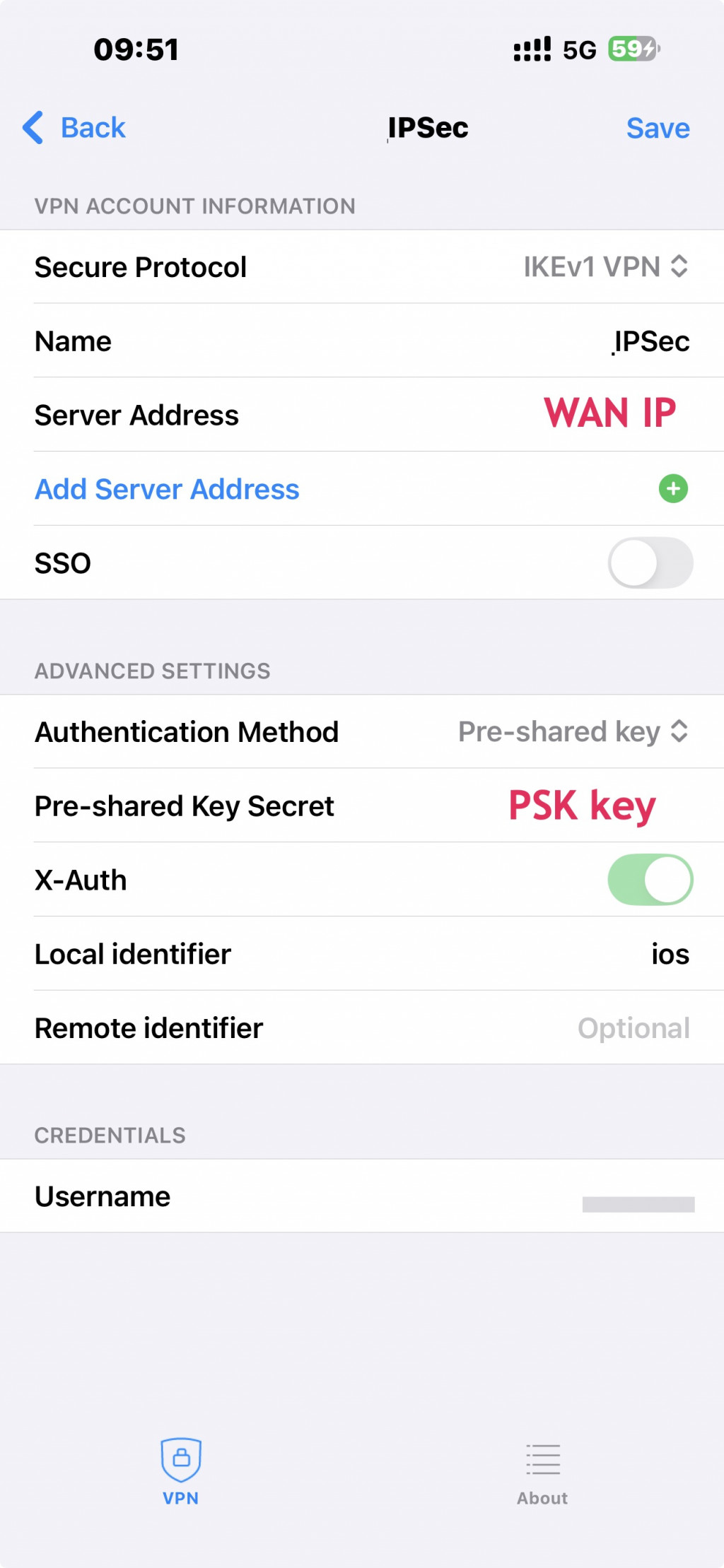
local identifier 要跟 phase1裡面peerid的一樣
不過有遇到一個問題
VPN User 沒辦法開2FA
完全不會跳詢問 Token 的視窗
但用SSLVPN就可以
這樣安全性就降低了



 iThome鐵人賽
 看影片追技術