iT邦幫忙

1

[6.1810][code] xv6 的 Processes (一)

  • 分享至 

  • xImage
  •  

系列文章 : [6.1810] 跟著 MIT 6.1810 學習基礎作業系統觀念

大綱

  • xv6-riscv book : 8. Scheduling
  • xv6-riscv book : 8.1 Multiplexing
  • xv6-riscv book : 8.2 Context switch overview
  • kerenl/proc.h/struct context
  • kernel/swtch.S/swtch
  • kernel/proc.h/struct cpu
  • kernel/proc.h/struct trapframe
  • kernel/proc.h/struct proc

xv6-riscv book : 8. Scheduling

  • 任何的作業系統都會希望,運行的 process 的數量超過電腦實際擁有的 CPUs 的數量。例如說我的筆記型電腦只有 4 個 CPU,但是可能會希望跑幾十,甚至幾百個 process。

  • 想要達成這個目的,我們需要把 CPUs 的時間分享給多個 process。

  • 理想上來說,CPUs 時間的分享對於 user processes 來說是 “transparent ( 透明 )” 的,也就是 user processes 看不到這個分享的過程,不會被分享的過程干擾,不會感知到目前正在進行 CPUs 時間的分享。

  • A common approach is to provide each process with the illusion that it has its own virtual CPU by multiplexing the processes onto the hardware CPUs.


xv6-riscv book : 8.1 Multiplexing

xv6-riscv 會在下面兩個情況來切換在某一個特定 CPU 上運行的 process ( 同一個 CPU,從 process A 換成執行 process B )

  • First, xv6 switches when a process makes a system call that blocks (has to wait), for example read or wait.
    • voluntary switches
  • Second, xv6 periodically forces a switch to cope with processes that compute for long periods without blocking.
    • involuntary switches

Implementing multiplexing poses a few challenges.

  • First, how to switch from one process to another?
    • The basic idea is to save and restore CPU registers, though the fact that this cannot be expressed in C makes it tricky
  • Second, how to force switches in a way that is transparent to user processes?
    • Xv6 uses the standard technique in which a hardware timer’s interrupts drive context switches.
  • Third, all of the CPUs switch among the same set of processes, so a locking plan is necessary to avoid mistakes such as two CPUs deciding to run the same process at the same time.
  • Fourth, a process’s memory and other resources must be freed when the process exits, but it cannot finish all of this itself.
  • Fifth, each CPU of a multi-core machine must remember which process it is executing so that system calls affect the correct process’s kernel state.


xv6-riscv book : 8.2 Context switch overview

  • The term context switch refers to the steps involved in a CPU leaving off execution of one kernel thread (usually for later resumption), and resuming execution of a different kernel thread. This switching is the heart of multiplexing.

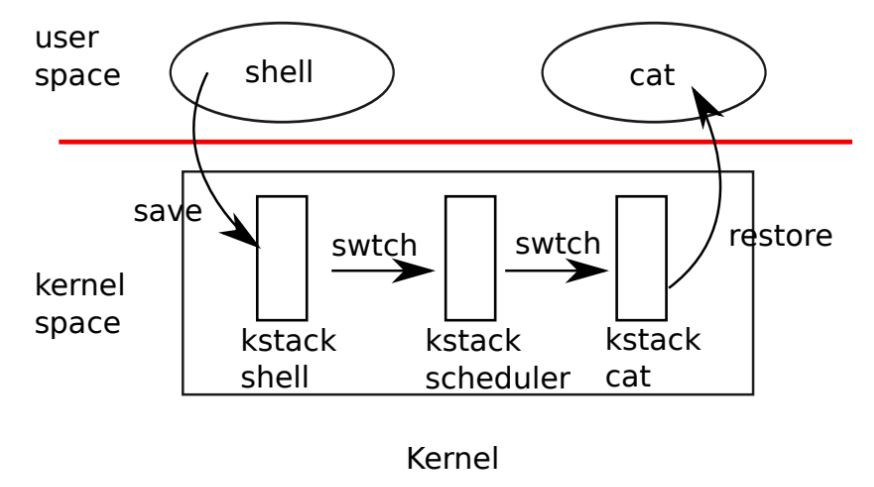
  • xv6-riscv 並不會直接從一個 process 的 kernel thread context switch 到另外一個 process 的 kernel thread。當 xv6-riscv 在進行 context-switch 的時候,會先切換到 CPU 的 scheduler thread,這個 scheduler thread 會選擇下一個要執行的 process,並且 context switch 到該 process。

  • user space 可能會因為 system call 或是 interrupt ( e.g. timer interrupt ) 而 trap 進入到 kernel space

    • 從該 process 的 user space 進入到該 process 的 kernel thread。
    • 皆換到該 CPU 的 scheduler thread 執行
    • context switch 到另一個 process 的 kernel thread 執行
    • 從新的 process 的 kernel thread 返回到新的 process 的 user space。

{ Figure 8.1 }
https://ithelp.ithome.com.tw/upload/images/20260529/20180992uvwk1LwvT6.jpg


kerenl/proc.h/struct context

// Saved registers for kernel context switches.
struct context {
  uint64 ra;
  uint64 sp;

  // callee-saved
  uint64 s0;
  uint64 s1;
  uint64 s2;
  uint64 s3;
  uint64 s4;
  uint64 s5;
  uint64 s6;
  uint64 s7;
  uint64 s8;
  uint64 s9;
  uint64 s10;
  uint64 s11;
};
  • 每個 struct-proc 都會有一個 struct context,代表每一個 process 的 context
  • 每個 struct-cpu 也都會有一個 struct context,這代表了 scheduler thread 的 context
  • context switch 發生的時候,就是會將舊的 struct-context 存到 ram 上的 struct-context,並且將新的 struct-context 載入到 CPU 的 CSRs。


kernel/swtch.S/swtch

# Context switch
#
#   void swtch(struct context *old, struct context *new);
# 
# Save current registers in old. Load from new.	


.globl swtch
swtch:
        sd ra, 0(a0)
        sd sp, 8(a0)
        sd s0, 16(a0)
        sd s1, 24(a0)
        sd s2, 32(a0)
        sd s3, 40(a0)
        sd s4, 48(a0)
        sd s5, 56(a0)
        sd s6, 64(a0)
        sd s7, 72(a0)
        sd s8, 80(a0)
        sd s9, 88(a0)
        sd s10, 96(a0)
        sd s11, 104(a0)

        ld ra, 0(a1)
        ld sp, 8(a1)
        ld s0, 16(a1)
        ld s1, 24(a1)
        ld s2, 32(a1)
        ld s3, 40(a1)
        ld s4, 48(a1)
        ld s5, 56(a1)
        ld s6, 64(a1)
        ld s7, 72(a1)
        ld s8, 80(a1)
        ld s9, 88(a1)
        ld s10, 96(a1)
        ld s11, 104(a1)
        
        ret
  • 第一個參數 ( register a0 ) 指的是舊的 context
  • 第二個參數 ( register a1 ) 指的是新的 context
  • 上半部分會把 CPU 的 registers 存到舊的 context
  • 下半部分會把新的 context 載入 CPU 的 register,完成 context switch

這邊舉一個例子,並用單單一個 register ra ( Return Address ) 來當作範例。假設我們現在運行在 CPU-1 上,並且想要從 process-A context switch 到 process-B。

  • process-A 呼叫 swtch,會把 return address 存到 ra
  • swtch
    • process-A 的 ra 會被存到 struct-proc(A)->context
    • struct-cpu(1)->context 的 ra 會從 RAM 載入到 CPU register,CPU 的 ra register 被更新
    • ret 的時候,會回到 struct-cpu(1) 呼叫 swtch 時的 return address,也就是 { https://github.com/mit-pdos/xv6-riscv/blob/riscv/kernel/proc.c#L449 } 的下一行。
    • 在 struct-cpu(1) 的 scheduler thread 會選擇下一個要運行的 process,這邊假設選中了 process-B。
    • struct-cpu(1) 的 scheduler thread 會呼叫 swtch(&c->context, &p->context),嘗試切換到 process-B 的 context
    • 在 swtch 裡面,會把 ra 換成 struct-proc(B)->context.ra,所以 return address 會被換成 process-B 呼叫 swtch 的下一道指令。
    • 在 swtch 裡面執行 ret 後,就會到 process-B 呼叫 swtch 的下一道指令開始執行
  • transparent
    • 對於 process-A 以及 process-B 來說,就像是呼叫 swtch 這個 function 後,很正常的從這個 function return 回來繼續執行罷了。
    • 對於 process-A 以及 process-B 來說,整個 context switch 的過程就像是透明 ( transparent ) 的一樣。


kernel/proc.h/struct cpu

// Per-CPU state.
struct cpu {
  struct proc *proc;      // The process running on this cpu, or null.
  struct context context; // swtch() here to enter scheduler().
  int noff;               // Depth of push_off() nesting.
  int intena;             // Were interrupts enabled before push_off()?
};
  • struct proc *proc
    • 目前正在這個 CPU 執行的 process
  • struct context context
    • 該 CPU 的 scheduler thread 的 context
  • int noff
    • 記錄呼叫了幾次的 push_off,我們要呼叫相同次數的 pop_off,才能依照 intena 的值來決定要不要 enable interrupt。
  • int intena
    • 在呼叫第一次的 push_off 的時候,interrupt 是否為打開的狀態。


kernel/proc.h/struct trapframe

// per-process data for the trap handling code in trampoline.S.
// sits in a page by itself just under the trampoline page in the
// user page table. not specially mapped in the kernel page table.
// uservec in trampoline.S saves user registers in the trapframe,
// then initializes registers from the trapframe's
// kernel_sp, kernel_hartid, kernel_satp, and jumps to kernel_trap.
// prepare_return() and userret in trampoline.S set up
// the trapframe's kernel_*, restore user registers from the
// trapframe, switch to the user page table, and enter user space.
struct trapframe {
  /*   0 */ uint64 kernel_satp;   // kernel page table
  /*   8 */ uint64 kernel_sp;     // top of process's kernel stack
  /*  16 */ uint64 kernel_trap;   // usertrap()
  /*  24 */ uint64 epc;           // saved user program counter
  /*  32 */ uint64 kernel_hartid; // saved kernel tp
  /*  40 */ uint64 ra;
  /*  48 */ uint64 sp;
  /*  56 */ uint64 gp;
  /*  64 */ uint64 tp;
  /*  72 */ uint64 t0;
  /*  80 */ uint64 t1;
  /*  88 */ uint64 t2;
  /*  96 */ uint64 s0;
  /* 104 */ uint64 s1;
  /* 112 */ uint64 a0;
  /* 120 */ uint64 a1;
  /* 128 */ uint64 a2;
  /* 136 */ uint64 a3;
  /* 144 */ uint64 a4;
  /* 152 */ uint64 a5;
  /* 160 */ uint64 a6;
  /* 168 */ uint64 a7;
  /* 176 */ uint64 s2;
  /* 184 */ uint64 s3;
  /* 192 */ uint64 s4;
  /* 200 */ uint64 s5;
  /* 208 */ uint64 s6;
  /* 216 */ uint64 s7;
  /* 224 */ uint64 s8;
  /* 232 */ uint64 s9;
  /* 240 */ uint64 s10;
  /* 248 */ uint64 s11;
  /* 256 */ uint64 t3;
  /* 264 */ uint64 t4;
  /* 272 */ uint64 t5;
  /* 280 */ uint64 t6;
};
  • 根據 kernel/proc.c/proc_pagetable,全部 process 的 struct-proc->trapframe 都會放到同樣的 virtual address : TRAPFRAME。
  • 在之前的幾篇文 : https://ithelp.ithome.com.tw/articles/10399495, https://ithelp.ithome.com.tw/articles/10399541 有提到,當 Trap 發生的時候,會需要有一段記憶體是配置在 process-page-table,但是只有 kernel-space 可以碰觸的部分。這是因為當我們從 U-mode 跳到 S-mode 的時候,CPU 的 hardware 並不會一併轉換 page-table 成 kernel-space-root-page-table。也就是說,明明是在 S-mode,但是卻是使用 process-page-table !
  • struct trapframe 便是在這個過渡時期裡,讓我們可以儲存 process-user-space 的狀態。


kernel/proc.h/struct proc

// Per-process state
struct proc {
  struct spinlock lock;

  // p->lock must be held when using these:
  enum procstate state; // Process state
  void *chan;           // If non-zero, sleeping on chan
  int killed;           // If non-zero, have been killed
  int xstate;           // Exit status to be returned to parent's wait
  int pid;              // Process ID

  // wait_lock must be held when using this:
  struct proc *parent; // Parent process

  // these are private to the process, so p->lock need not be held.
  uint64 kstack;               // Virtual address of kernel stack
  uint64 sz;                   // Size of process memory (bytes)
  pagetable_t pagetable;       // User page table
  struct trapframe *trapframe; // data page for trampoline.S
  struct context context;      // swtch() here to run process
  struct file *ofile[NOFILE];  // Open files
  struct inode *cwd;           // Current directory
  char name[16];               // Process name (debugging)
};
  • struct spinlock lock
    • 在取用 struct-proc 裡面的某些狀態的時候,會需要取用這個 spinlock
  • p->must be held
    • enum procstate state
      • 顯示該 process 目前的狀態。在 xv6-riscv 的設計中,總共會有下面幾種狀態
      • UNUSED : 沒有被使用的 process。在 procinit 初始化 struct-proc pool 的時候,會先把每一個 pool 內的 struct-proc 標示為 UNUSED
      • USED : 當我們想要用 allocproc 來 allocate 一個 struct-proc 的時候,會將該 struct-proc 標示為 USED
        • UNUSED : 在 struct-proc 內,沒有人使用
        • USED : 在 struct-proc 內,被 allocate 了
      • SLEEPING : 代表這個 process 正在睡眠在某個 chan ( channel ) 上。
      • RUNNABLE : 標示這個 process 可以被 CPU 的 scheduler thread 選中並進入 RUNNING 狀態。
      • RUNNING : 表示這個 process 目前正在佔用 CPU 並執行。
      • ZOMBIE : 一個 process 執行結束後 ( kexit ),會進入 ZOMBIE 狀態,直到 parent 呼叫 wait
    • void *chan
      • 假如這個值非 0,表示該 process 正睡在某個 channel 上。
    • int killed
      • 假如不是 0 的話,表示該 process 已經被 kill 了
    • int xstate
      • 當 parent process 用 wait 接住已經被 kill 的這個 process,這個 process 要回傳給 parent-process 的 wait 的值。
      • 也就是 parent-process 呼叫 wait 接住已經被 kill 的 process 時的回傳值。
    • int pid
      • 每個 process 都有自己的 pid ( Process ID ),我們可以用 pid 來分辨不同的 process。
  • wait_lock must be held
    • Q: What is wait_lock ?
      • 一個全域的鎖,每個 process 都使用同一個 wait_lock
      • 當我們使用 struct-proc->parent 的時候,都需要取用這個鎖
    • struct proc *parent
      • 該 process 的 parent process
  • private to process
    • uint64 kstack
      • kernel stack 的 virtual address
    • uint64 sz
      • process memory 的大小,單位為 bytes
      • TODO : 需要研究一下,這個 sz 包含了哪些,例如有包含 kernel stack 嗎 ?
    • pagetable_t pagetable
      • 該 process 的 pagetable
    • struct trapframe *trapframe
      • 該 process 的 trapframe,當發生 trap 的時候會將 user-space 的 register 狀態儲存在這裡。
    • struct context context
      • 該 process 的 context。
      • 當該 process 失去 CPU 使用權的時候,會把資訊存在 struct-context
      • 當該 process 獲得 CPU 使用權的時候,會把 struct-context 的資訊載入到 CPU
    • struct file *ofile[NOFILE]
      • 該 process 開啟的檔案。目前檔案可能是 regular file, directory, device
      • 該陣列的 index 就是該 process 的 file descriptor。
    • struct inode *cwd
      • 該 process 當前的工作目錄 ( current working directory )。
    • char name[16]
      • 該 process 的 name,用以 debug。
      • 會在 kernel/exec.c/kexec 裡面賦予 struct-proc->name


圖片
  熱門推薦
圖片
{{ item.channelVendor }} | {{ item.webinarstarted }} |
{{ formatDate(item.duration) }}
直播中

1 則留言

0
tg_y5582
iT邦新手 5 級 ‧ 2026-05-29 21:24:20

日 本 出 差 旅 遊 t g 搜 y 5 5 8 2 外 國 人 O K

我要留言

立即登入留言