
環境 SQL SERVER 22.5.2

處理方式:
點擊上方功能表的 [工具] (Tools) > [選項] (Options)。
在彈出視窗的左側樹狀目錄中,依序展開 [設計師] (Designers) > [資料表和資料庫設計工具] (Table and Database Designers)。
取消勾選 [防止儲存需要重新建立資料表的變更] (Prevent saving changes that require table re-creation)。
按下 [確定] (OK) 儲存設定。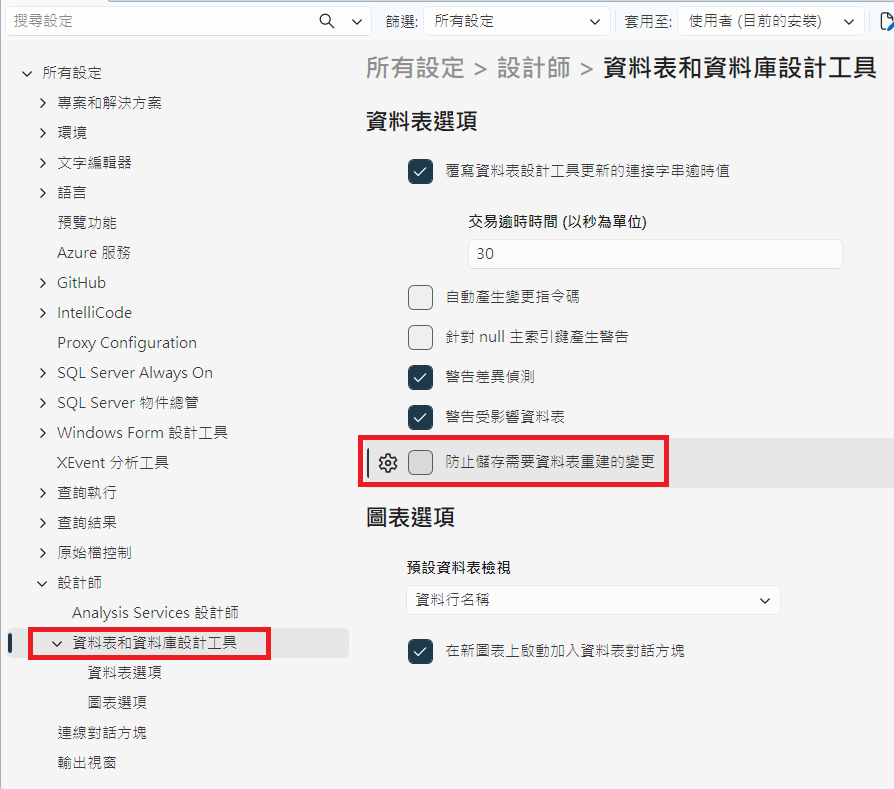

 圓頭人
圓頭人

 iThome鐵人賽
 看影片追技術