
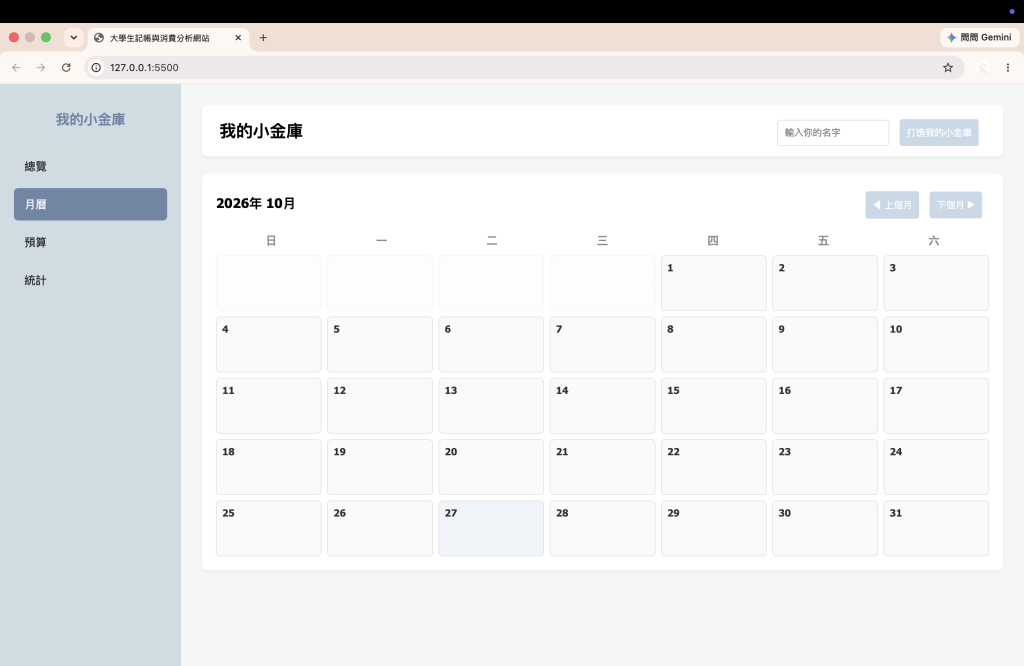
不同於死板的列表,一個好的記帳軟體一定要能用月曆檢視每天的花費狀況。今天我們會透過 JavaScript 動態計算當月的總天數、第一天是星期幾,並完美排版出 7 欄的日曆網格,支援上下個月任意切換!
在 index.html 的月曆分頁中,加上月份標題、切換按鈕,以及用 CSS Grid 排版的 7 欄星期與日曆容器:
<!-- 月曆頁面結構 -->
<div id="calendar-page" class="page-view">
    <div class="section-box">
        <div style="display: flex; justify-content: space-between; align-items: center; margin-bottom: 20px;">
            <h3 id="calendar-month-title" style="margin: 0;">2026年 10月</h3>
            <div>
                <button id="prev-month-btn">◀ 上個月</button>
                <button id="next-month-btn">下個月 ▶</button>
            </div>
        </div>

        <!-- 星期標題列 -->
        <div style="display: grid; grid-template-columns: repeat(7, 1fr); text-align: center; font-weight: bold; color: #7f8c8d; margin-bottom: 10px;">
            <div>日</div><div>一</div><div>二</div><div>三</div><div>四</div><div>五</div><div>六</div>
        </div>

        <!-- 動態生成的月曆格子容器 -->
        <div id="calendar-grid" style="display: grid; grid-template-columns: repeat(7, 1fr); gap: 8px;"></div>
    </div>
</div>
.calendar-cell {
    background: #fafafa;
    border: 1px solid #e0e0e0;
    border-radius: 6px;
    min-height: 80px;
    padding: 8px;
    display: flex;
    flex-direction: column;
    justify-content: space-between;
    transition: 0.2s;
}
.calendar-cell:hover { background: #f0f4f8; }
.calendar-cell.empty { background: #fdfdfd; border: 1px dashed #eee; }
寫日曆最麻煩的地方在於每個月的天數不一樣,而且每月 1 號的星期幾也不一樣。所以我們利用 JavaScript 的 Date 物件巧妙解決:
1.取得當月第一天是星期幾:new Date(year, month, 1).getDay()
2.取得當月總天數:利用 new Date(year, month + 1, 0).getDate()(把日期設為下個月的第 0 天,就會自動倒退回當月最後一天。)
let currentYear = new Date().getFullYear();
let currentMonth = new Date().getMonth(); // 0 ~ 11

function renderCalendar() {
    calendarGrid.innerHTML = '';
    calendarMonthTitle.textContent = `${currentYear}年 ${currentMonth + 1}月`;

    const firstDayIndex = new Date(currentYear, currentMonth, 1).getDay();
    const totalDays = new Date(currentYear, currentMonth + 1, 0).getDate();

    // 1. 補齊 1 號之前的空白格子
    for (let i = 0; i < firstDayIndex; i++) {
        const emptyCell = document.createElement('div');
        emptyCell.classList.add('calendar-cell', 'empty');
        calendarGrid.appendChild(emptyCell);
    }

    // 2. 渲染當月的每一天
    for (let day = 1; day <= totalDays; day++) {
        const cell = document.createElement('div');
        cell.classList.add('calendar-cell');

        const mm = String(currentMonth + 1).padStart(2, '0');
        const dd = String(day).padStart(2, '0');
        const dateStr = `${currentYear}-${mm}-${dd}`;

        cell.innerHTML = `
            <div class="date-num">${day}</div>
            <div style="font-size: 11px; color: #666;" id="cell-data-${dateStr}"></div>
        `;
        calendarGrid.appendChild(cell);
    }
}
最後,寫兩個按鈕事件來控制月份的加減,當月份小於 0 或大於 11 時自動進退年份:
prevMonthBtn.addEventListener('click', function() {
    currentMonth--;
    if (currentMonth < 0) { currentMonth = 11; currentYear--; }
    renderCalendar();
});

nextMonthBtn.addEventListener('click', function() {
    currentMonth++;
    if (currentMonth > 11) { currentMonth = 0; currentYear++; }
    renderCalendar();
});

// 初始化
renderCalendar();

 rong824

 iThome鐵人賽
 看影片追技術