iT邦幫忙

0

[故障排除紀錄] 剛創建並註冊好的 gitlab-runner 呈現離線(offline) 狀態

  • 分享至 

  • xImage
  •  

這幾天透過線上版 Gitlab 練習 CI/CD
在我的 Ubuntu VM 上面創建並註冊了 Gitlab-runner
結果上面的 runner 是離線狀態
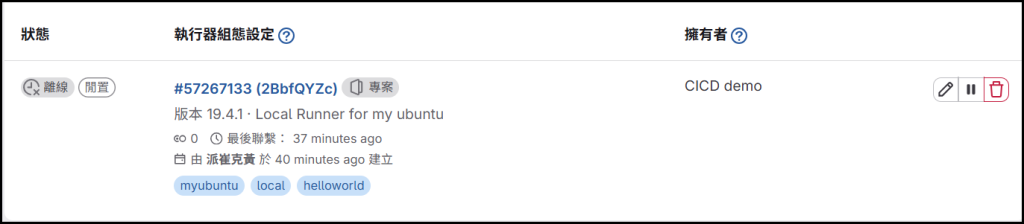
也就是說:剛剛建立的 runner 此時跟 Gitlab 並沒有搭上線

https://ithelp.ithome.com.tw/upload/images/20261010/20184610aSiO5k1DIr.png


當下第一個判斷是:

「Runner 的設定(config.toml)內容有問題,所以無法連線到 Gitlab」

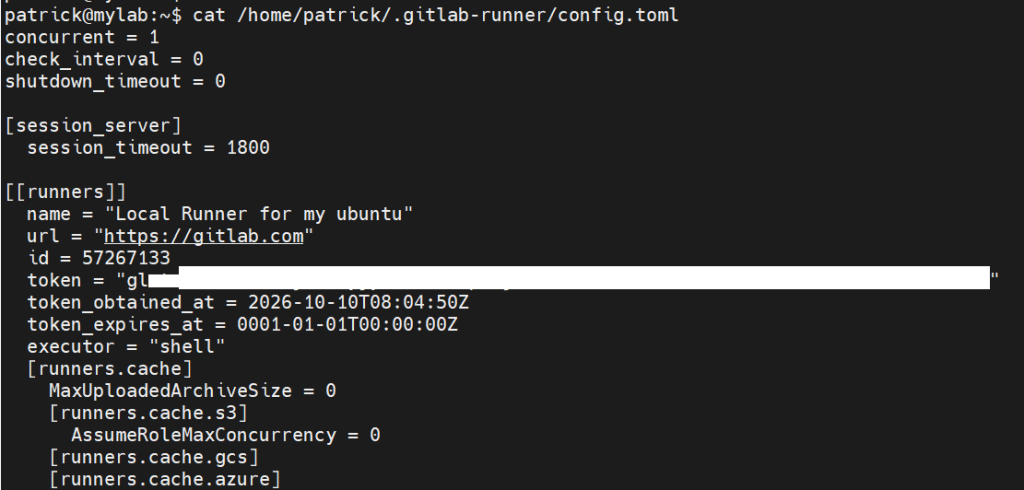
為了驗證自己的判斷,我查看了 config.toml 內容:
https://ithelp.ithome.com.tw/upload/images/20261010/20184610Q4VXNmKnWh.png

但設定都沒問題,連 token 也是正確的,所以 root cause 不在這裡


網路上搜尋相關的技術文章,裡面提到:

驗證 GitLab Runner 的設定檔是否正確,並確保其中的設定與您的 GitLab 實例相符。
設定檔通常位於 /etc/gitlab-runner/config.toml。

於是我透過 systemctl status gitlab-runner指令
看它去哪個路徑下讀取設定檔
確定是 /etc/gitlab-runner/ 沒錯
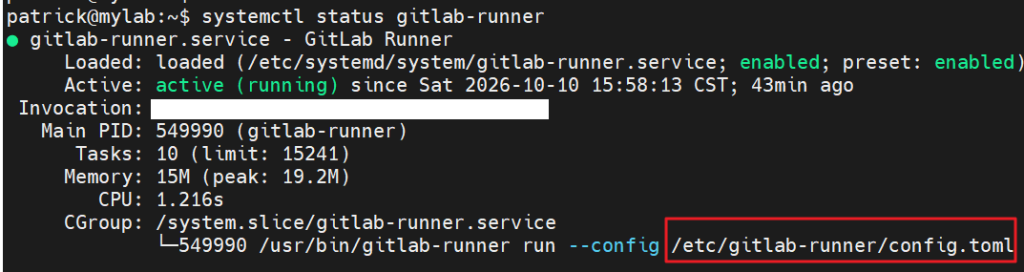
https://ithelp.ithome.com.tw/upload/images/20261010/20184610VkRidH6LvJ.png

咦?等等,剛剛檢查 config.toml 設定檔的位置是 /home/patrick/.gitlab-runner/ 耶!

https://ithelp.ithome.com.tw/upload/images/20261010/20184610pGAIL3FVcX.png

到這邊,問題根源(root cause)已經水落石出了:

「存放 config.toml 設定檔的位置不正確,所以無法連線到 Gitlab」


解決方案(Troubleshooting):

將正確設定檔複製過去,最後 Runner 的狀態順利變成「在線」了

sudo cp /home/patrick/.gitlab-runner/config.toml \
  /etc/gitlab-runner/config.toml
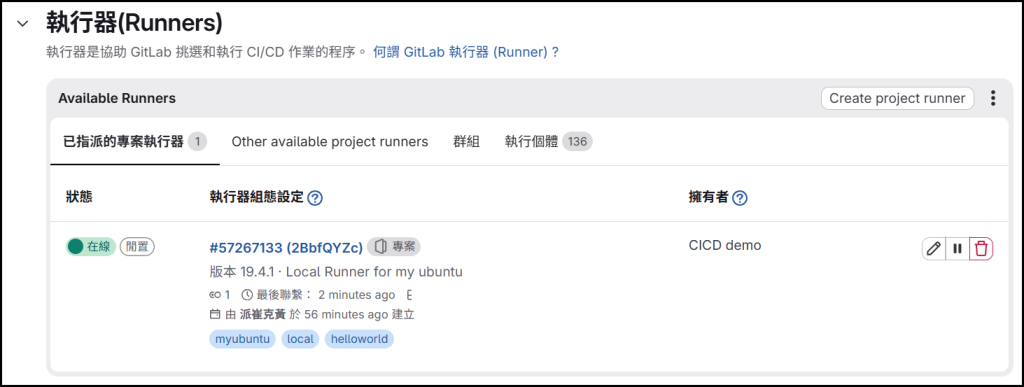
https://ithelp.ithome.com.tw/upload/images/20261010/20184610THaK9fk64I.png

希望這篇記錄能幫助大家順利解決問題


參考資料

https://blog.csdn.net/zhezhebie/article/details/136679906


圖片
  熱門推薦
圖片
{{ item.channelVendor }} | {{ item.webinarstarted }} |
{{ formatDate(item.duration) }}
直播中

尚未有邦友留言

立即登入留言