

登入成功後,使用者通常不需要在每一次 API 請求中重新輸入密碼。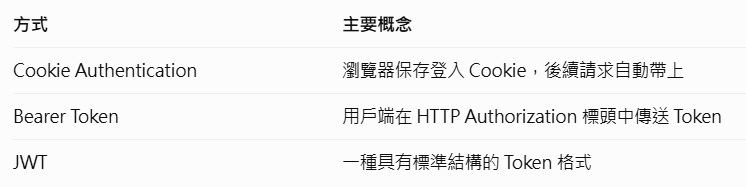
今天我們選擇 Cookie Authentication,因為它很適合學習瀏覽器登入系統。
開啟 VS Code,進入昨日的專案資料夾
在終端機執行:dotnet add package Microsoft.AspNetCore.Identity.EntityFrameworkCore --version "10.0.*"
安裝完成後輸入:dotnet build
在 Data 資料夾中新增:AuthDbContext.cs
using Microsoft.AspNetCore.Identity;
using Microsoft.AspNetCore.Identity.EntityFrameworkCore;
using Microsoft.EntityFrameworkCore;

namespace TaskFlow3.Api.Data
{
    public class AuthDbContext
        : IdentityDbContext<IdentityUser>
    {
        public AuthDbContext(
            DbContextOptions<AuthDbContext> options
        ) : base(options)
        {
        }
    }
}
using Microsoft.AspNetCore.Identity;
using Microsoft.EntityFrameworkCore;
using TaskFlow3.Api.Data;
using TaskFlow3.Api.Services;

var builder = WebApplication.CreateBuilder(args);

// OpenAPI
builder.Services.AddOpenApi();

// Controller
builder.Services.AddControllers();

// 原本的任務 Service
builder.Services.AddScoped<ITaskService, TaskService>();

// 原本的 TaskFlow 資料庫
string dbPath = Path.Combine(
    builder.Environment.ContentRootPath,
    "taskflow-ef.db"
);

builder.Services.AddDbContext<TaskFlowDbContext>(options =>
    options.UseSqlite($"Data Source={dbPath}")
);

// 今天新增的登入資料庫
string authDbPath = Path.Combine(
    builder.Environment.ContentRootPath,
    "taskflow-auth.db"
);

builder.Services.AddDbContext<AuthDbContext>(options =>
    options.UseSqlite($"Data Source={authDbPath}")
);

// Identity
builder.Services.AddAuthorization();

builder.Services.AddIdentityApiEndpoints<IdentityUser>()
    .AddEntityFrameworkStores<AuthDbContext>();

var app = builder.Build();

if (app.Environment.IsDevelopment())
{
    app.MapOpenApi();

    app.UseSwaggerUI(options =>
    {
        options.SwaggerEndpoint("/openapi/v1.json", "v1");
    });
}

app.UseHttpsRedirection();

app.UseAuthentication();
app.UseAuthorization();

app.MapControllers();

// 註冊與登入路由
app.MapGroup("/auth").MapIdentityApi<IdentityUser>();

// 原本的伺服器測試
app.MapGet("/test", () => "伺服器正常運作!");

// 原本的資料庫測試
app.MapGet("/db-check", async (TaskFlowDbContext db) =>
{
    var tasks = await db.Tasks.ToListAsync();

    return Results.Ok(tasks);
});

// 需要登入的 API
app.MapGet("/api/my-account", (
    System.Security.Claims.ClaimsPrincipal user) =>
{
    return Results.Ok(new
    {
        message = "登入驗證成功!",
        userName = user.Identity?.Name
    });
})
.RequireAuthorization();

app.Run();
先執行:dotnet build
再輸入:dotnet ef migrations add InitialAuth --context AuthDbContext
接著:dotnet ef database update --context AuthDbContext
啟動伺服器:dotnet run
為了註冊測試帳號開啟另一個 PowerShell 終端機,輸入:
$base = "https://localhost:7001"

$register = @{
    email = "student@example.com"
    password = "DemoOnly_2026!"
} | ConvertTo-Json

Invoke-RestMethod `
    -Uri "$base/auth/register" `
    -Method Post `
    -ContentType "application/json" `
    -Body $register
登入帳號:
$login = @{
    email = "student@example.com"
    password = "DemoOnly_2026!"
} | ConvertTo-Json

Invoke-RestMethod `
    -Uri "$base/auth/login?useCookies=true" `
    -Method Post `
    -ContentType "application/json" `
    -Body $login `
    -SessionVariable loginSession
測試受保護的 API:
不帶登入資訊:Invoke-WebRequest -Uri "$base/api/my-account"
使用登入後的工作階段:Invoke-RestMethod
-Uri "$base/api/my-account" -WebSession $loginSession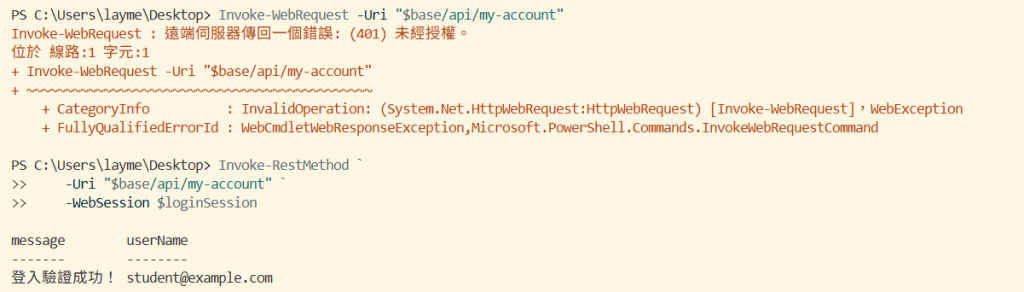

 414570681

 iThome鐵人賽
 看影片追技術