
使用 Gemini 與 ChatGPT 重新建置 Areawell AW-2401 控制網頁,若您手上還有 Areawell AW-2401 且網路埠是正常的。
透過 Wireshark 擷取 IControlSample.exe 各鍵控制內碼,
要控制這類閉源硬體的第一步,就是找出它在區網內接收的控制指令。透過官方提供的測試工具 IControlSample.exe,配合 Wireshark 進行區域網路封包攔截,我們得以一窺其底層通訊協定。
透過 Wireshark 抓取 Search、All On、All Off 以及各個 Port (1~4) 的切換封包。
確認該排插支援透過簡單的區網 HTTP 請求或 Socket 指令直接驅動。
藉此我們能夠設計一個輕量級的中介 API 伺服器,將網頁端的點擊轉化為排插看得懂的硬體指令。
IControlSample.exe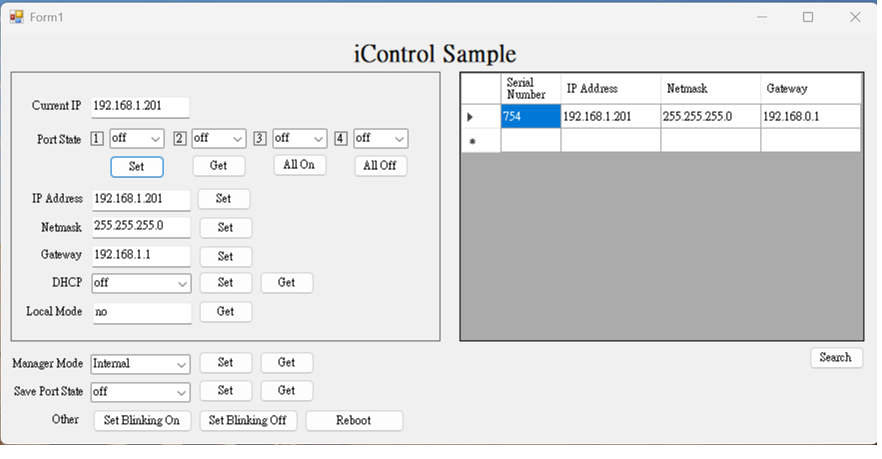
Wireshark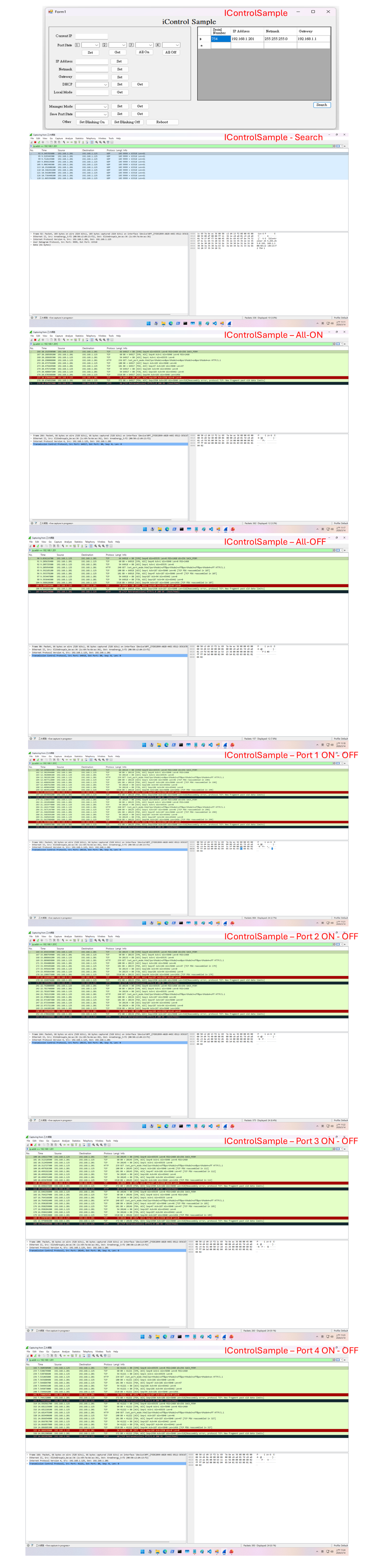
整個系統採用 Node.js 作為輕量後端,配合單一 index.html 作為前端控制介面,並將排程與設定存在瀏覽器 localStorage 中,實現極速回應(本地控制響應小於 5ms)。
目前功能;基本開關控制(單獨/全部),定時排程(可多組),目前僅網頁操作。
後端伺服器 (server.js)
const http = require('http');
const fs = require('fs');
const path = require('path');
const url = require('url');

const PORT = 3000;

const server = http.createServer((req, res) => {
    const parsedUrl = url.parse(req.url, true);

    // 提供前端主頁
    if (parsedUrl.pathname === '/' || parsedUrl.pathname === '/index.html') {
        fs.readFile(path.join(__dirname, 'index.html'), (err, data) => {
            if (err) {
                res.writeHead(500, { 'Content-Type': 'text/plain' });
                res.end('500 Internal Server Error');
            } else {
                res.writeHead(200, { 'Content-Type': 'text/html; charset=utf-8' });
                res.end(data);
            }
        });
    }
    // 處理排插開關控制請求
    else if (parsedUrl.pathname === '/control') {
        const query = parsedUrl.query;
        // 這裡可根據 Wireshark 逆向出來的實際語法向 Areawell 排插發送 HTTP/TCP 請求
        console.log(`[控制指令]收到請求 -> Port 1:${query.p1} | Port 2:${query.p2} | Port 3:${query.p3} | Port 4:${query.p4}`);

        res.writeHead(200, { 'Content-Type': 'application/json' });
        res.end(JSON.stringify({ status: 'success', statusCode: 200, message: 'Command sent' }));
    }
    // 處理定時排程儲存
    else if (parsedUrl.pathname === '/set-schedules') {
        res.writeHead(200, { 'Content-Type': 'application/json' });
        res.end(JSON.stringify({ status: 'success', message: 'Schedules synced' }));
    } else {
        res.writeHead(404, { 'Content-Type': 'text/plain' });
        res.end('404 Not Found');
    }
});

server.listen(PORT, () => {
    console.log(`Areawell Control Server running on port ${PORT}`);
});
控制介面 (index.html)
<!DOCTYPE html>
<html lang="zh-TW">
<head>
    <meta charset="UTF-8">
    <title>Power Management Unit</title>
    <style>
        *, *:before, *:after { box-sizing: border-box; margin: 0; padding: 0; }
        html, body { height: 100vh; width: 100vw; background-color: #1c1d1f; color: #ffffff; font-family: sans-serif; overflow: hidden; display: flex; flex-direction: column; padding: 10px 20px; }
        .top-bar { position: relative; display: flex; justify-content: center; align-items: center; height: 50px; margin-bottom: 5px; flex-shrink: 0; }
        .main-title { font-size: 28px; font-weight: 500; display: flex; align-items: center; gap: 10px; }
        .title-gear { cursor: pointer; font-size: 20px; color: #94a3b8; }
        .header-right { position: absolute; right: 0; top: 0; display: flex; flex-direction: column; align-items: flex-end; gap: 6px; }
        .online-badge { background: #2ed573; color: white; padding: 3px 12px; border-radius: 20px; font-size: 12px; }
        .btn-group { display: flex; gap: 6px; }
        .btn-all { width: 48px; height: 34px; border-radius: 6px; border: none; color: white; font-size: 11px; font-weight: bold; cursor: pointer; }
        .btn-all.on { background: #2ed573; } .btn-all.off { background: #ff4757; }
        .main-grid { display: grid; grid-template-columns: repeat(4, 1fr); gap: 15px; flex: 1; min-height: 0; margin-bottom: 10px; }
        .card { background: transparent; display: flex; flex-direction: column; align-items: center; justify-content: space-between; padding: 4px 0; }
        .button-3d { display: block; width: 160px; height: 52px; position: relative; background-color: #000000; box-shadow: 0 -1px 0 rgba(255, 255, 255, 0.2) inset; border-radius: 12px; overflow: hidden; cursor: pointer; }
        .button-3d span { display: block; position: absolute; top: 3px; width: 74px; height: 46px; background-color: #1c1d1f; transition: transform 300ms ease; }
        .button-3d span:first-of-type { left: 3px; border-top-left-radius: 10px; border-bottom-left-radius: 10px; transform: perspective(1000px) rotateY(40deg); transform-origin: right center; }
        .button-3d span:first-of-type:before { content: "ON"; color: rgba(0, 0, 0, 0.5); font-weight: 800; font-size: 16px; position: absolute; top: 50%; left: 50%; transform: translate(-50%, -50%); }
        .button-3d span:last-of-type { right: 3px; border-top-right-radius: 10px; border-bottom-right-radius: 10px; transform-origin: left center; }
        .button-3d span:last-of-type:before { content: "OFF"; color: #ff4847; font-weight: 800; font-size: 16px; position: absolute; top: 50%; left: 50%; transform: translate(-50%, -50%); text-shadow: 0 0 14px rgba(255, 72, 71, 0.6); }
        .button-3d input[type="checkbox"] { display: none; }
        .button-3d input[type="checkbox"]:checked ~ span:first-of-type { transform: none; }
        .button-3d input[type="checkbox"]:checked ~ span:first-of-type:before { color: #93c913; text-shadow: 0 0 14px rgba(147, 201, 19, 0.6); }
        .button-3d input[type="checkbox"]:checked ~ span:last-of-type { transform: perspective(1000px) rotateY(-40deg); }
        .button-3d input[type="checkbox"]:checked ~ span:last-of-type:before { color: rgba(0, 0, 0, 0.5); text-shadow: none; }
        .socket-wrapper { width: 185px; height: 185px; display: flex; align-items: center; justify-content: center; margin: auto 0; }
        .device-info { display: flex; align-items: center; gap: 8px; font-size: 18px; color: #e2e8f0; }
        .console-box { background: #0d1117; border: 1px solid #1e293b; border-radius: 8px; padding: 10px 18px; height: 190px; flex-shrink: 0; display: flex; flex-direction: column; font-family: monospace; font-size: 16px; overflow: hidden; }
        .console-log { flex: 1; overflow: hidden; color: #38bdf8; display: flex; flex-direction: column-reverse; line-height: 1.4; }
    </style>
</head>
<body>
    <div class="top-bar">
        <div class="main-title">Power Management Unit <span class="title-gear" onclick="editTargetIp()">⚙️</span></div>
        <div class="header-right">
            <div class="online-badge">區域線上 (5ms)</div>
            <div class="btn-group">
                <button class="btn-all on" onclick="setAll('on')">全開<br>All On</button>
                <button class="btn-all off" onclick="setAll('off')">全關<br>All Off</button>
            </div>
        </div>
    </div>

    <div class="main-grid">
        <!-- 通道 1~4 迴圈結構 -->
        <script>
            for(let i=1; i<=4; i++) {
                document.write(`
                <div class="card">
                    <label class="button-3d"><input type="checkbox" id="p${i}" onchange="triggerUpdate()"><span></span><span></span></label>
                    <div class="socket-wrapper">
                        <svg width="185" height="185" viewBox="0 0 100 100">
                            <circle cx="50" cy="50" r="46" fill="none" stroke="#ff9800" stroke-width="7" id="svg-ring-${i}"/>
                            <circle cx="50" cy="50" r="42" fill="#e5e7eb"/>
                            <rect x="34" y="32" width="6" height="20" rx="1.5" fill="#6b7280"/>
                            <rect x="60" y="35" width="6" height="14" rx="1.5" fill="#6b7280"/>
                            <path d="M 43 61 A 7 7 0 0 1 57 61 L 57 69 L 43 69 Z" fill="#6b7280"/>
                        </svg>
                    </div>
                    <div class="device-info"><span id="name-${i}">Switch-0${i}</span></div>
                </div>`);
            }
        </script>
    </div>

    <div class="console-box">
        <div style="color:#64748b; font-size:13px;">> HTTP 網頁通訊即時日誌 (Packet Inspector)</div>
        <div class="console-log" id="log-box"></div>
    </div>

    <script>
        function log(msg) {
            const box = document.getElementById("log-box"), time = new Date().toTimeString().split(" ")[0], div = document.createElement("div");
            div.innerText = "[" + time + "] " + msg; box.insertBefore(div, box.firstChild);
        }
        function triggerUpdate() {
            const p1 = document.getElementById("p1").checked ? "on" : "off";
            const p2 = document.getElementById("p2").checked ? "on" : "off";
            const p3 = document.getElementById("p3").checked ? "on" : "off";
            const p4 = document.getElementById("p4").checked ? "on" : "off";
            log("[HTTP指令] 發送控制請求 -> 1:[" + p1 + "] 2:[" + p2 + "] 3:[" + p3 + "] 4:[" + p4 + "]");
            fetch("/control?p1=" + p1 + "&p2=" + p2 + "&p3=" + p3 + "&p4=" + p4)
                .then(res => res.json())
                .then(data => log("[成功] 排插回應狀態碼: " + data.statusCode + " (4ms)"))
                .catch(err => log("[錯誤] 通訊失敗: " + err.message));
        }
        function setAll(state) {
            for (let i = 1; i <= 4; i++) document.getElementById("p" + i).checked = (state === "on");
            triggerUpdate();
        }
    </script>
</body>
</html>
Web Ui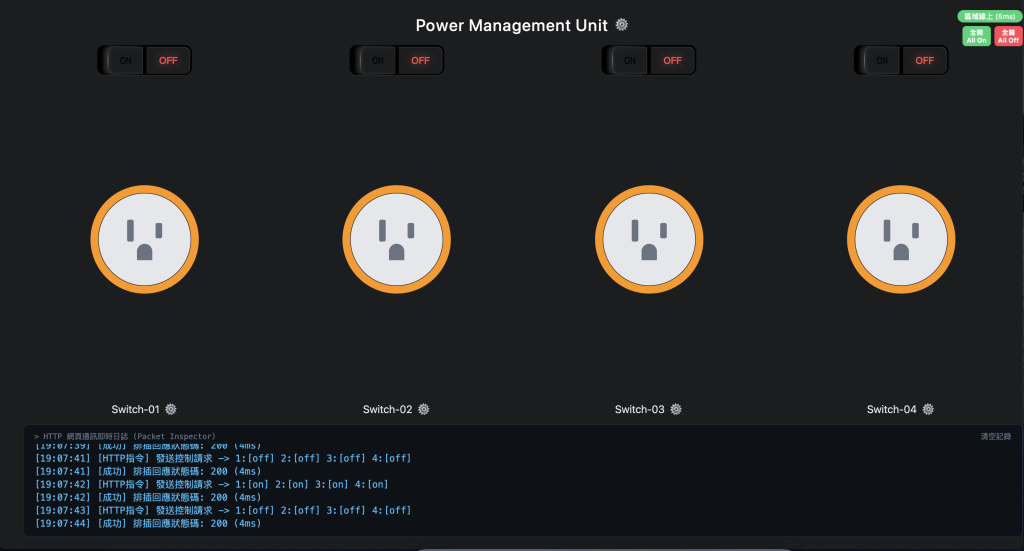
常駐守護 (pm2)
# 全域安裝 pm2
npm install -g pm2

# 啟動並常駐伺服器
pm2 start server.js --name "areawell-web"

# 設定開機自動掛載
pm2 save
pm2 startup
讓老舊 Areawell AW-2401 排插重新上工
在 Web UI 的前端互動上有其他想法?歡迎分享!

 1833

 iThome鐵人賽
 看影片追技術