
由於幻覺(hallucinations)和過時的訓練數據,使用大型語言模型(LLM)獲取準確、最新的體育統計數據向來非常困難。本篇文章將探討如何使用 Gemini 3 Flash Preview 模型、URL 上下文(URL Context)、搭配 Google 搜尋的接地功能(Grounding with Google Search)以及結構化輸出,來提取英超聯賽(Premier League)2025/2026 賽季的球員統計數據。我將分享所學到的經驗、如何在官方英超球員個人資料頁面可用時從中提取數據,以及如何使用 Google 搜尋在網站上尋找缺失的資料。
Gemini 3 Flash Preview 模型支援結構化輸出、URL 上下文和搭配 Google 搜尋的接地功能。當回應的 MIME 類型為 application/json 且提供了回應的 JSON 綱要(schema)時,Gemini 3 在回傳有效的 JSON 物件方面表現得極其出色且一致。此外,Pydantic 函式庫也提供了將通用 JSON 物件轉換為 Pydantic 模型的功能。
本文將帶您了解 Colab 筆記本中的程式碼,並示範如何撰寫提示詞(prompt engineering),將提供的 URL 作為主要來源。當 URL 無效或數據缺失(例如:淨資產、慣用腳和身高)時,模型會使用 Google 搜尋工具。在為每個欄位生成答案時,我會應用接地功能來驗證模型是否產生幻覺,並確保其正確引用了可靠的來源。
要執行提供的 Colab 筆記本,您需要:
google-genai SDK。我們將看到如何強制模型優先進行檢索(retrieval)而非生成(generation)。此示範嘗試檢索英超聯賽 2025/2026 賽季的球員統計數據。
Gemini 3 Flash Preview 模型被給予了以下頁面:
 url_list = [
    "https://www.premierleague.com/en/players/141746/bruno-fernandes/stats",
    "https://www.premierleague.com/en/players/223094/erling-haaland/stats",
    "https://www.premierleague.com/en/players/97032/virgil-van-dijk/stats",
    "https://www.premierleague.com/en/players/244851/cole-palmer/stats"
]

urls = "\n".join(url_list)
當請求的球員是 Bruno Fernandes、Erling Haaland、Virgil Van Dijk 或 Cole Palmer 時,模型將執行 URL 上下文工具來提取上述 URL 中的數據。否則,模型將執行 Google 搜尋工具,從可靠來源中尋找事實。
系統在檢索數據前會進行名稱驗證。如果對象不是球員,或不是 2025/2026 賽季的英超球員,結構化輸出會將 false 指派給 is_professional_player,並在 verification_status 中提供說明。當該名球員為英超球員時,提示詞會指示模型回傳一個 JSON 物件,其中包含姓名(name)、淨資產(net_worth)、是否為職業球員(is_professional_player)、驗證狀態(verification_status)、身高(height)、球衣號碼(shirt_number)、慣用腳(preferred_foot)、進球數(goals)、助攻數(goal_assists)、出場次數(appearances)和上場分鐘數(minutes_played)。接著,筆記本會將通用的 JSON 物件轉換為 Pydantic 的 PlayerStats 模型,並顯示數值、來源引用、URI 和來源類型,以確保準確性。
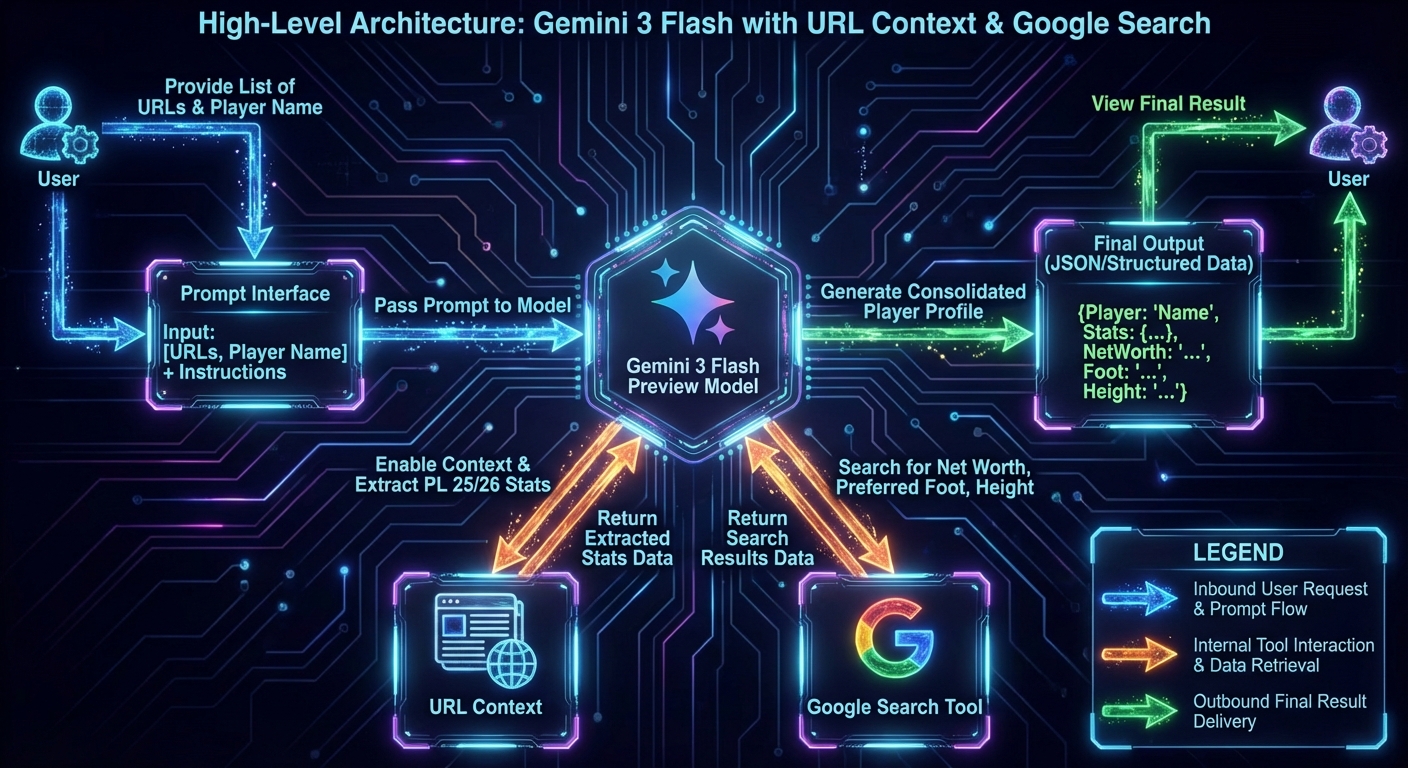
URL 上下文和 Google 搜尋工具使 Gemini 3 Flash Preview 模型能夠從英超球員個人資料頁面提取 2025/2026 賽季的表現指標,同時從網路上檢索個人資訊,例如淨資產、慣用腳和身高。即使模型的內部數據已過時,它也能存取外部系統以獲取最新資訊。
將 .env.example 複製到 .env,並將 GOOGLE_CLOUD_API_KEY 替換為您的 API 金鑰。
GOOGLE_CLOUD_API_KEY=<GOOGLE CLOUD API KEY>
create_vertexai_client 函式會建構並回傳一個 Gemini 用戶端。我使用該用戶端呼叫 Gemini 3 Flash Preview 模型,從提供的 URL 檢索數據,並在未提供 URL 或深層搜尋後仍未提供細節時,退而使用 Google 搜尋工具。
create_vertexai_client 的結果會被指派給全域變數 client。
genai 是適用於 Gemini API 和 Vertex AI 中 Gemini 的統一 SDK。vertexai=True 參數指定在 Colab 筆記本中使用 Vertex AI 中的 Gemini。
from google import genai
from dotenv import load_dotenv
from google.genai import types
from pydantic import BaseModel, Field
from typing import Literal
import os

def create_vertexai_client():

    cloud_api_key = os.getenv("GOOGLE_CLOUD_API_KEY")
    if not cloud_api_key:
        raise ValueError("GOOGLE_CLOUD_API_KEY not found in .env file")

    # Configure the client with your API key
    client = genai.Client(
        vertexai=True,
        api_key=cloud_api_key,
    )

    return client
load_dotenv()

client = create_vertexai_client()
此示範使用了較新的 Google Gen AI SDK,因此我安裝了 google-genai 函式庫。
%pip install google-genai
%pip install dotenv
%pip install pydantic
我將描述在此示範中所面臨的挑戰以及我是如何解決每一個問題的。
問題:
除非受到明確限制,否則 Gemini 會優先使用其內部訓練數據(或通用的搜尋),而非特定的 url_context 工具。它依賴 Google 搜尋或內部知識來尋找每個欄位的事實,而不是使用給定的英超球員個人資料頁面。
解決方案:
我在提示詞中加入了一個 DYNAMIC SOURCE IDENTIFICATION(動態來源識別)章節,以便在球員個人資料頁面可用時始終執行 URL 上下文工具。當球員個人資料頁面不可用時,模型會使用搭配 Google 搜尋的接地功能來檢索 JSON 物件中每個欄位的資訊。最後,我強調了官方 URL、網路引用和內部訓練數據的優先順序。
### **1. DYNAMIC SOURCE IDENTIFICATION**
1.  **IF a Premier League URL is provided:**
    *   You **MUST** execute the `url_context` tool first. This is your **Primary Source**.
2.  **IF NO URL is provided (or if the player is non-Premier League):**
    *   The **Web Citations** (Google Search results) become your **Primary Source**.
3.  **PRIORITY:** Official URL > Web Citations > Internal Training Data.
問題:
我希望能驗證 AI 是否產生幻覺,並為 JSON 物件中的欄位指派錯誤的數值。因此,我宣告了一個 Pydantic 模型 PlayerField,用來儲存提供該欄位答案的區塊 ID(chunk id)。
class PlayerField(BaseModel):
    value: str | int | float
    chunk_id: int = Field(..., description="Index of the chunk in the grounding metadata that provide the value")

class PlayerStats(BaseModel):
    name: str
    net_worth: PlayerField | None = Field(..., description="Net worth of the Premier League player.")
    is_professional_player: bool = Field(..., description="Must be True if found in Premier League records, False otherwise")
    verification_status: str = Field(..., description="Explanation of where the data was found or why it failed")
    height: PlayerField
    shirt_number: PlayerField
    preferred_foot: PlayerField
    goals: PlayerField
    goal_assists: PlayerField
    appearances: PlayerField
    minutes_played: PlayerField
此外,我還寫了一些函式來從接地中繼資料(grounding metadata)中獲取網路和檢索到的上下文 URI,以驗證區塊 ID。
def get_citations(response: types.GenerateContentResponse) -> tuple[int, list[dict]]:

    citations: list[dict] = []
    if response.candidates is not None and len(response.candidates) > 0:
        candidate = response.candidates[0]
        if candidate.grounding_metadata:
            grounding_chunks = candidate.grounding_metadata.grounding_chunks or []
            num_chunks = len(grounding_chunks)
            for i, chunk in enumerate(grounding_chunks):
                if chunk and chunk.web and chunk.web.uri:
                    citations.append({
                        "chunk_id": i,
                        "uri": chunk.web.uri,
                        "title": chunk.web.title
                    })
                elif chunk and chunk.retrieved_context and chunk.retrieved_context.uri:
                    citations.append({
                        "chunk_id": i,
                        "uri": chunk.retrieved_context.uri,
                        "title": chunk.retrieved_context.text
                    })

    return num_chunks, citations

def print_citations_by_response(response: types.GenerateContentResponse):
    num_chunks, citations = get_citations(response)

    print("num_chunks ->", num_chunks)
    for i, citation in enumerate(citations):
        print(f"Citation {i}: {citation}")
PlayerField 中的 chunk_id 大於 num_chunks,這表示模型產生了幻覺,並建立了一個在接地中繼資料中並不存在的 chunk_id。
區塊數量:5。區塊 ID 範圍為 0 到 4。
{
  "value":  "Right",
  "chunk_id": 10    (不正確的區塊 id)
}
區塊數量:5。區塊 ID 範圍為 0 到 4。
{
  "value":  "Right",
  "chunk_id": 2    (正確的區塊 id)
}
解決方案:
我認為接地中繼資料是不具公信力的事實來源,因此不使用它來驗證區塊 ID。我修改了 PlayerField 模型,移除了 chunk_id 欄位,並增加了 source_quote、uri 和 source_type 欄位。
這一架構轉變包括從依賴接地中繼資料轉向要求模型在 uri 欄位中內嵌生成引用。
class PlayerField(BaseModel):
    value: str | int | float
    source_quote: str
    uri: str | None = Field(None, description="The EXACT, UNEDITED URL provided by the tool. Do not guess or shorten. None if the source is internal training data")
    source_type: Literal["GOOGLE_SEARCH", "URL_CONTEXT", "INTERNAL_KNOWLEDGE"] = Field(None, description="Categorize the source of this specific field. Must not be None when uri is not null.")
這迫使 Gemini 閱讀頁面以引用特定資訊,而不是為每個欄位憑空捏造答案。uri 欄位儲存提供的 URL 或 Google 搜尋結果的 URL。如果 Gemini 擁有該事實並提供了答案,則 uri 欄位為 None。當 uri 為 None 時,source_type 必須為 INTERNAL_KNOWLEDGE。當 uri 包含 vertexaisearch 時,source_type 為 GOOGLE_SEARCH。否則,source_type 為 URL_CONTEXT。
問題:
JSON 物件中的 uri 往往是 vertexaisearch 代理連結或幻覺出來的字串,而不是直接的來源 URL。當 uri 既不是 None,也不是提供的英超球員個人資料頁面之一時,它就是 Google 搜尋結果。由於我使用的是 Vertex AI 中的 Gemini,搜尋結果的基礎 URL 是 https://vertexaisearch.cloud.google.com。如果 URI 有不同的基礎 URL,則極有可能是損壞或無效的。
解決方案:
我增加了一個 URI EXTRACTION RULES (STRICT)(URI 提取規則 - 嚴格)章節,以指定確定 PlayerField 模型中 uri 欄位的規則。
### **4. URI EXTRACTION RULES (STRICT):**
1.  **NO GUESSING:** You are strictly forbidden from constructing, autocompleting, or guessing a URL based on the website name.
2.  **LITERAL COPY:** You must copy the `uri` exactly as it appears in the search result that provided the `source_quote`.
3.  **THE JOIN RULE:** Before finalizing the JSON, verify that the `source_quote` actually appears in the content/snippet associated with the `uri` you provided.
4.  **IF IN DOUBT:** If you found a fact in your training data but cannot find a specific, working URI for it in the search results, you MUST set `source_type` to `INTERNAL_KNOWLEDGE` and `uri` to `null`.
重新執行 Colab 筆記本後,uri 包含了 vertexaisearch。當我將 vertexaisearch 的 URI 貼上到瀏覽器時,它將我重新導向到了真正的頁面。
專業提示:vertexaisearch.cloud.google.com 連結是 Vertex AI 中搭配 Google 搜尋的接地功能特有的,它們充當了通往原始來源的橋樑。
這是 Erling Haaland 的結果(在下一次修正前的錯誤輸出)。
{
  "name": "Erling Haaland",
  "net_worth": {
    "value": "$80 million",
    "source_quote": "Haaland's net worth, which according to Forbes is $80m (£59.5m)",
    "uri": "https://vertexaisearch.cloud.google.com/grounding-api-redirect/AUZIYQHwe5-b036A0QaSzU9G0uAgOVZs1OJ0NMe0MmnMy-wRh4Qh9PtR_PhO6UV4S4-6ZJXJL4cicMEt0CFm_hwEER-d5WI5uY3H6DySLRcQZOmbeXF0PQU68ny6xyWF-64jJ_2Jnht_hkr7Kk3FasVjBki_2Q-n8jvr6PIcYUkTrFyJa2wZjPt4jkkdrFDo4Y6A2_OahUrg7unsUbzWJBxPp6e52tzg9w==",
    "source_type": null
  },
  "is_professional_player": true,
  "verification_status": "Confirmed active for Manchester City in the Premier League for the 2025/26 Season via official Premier League statistics.",
  "height": {
    "value": 1.95,
    "source_quote": "Height, 1.95 m (6 ft 5 in).",
    "uri": "https://vertexaisearch.cloud.google.com/grounding-api-redirect/AUZIYQHFUkt6uBYUgbC5fgMofMPjKps_9QszoJClzsHz1zkpovNWK1-OueQEj_2oFq--1dOaL7L4X9Aef7iLamfT1f4iN2aH3BxaYfJUznngJ2vXuawp-SAWl4x3R1nxHpiSCKF_pjnPg-rL",
    "source_type": null
  },
  "shirt_number": {
    "value": 9,
    "source_quote": "Man City• 9",
    "uri": "https://www.premierleague.com/en/players/223094/erling-haaland/stats",
    "source_type": null
  },
  "preferred_foot": {
    "value": "left",
    "source_quote": "Foot: left",
    "uri": "https://vertexaisearch.cloud.google.com/grounding-api-redirect/AUZIYQHf-kM-at4W05tsLLdo3dzthpWxntkWhnfwd4fWKBHxvl8qWHioz9jaDrI5ZkmhVlo71D7RQhctvDTXFqywdvl40_Q6CC2S24FujOcmdg1rhVGJiJudqtzVqLtpQ-kIWlJIkevddD68Fe40se8gRmljvgmqx4O5ATDve4F23gRmljvgmqx4O5ATDve4F23g==",
    "source_type": null
  },
  "goals": {
    "value": 20,
    "source_quote": "Goals 20",
    "uri": "https://www.premierleague.com/en/players/223094/erling-haaland/stats",
    "source_type": null
  },
  "goal_assists": {
    "value": 4,
    "source_quote": "Assists 4",
    "uri": "https://www.premierleague.com/en/players/223094/erling-haaland/stats",
    "source_type": null
  },
  "appearances": {
    "value": 22,
    "source_quote": "Appearances 22",
    "uri": "https://www.premierleague.com/en/players/223094/erling-haaland/stats",
    "source_type": null
  },
  "minutes_played": {
    "value": 1906,
    "source_quote": "Minutes Played 1,906",
    "uri": "https://www.premierleague.com/en/players/223094/erling-haaland/stats",
    "source_type": null
  }
}
其中一個重新導向的 URL 將我帶到了 https://www.sofascore.com/football/player/erling-haaland/839956,以查看足球運動員的慣用腳。
問題:
當球員是 Erling Haaland 時,即使 uri 是 https://www.premierleague.com/en/players/223094/erling-haaland/stats 或有效的 Google 搜尋結果,source_type 仍然為 null。
當球員是 Kaoru Mitoma(三笘薰)時,模型運作正常,並將 GOOGLE_SEARCH 指派給所有 URI 的 source_type 欄位。
這是因為模型在成功使用 URL 上下文工具後,沒有對 source_type 進行分類。因此,Erling Haaland 的來源類型為 null。
當球員是 Kaoru Mitoma 時,模型詳盡地查詢了 Google 搜尋,並將 source_type 分類為 GOOGLE_SEARCH。
解決方案:
解決方案是為 PlayerField 模型中的 source_type 欄位提供分類說明。
提示詞中有一個新的 MANDATORY SOURCE_TYPE CLASSIFICATION RULES(強制來源類型分類規則)章節,用於根據 uri 欄位衍生出 source_type 欄位。
### **2. MANDATORY SOURCE_TYPE CLASSIFICATION RULES**
You are strictly forbidden from returning `null` for `source_type` if a `uri` is present.
*   **MATCHING RULE:** If the `uri` matches one of the URLs provided below, you MUST use "URL_CONTEXT".
*   **SEARCH RULE:** If the `uri` is a search result (e.g., Transfermarkt, Wikipedia, vertexaisearch links), you MUST use "GOOGLE_SEARCH".
*   **FALLBACK RULE:** If no tool found the data and you use internal memory, `uri` must be `null` and `source_type` must be "INTERNAL_KNOWLEDGE".
我重新執行了 Colab 筆記本,當 uri 欄位為 None 時,source_type 欄位也為 None。
{
  "name": "Erling Haaland",
  "net_worth": {
    "value": "$80 million",
    "source_quote": "Haaland's net worth, which according to Forbes is $80m (£59.5m)",
    "uri": "https://vertexaisearch.cloud.google.com/grounding-api-redirect/AUZIYQHwe5-b036A0QaSzU9G0uAgOVZs1OJ0NMe0MmnMy-wRh4Qh9PtR_PhO6UV4S4-6ZJXJL4cicMEt0CFm_hwEER-d5WI5uY3H6DySLRcQZOmbeXF0PQU68ny6xyWF-64jJ_2Jnht_hkr7Kk3FasVjBki_2Q-n8jvr6PIcYUkTrFyJa2wZjPt4jkkdrFDo4Y6A2_OahUrg7unsUbzWJBxPp6e52tzg9w==",
    "source_type": "GOOGLE_SEARCH"
  },
  "is_professional_player": true,
  "verification_status": "Confirmed active for Manchester City in the Premier League for the 2025/26 season via official Premier League statistics.",
  "height": {
    "value": 1.95,
    "source_quote": "Height, 1.95 m (6 ft 5 in).",
    "uri": "https://vertexaisearch.cloud.google.com/grounding-api-redirect/AUZIYQHFUkt6uBYUgbC5fgMofMPjKps_9QszoJClzsHz1zkpovNWK1-OueQEj_2oFq--1dOaL7L4X9Aef7iLamfT1f4iN2aH3BxaYfJUznngJ2vXuawp-SAWl4x3R1nxHpiSCKF_pjnPg-rL",
    "source_type": "GOOGLE_SEARCH"
  },
  "shirt_number": {
    "value": 9,
    "source_quote": "Man City• 9",
    "uri": "https://www.premierleague.com/en/players/223094/erling-haaland/stats",
    "source_type": "URL_CONTEXT"
  },
  "preferred_foot": {
    "value": "left",
    "source_quote": "Foot: left",
    "uri": "https://vertexaisearch.cloud.google.com/grounding-api-redirect/AUZIYQHf-kM-at4W05tsLLdo3dzthpWxntkWhnfwd4fWKBHxvl8qWHioz9jaDrI5ZkmhVlo71D7RQhctvDTXFqywdvl40_Q6CC2S24FujOcmdg1rhVGJiJudqtzVqLtpQ-kIWlJIkevddD68Fe40se8gRmljvgmqx4O5ATDve4F23gRmljvgmqx4O5ATDve4F23g==",
    "source_type": "GOOGLE_SEARCH"
  },
  "goals": {
    "value": 20,
    "source_quote": "Goals 20",
    "uri": "https://www.premierleague.com/en/players/223094/erling-haaland/stats",
    "source_type": "URL_CONTEXT"
  },
  "goal_assists": {
    "value": 4,
    "source_quote": "Assists 4",
    "uri": "https://www.premierleague.com/en/players/223094/erling-haaland/stats",
    "source_type": "URL_CONTEXT"
  },
  "appearances": {
    "value": 22,
    "source_quote": "Appearances 22",
    "uri": "https://www.premierleague.com/en/players/223094/erling-haaland/stats",
    "source_type": "URL_CONTEXT"
  },
  "minutes_played": {
    "value": 1906,
    "source_quote": "Minutes Played 1,906",
    "uri": "https://www.premierleague.com/en/players/223094/erling-haaland/stats",
    "source_type": "URL_CONTEXT"
  }
}
這是結合了這些經驗後的完整提示詞。它包含了目標(檢索球員統計數據)、指令(優先執行 URL 上下文工具,其次執行 Google 搜尋)、限制條件(必須是 2025/2026 賽季的現役英超球員)、上下文(提供的 URL 和球員姓名)以及輸出格式(JSON 物件)。
**OBJECTIVE:**
Search and identify the Premier League 2025/2026 Player Statistics of {player}.

---

### **1. DYNAMIC SOURCE IDENTIFICATION**
1.  **IF a Premier League URL is provided:**
    *   You **MUST** execute the `url_context` tool first. This is your **Primary Source**.
2.  **IF NO URL is provided (or if the player is non-PL):**
    *   The **Web Citations** (Google Search results) become your **Primary Source**.
3.  **PRIORITY:** Official URL > Web Citations > Internal Training Data.

### **2. MANDATORY SOURCE_TYPE CLASSIFICATION RULES**
You are strictly forbidden from returning `null` for `source_type` if a `uri` is present.
*   **MATCHING RULE:** If the `uri` matches one of the URLs provided below, you MUST use "URL_CONTEXT".
*   **SEARCH RULE:** If the `uri` is a search result (e.g., Transfermarkt, Wikipedia, vertexaisearch links), you MUST use "GOOGLE_SEARCH".
*   **FALLBACK RULE:** If no tool found the data and you use internal memory, `uri` must be `null` and `source_type` must be "INTERNAL_KNOWLEDGE".

### **3. INACTIVE / NON-PROFESSIONAL PLAYER LOGIC**
If the player cannot be found in active professional records for the 2025/26 Season:
*   `is_professional_player`: `false`.
*   **All Numeric Fields:** `{{ "value": 0, "source_quote": null, "uri": null, "source_type": null }}`.
*   **All String Fields:** `{{ "value": "n/a", "source_quote": null, "uri": null, "source_type": null }}`.
*   **Verification Status:** "Player not found in active professional databases."

### **4. URI EXTRACTION RULES (STRICT):**
1.  **NO GUESSING:** You are strictly forbidden from constructing, autocompleting, or guessing a URL based on the website name.
2.  **LITERAL COPY:** You must copy the `uri` exactly as it appears in the search result that provided the `source_quote`.
3.  **THE JOIN RULE:** Before finalizing the JSON, verify that the `source_quote` actually appears in the content/snippet associated with the `uri` you provided.
4.  **IF IN DOUBT:** If you found a fact in your training data but cannot find a specific, working URI for it in the search results, you MUST set `source_type` to `INTERNAL_KNOWLEDGE` and `uri` to `null`.

### **5. DATA VALIDATION & AUDIT**
*   **`net_worth`**: Must be a string (e.g., `100 million dollars`).
*   **`height`**: Must be a float (e.g., `1.85`).

### PROVIDED URLS:
{ urls }

### OUTPUT FORMAT:
Return a JSON object exactly as follows:
{{
    "name": "string",
    "net_worth": {{ "value": "string", "source_quote": "...", "uri": "...", "source_type": "Google Search" }},
    "is_professional_player": boolean,
    "verification_status": "Detailed confirmation of Premier League status for 2025/26",
    "height": {{ "value": float, "source_quote": "...", "uri": "...", "source_type": "URL Context" }},
    "shirt_number": {{ "value": int, "source_quote": "...", "uri": "...", "source_type": "URL Context" }},
    "preferred_foot": {{ "value": "string", "source_quote": "...", "uri": "...", "source_type": "URL Context" }},
    "goals": {{ "value": int, "source_quote": "...", "uri": "...", "source_type": "URL Context" }},
    "goal_assists": {{ "value": int, "source_quote": "...", "uri": "...", "source_type": "URL Context" }},
    "appearances": {{ "value": int, "source_quote": "...", "uri": "...", "source_type": "URL Context" }},
    "minutes_played": {{ "value": int, "source_quote": "...", "uri": "...", "source_type": "URL Context" }}
}}
上述內容是一個 Python 的 F-string,其中雙大括號 {{ }} 用於轉義 JSON 結構,以便 Python 不將其視為變數。
在制定了生成結構化輸出的提示詞後,我接著定義了與之對齊的 Pydantic 模型。
PlayerField 模型具有一個 value 欄位,它可以是字串、整數或浮點數。
PlayerStats 模型代表了包含表現指標和個人資訊(如淨資產、身高和姓名)的結構化輸出。is_professional_player 和 verification_status 欄位確認了該球員是否在 2025/2026 賽季的英超聯賽中效力。
這些欄位描述作為 JSON 綱要的一部分傳遞給模型,它們充當了「微提示詞」(micro-prompts)。
class PlayerField(BaseModel):
    value: str | int | float
    source_quote: str
    uri: str | None = Field(None, description="The EXACT, UNEDITED URL provided by the tool. Do not guess or shorten. None if the source is internal training data")
    source_type: Literal["GOOGLE_SEARCH", "URL_CONTEXT", "INTERNAL_KNOWLEDGE"] = Field(None, description="Categorize the source of this specific field. Must not be None when uri is not null.")

class PlayerStats(BaseModel):
    name: str
    net_worth: PlayerField = Field(..., description="Net worth of the PL player.")
    is_professional_player: bool = Field(..., description="Must be True if found in PL records, False otherwise")
    verification_status: str = Field(..., description="Explanation of where the data was found or why it failed")
    height: PlayerField
    shirt_number: PlayerField
    preferred_foot: PlayerField
    goals: PlayerField
    goal_assists: PlayerField
    appearances: PlayerField
    minutes_played: PlayerField
get_player_stats 函式將提示詞中的 urls 和 player 變數替換為串接後的 URL 和球員姓名。接著,我將提示詞傳遞給 Gemini 3 Flash Preview 模型以獲取回應。
設定中指定了 response_mime_type 為 application/json,且 response_json_schema 是 PlayerStats 模型的 JSON 綱要。思考層級(thinking level)設定為高(High)。該模型還包含了 URL 上下文工具以閱讀英超球員頁面,以及 Google 搜尋工具以查詢網頁上缺失的細節。
ThinkingLevel.High 也會增加延遲和成本。高思考層級會使模型在生成 JSON 物件之前採取更多的推理步驟,並使用更多的思考標記(thinking tokens)。
from google.genai import types

def get_player_stats(player: str) -> types.GenerateContentResponse:

    prompt = f"""<original prompt from the above section>"""

    response = client.models.generate_content(
        model='gemini-3-flash-preview',
        contents=types.Content(
            role="user",
            parts=[types.Part(text=prompt)]
        ),
        config=types.GenerateContentConfig(
            response_mime_type="application/json",
            response_json_schema=PlayerStats.model_json_schema(),
            thinking_config=types.ThinkingConfig(
                thinking_level=types.ThinkingLevel.HIGH,
            ),
            tools=[
                types.Tool(url_context=types.UrlContext()),
                types.Tool(google_search=types.GoogleSearch()),
            ]
        )
    )

    return response
該模型精通回傳 JSON 物件,可以在 response.parsed 中找到。接著,我使用 PlayerStats.model_validate(...) 將 response.parsed 解析為 player_stats 執行個體。
當指定了 response_mime_type="application/json" 時,parsed 欄位是預期的路徑,而解析文字是針對邊緣情況的備案(fallback)。
如果 response.parsed 為 None,備案是使用 PlayerStats.model_validate_json(...) 解析 response.text。Vertex AI 中的 Gemini 會將文字回應封裝在 Markdown JSON 程式碼區塊中,因此 clean_json_string 函式會移除該程式碼區塊,以確保正確解析。
def clean_json_string(raw_string):
    # Remove the markdown code blocks
    clean_str = raw_string.strip()
    if clean_str.startswith("```json"):
        clean_str = clean_str[7:]
    if clean_str.endswith("```"):
        clean_str = clean_str[:-3]
    return clean_str.strip()

def print_player_stats(response: types.GenerateContentResponse):
    if response.parsed:
        player_stats = PlayerStats.model_validate(response.parsed)
    else:
        player_stats = PlayerStats.model_validate_json(clean_json_string(response.text))

    print(player_stats.model_dump_json(indent=2))
當呼叫 get_player_stats 函式並傳入 Erling Haaland 時,模型會先觸發 URL 上下文工具,接著觸發 Google 搜尋工具。相反地,當球員是 Kaoru Mitoma 且其個人資料頁面未包含在提供的 URL 列表中時,模型會觸發 Google 搜尋工具。
response = get_player_stats(player="Erling Haaland")
print_player_stats(response=response)

response = get_player_stats(player="Kaoru Mitoma")
print_player_stats(response)
我提供了 URL 上下文和 Google 搜尋工具,讓 Gemini 3 能夠與外部知識進行互動。Gemini 3 Flash Preview 模型的內部知識缺乏英超聯賽 2025/2026 賽季的最新球員統計數據,因此它必須呼叫工具,從英超官方球員個人資料頁面以及其他體育網頁中尋找缺失的淨資產、身高和慣用腳等統計數據。
希望您覺得這些內容有所幫助,並能體會到 Gemini API 的強大能力。
謝謝。

 Connie

 iThome鐵人賽
 看影片追技術