

讓我們來回顧一下 cmd.(Command) 的介面與實作:如果想要加入新的 Redis 指令,只需要實作 cmd.(Command) 這個介面,並且在 cmd.NewCommands() 中加以初始化即可。
// file: ./internal/service/cmd/cmd.go
type Command interface {
	Command() string
	Exec(context.Context, *resp.Command) (resp.Value, error)
}

func NewCommands(storage repo.Storage) []Command {
	return []Command{
		&Ping{},

		NewSet(storage),
		NewGet(storage),
	}
}
repo.(Storage) 介面我們可以發現 NewGet() 與 NewSet() 都需要 repo.(Storage) 介面作為參數,我們應該如何在測試時獲取這個介面呢?
Mocking 模擬。
在測試 cmd.(*Get) 及 cmd.(*Set) 的時候,我們並不關心 repo.(Storage) 中的邏輯:我們預期它是正確的,因為它的正確性應該由它自己的單元測試保證。
因為 NewGet() 與 NewSet() 只要求是 repo.(Storage) 的介面,不要求一定要是 repo.(*mapStorage);因此,我們可以在測試時建立一個 stubStorage:
讓我們來回顧一下 cmd.(Command) 的介面與實作:如果想要加入新的 Redis 指令,只需要實作 cmd.(Command) 這個介面,並且在 cmd.NewCommands() 中加以初始化即可。
// file: ./internal/service/cmd/cmd.go
type Command interface {
	Command() string
	Exec(context.Context, *resp.Command) (resp.Value, error)
}

func NewCommands(storage repo.Storage) []Command {
	return []Command{
		&Ping{},

		NewSet(storage),
		NewGet(storage),
	}
}
repo.(Storage) 介面我們可以發現 NewGet() 與 NewSet() 都需要 repo.(Storage) 介面作為參數,我們應該如何在測試時獲取這個介面呢?
Mocking 模擬。
在測試 cmd.(*Get) 及 cmd.(*Set) 的時候,我們並不關心 repo.(Storage) 中的邏輯:我們預期它是正確的,因為它的正確性應該由它自己的單元測試保證。
因為 NewGet() 與 NewSet() 只要求是 repo.(Storage) 的介面,不要求一定要是 repo.(*mapStorage);因此,我們可以在測試時建立一個 stubStorage:
註:這邊的 Code Block 被 ithome 的 Cloudflare 擋下來了,因此我這邊以截圖的方式呈現。
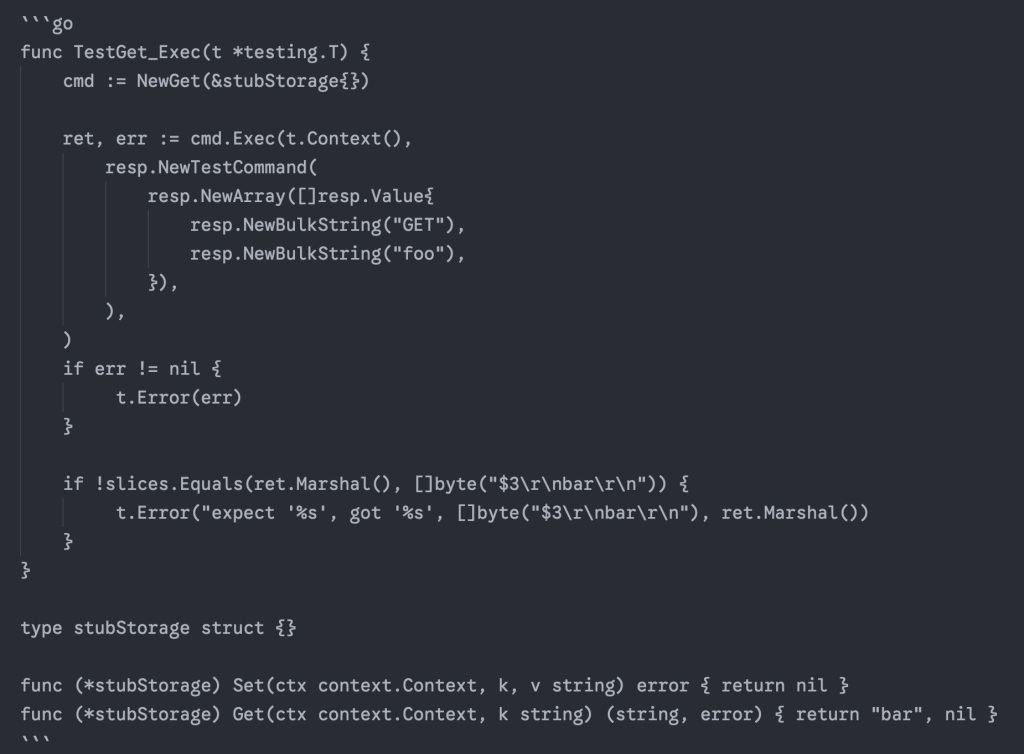
只要實現了 Set(context.Context, string, string) 與 Get(context.Context, string) 的類型,都算是 repo.(Storage) 的實作,因此做一個 stubStorage 並使用是完全合法的。
一般來說,如果我們並不關心被模擬出來的物件到底做了什麼,完全可以用 stub 的方式進行測試。只不過,有的時候我們會期望驗證某個函式是否有被調用,或是客製化某個函式被調用後的行為或回傳值等。
有這種需求的話,調用外部的函式庫會比起自行實作來得有效率得多。
而 stretchr/testify 就是一個典型的有提供 mock generator 的函式庫;然而我並不喜歡它,它的寫法讓我覺得自己是個 Java 工程師(絕對沒有貶低或引戰的意思,但我對於沒有 32:9 螢幕就能做 Java 開發的前輩們通常是充滿尊敬的)。
我個人則偏好使用 matryer/moq,這是一個編譯時期藉由 go generate 生成的 mock 生成器,其優勢在於少了反射這種魔法,並且讓靜態分析時就可預期其行為。
$ go get -tool github.com/matryer/moq
註:在 moq 的官方文件上說應該使用
go install github.com/matryer/moq來安裝,但這會安裝為全域的執行檔,在 Go 1.24 之後使用go get -tool可以讓安裝保留在套件層級。
只要在 repo.(Storage) 上加入相應的 go generate 註解即可:
// file: ./internal/repo/storage.go
//go:generate go tool moq -rm -out storage_mock.go . Storage
type Storage interface {
	Set(ctx context.Context, k, v string) error
	Get(ctx context.Context, k string) (string, error)
}
然後執行以下指令,應該就會看到 go 編譯器自動生成 ./internal/repo/storage_mock.go
$ go generate ./...
moq 會自動生成 repo.(*StorageMock)。
repo.(*StorageMock) 一起測試func TestGet_Exec(t *testing.T) {
cmd := NewGet(&repo.StorageMock{
GetFunc: func(ctx context.Context, k string) (string, error) { return "bar", nil }
})
ret, err := cmd.Exec(t.Context(),
resp.NewTestCommand(
resp.NewArray([]resp.Value{
resp.NewBulkString("GET"),
resp.NewBulkString("foo"),
}),
),
)
if err != nil {
t.Error(err)
}
if !slices.Equals(ret.Marshal(), []byte("$3\r\nbar\r\n")) {
t.Error("expect '%s', got '%s', []byte("$3\r\nbar\r\n"), ret.Marshal())
}
}
moq 的模擬邏輯相當簡單:藉由新增 {FunctionName}Func 的函式欄位,讓開發者能夠自行控制指定函式的行為。


 iThome鐵人賽
 看影片追技術