
本文同步發表於個人部落格:端點快取,什麼時候要重問
火線超人的伺服器設定表上,有兩個可以是空的欄位:authorize_endpoint 跟 token_endpoint。
空的時候會呼叫一支 discover_oauth_endpoints! 去抓那台伺服器的 /metadata。從裡面的 oauth-uris extension 取出兩個網址,寫回資料庫。抓到就存著,下次直接用。
有一件事要先講,因為它跟本系列教的不一樣。火線超人問的是 /metadata,不是 .well-known/smart-configuration。
day06 教的是 .well-known/smart-configuration,那是 SMART 現在的標準做法。.well-known 回一個扁平的 JSON,欄位清楚。
另一條路是 FHIR 的 /metadata,它回一個 CapabilityStatement。授權端點藏在 security.extension 底下那個 oauth-uris 的子 extension 裡。
rest 是一個陣列,規範沒有保證授權資訊一定在第一項。通用的解析要走過陣列裡每一個 mode 為 server 的項目,再從對應那一項的 security.extension 讀值。這台 sandbox 的 rest 只有一項,所以下面直接寫 rest[0]。
兩條都拿得到端點,但規範的態度不一樣。現行版寫明伺服器 SHALL 提供 .well-known/smart-configuration。
用 CapabilityStatement 傳這些授權資訊是舊版做法。現行版已經把它標成 deprecated。
被標的是這套 discovery 做法,不是 /metadata 這個端點。/metadata 本身照樣是 FHIR 的正規端點。
這台 sandbox 兩條都吐,我實際比對過。/metadata 的 rest[0].security 底下有一個 extension:
http://fhir-registry.smarthealthit.org/StructureDefinition/oauth-uris
oauth-uris 的三個子 extension 跟 .well-known 的三個端點欄位逐字相同。差別在資訊量與體積:
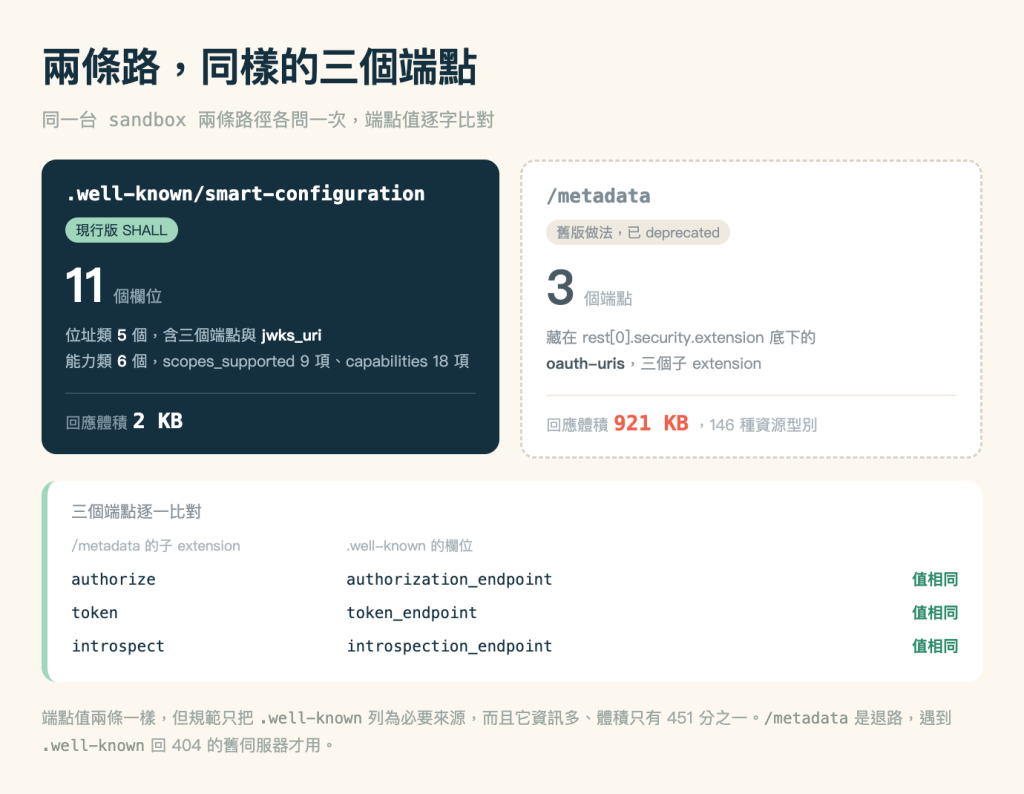
端點拿哪一條都一樣,所以優先用 .well-known。/metadata 是退路。碰到一台問 .well-known 回 404 的伺服器,別急著當它壞了,去問 /metadata 看看。
deprecated 不等於今天就不能用。它的意思是規範不再往這個方向走,但既有的伺服器還吐得出來。
火線超人選 /metadata,因為它要接的伺服器裡有只吐這一條的。這台 sandbox 兩條都支援。所以「舊伺服器只有 /metadata」這件事我沒辦法在這裡示範,那是經驗談。
那 11 個欄位分兩類,五個位址、六個能力。
位址類五個:issuer、jwks_uri,加上三個端點。這些是這台伺服器的位址設定。本篇把這五個一起快取,這次實測沒有量過它們多久改一次。
能力類六個:scopes_supported 9 項、capabilities 18 項、response_types_supported 5 項,還有三個。一是 grant_types_supported,二是 token_endpoint_auth_methods_supported,三是 code_challenge_methods_supported。這些是宣告,更新頻率我沒有另外設,跟位址類一起快取。
兩類都能快取。真正的問題不是「能不能」,是「多久」跟「改了怎麼辦」。
不快取的話,每次授權前都要多發一次請求。
單台伺服器上這個成本幾乎看不出來,一次往返而已。但兩件事會讓它變明顯。
多伺服器。 三家醫院就是三次。而且 day20 說過查詢要平行發。那三次 discovery 也要平行,程式複雜度跟著上去。
授權流程的位置。 discovery 卡在使用者按下按鈕跟看到登入畫面之間。這一段的延遲使用者感受得到,因為畫面停在那裡不動。
這是最容易寫錯的一行。
直覺會用醫院代號當 key,像 cache['a']。這樣寫,換端點的時候會拿到舊資料。
key 要用 FHIR base URL。 同一家醫院只要換了 base URL,就不該再命中舊 URL 留下的那份快取:
const cache = readCache()
const hit = cache[server.fhirBaseUrl]
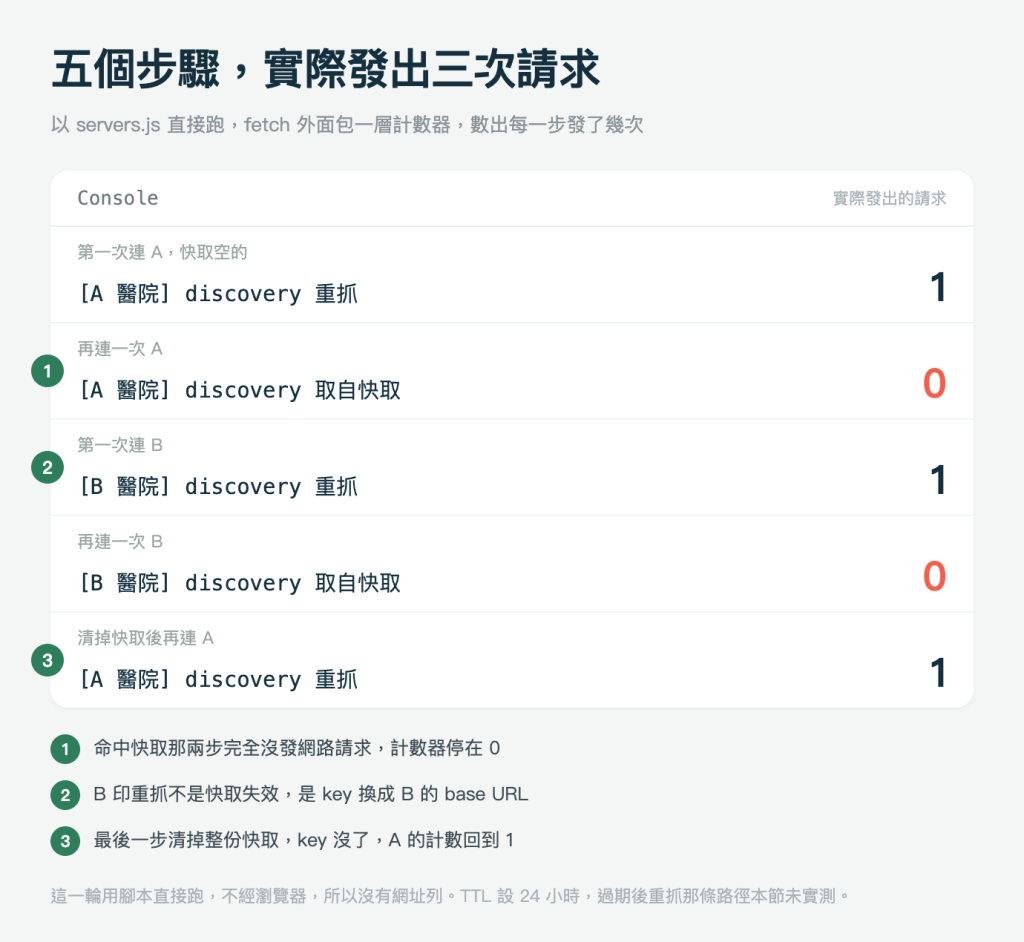
我把 servers.js 單獨跑過一輪計數。連兩次 A、連兩次 B、清掉快取再連一次 A,這五步裡 getConfiguration() 發出三次請求。命中快取那兩步是 0,逐行的輸出放在下面跟著做那張圖裡。
localStorage 從頭到尾只有 smart-app.discovery 這一個 key,兩家醫院是它底下的兩個屬性。跑到第四步、還沒清快取的時候,裡面是 A 與 B 兩份,各自存著自己那份設定。
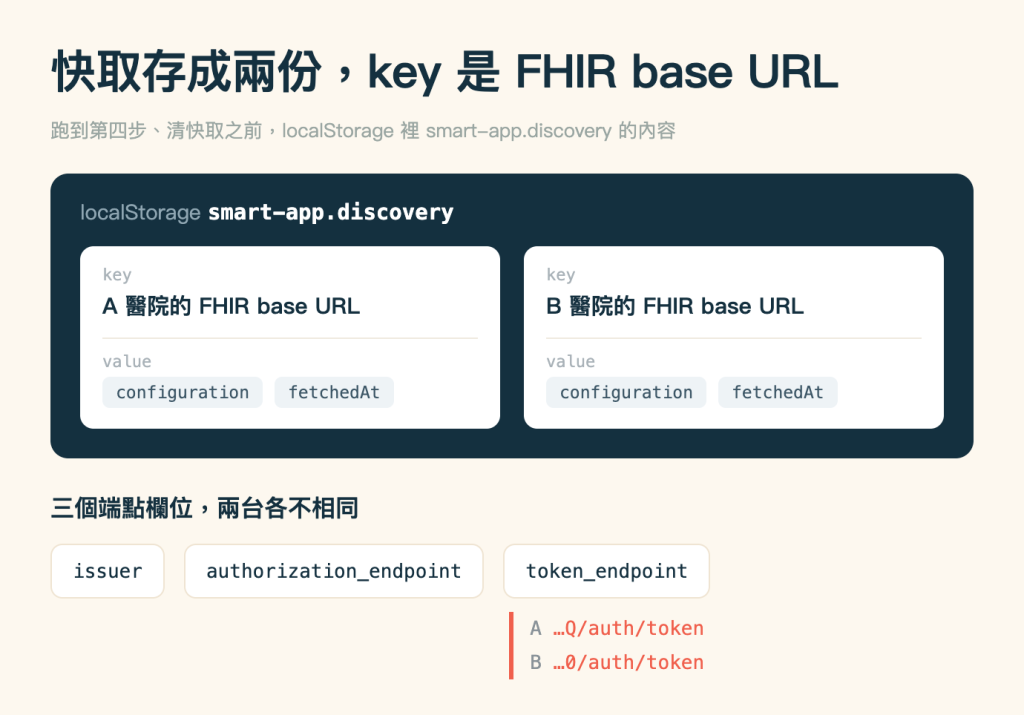
TTL(time to live,一份快取可以活多久)我設 24 小時。
這個數字不是規範的建議值,只是本文範例的選擇。你能接受舊設定被用多久,就設多久。
但 24 小時到底管什麼要講清楚。它只決定下次呼叫 getConfiguration() 時要不要嘗試重抓。
過了 24 小時,重抓成功就覆蓋舊值。重抓失敗而快取裡還留著舊值的話,程式會把舊值回傳出去。程式沒有替舊值另外設一個年齡上限,所以那份設定在 localStorage 裡待多久都有可能。
這是抓不到時的回退,跟提前失效是兩件事。提前失效指的是「還沒到 24 小時但端點已經換了」。那種情況要等 TTL 到期才會重抓。
回退這件事,火線超人的做法值得抄。discover_oauth_endpoints! 抓失敗時不改動既有欄位,保留舊值。
失敗有兩種。一是 metadata 裡沒有 OAuth 資訊,二是根本連不上。兩種都丟錯誤出來,但不清掉本來就存著的那兩個網址。
理由很實際。discovery 抓不到,不代表原本那組端點已經失效。這時候把快取清空,等於自己把唯一能用的資訊丟掉。寧可用可能過期的資料,也不要沒有資料。
代價要知道:對方如果是「換了端點才連不上」,回退會讓你一直用錯的那一組。這種情況跟前面說的提前失效一樣。等 TTL 到期太慢,下一節那顆手動清除就是為此而留。
火線超人的端點解析有四層優先序:
第三層最容易被跳過。有些伺服器的 discovery 就是不可靠。設定檔裡先寫死一組當保險,比每次失敗好。
除了自動失效,還要留一個手動清快取的方法。
火線超人的管理介面會把快取下來的端點顯示出來,人看得到現在用的是哪一組。下面那顆清除按鈕是本文範例另外加的,讓你能直接把 discovery 重跑一次。
把目前用的端點顯示出來,再配一顆清除按鈕,除錯的時候很有用。「授權一直失敗」這種問題,第一個要排除的就是「你是不是還在用三個月前的端點」。看得到才排除得掉。
範例裡放一顆按鈕:
export function forgetDiscovery() {
  localStorage.removeItem(CACHE_KEY)
}
一行。但沒有它,你得教使用者去開開發者工具清 localStorage。
起點是 day21 結束時的專案,已經有 servers.js 跟兩家醫院的設定。
servers.js 加上快取const CACHE_KEY = 'smart-app.discovery'
const TTL_MS = 24 * 60 * 60 * 1000
function readCache() {
try {
return JSON.parse(localStorage.getItem(CACHE_KEY) ?? '{}')
} catch {
return {}
}
}
export async function getConfiguration(server) {
const cache = readCache()
const hit = cache[server.fhirBaseUrl]
if (hit && Date.now() - hit.fetchedAt < TTL_MS) {
console.log(`[${server.label}] discovery 取自快取`)
return hit.configuration
}
console.log(`[${server.label}] discovery 重抓`)
try {
const response = await fetch(
`${server.fhirBaseUrl}/.well-known/smart-configuration`
)
if (!response.ok) {
throw new Error(`discovery 失敗,HTTP ${response.status}`)
}
const configuration = await response.json()
cache[server.fhirBaseUrl] = { fetchedAt: Date.now(), configuration }
localStorage.setItem(CACHE_KEY, JSON.stringify(cache))
return configuration
} catch (error) {
if (hit) {
console.warn(`[${server.label}] discovery 抓不到,改用過期的快取`, error.message)
return hit.configuration
}
throw error
}
}
export function forgetDiscovery() {
localStorage.removeItem(CACHE_KEY)
}
readCache 那個 try 不能省。localStorage 裡存的那份 JSON 可能被別的程式寫壞,也可能是你上一版留下的舊格式。解不開就當成空的重來,不要讓整個 app 掛在這裡。
那個 catch 就是上面說的「寧可用可能過期的資料」。光是不清掉舊值還不夠,要真的在抓失敗時把它拿出來用,那條原則才算真的做到。舊值連一份都沒有時才往外丟錯誤。
import { SERVERS, getConfiguration, forgetDiscovery } from './servers.js'

async function authorize(key) {
  const server = SERVERS[key]
  sessionStorage.setItem(SERVER_KEY, key)
  await getConfiguration(server)

  FHIR.oauth2.authorize({
    iss: server.fhirBaseUrl,
    clientId: server.clientId,
    scope: server.scope,
    redirectUri: window.location.pathname,
  })
}
有個地方會讓人困惑:FHIR.oauth2.authorize() 自己也會去抓 discovery,我們這一步好像白做了。
沒錯,以這個範例來說是這樣。getConfiguration() 回傳的設定並沒有交給 fhirclient。這一步只是讓你從 console 看見我們這一層的快取有沒有命中。
所以「discovery 抓不到還是能完成授權」這件事,這個範例沒有示範到。正式的程式要讓後面的呼叫真的用上回傳的那份設定,過期回退才會發揮作用。例如自己打 token 端點做 refresh,那時候快取就派得上用場。
<button id="forget" class="rounded border border-slate-300 px-4 py-2 text-sm">清掉 discovery 快取</button>
放進 day21 那個 #connect 區塊,跟兩顆醫院按鈕排在一起。綁定跟它們一樣寫在模組層:
document.querySelector('#forget').addEventListener('click', () => {
  forgetDiscovery()
  status.textContent = 'discovery 快取已清掉,下次連線會重抓'
})
這顆跟授權狀態無關,授權前後都要按得到。day21 那個 showSwitchControls() 只動醫院那兩顆,不碰它。
先在 DevTools 的 Console 面板勾起 Preserve log。授權會整頁跳走,不勾的話印出來的訊息會被清掉。
按 A 醫院,console 印 discovery 重抓。授權完導回首頁,那顆按鈕已經變成「重新連 A 醫院」。按下去,這次印 discovery 取自快取。
Network 面板第二次還是會看到一次 .well-known。 那是 FHIR.oauth2.authorize() 自己發的,不是我們的 getConfiguration()。要驗我們這一層有沒有省下請求,看 console 印的是「重抓」還是「取自快取」。
再按「換到 B 醫院」,印的是 重抓,因為 key 不一樣。等 B 也授權完導回首頁之後,在 console 執行:
Object.keys(JSON.parse(localStorage.getItem('smart-app.discovery')))
要等導回首頁才能執行。授權途中瀏覽器在 launch.smarthealthit.org 上,那是另一個來源,讀不到我們的 localStorage。
會看到兩個 key,就是兩家醫院的 base URL。按下清快取那顆按鈕,再連一次,又變回 重抓。
第三幕到這裡結束。這一段給中途接上或哪裡壞掉的人。
本篇動到三個檔案,三個都完整列在下面。servers.js 加上快取那一層,app.js 改授權那一段,index.html 多一顆清快取按鈕。
另外六個模組從第三幕前幾篇累積下來,本篇一行都沒動。分別是 patient.js、vitals.js、clinical.js、write.js、errors.js、search.js。加上 vendor/ 底下三支函式庫,這些直接從 GitHub 取,網址在本節最後。
先看 servers.js。兩個 fhirBaseUrl 在這裡是刪節過的,換成你自己在 Launcher 開的那兩串:
// day21:每家醫院一組獨立的 credentials。
// day22:多加一層 discovery 快取。注意 fhirclient 授權時仍會自行重抓,
// 這一層省下的是我們自己發的那一次。

export const SERVERS = {
  a: {
    label: 'A 醫院',
    fhirBaseUrl: 'https://launch.smarthealthit.org/v/r4/sim/WyIzIiwiMDE4…/fhir',
    clientId: 'hospital-a-client',
    scope: 'launch/patient patient/*.rs openid fhirUser offline_access',
  },
  b: {
    label: 'B 醫院',
    fhirBaseUrl: 'https://launch.smarthealthit.org/v/r4/sim/WyIzIiwiYWI0…/fhir',
    clientId: 'hospital-b-client',
    scope: 'launch/patient patient/Patient.rs patient/Observation.rs',
  },
}

const CACHE_KEY = 'smart-app.discovery'
const TTL_MS = 24 * 60 * 60 * 1000

function readCache() {
  try {
    return JSON.parse(localStorage.getItem(CACHE_KEY) ?? '{}')
  } catch {
    return {}
  }
}

// 快取的 key 是 FHIR base URL 而不是醫院代號。
// 同一家醫院只要換了 base URL,就不該再命中舊 URL 留下的那份快取。
export async function getConfiguration(server) {
  const cache = readCache()
  const hit = cache[server.fhirBaseUrl]
  if (hit && Date.now() - hit.fetchedAt < TTL_MS) {
    console.log(`[${server.label}] discovery 取自快取`)
    return hit.configuration
  }

  console.log(`[${server.label}] discovery 重抓`)
  try {
    const response = await fetch(
      `${server.fhirBaseUrl}/.well-known/smart-configuration`
    )
    if (!response.ok) {
      throw new Error(`discovery 失敗,HTTP ${response.status}`)
    }
    const configuration = await response.json()

    cache[server.fhirBaseUrl] = { fetchedAt: Date.now(), configuration }
    localStorage.setItem(CACHE_KEY, JSON.stringify(cache))
    return configuration
  } catch (error) {
    // 抓不到的時候,過期的舊值比沒有值好。
    // 伺服器暫時掛掉時舊端點多半還是對的,這時候放棄等於自廢武功。
    if (hit) {
      console.warn(`[${server.label}] discovery 抓不到,改用過期的快取`, error.message)
      return hit.configuration
    }
    throw error
  }
}

export function forgetDiscovery() {
  localStorage.removeItem(CACHE_KEY)
}
兩串 fhirBaseUrl 換成你自己在 Launcher 開的那兩份。
接著是 app.js,第三幕八篇累積下來的完整版。本篇改三處。一是從 servers.js 多匯入 getConfiguration 與 forgetDiscovery。二是替清除按鈕綁一個 handler。三是 authorize() 改成 async,授權前先呼叫 getConfiguration(server)。
import { SERVERS, getConfiguration, forgetDiscovery } from './servers.js'
import { summarize } from './patient.js'
import { loadVitals, toChartData, renderChart } from './vitals.js'
import {
  loadConditions,
  loadMedications,
  conditionsTable,
  medicationsTable,
} from './clinical.js'
import { selfMeasuredBloodPressure, createRaw } from './write.js'
import { describeFailure, describeClientError } from './errors.js'

const SERVER_KEY = 'smart-app.server'

const status = document.querySelector('#status')
const connectButton = document.querySelector('#connect')
const details = document.querySelector('#patient')
const vitalsCanvas = document.querySelector('#vitals')
const conditionsBox = document.querySelector('#conditions')
const medicationsBox = document.querySelector('#medications')
const systolicInput = document.querySelector('#systolic')
const diastolicInput = document.querySelector('#diastolic')
const saveButton = document.querySelector('#save-bp')
const writeResult = document.querySelector('#write-result')
const errorResult = document.querySelector('#error-result')

// 第二個參數只接 ready() 自己的失敗,也就是還沒授權。
// 寫成 .then(showPatient).catch(offerConnect) 的話,
// showPatient() 裡的讀取失敗也會掉進 offerConnect(),
// 畫面會叫一個已經授權完的人再去挑一次醫院。
FHIR.oauth2.ready().then(showPatient, offerConnect)

// 綁定只做一次,授權前後共用同一組按鈕。
for (const button of connectButton.querySelectorAll('[data-server]')) {
  button.addEventListener('click', () => authorize(button.dataset.server))
}
document.querySelector('#forget').addEventListener('click', () => {
  forgetDiscovery()
  status.textContent = 'discovery 快取已清掉,下次連線會重抓'
})

function offerConnect() {
  status.textContent = '還沒授權,挑一家醫院開始'

  for (const button of connectButton.querySelectorAll('[data-server]')) {
    button.hidden = false
    button.textContent = `連線到 ${SERVERS[button.dataset.server].label}`
  }
  connectButton.hidden = false
}

// 授權完之後三顆都留著。目前這家換成「重新連」,那不是多餘的按鈕:
// 要驗證 discovery 有沒有命中快取,就是在已連 A 的狀態下再連一次 A。
// 清快取那顆跟授權狀態無關,一直留著,day22 要按它才示範得出快取行為。
function showSwitchControls(currentKey) {
  for (const button of connectButton.querySelectorAll('[data-server]')) {
    const key = button.dataset.server
    const label = SERVERS[key].label
    button.hidden = false
    button.textContent = key === currentKey ? `重新連 ${label}` : `換到 ${label}`
  }
  connectButton.hidden = false
}

async function authorize(key) {
  const server = SERVERS[key]
  // 記住這次選了哪一家,導回來之後才知道要顯示哪一家的名字
  sessionStorage.setItem(SERVER_KEY, key)

  // 先過我們這一層快取。命中的話這一層不發請求,
  // 但下一行的 fhirclient 仍會自行抓一次 discovery。
  await getConfiguration(server)

  FHIR.oauth2.authorize({
    iss: server.fhirBaseUrl,
    clientId: server.clientId,
    scope: server.scope,
    redirectUri: window.location.pathname,
  })
}

async function showPatient(client) {
  showSwitchControls(sessionStorage.getItem(SERVER_KEY) ?? 'a')
  status.textContent = '讀取中…'

  try {
    // client.patient.read() 讀的是 token 裡那個 patient context 指到的人,
    // 不必自己組網址,也不必自己帶 Authorization header。
    const patient = await client.patient.read()
    const summary = summarize(patient)

    details.replaceChildren(
      ...row('姓名', summary.name),
      ...row('性別', summary.gender),
      ...row('生日', summary.birthDate),
      ...row('病歷號', summary.id)
    )
    details.hidden = false

    const server = SERVERS[sessionStorage.getItem(SERVER_KEY) ?? 'a']
    status.textContent = summary.name
      ? `${server.label}:${summary.name} 的基本資料`
      : `${server.label}:這位病人沒有登記姓名`

    console.log('伺服器:', server.label, server.clientId)
    console.log('patient id:', client.patient.id)
    console.log('scope:', client.state.tokenResponse.scope)

    // 三塊資料互不相干,一起發出去
    await Promise.all([
      showVitals(client),
      showConditions(client),
      showMedications(client),
    ])
  } catch (error) {
    status.textContent = '讀不到這位病人的資料'
    console.error(error)
  }

  saveButton.disabled = false
  saveButton.addEventListener('click', () => saveBloodPressure(client))

  for (const button of document.querySelectorAll('[data-case]')) {
    button.addEventListener('click', () => tryFailure(client, button.dataset.case))
  }
}

const FAILURE_CASES = {
  notfound: (base) => [`${base}/Observation/no-such-observation-xyz`, {}],
  badparam: (base) => [`${base}/Observation?totally-not-a-param=1`, {}],
  badtoken: (base, patientId) => [
    `${base}/Patient/${patientId}`,
    { headers: { Authorization: 'Bearer not-a-real-token' } },
  ],
  mismatch: (base) => [
    `${base}/Observation`,
    {
      method: 'POST',
      headers: { 'Content-Type': 'application/fhir+json' },
      body: JSON.stringify({ resourceType: 'Patient' }),
    },
  ],
}

// 斷網、DNS 解不出來、CORS 預檢被擋,這三種是 fetch 自己 reject。
// 沒有這個 catch,它們會變成一個沒人接的 Promise rejection。
async function tryFailure(client, name) {
  try {
    const [url, init] = FAILURE_CASES[name](client.state.serverUrl, client.patient.id)
    report(name, await describeFailure(await fetch(url, init)))
  } catch (error) {
    report(name, describeClientError(error))
  }
}

function report(name, failure) {
  console.log(`[${name}]`, failure.status, failure.retriable ? '可重試' : '不重試')
  console.log('  給使用者:', failure.userMessage)
  console.log('  給開發者:', failure.developerMessage)

  errorResult.className = 'mt-2 text-sm text-rose-700'
  errorResult.textContent = `HTTP ${failure.status}:${failure.userMessage}`
}

async function saveBloodPressure(client) {
  saveButton.disabled = true
  const resource = selfMeasuredBloodPressure(
    client.patient.id,
    Number(systolicInput.value),
    Number(diastolicInput.value),
    new Date().toISOString()
  )

  const outcome = await createRaw(client, resource)
  console.log('HTTP', outcome.status)
  console.log('Location:', outcome.location)
  console.log('ETag:', outcome.etag)
  console.log('讀得到的 header:', outcome.exposedHeaders)
  console.log('新資源 id:', outcome.body.id)

  writeResult.textContent = outcome.ok
    ? `存好了,id 是 ${outcome.body.id}。重整頁面就會出現在上面的趨勢圖`
    : `存不進去,HTTP ${outcome.status}`
  saveButton.disabled = false
}

async function showConditions(client) {
  const rows = await loadConditions(client)
  conditionsBox.className = ''
  conditionsBox.innerHTML = conditionsTable(rows)
  console.log('病況:', rows.length, '筆')
}

async function showMedications(client) {
  const rows = await loadMedications(client)
  medicationsBox.className = ''
  medicationsBox.innerHTML = medicationsTable(rows)
  console.log('用藥:', rows.length, '筆')
}

async function showVitals(client) {
  const data = toChartData(await loadVitals(client))
  renderChart(vitalsCanvas, data)

  const counted = data.datasets.map(
    (one) => one.data.filter((value) => value !== null).length
  )
  console.log('趨勢圖:', data.labels.length, '個日期,各線', counted)
}

// 欄位是空的時候不要留一個空格子。
// 空格子看起來像畫面壞了,寫出來才知道是這筆資料本來就沒有。
//
// 值一律用 textContent 寫進去,不要組 HTML 字串。
// 姓名是伺服器給的資料,裡面若含有標籤會被瀏覽器當成 HTML 執行。
function row(label, value) {
  const dt = document.createElement('dt')
  dt.textContent = label

  const dd = document.createElement('dd')
  dd.textContent = value ?? '未提供'

  return [dt, dd]
}
最後是 index.html。兩顆 data-server 按鈕從 day21 延續下來,本篇新增的是那顆 #forget:
<!doctype html>
<html lang="zh-Hant">
  <head>
    <meta charset="utf-8" />
    <title>SMART App</title>
  </head>
  <body class="bg-slate-50 text-slate-900 p-6 md:p-10">
    <div class="mx-auto max-w-3xl space-y-8">
      <h1 class="text-2xl font-bold">我的健康資料</h1>
    <p id="status" class="text-slate-600">載入中…</p>
    <div id="connect" hidden class="flex gap-2">
        <button data-server="a" class="rounded bg-slate-800 px-4 py-2 text-white">連線到 A 醫院</button>
        <button data-server="b" class="rounded bg-slate-800 px-4 py-2 text-white">連線到 B 醫院</button>
        <button id="forget" class="rounded border border-slate-300 px-4 py-2 text-sm">清掉 discovery 快取</button>
      </div>
    <dl id="patient" hidden class="grid grid-cols-[6rem_1fr] gap-y-1 rounded bg-white p-4 shadow-sm"></dl>

    <section class="rounded bg-white p-4 shadow-sm">
        <h2 class="mb-2 font-semibold">生命徵象趨勢</h2>
    <canvas id="vitals" height="140"></canvas>
      </section>

      <section class="rounded bg-white p-4 shadow-sm">
        <h2 class="mb-2 font-semibold">病況</h2>
        <div id="conditions" class="text-slate-500">尚未載入</div>
      </section>

      <section class="rounded bg-white p-4 shadow-sm">
        <h2 class="mb-2 font-semibold">用藥</h2>
        <div id="medications" class="text-slate-500">尚未載入</div>
      </section>

      <section class="rounded bg-white p-4 shadow-sm">
        <h2 class="mb-2 font-semibold">自己量的血壓</h2>
        <div class="flex flex-wrap items-end gap-3">
          <label class="text-sm">收縮壓
            <input id="systolic" type="number" value="118"
                   class="ml-1 w-20 rounded border border-slate-300 px-2 py-1" />
          </label>
          <label class="text-sm">舒張壓
            <input id="diastolic" type="number" value="76"
                   class="ml-1 w-20 rounded border border-slate-300 px-2 py-1" />
          </label>
          <button id="save-bp" disabled
                  class="rounded bg-slate-800 px-4 py-2 text-white disabled:opacity-40">存回伺服器</button>
        </div>
        <p id="write-result" class="mt-2 text-sm text-slate-600"></p>
      </section>

      <section class="rounded bg-white p-4 shadow-sm">
        <h2 class="mb-2 font-semibold">錯誤長什麼樣</h2>
        <div class="flex flex-wrap gap-2">
          <button data-case="notfound"
                  class="rounded border border-slate-300 px-3 py-1 text-sm">讀一個不存在的 id</button>
          <button data-case="badparam"
                  class="rounded border border-slate-300 px-3 py-1 text-sm">用一個不支援的參數</button>
          <button data-case="badtoken"
                  class="rounded border border-slate-300 px-3 py-1 text-sm">帶一個亂寫的 token</button>
          <button data-case="mismatch"
                  class="rounded border border-slate-300 px-3 py-1 text-sm">送錯資源型別</button>
        </div>
        <p id="error-result" class="mt-2 text-sm"></p>
      </section>
    </div>

    <script src="vendor/tailwind-browser.js"></script>
    <script src="vendor/fhir-client.pure.min.js"></script>
    <script src="vendor/chart.umd.js"></script>
    <script type="module" src="app.js"></script>
  </body>
</html>
完整可跑的版本在 GitHub 上的 day22-multi-server,想先看跑起來的樣子可以直接開線上版。那裡還有第三幕其他幾篇累積下來的檔案。
八天前,這個 app 只會在 console 印幾行字。
現在這個 app 會顯示病人基本資料、把血壓與體重畫成趨勢圖、列出病況與用藥。
它還能讓病人把在家量的血壓存回去、把伺服器的錯誤轉成一句人話、跟完十頁搜尋結果。而且同時接得上兩家醫院。
這一路撿到的,有不少不在規範裡。component 的順序不保證,瀏覽器讀不到 Location。寫完立刻查會查不到,拿錯 token 回的是 200 不是 403。這些都是真的跑過才知道。
明天進第四幕,題目是「真實世界的坑」。第一篇要處理的情況是:你要做的功能,標準還沒寫到。



 iThome鐵人賽
 看影片追技術