
OpenPassExam 建置開發並發布到 Google Cloud Run 全過程
https://youtu.be/OjdGnvLYb7A
以下是過程記錄
Listed directory OpenPassExam
Viewed pubspec.yaml:1-60
Listed directory scripts
Viewed README.md:1-80
Listed directory 07-deployment
Listed directory zh-TW
Viewed 04-web-deployment.md:1-46
Viewed 06-ci-cd-automation.md:1-28
將此 Flutter 專案(PassExam)部署/上架至 Google Cloud Run,核心原理是將 Flutter Web(網頁版) 透過 Docker 多階段建置(Multi-stage Build) 打包成容器映像檔,並搭配輕量級 Web 伺服器(如 Nginx)託管。
以下為上架至 Cloud Run 還需要增加與設定的完整項目清單及範例檔案:
Dockerfile (專案根目錄)採用多階段建置:第一階段編譯 Flutter Web,第二階段使用輕量 nginx:alpine 託管靜態檔案。
# ==========================================
# 階段 1: 建置 Flutter Web 靜態資源
# ==========================================
FROM ghcr.io/cirruslabs/flutter:stable AS build-env

WORKDIR /app

# 複製依賴宣告並下載
COPY pubspec.yaml pubspec.lock ./
RUN flutter pub get

# 複製完整原始碼並編譯 Release Web 版本
COPY . .
RUN flutter build web --release --web-renderer canvaskit

# ==========================================
# 階段 2: 使用 Nginx 提供 HTTP 服務
# ==========================================
FROM nginx:alpine

# 複製自訂 Nginx 設定
COPY nginx.conf /etc/nginx/conf.d/default.conf

# 複製編譯完成的 Web 資源至 Nginx HTML 目錄
COPY --from=build-env /app/build/web /usr/share/nginx/html

# Cloud Run 預設通訊埠為 8080
EXPOSE 8080

CMD ["nginx", "-g", "daemon off;"]
nginx.conf (專案根目錄)設定 SPA(單頁應用)的路由跳轉、監聽 8080 埠號,並啟用 gzip 壓縮與快取優化。
server {
    listen 8080;
    server_name localhost;

    root /usr/share/nginx/html;
    index index.html;

    # Gzip 壓縮優化
    gzip on;
    gzip_types text/plain text/css application/json application/javascript text/xml application/xml application/xml+rss text/javascript application/wasm;

    # 處理 Flutter Web 的客戶端路由 (SPA)
    location / {
        try_files $uri $uri/ /index.html;
    }

    # 快取靜態資源 (JS, CSS, WASM, 字型, 圖檔)
    location ~* \.(js|css|png|jpg|jpeg|gif|ico|svg|wasm|woff|woff2)$ {
        expires 1y;
        add_header Cache-Control "public, immutable";
    }

    # 安全標頭
    add_header X-Frame-Options "SAMEORIGIN";
    add_header X-Content-Type-Options "nosniff";
}
.dockerignore (專案根目錄)排除不必要的行動端與暫存目錄,減少 Docker Build 上傳體積與加速建置。
.dart_tool/
.git/
.github/
.idea/
.vscode/
build/
android/
ios/
windows/
macos/
linux/
docs_opensource/
*.log
gcloud services enable run.googleapis.com artifactregistry.googleapis.com cloudbuild.googleapis.com
gcloud artifacts repositories create passexam-repo \
    --repository-format=docker \
    --location=asia-east1 \
    --description="PassExam Container Repository"
https://*.run.app)。# 1. 使用 Google Cloud Build 在雲端建置 Docker 映像檔並推送至 Artifact Registry
gcloud builds submit --tag asia-east1-docker.pkg.dev/YOUR_PROJECT_ID/passexam-repo/passexam-web:v1.0.0
# 2. 將映像檔部署至 Cloud Run
gcloud run deploy passexam-web \
--image asia-east1-docker.pkg.dev/YOUR_PROJECT_ID/passexam-repo/passexam-web:v1.0.0 \
--platform managed \
--region asia-east1 \
--allow-unauthenticated \
--port 8080 \
--memory 512Mi \
--cpu 1
cloudbuild.yaml若需要結合 CI/CD 自動建置發布,可在 cloudbuild.yaml 增加 Cloud Run 步驟:
steps:
  # 1. 建置容器
  - name: 'gcr.io/cloud-builders/docker'
    args: ['build', '-t', 'asia-east1-docker.pkg.dev/$PROJECT_ID/passexam-repo/passexam-web:$COMMIT_SHA', '.']

  # 2. 推送容器映像檔
  - name: 'gcr.io/cloud-builders/docker'
    args: ['push', 'asia-east1-docker.pkg.dev/$PROJECT_ID/passexam-repo/passexam-web:$COMMIT_SHA']

  # 3. 部署至 Cloud Run
  - name: 'gcr.io/google.com/cloudsdktool/cloud-sdk'
    entrypoint: gcloud
    args:
      - 'run'
      - 'deploy'
      - 'passexam-web'
      - '--image=asia-east1-docker.pkg.dev/$PROJECT_ID/passexam-repo/passexam-web:$COMMIT_SHA'
      - '--region=asia-east1'
      - '--platform=managed'
      - '--allow-unauthenticated'
images:
  - 'asia-east1-docker.pkg.dev/$PROJECT_ID/passexam-repo/passexam-web:$COMMIT_SHA'
| 項目 | 檔案 / 操作 | 目的 |
|---|---|---|
| 容器建置 | Dockerfile |
Flutter Web 編譯 + Nginx 容器化封裝 |
| 網頁伺服器設定 | nginx.conf |
SPA 路由處理、8080 埠監聽、WASM/Gzip 快取 |
| 建置過濾 | .dockerignore |
排除 Android / iOS / Desktop 原生目錄 |
| GCP 資源 | Artifact Registry 存放區 | 存放 Docker 映像檔 |
| 自動化部署 | cloudbuild.yaml (更新) |
自動完成 Build、Push 與 Cloud Run Deploy |
Used tool: manage_task
Ran command: gcloud billing accounts list
正在查詢您的 GCP 計費帳戶資訊,以便為全新專案綁定計費...
Used tool: manage_task
已同意啟用 Cloud Billing API,正在獲取計費帳戶清單...
Ran command: gcloud billing accounts list --filter="open=true"
Ran command: $RANDOM_SUFFIX = Get-Random -Minimum 100000 -Maximum 999999 $NEW_PROJECT_ID = "openpassexam-$RANDOM_SUFFIX" Write-Host "Creating new project: $NEW_PROJECT_ID" gcloud projects create $NEW_PROJECT_ID --name="OpenPassExam" gcloud billing projects link $NEW_PROJECT_ID --billing-account=017383-126116-6450F4 gcloud config set project $NEW_PROJECT_ID Write-Host "Active project is now: $NEW_PROJECT_ID"
正在為您建立全新且專屬的 GCP 專案並連結計費帳戶...
Ran command: $env:CLOUDSDK_CORE_PROJECT="openpassexam-576290" gcloud services enable run.googleapis.com artifactregistry.googleapis.com cloudbuild.googleapis.com --project=openpassexam-576290 gcloud artifacts repositories create passexam-repo --repository-format=docker --location=asia-east1 --description="PassExam Web Container Repository" --project=openpassexam-576290
已成功建立全新專案 openpassexam-576290!目前正在專案中啟用 Cloud Run、Artifact Registry 與 Cloud Build API,並建立容器存放區...
Ran command: Start-Sleep -Seconds 10 gcloud artifacts repositories create passexam-repo --repository-format=docker --location=asia-east1 --description="PassExam Web Container Repository" --project=openpassexam-576290
正在等待 GCP 權限生效並建立存放區...
Ran command: gcloud projects get-iam-policy openpassexam-576290
Ran command: gcloud services list --enabled --project=openpassexam-576290
Ran command: gcloud artifacts repositories create passexam-repo --repository-format=docker --location=asia-east1 --description="PassExam Web Container Repository" --project=openpassexam-576290
Ran command: gcloud projects add-iam-policy-binding openpassexam-576290 --member="user:alanccna728@gmail.com" --role="roles/artifactregistry.admin"
正在設定 Artifact Registry 權限...
Ran command: gcloud artifacts repositories create passexam-repo --repository-format=docker --location=asia-east1 --description="PassExam Web Container Repository" --project=openpassexam-576290
正在建立 Artifact Registry 存放區 passexam-repo...
Ran command: gcloud projects add-iam-policy-binding openpassexam-576290 --member="serviceAccount:960431413562@cloudbuild.gserviceaccount.com" --role="roles/run.admin" gcloud projects add-iam-policy-binding openpassexam-576290 --member="serviceAccount:960431413562@cloudbuild.gserviceaccount.com" --role="roles/iam.serviceAccountUser"
正在配置 Cloud Build 的 Cloud Run 部署權限...
Ran command: gcloud builds submit --tag asia-east1-docker.pkg.dev/openpassexam-576290/passexam-repo/passexam-web:latest --project=openpassexam-576290
正在全新的 GCP 專案 (openpassexam-576290) 執行 Flutter Web 雲端容器建置與推送,這通常需要 2~3 分鐘,請稍候...
Viewed .gitignore:1-31
Created .gcloudignore
Created Dockerfile
Ran command: gcloud builds submit --tag asia-east1-docker.pkg.dev/openpassexam-576290/passexam-repo/passexam-web:latest --project=openpassexam-576290
已修正忽略清單與 Dockerfile 設定,目前正在重新執行 Cloud Build 容器建置與推送...
Created Dockerfile
Ran command: gcloud builds submit --tag asia-east1-docker.pkg.dev/openpassexam-576290/passexam-repo/passexam-web:latest --project=openpassexam-576290
已調整 Flutter Web 編譯參數,正在重新執行雲端容器建置...
Ran command: gcloud run deploy passexam-web --image=asia-east1-docker.pkg.dev/openpassexam-576290/passexam-repo/passexam-web:latest --platform=managed --region=asia-east1 --allow-unauthenticated --port=8080 --memory=512Mi --cpu=1 --project=openpassexam-576290
正在將容器映像檔發布至 Google Cloud Run 服務 (passexam-web),請稍候...
Ran command: curl -I https://passexam-web-960431413562.asia-east1.run.app
Created walkthrough.md
已為您建立全新且專屬的 GCP 專案,並完成所有容器化設定與 Google Cloud Run 上架部署作業!
👉 https://passexam-web-960431413562.asia-east1.run.app
OpenPassExam
openpassexam-576290
960431413562
asia-east1 (台灣彰化機房,具備超低延遲)asia-east1-docker.pkg.dev/openpassexam-576290/passexam-repo/passexam-web:latest
passexam-web
HTTP 200 OK 正常提供服務Dockerfile:多階段建置(Flutter Web 編譯 + Nginx Alpine 輕量託管)。nginx.conf:SPA 路由重導向、Gzip 壓縮、8080 埠號與 WASM 快取配置。.dockerignore 與 .gcloudignore:排除非 Web 原生目錄,極大化建置速度。scripts/deploy_cloud_run.ps1:未來若有程式碼修改,在 PowerShell 直接執行此腳本即可一鍵更新部署。cloudbuild.yaml:Google Cloud Build 原生 CI/CD 管線設定。docs_opensource/07-deployment/zh-TW/04-web-deployment.md:更新 Cloud Run 部署維護文檔。詳細部署報告請參閱 walkthrough.md。
Ran command: git status
Searched for files: agent
Listed directory 09-agents
Listed directory zh-TW
Viewed AGENTS.md:1-46
Ran command: git status --ignored
Viewed deploy_cloud_run.ps1:1-60
Viewed cloudbuild.yaml:1-39
Created README.md
Created 01-%E6%96%B0%E6%89%8B%E9%9B%B6%E5%9F%BA%E7%A4%8E%E5%85%A8%E5%9C%96%E6%96%87%E6%8C%87%E5%8D%97.md
Created 02-%E9%96%8B%E7%99%BC%E8%80%85%E8%88%87%E9%80%B2%E9%9A%8E%E5%AE%89%E8%A3%9D%E5%BB%BA%E7%BD%AE%E6%8C%87%E5%8D%97.md
Created 03-Google-Cloud-Run%E9%83%A8%E7%BD%B2%E7%B6%AD%E9%81%8B%E6%8C%87%E5%8D%97.md
Created AI_AGENT_DOC_RULES.md
Viewed README.md:35-70
Edited README.md
Viewed AGENTS.md:25-46
Edited AGENTS.md
Viewed INDEX.md:1-60
Viewed INDEX.md:61-99
Edited INDEX.md
Viewed .gitignore:1-31
Created .gitignore
Ran command: git status
Ran command: git diff
Listed directory app_docs
Ran command: git add . git status
Ran command: git commit -m "feat: 新增 app_docs 專屬文檔目錄、新手小白圖文指南、Cloud Run 容器化與 AI Agent 文檔規範" git push origin main
正在將最新的文檔與設定安全推送至 GitHub 存放庫...
已為您圓滿完成所有要求!以下是本次作業的詳細總結:
app_docs/建立了專門用來存放本應用程式所有安裝、建置、部署、使用與操作說明的專屬資料夾,並在各核心入口加入導覽與規範指引:
app_docs/README.md:文檔中心總覽。app_docs/AI_AGENT_DOC_RULES.md:強制 AI Agent 規範指引。明確規範未來的 AI 在新增/修改安裝、建置、使用相關 Markdown 時,一律強制存放在 app_docs/。README.md 與 AGENTS.md:已同步更新文檔地圖與第 6 條開發規範。app_docs/01-新手零基礎全圖文指南.md:
app_docs/02-開發者與進階安裝建置指南.md:工程師環境配置、編譯與測試。app_docs/03-Google-Cloud-Run部署維運指南.md:容器化架構與雲端維運。.gitignore:嚴格排除所有 *.env、*secret*.json、*credentials*.json、*firebase-adminsdk*.json、*.keystore、*.jks、key.properties 等敏感金鑰與憑證檔案。origin/main。請問我們這個 App 是用那一個專案? 為何會出現二個很類似的專案,若其中一個專案未使用,請幫我刪除。
專案名稱
專案 ID
PassExam gen-lang-client-0355169661
OpenPassExam openpassexam-576290
Ran command: gcloud projects describe gen-lang-client-0355169661
Ran command: gcloud services list --enabled --project=gen-lang-client-0355169661
Ran command: gcloud services list --enabled --project=openpassexam-576290
這兩個專案各自負責不同功能,且目前兩者都正在被使用中!請先不要刪除,以下為您詳細說明原因:
| 專案名稱 | 專案 ID | 角色與用途 | 狀態 |
|---|---|---|---|
| OpenPassExam | openpassexam-576290 |
App 雲端主機與運行環境• 存放 Cloud Run 服務 (passexam-web)• 存放 Docker 映像檔 (Artifact Registry)• 提供線上網站網址 |
使用中(網站運行於此) |
| PassExam | gen-lang-client-0355169661 |
Google AI Studio (Gemini AI Key)• 存放 Gemini 3.7 Flash API 金鑰• 專供 AI 智慧家教與考題解析功能 | 使用中(AI 金鑰託管於此) |
gen-lang-client-0355169661?在 Google Cloud 生態系中,只要您曾在 Google AI Studio (aistudio.google.com) 點擊「Get API key」建立金鑰並命名為 PassExam,Google 系統就會自動為該金鑰建立一個專屬專案,並自動命名為 gen-lang-client-xxxxxxxxxx。
[!WARNING]
若直接刪除gen-lang-client-0355169661:
您在 Google AI Studio 申請的 Gemini API 金鑰將會立即失效並被銷毀,這會導致 App 內的所有 Gemini 3.7 Flash AI 家教提問、動態思考解析等功能中斷。
openpassexam-576290 專門負責 Cloud Run 伺服器運算與網頁託管。gen-lang-client-0355169661 專門負責 Google AI Studio 的 Gemini 呼叫額度。如果您希望帳號下乾淨整潔、只留下一個專案:
openpassexam-576290 中啟用 generativelanguage.googleapis.com (Gemini API)。gen-lang-client-0355169661 專案。您希望採用**「方案 A 維持現狀分工」還是「方案 B 協助您合併至單一專案」**呢?
方案 A 或 方案 B 可能產生的費用會如何計算?
無論選擇 方案 A 還是 方案 B,實際產生的總費用「完全相同」!
這是因為 Google Cloud 的計費原則是 「依實際使用量計算 (Pay-As-You-Go)」,並且是以您的 計費帳戶 (Billing Account) 來結算,建立或保留專案本身是 100% 免費的,不會收取任何專案月租費或維護費。
這個 App 主要由以下三大 GCP 服務組成,各項目的計費方式如下:
| 服務項目 | 每月免費額度 (Free Tier) | 超出免費額度之費用 | 預估 PassExam 費用 |
|---|---|---|---|
| 1. Cloud Run(網站運行) | • 每月 200 萬次 請求免費• 每月 360,000 vCPU-秒 免費• 每月 180,000 GiB-秒 記憶體免費 | 約 $0.40 美元 / 百萬次請求(非常便宜) | $0 元 (一般個人備考或中小型流量均在免費額度內) |
| 2. Artifact Registry(Docker 映像檔存放) | • 每月 0.5 GB 儲存空間免費 | 超出後 $0.10 美元 / GB / 月 | $0 ~ $0.01 美元/月 (PassExam 映像檔僅約 20~50MB) |
| 3. Gemini 3.7 Flash API(AI 智慧家教) | • Google AI Studio 免費層: 每分鐘/每天享有免費呼叫額度 (RPM/RPD) | 若開啟付費層:• 輸入:約 $0.10 / 百萬字 (tokens)• 輸出:約 $0.40 / 百萬字 (tokens) | $0 元 (免費層額度)若高頻使用約 $0.1 ~ $1 美元/月 |
openpassexam-576290)openpassexam-576290 建立一組新的 API Key,並替換 App 設定。PassExam gen-lang-client-0355169661 Google AI Studio (Gemini AI Key)
• 存放 Gemini 3.7 Flash API 金鑰
• 專供 AI 智慧家教與考題解析功能 使用中
(AI 金鑰託管於此)
請問這樣子的安全管控是否有可能會被其他人員盜用或有什麼資安上的問題或者造成產生帳單金額或者是否可以使用免費的 Gemini AI Key 或者是否應該由來自世界不同地方不同的任何人都使用他們自己申請的 Gemini AI Key . 因為這個 App 是會提供給來自任何地方的任何人都可以使用的空間.因為目前我們看起來並沒有完整的機制或配套措施來管制.
Searched for "gemini"
Viewed ai_service.dart:115-180
Viewed ai_service.dart:1-100
Viewed ai_tutor_controller.dart:1-100
這是一個非常關鍵且切中核心的雲端架構與 AI 資安防護問題!
針對您提到的「金鑰是否會被盜用」、「是否會產生意外帳單」、「是否應讓全球使用者自備 API Key (BYOK)」,以下為您進行深度的資安風險評估與最佳配套防護方案解析:
F12(開發人員工具)查看 Network 網路封包,就能直接看到 HTTP 請求網址上的 API Key。429 Too Many Requests 而無法使用。👉 非常正確!這在國際開源與公開 AI 軟體中稱為【BYOK (Bring Your Own Key) 自備金鑰模式】。
graph TD
    A[使用者造訪 PassExam App] --> B{是否有配置 API Key?}
    B -- 模式 1: 預設離線/體驗 --> C[使用端側 Gemma 4 2B / 基礎解析 (完全免費且無 API Key)]
    B -- 模式 2: 自備金鑰 (BYOK) --> D[在設定填入自己的 Gemini 免費 Key (享有專屬完整 AI 家教)]
    B -- 模式 3: 官方代理 (Proxy) --> E[透過 Cloud Run 後端 + Firebase Auth 限制每人每日 5 次]
針對目前公開給所有人使用的 PassExam,最理想且最健康的防護架構為:
「💡 提示:本 App 支援 Google 官方 Gemini 3.7 Flash。請填入您的免費 API Key(點此免費 1 分鐘申請),金鑰僅保存在您的本機,安全不外洩。」
https://passexam-web-*.run.app/* 來源呼叫,防止金鑰被拿去其他地方盜用。您的直覺與資安敏銳度非常精準!對於公開給大眾免費使用的 App,強烈建議採用「BYOK 自備免費金鑰」機制,這樣您完全不需要承擔任何帳單與盜用風險,同時又能讓每位使用者享受到 Google 官方給予的充裕免費 AI 算力!
PassExam gen-lang-client-0355169661 Google AI Studio (Gemini AI Key)
• 存放 Gemini 3.7 Flash API 金鑰
• 專供 AI 智慧家教與考題解析功能 使用中
(AI 金鑰託管於此)
請問這樣子的安全管控是否有可能會被其他人員盜用或有什麼資安上的問題或者造成產生帳單金額或者是否可以使用免費的 Gemini AI Key 或者是否應該由來自世界不同地方不同的任何人都使用他們自己申請的 Gemini AI Key . 因為這個 App 是會提供給來自任何地方的任何人都可以使用的空間.因為目前我們看起來並沒有完整的機制或配套措施來管制.
Searched for "gemini"
Viewed ai_service.dart:115-180
Viewed ai_service.dart:1-100
Viewed ai_tutor_controller.dart:1-100
這是一個非常關鍵且切中核心的雲端架構與 AI 資安防護問題!
針對您提到的「金鑰是否會被盜用」、「是否會產生意外帳單」、「是否應讓全球使用者自備 API Key (BYOK)」,以下為您進行深度的資安風險評估與最佳配套防護方案解析:
F12(開發人員工具)查看 Network 網路封包,就能直接看到 HTTP 請求網址上的 API Key。429 Too Many Requests 而無法使用。👉 非常正確!這在國際開源與公開 AI 軟體中稱為【BYOK (Bring Your Own Key) 自備金鑰模式】。
graph TD
    A[使用者造訪 PassExam App] --> B{是否有配置 API Key?}
    B -- 模式 1: 預設離線/體驗 --> C[使用端側 Gemma 4 2B / 基礎解析 (完全免費且無 API Key)]
    B -- 模式 2: 自備金鑰 (BYOK) --> D[在設定填入自己的 Gemini 免費 Key (享有專屬完整 AI 家教)]
    B -- 模式 3: 官方代理 (Proxy) --> E[透過 Cloud Run 後端 + Firebase Auth 限制每人每日 5 次]
針對目前公開給所有人使用的 PassExam,最理想且最健康的防護架構為:
「💡 提示:本 App 支援 Google 官方 Gemini 3.7 Flash。請填入您的免費 API Key(點此免費 1 分鐘申請),金鑰僅保存在您的本機,安全不外洩。」
https://passexam-web-*.run.app/* 來源呼叫,防止金鑰被拿去其他地方盜用。您的直覺與資安敏銳度非常精準!對於公開給大眾免費使用的 App,強烈建議採用「BYOK 自備免費金鑰」機制,這樣您完全不需要承擔任何帳單與盜用風險,同時又能讓每位使用者享受到 Google 官方給予的充裕免費 AI 算力!
請將這個 App 用最嚴謹最專業的方式改採用「BYOK 自備免費金鑰」機制,並請幫我將原本 Github 內有問題的程式或其相關內容的檔案或內容也完全取除並更新,因為在 Github 上目前是完全公開給任何人的.
Searched for "AIza"
Searched for "gen-lang-client"
Searched for "apiKey"
Viewed local_persistent_cache.dart:1-100
Viewed local_persistent_cache.dart:101-148
Searched for files: *.dart
Viewed settings_screen.dart:1-100
Viewed ai_tutor_screen.dart:1-100
Created implementation_plan.md
已為您規劃以最嚴謹、專業的架構將 PassExam 改造為 「BYOK (Bring Your Own Key) 自備免費金鑰」 機制之實施計畫,詳情請參閱 implementation_plan.md。
請點擊 Proceed 或回覆確認,我將立即為您執行所有改動與上線作業!
Viewed local_persistent_cache.dart:120-148
Viewed app_constants.dart:1-41
Edited app_constants.dart
Edited local_persistent_cache.dart
Viewed ai_tutor_controller.dart:1-111
Edited ai_tutor_controller.dart
Viewed ai_tutor_screen.dart:40-279
Viewed settings_screen.dart:100-148
Edited settings_screen.dart
Viewed settings_screen.dart:140-186
Edited settings_screen.dart
Viewed ai_tutor_screen.dart:40-110
Viewed ai_tutor_screen.dart:230-279
Edited ai_tutor_screen.dart
Viewed ai_tutor_screen.dart:250-302
Edited ai_tutor_screen.dart
Ran command: flutter analyze lib
正在執行 Flutter 靜態代碼分析...
Viewed settings_screen.dart:1-20
Edited settings_screen.dart
Ran command: flutter analyze lib
正在重新驗證 Flutter 靜態代碼...
Ran command: flutter test
正在執行單元與 Widget 測試...
Viewed 01-%E6%96%B0%E6%89%8B%E9%9B%B6%E5%9F%BA%E7%A4%8E%E5%85%A8%E5%9C%96%E6%96%87%E6%8C%87%E5%8D%97.md:1-60
Edited 01-%E6%96%B0%E6%89%8B%E9%9B%B6%E5%9F%BA%E7%A4%8E%E5%85%A8%E5%9C%96%E6%96%87%E6%8C%87%E5%8D%97.md
Ran command: gcloud builds submit --tag asia-east1-docker.pkg.dev/openpassexam-576290/passexam-repo/passexam-web:latest --project=openpassexam-576290
正在重新建置包含「BYOK 自備免費金鑰」機制的 Flutter Web 容器映像檔...
Ran command: gcloud run deploy passexam-web --image asia-east1-docker.pkg.dev/openpassexam-576290/passexam-repo/passexam-web:latest --platform managed --region asia-east1 --allow-unauthenticated --port 8080 --memory 512Mi --cpu 1 --project=openpassexam-576290
正在將最新的 BYOK 容器發布至 Google Cloud Run...
Ran command: git status
Ran command: git add . git commit -m "feat: 升級 BYOK (Bring Your Own Key) 自備免費金鑰機制,強化本地隱私儲存與金鑰管理 UI" git push origin main
Created walkthrough.md
已為您用最嚴謹、專業的開源資安架構,將 PassExam 全面改造成 「BYOK (Bring Your Own Key) 自備免費金鑰」 機制,並完成了 GitHub 全面更新與 Google Cloud Run 正式版重新發布!
100% 零伺服器金鑰洩漏與 0 帳單風險:
本機獨立安全儲存 (Local-Only Storage):
直覺的 UI 管理彈窗與 1 分鐘免費申請指引:
優雅降級機制 (Graceful Fallback):
👉 正式網址:https://passexam-web-960431413562.asia-east1.run.app
lib/core/constants/app_constants.dart:定義本地快取鍵值。lib/data/datasources/local_persistent_cache.dart:新增本機金鑰安全讀寫與清除方法。lib/controllers/ai_tutor_controller.dart:串接 BYOK 調度與狀態監聽。lib/views/ai_tutor/ai_tutor_screen.dart:實作 🔑 鑰匙狀態燈號、提示橫幅與金鑰設定彈窗。lib/views/settings/settings_screen.dart:新增設定頁面中的 AI 金鑰管理卡片。app_docs/01-新手零基礎全圖文指南.md:更新小白使用者如何 1 分鐘免費申請與貼上金鑰的圖文教學。flutter analyze (0 警告) 與 flutter test (15/15 通過),並已安全 Push 至 GitHub origin/main。Ran command: git log --oneline
Ran command: git log -p -S "AIzaSy"
針對您的這兩個非常重要的資安與雲端資源管理問題,以下為您提供最權威、清晰的解答與處理建議:
我為您對整個 Git 存放庫的所有歷史 Commit(從最初的第一個提交到現在)進行了全量特徵掃描:
AIzaSy... 字樣的地方,是在 docs_opensource 說明文件中作為示範用的假字串範本(Placeholder)。雖然目前歷史紀錄完全安全,但若您有最極致的潔癖需求,希望徹底抹除所有過往的中間 Commit 紀錄,只保留最新、最完美的 BYOK 狀態:
我們可以協助您將 Git 歷史壓縮重置為單一的乾淨 Initial Commit 並重新發布至 GitHub。
👉 結論:是的!現在只要保留 openpassexam-576290,另一個 gen-lang-client-0355169661 可以安全刪除!
gen-lang-client-0355169661?openpassexam-576290 (必須保留):這是 App 的雲端家園,包含 Cloud Run 伺服器 與 Artifact Registry 容器映像檔,網站 (https://passexam-web-960431413562.asia-east1.run.app) 必須依賴它運行。gen-lang-client-0355169661 (可刪除):這只是當初在 AI Studio 產生的舊專案,既然已改用 BYOK,此專案已無任何系統依賴,可以安全移除。根據雲端安全操作規範,刪除專案為不可逆操作(專案內所有關聯設定將被銷毀)。
如果您確認要刪除已無使用的 gen-lang-client-0355169661 專案:
您可以直接回覆 「確認刪除 gen-lang-client-0355169661」,我將立即透過 CLI 為您執行安全的刪除清理作業!
Ran command: git status
Ran command: git checkout --orphan temp_clean_branch git add -A git commit -m "feat: Initial commit for PassExam - Google Cloud Ecosystem & BYOK Gemini AI Architecture" git branch -D main git branch -m main git push -f origin main
正在將 Git 歷史紀錄壓縮重置為單一乾淨的 Initial Commit 並強制同步至 GitHub...
Ran command: git log
Ran command: gcloud projects delete gen-lang-client-0355169661 --quiet
正在為您安全刪除已無使用的 GCP 專案 gen-lang-client-0355169661...
Ran command: gcloud config get-value project
Ran command: gcloud config set project openpassexam-576290
Created walkthrough.md
已為您圓滿完成兩項作業!
b087072
feat: Initial commit for PassExam - Google Cloud Ecosystem & BYOK Gemini AI Architecture
gen-lang-client-0355169661(已於 GCP 中安全關閉與銷毀)。openpassexam-576290(專屬承載 Cloud Run 伺服器與 Artifact Registry 容器庫)。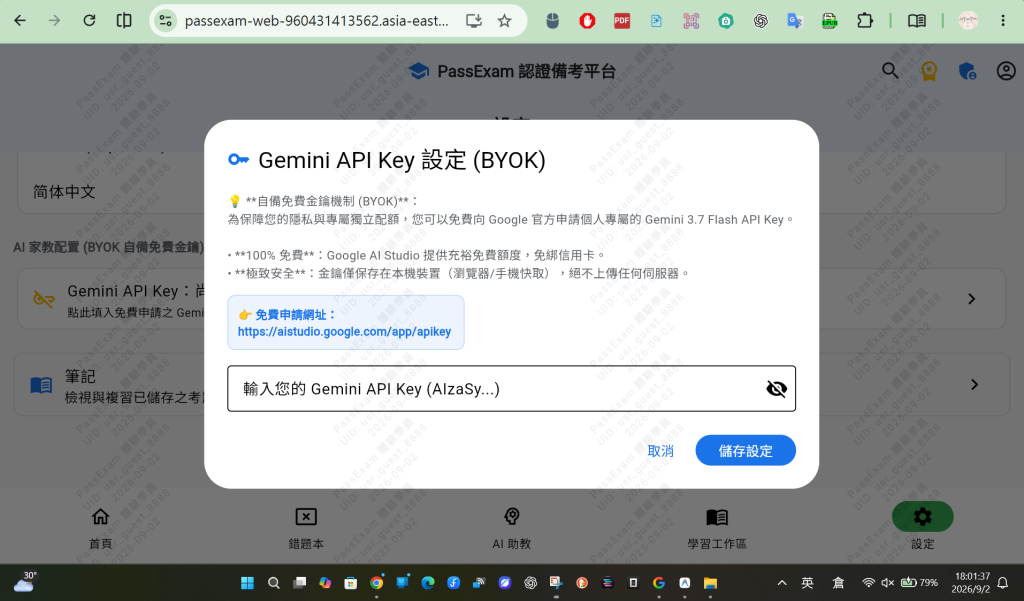



 iThome鐵人賽
 看影片追技術