
Day 1、Day 2 我們已經可以從 Linux 的 /proc 讀取 Process 資訊,包含:
接著再利用 PID / PPID 建立 Process Tree,也就是看「誰啟動誰」。
今天 Day 3 要做的事情,是讓 BehaviorGuard 從「只會看資料」進一步變成「會判斷行為」。
今天的目標
今天加入第一條 Behavior Detection Rule:
apache2
↓
bash
讀取 Process 資訊,
包含: - PID - PPID - UID - command - executable
接著再利用 PID / PPID 建立 Process Tree,也就是看「誰啟動誰」。
今天 Day 3 要做的事情,是讓 BehaviorGuard 從「只會看資料」進一步變成「會判斷行為」。
Web Server 本身不一定有問題,bash 本身也很正常,但如果 Web Server 突然啟動 Shell,就值得進一步調查。
所以我們的邏輯是:
收集 Process
↓
找到 Shell
↓
查看它的 PPID
↓
找出 Parent Process
↓
如果 Parent 是 apache2 / nginx / httpd
↓
發出 ALERT
第一條 Detection Rule
目前先定義:
web_servers = [
"apache2",
"nginx",
"httpd"
]
shells = [
"bash",
"sh",
"zsh"
]
當 Child Process 是 Shell,而且 Parent Process 是 Web Server 時,就產生警訊。
測試過程
一開始我嘗試把 /bin/bash 複製成 /tmp/apache2 來模擬:
cp /bin/bash /tmp/apache2
但實際檢查後發現,Linux 看到的 Process Name 還是 bash。
也就是說:檔名叫 apache2≠Process Name 就一定是 apache2
因此第一個測試失敗。
後來改用 Python 的 prctl 修改 Process Name,再建立:
apache2
↓
bash
↓
sleep
最後成功觸發 BehaviorGuard:
[ALERT] Suspicious process chain detected
Parent : apache2
↓
Child : bash
Total alerts: 1
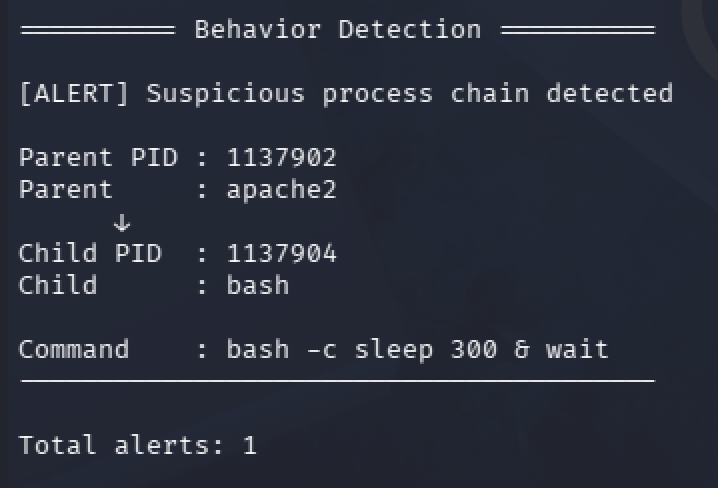
今天學到什麼:
今天最大的重點不是只有看到 [ALERT],而是理解:
單一 Process 不一定可疑
真正重要的是 Process 之間的行為關係
例如:
qterminal → zsh
但:
apache2 → bash
就比較值得注意。
另外今天也學到一個很重要的 Debugging 觀念:
結果不對時
不要先假設 Detector 壞掉
要先確認:
測試條件真的成立嗎?
Process Name 對嗎?
PPID 對嗎?
Parent / Child 關係真的存在嗎?
Day 3 完成後,BehaviorGuard 已經從單純的 Process Monitor,正式進入 Behavior Detection 的階段。

 kunyo
kunyo

 iThome鐵人賽
 看影片追技術