
摘要
Day 2 已經接上 FHIR R4 Validator 與 OperationOutcome。Day 3 把 Bundle 裡有哪些 Resource 盤點出來,顯示每筆 entry 的resourceType、id、fullUrl,並建立第一批可重現測試資料。
Day 2 做的是 FHIR R4 validation layer:確認輸入能不能被 HAPI FHIR R4 Validator 檢查,並把 OperationOutcome issue 顯示在頁面上。
但 FHIR R4 validation 只回答:
這份資料是否符合 FHIR base rule?
它還沒有回答:
這份 Bundle 裡到底有哪些 Resource?
這件事看起來很基本,但後面要做交換契約規則時會變得很重要。以檢驗資料來說,MVP 只承諾處理三種 Resource:
Patient
Observation
DiagnosticReport
如果系統連 Bundle 裡有幾個 Patient、幾個 Observation、幾個 DiagnosticReport 都沒有先整理出來,後面就很難檢查:
Observation.subject 是否指向 Bundle 裡存在的 Patient。DiagnosticReport.result 是否指向 Bundle 裡存在的 Observation。DiagnosticReport 與 Observation 是否對應同一個 Patient。所以 Day 3 的目標不是新增一條驗證規則,而是先建立 Resource inventory。
Parser:資料能不能被讀懂
        ↓
FHIR R4 Validator:資料是否符合 FHIR base rule
        ↓
Resource Inventory:Bundle 裡有哪些 Resource
        ↓
Exchange Rules:Resource 之間的關係是否符合契約
今天仍然不做 TW Core Profile validation,也不做交換契約規則。這兩件事繼續保留在後面,避免把「Resource 盤點」和「規則判斷」混在同一天。
Day 3 的 Resource inventory 先做最小可用版本。每筆 Bundle.entry 顯示四個欄位:
| 欄位 | 說明 |
|---|---|
| resourceType | entry 裡的 FHIR Resource 類型 |
| id | Resource 的 logical id |
| fullUrl | Bundle entry 的 fullUrl |
| Day 3 status | 目前 MVP 是否會處理這種 Resource |
Day 3 只把三種 MVP Resource 標成 SUPPORTED:
| Resource | Day 3 status |
|---|---|
| Patient | SUPPORTED |
| Observation | SUPPORTED |
| DiagnosticReport | SUPPORTED |
| 其他 Resource | NOT_EVALUATED |
這裡的 SUPPORTED 只代表:
這是後續 MVP 會處理的 Resource 類型。
它不代表:
這個 Resource 已經通過 TW Core Profile,或已經符合交換契約。
這個界線很重要。Day 3 的 NOT_EVALUATED 也不是錯誤,只是明確告訴使用者:這個 Resource 不在目前 MVP 的處理範圍內。
Bundle.entry 是後續跨 Resource 檢查的資料來源。resourceType、id、fullUrl,不要急著判斷 Reference 對錯。NOT_EVALUATED,避免被誤解成通過或失敗。Day 3 的流程如下:
使用者貼上或上傳 JSON
        ↓
Jackson 檢查 JSON grammar
        ↓
JSON 合法?
  ├─ 否 → JSON parse FAILED,Resource inventory 不執行
  └─ 是
        ↓
HAPI FHIR R4 parser 解析 Resource
        ↓
FHIR Resource 可解析?
  ├─ 否 → FHIR R4 parse FAILED,Resource inventory 不執行
  └─ 是
        ↓
是 Bundle?
  ├─ 否 → Resource Type Gate FAILED,Resource inventory 不執行
  └─ 是
        ↓
HAPI FHIR R4 Validator
        ↓
整理 OperationOutcome issues
        ↓
盤點 Bundle.entry
        ↓
顯示 Resource summary 與 Bundle entry table
這裡的順序刻意放在 FHIR R4 parse 與 Resource Type Gate 後面。因為只有確定輸入是 Bundle,才有 Bundle.entry 可以盤點。
今天的架構比 Day 2 多了一個 inventory 步驟:
             Browser
                |
          Multipart JSON
                |
        Spring Controller
                |
       BundleParseService
      /       |        \
 Jackson   HAPI      FHIR R4
 Parser    Parser    Validator
      \       |        /
       Resource Inventory
                |
       ValidationResult
                |
          Thymeleaf UI
Day 3 還是先維持單一 BundleParseService。目前流程仍然夠短,先不急著拆成多個 service。等 Reference rule、TW Core validator 或契約規則加入後,再依職責拆開會比較自然。
專案目錄新增或調整如下:
src/main/java/com/twlab/qualitygate
├─ validation
│  ├─ BundleEntrySummary.java
│  ├─ BundleParseService.java
│  ├─ OperationOutcomeIssue.java
│  ├─ ParseStatus.java
│  ├─ ResourceSummary.java
│  └─ ValidationResult.java
└─ web
   └─ ParseController.java

src/main/resources/templates
└─ index.html

src/test/resources/cases
├─ missing-bundle-type.json
├─ unsupported-resource-in-bundle.json
└─ valid-minimal-lab-bundle.json
BundleEntrySummary
BundleEntrySummary 是頁面顯示用 DTO。它只保留 Day 3 需要的欄位,不把 HAPI 的 BundleEntryComponent 直接傳到 Thymeleaf。
public record BundleEntrySummary(
    String resourceType,
    String id,
    String fullUrl,
    String evaluationStatus
) {
  public static BundleEntrySummary fromEntry(Bundle.BundleEntryComponent entry) {
    Resource resource = entry.getResource();
    String resourceType = resource == null ? "MISSING_RESOURCE" : resource.fhirType();
    String id = resource == null ? "N/A" : valueOrDefault(resource.getIdElement().getIdPart());
    String fullUrl = valueOrDefault(entry.getFullUrl());
    String evaluationStatus = isMvpResource(resourceType) ? "SUPPORTED" : "NOT_EVALUATED";
    return new BundleEntrySummary(resourceType, id, fullUrl, evaluationStatus);
  }
}
這裡先用 resource.fhirType() 取得 Resource 類型,例如 Patient、Observation、DiagnosticReport。如果 entry 沒有 resource,就顯示 MISSING_RESOURCE,避免頁面或測試因為 null 直接壞掉。
id 和 fullUrl 需要同時保留,因為它們回答的是不同問題。id 是 Resource 自己的 logical id,例如 Patient/patient-1 會用到 patient-1;fullUrl 則是 Bundle entry 在這份 Bundle 裡的定位,例如 urn:uuid:123e4567-e89b-12d3-a456-426614174000。後續做 Reference resolver 時,系統不能只靠 id,因為 Bundle 內 reference 可能使用 Observation/obs-1,也可能使用 urn:uuid:...。Day 3 先把兩者都記錄下來,是為了避免做 Reference 規則時才回頭補資料模型。
ResourceSummary
頁面除了列出每筆 entry,也需要一眼看到 MVP 三種 Resource 的數量。
public record ResourceSummary(
    long patientCount,
    long observationCount,
    long diagnosticReportCount,
    long notEvaluatedCount
) {
  public static ResourceSummary fromEntries(List<BundleEntrySummary> entries) {
    return new ResourceSummary(
        count(entries, "Patient"),
        count(entries, "Observation"),
        count(entries, "DiagnosticReport"),
        entries.stream()
            .filter(entry -> "NOT_EVALUATED".equals(entry.evaluationStatus()))
            .count()
    );
  }
}
notEvaluatedCount 不是錯誤數量。它只是提醒使用者:這份 Bundle 裡有目前 MVP 不處理的 Resource。
ValidationResult
Day 2 的 ValidationResult 已經有 parse status、FHIR validation status 與 OperationOutcome issues。Day 3 新增兩個欄位:
public record ValidationResult(
    ParseStatus jsonStatus,
    ParseStatus fhirR4Status,
    ParseStatus resourceTypeStatus,
    ParseStatus fhirValidationStatus,
    List<OperationOutcomeIssue> operationOutcomeIssues,
    ResourceSummary resourceSummary,
    List<BundleEntrySummary> bundleEntrySummaries,
    Integer resourceCount,
    String resourceType,
    String errorMessage
) {}
非法 JSON、FHIR parse 失敗或不是 Bundle 時,resourceSummary 回傳空 summary,bundleEntrySummaries 回傳空 list。
這樣 UI 可以一致地讀取欄位,不需要在每個失敗分支處理 null。
核心邏輯很短:
List<BundleEntrySummary> bundleEntrySummaries = bundle.getEntry().stream()
    .map(BundleEntrySummary::fromEntry)
    .toList();

return new ValidationResult(
    ParseStatus.PASSED,
    ParseStatus.PASSED,
    ParseStatus.PASSED,
    hasErrors(validationResult.getMessages()) ? ParseStatus.FAILED : ParseStatus.PASSED,
    issues,
    ResourceSummary.fromEntries(bundleEntrySummaries),
    bundleEntrySummaries,
    bundle.getEntry().size(),
    "Bundle",
    null
);
Day 3 只是盤點資料,不在這裡檢查 Reference。即使 Observation.subject 指到不存在的 Patient,今天也不會擋。這是 Reference 規則的工作。
頁面新增 Resource summary 區塊:
<h3>Resource summary</h3>
<dl>
  <dt>Patient</dt>
  <dd th:text="${result.resourceSummary.patientCount}">1</dd>

  <dt>Observation</dt>
  <dd th:text="${result.resourceSummary.observationCount}">1</dd>

  <dt>DiagnosticReport</dt>
  <dd th:text="${result.resourceSummary.diagnosticReportCount}">1</dd>

  <dt>Not evaluated</dt>
  <dd th:text="${result.resourceSummary.notEvaluatedCount}">0</dd>
</dl>
接著顯示 Bundle entry table:
<table th:if="${!#lists.isEmpty(result.bundleEntrySummaries)}">
  <thead>
  <tr>
    <th>Resource type</th>
    <th>ID</th>
    <th>Full URL</th>
    <th>Day 3 status</th>
  </tr>
  </thead>
  <tbody>
  <tr th:each="entry : ${result.bundleEntrySummaries}">
    <td th:text="${entry.resourceType}">Patient</td>
    <td th:text="${entry.id}">patient-1</td>
    <td th:text="${entry.fullUrl}">urn:uuid:...</td>
    <td>
      <span class="status"
            th:classappend="${entry.evaluationStatus == 'SUPPORTED'} ? ' passed' : ' not-evaluated'"
            th:text="${entry.evaluationStatus}">SUPPORTED</span>
    </td>
  </tr>
  </tbody>
</table>
Day 2 既有的 JSON parse、FHIR R4 parse、Resource Type Gate、FHIR R4 validation、TW Core NOT_EVALUATED 與 OperationOutcome issues 都保留。
Day 3 測試資料放到 src/test/resources/cases。
valid-minimal-lab-bundle.json
這份資料是最小檢驗 Bundle:
Bundle
├─ Patient/patient-1
├─ Observation/obs-1
└─ DiagnosticReport/report-1
它的用途是確認畫面會顯示:
Patient: 1
Observation: 1
DiagnosticReport: 1
Not evaluated: 0
missing-bundle-type.json
這份資料刻意拿掉 Bundle.type。它可以被 HAPI parser 讀成 Bundle,但 FHIR R4 validation 會失敗。
用途是確認 Day 2 的 OperationOutcome 行為沒有被 Day 3 破壞。
unsupported-resource-in-bundle.json
這份資料包含 Patient 和 Practitioner。
Practitioner 是合法 FHIR Resource,但不是本專案 MVP 的三種 Resource 之一,所以 Day 3 顯示:
Practitioner: NOT_EVALUATED
這不是資料錯誤,而是 MVP 邊界。
Day 3 最重要的展示,是同一套頁面除了顯示 FHIR R4 validation,也能顯示 Bundle 內容盤點。
使用首頁預設 sample,或貼上 valid-minimal-lab-bundle.json,按下 Parse Bundle。
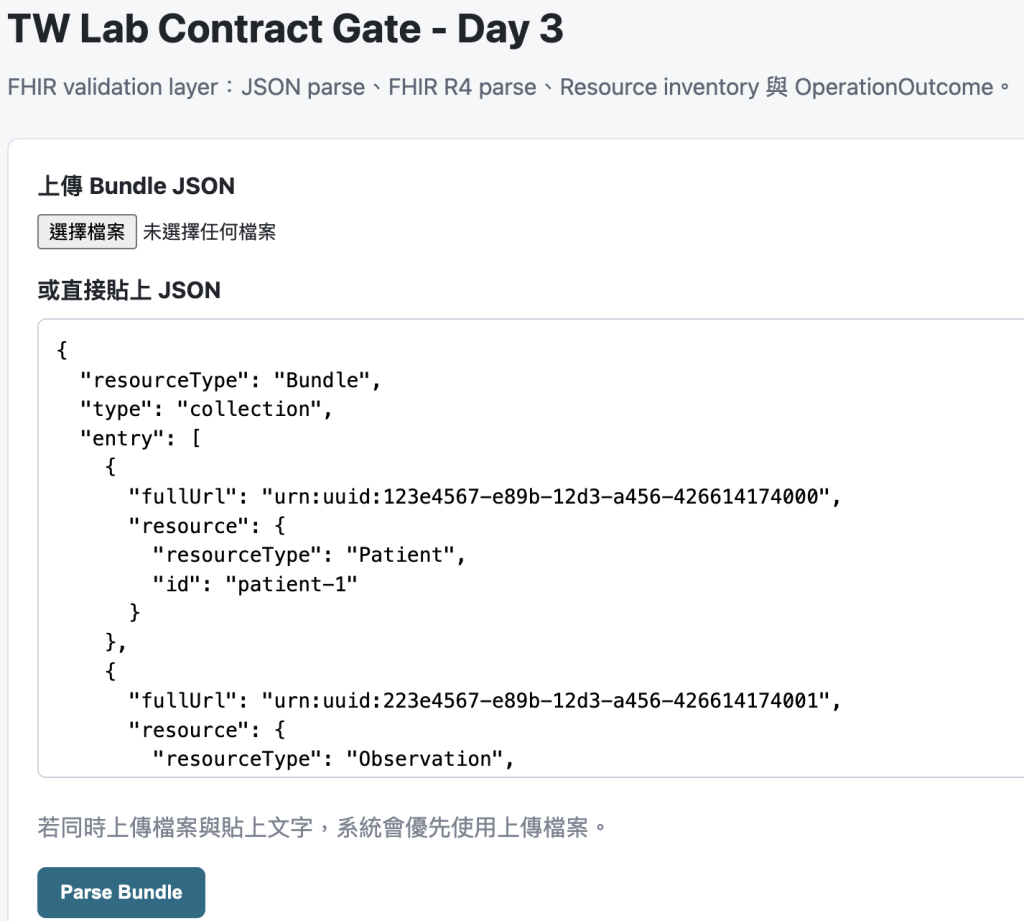
結果會看到:
JSON parse: PASSED
FHIR R4 parse: PASSED
Resource Type Gate: PASSED
FHIR R4 validation: PASSED
TW Core validation: NOT_EVALUATED
Resource summary 顯示:
Patient: 1
Observation: 1
DiagnosticReport: 1
Not evaluated: 0
Bundle entry table 顯示三筆資料:
| Resource type | ID | Day 3 status |
|---|---|---|
| Patient | patient-1 | SUPPORTED |
| Observation | obs-1 | SUPPORTED |
| DiagnosticReport | report-1 | SUPPORTED |
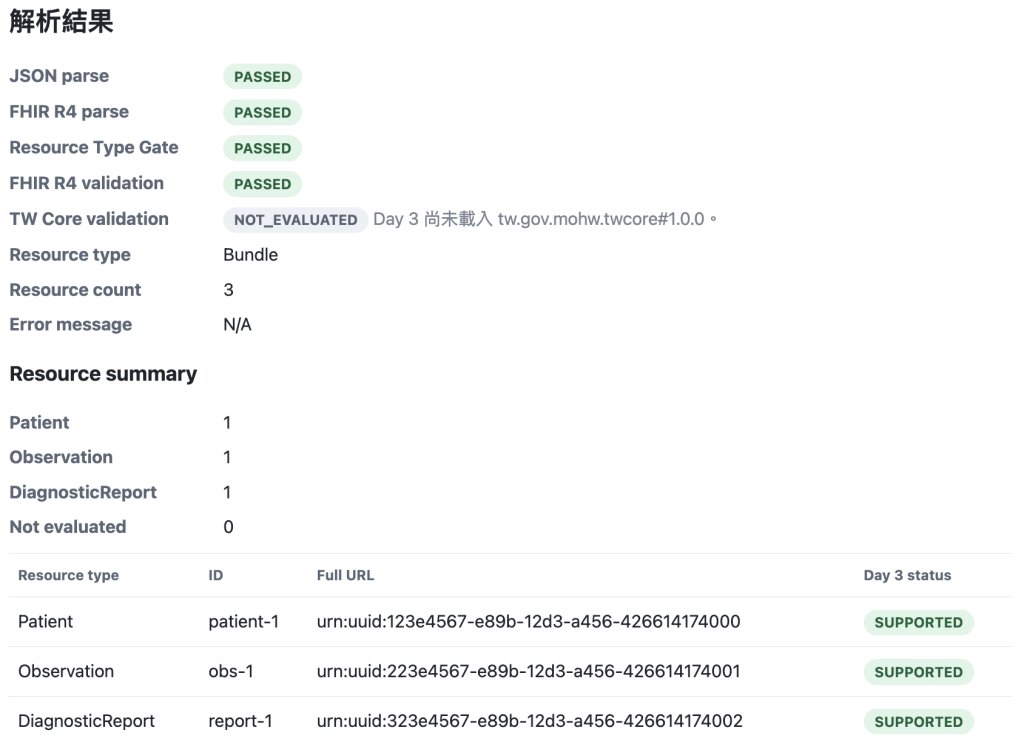
這代表系統已經能看懂 Bundle 裡的資料組成,但還沒有判斷 Reference 是否正確。
Bundle.type
貼上 missing-bundle-type.json。
這份資料可以被 parser 讀成 Bundle,所以 Resource inventory 仍然可以顯示 entry 內容。
但它違反 FHIR R4 base rule,所以:
FHIR R4 validation: FAILED
OperationOutcome issues 會顯示 Bundle.type 相關診斷。
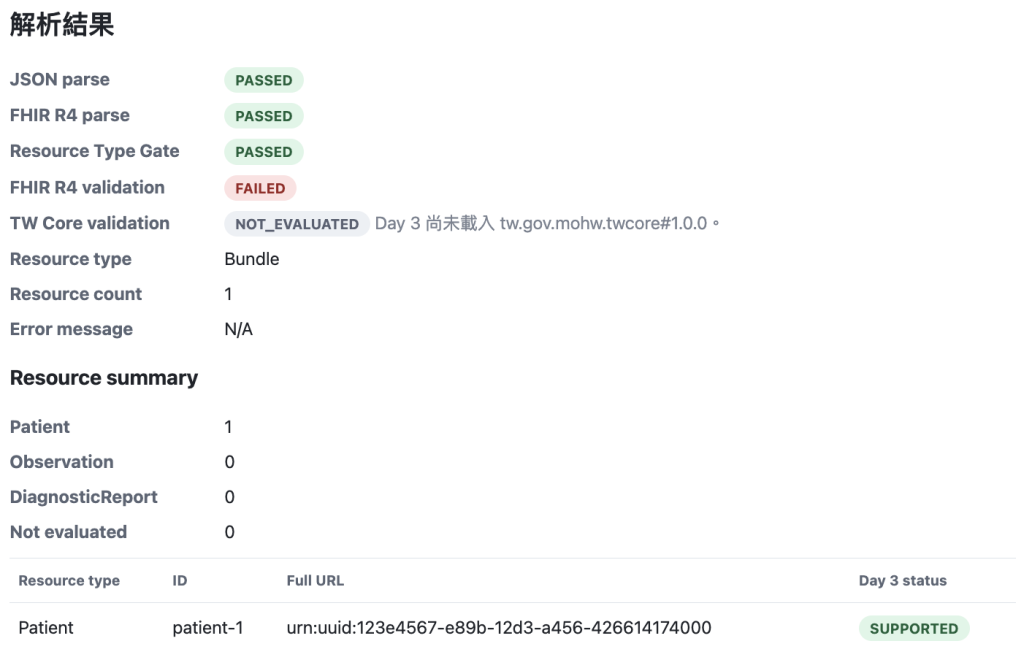
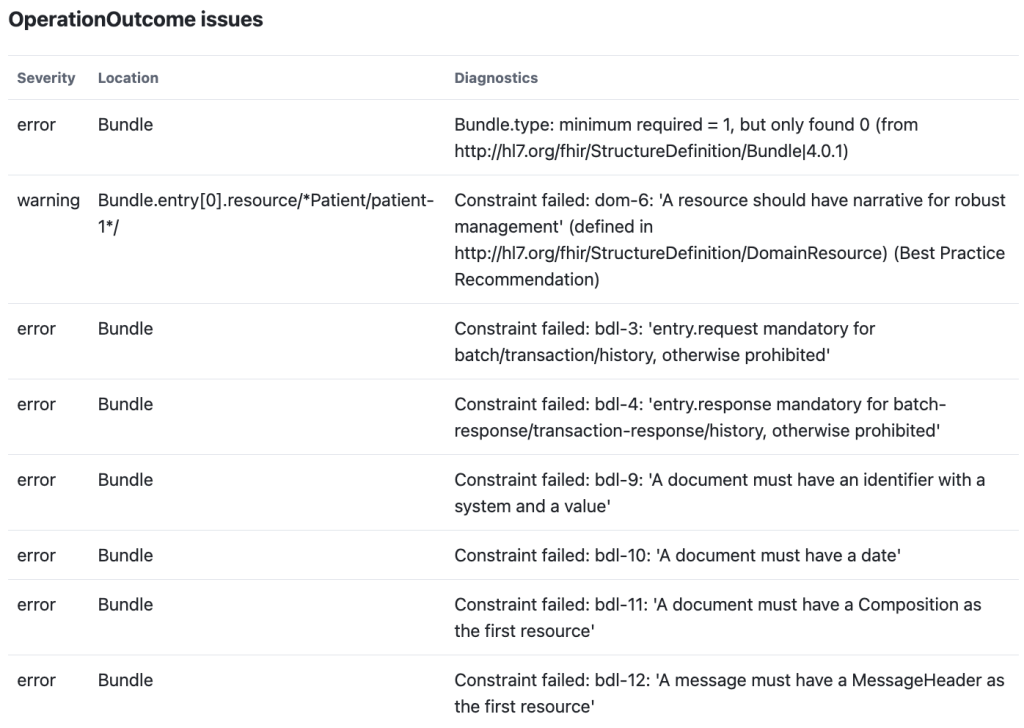
這個案例用來確認:Day 3 新增 Resource inventory 後,Day 2 的 FHIR validation layer 仍然正常。
貼上 unsupported-resource-in-bundle.json。
結果會看到 Patient 被標示為 SUPPORTED,Practitioner 被標示為 NOT_EVALUATED。
Resource summary 顯示:
Patient: 1
Observation: 0
DiagnosticReport: 0
Not evaluated: 1
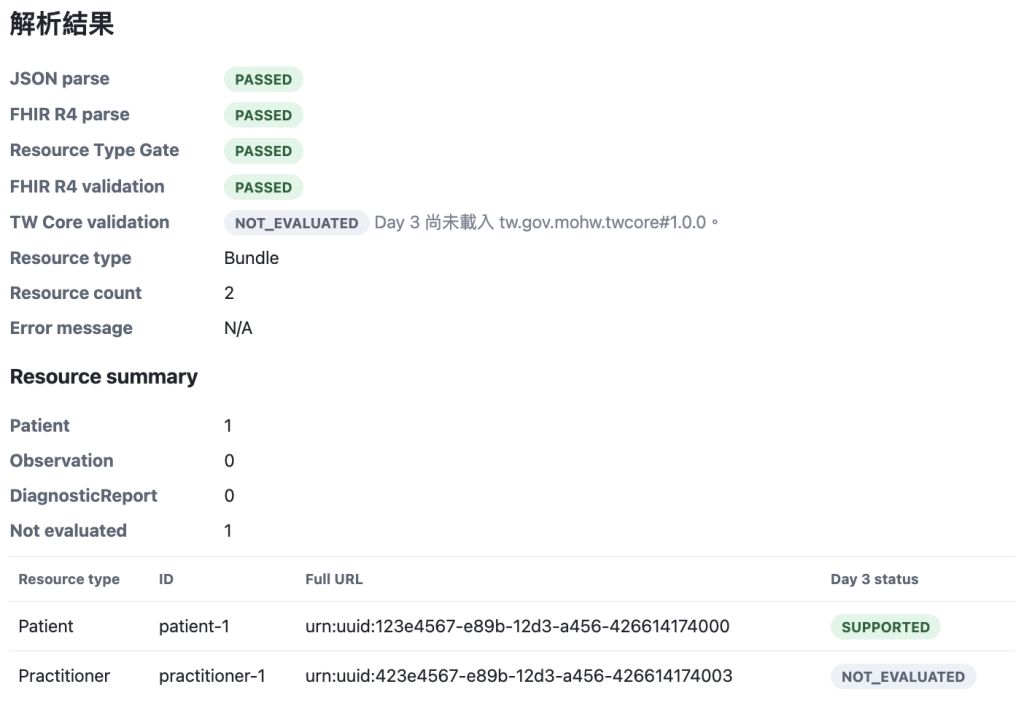
這是 Day 3 的 MVP 邊界展示:系統不崩潰,也不把未支援 Resource 假裝成通過。
貼上這份資料:
{ not-json
結果仍然停在 JSON parse layer:
JSON parse: FAILED
FHIR R4 parse: FAILED
Resource Type Gate: FAILED
FHIR R4 validation: NOT_EVALUATED
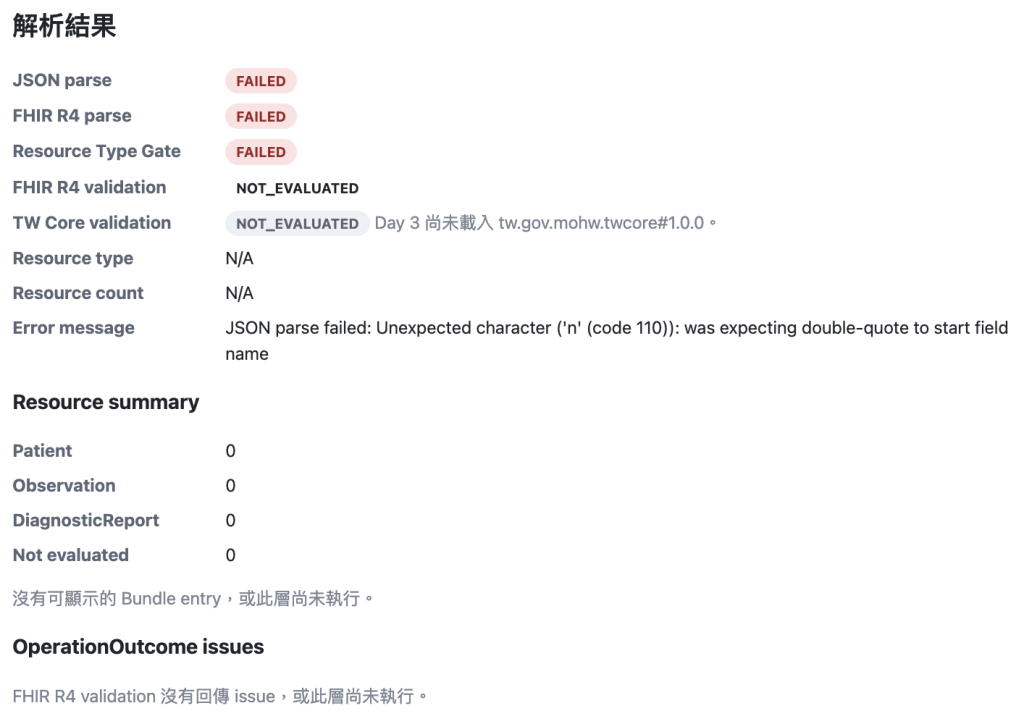
Resource inventory 不執行,因此不會顯示 Bundle entry table。
這表示 Day 3 新增的盤點邏輯沒有破壞原本的錯誤分層。
Day 2 的重點是 FHIR R4 validation:
| 情境 | JSON | FHIR Parser | Resource Type Gate | FHIR R4 Validation |
|---|---|---|---|---|
| 合法 Bundle | PASS | PASS | PASS | PASS |
缺少 Bundle.type |
PASS | PASS | PASS | FAIL |
| JSON 壞掉 | FAIL | - | - | NOT_EVALUATED |
| Patient Resource | PASS | PASS | FAIL | NOT_EVALUATED |
Day 3 新增 Resource inventory 後,變成:
| 情境 | FHIR R4 Validation | Resource Inventory |
|---|---|---|
| minimal lab Bundle | PASS | Patient 1、Observation 1、DiagnosticReport 1 |
缺少 Bundle.type |
FAIL | 仍可盤點 Bundle entry |
| unsupported Resource | PASS 或 warning | 非 MVP Resource 標示 NOT_EVALUATED |
| JSON 壞掉 | NOT_EVALUATED | 不執行 |
| Patient Resource | NOT_EVALUATED | 不執行 |
這張表會成為後面 Reference 規則的前置基礎。下一步要做 Observation.subject 與 DiagnosticReport.result 時,就會需要今天整理出的 Resource 清單。
指令:
./mvnw test
正常測試結果:
Tests run: 13, Failures: 0, Errors: 0, Skipped: 0
SUPPORTED 誤解成 validation passedDay 3 的 SUPPORTED 只表示這是 MVP 會處理的 Resource 類型。它不代表 FHIR R4、TW Core 或交換契約都通過。
例如 Practitioner 是合法 FHIR Resource,只是目前 MVP 不處理。Day 3 應該標示 NOT_EVALUATED,而不是直接判定失敗。
Bundle.entry
Resource inventory 必須放在 JSON parse、FHIR parse 與 Resource Type Gate 之後。否則非法 JSON 或非 Bundle 輸入很容易造成不必要的例外。
id 取代 fullUrl
id 與 fullUrl 都要保留。後續處理 urn:uuid reference 時,fullUrl 會很重要。
Day 3 只盤點 Resource,不判斷 Observation.subject 或 DiagnosticReport.result 是否正確。Reference integrity 留到後續規則層處理。
BundleEntrySummary DTO。ResourceSummary DTO。ValidationResult,加入 Resource summary 與 Bundle entry summaries。BundleParseService 中盤點 Bundle.entry。NOT_EVALUATED。NOT_EVALUATED。Day 3 尚未處理:
tw.gov.mohw.twcore#1.0.0 載入。Observation.subject 指向 Patient 的規則。DiagnosticReport.result 指向 Observation 的規則。後續分層大概會變成:
quality-gate
├─ parser
├─ fhir-r4-validator
├─ resource-inventory
├─ tw-core-validator
├─ reference-checker
├─ contract-rule
└─ report
Repository:twcore-data-quality-gate



 iThome鐵人賽
 看影片追技術