
Yesterday, I talked about why I wanted to try building a distributed DuckDB. Today, let's follow one query through it. If we add a few workers, what actually happens between submitting SQL and getting the result back?
We'll use this query:
SELECT customer_id, count(*) AS orders
FROM read_parquet('sales.parquet')
WHERE price > 100
GROUP BY customer_id
ORDER BY customer_id;
Nothing unusual here. Read some Parquet data, filter it, and count the remaining orders per customer. The interesting part is deciding where each piece runs.
I don't really want to write another SQL parser or optimizer. DuckDB already knows how to resolve columns, check types, and optimize this query. Let's start with what it gives us.
For our example, the work is roughly scan → filter → projection → aggregate → sort. The actual plan can look different: DuckDB can push price > 100 into the Parquet scan, for example. We should keep those optimizations.
A logical plan describes the operations and their inputs. A physical plan chooses the operators that actually execute them, such as a particular aggregation implementation. DuckDB's optimizer extension hook gives us a place to examine the optimized logical plan before that physical planning step.
Why there? We still have the operators and expressions needed to describe the work. We can capture a fragment for a worker and put a network operator where its output used to be. The parent still receives the same columns and types, just from a different place.
My first cut was to move the scan, filter, and projection to workers, while keeping the aggregation and sort in the application's DuckDB process. Projection just selects the columns we need; here, the aggregation needs customer_id after the price filter has been applied.
That gives us two stages. The producer stage describes the remote work. The coordinator stage consumes its output and finishes the query. A stage is a plan fragment, so creating one hasn't started a worker yet.
At execution time, we give that fragment concrete input assignments. Those executions are tasks. Two tasks can run the same fragment while reading different parts of the data.
I started with whole files as the input assignments. That's easy to describe, but what if most of the data is in one file? Parquet divides a file into row groups, each containing a horizontal subset of its rows. Assigning those groups separately lets several tasks work on one large file. Either way, each intended input occurrence must be assigned exactly once, or our count will be wrong.
A worker is the process running a task; it isn't permanently tied to one stage or one piece of data.
Here's the path for the scan version. Solid arrows carry data; dashed arrows carry task registration and control messages.
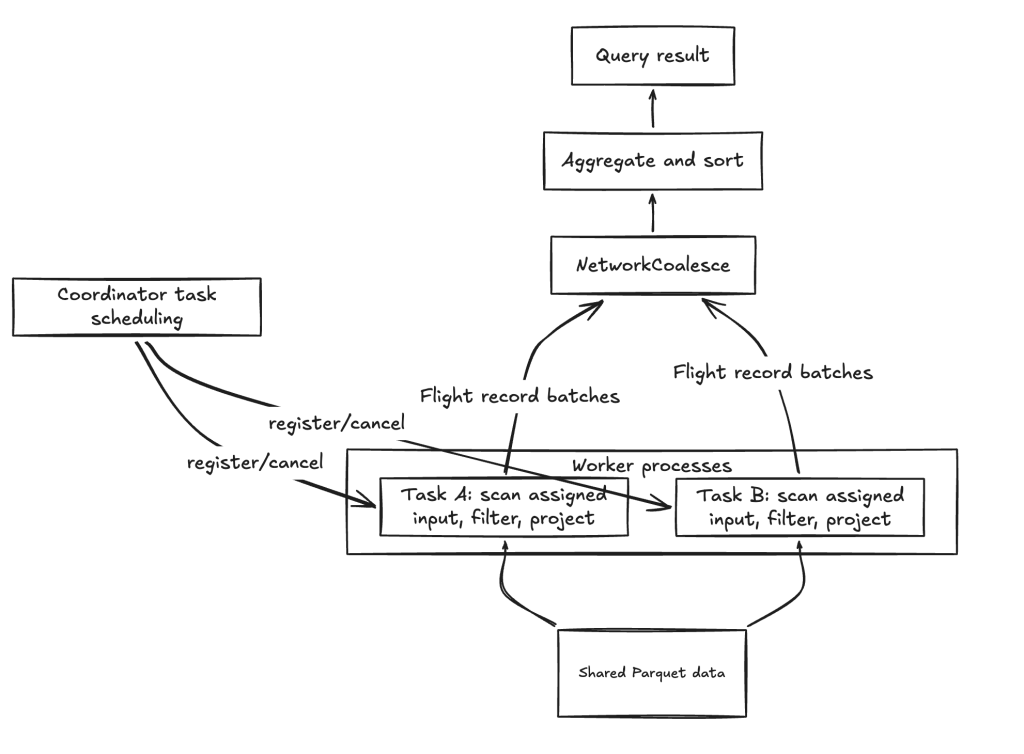
Workers read the data directly. Sending a file path doesn't send the file, so every selected worker needs access to that path and its own credentials where required.
The coordinator serializes the fragment—encodes the plan into bytes—and sends it with a task identifier, input assignments, and the expected column types. That is enough to describe which work to run and how to check the returned data. The worker needs a compatible DuckDB and extension build to interpret the plan. Shipping an internal plan gives us plenty to reuse, but also a compatibility contract to maintain.
I used Arrow Flight to connect the processes. It provides RPCs for exchanging control messages and streaming Arrow data, which represents values in columns. We still have to define what a task means. Our control actions check worker compatibility, register tasks, and cancel them. Flight's DoGet request opens a result stream; in our protocol, it also claims the registered task for execution.
The worker reconstructs the fragment and executes it with DuckDB. Distribution is disabled for that execution; otherwise, the worker could try to distribute the fragment again. That would be an interesting way to keep everyone busy without answering the query.
Workers return Arrow record batches, each containing a batch of rows represented as columns. We need a source operator on the coordinator that reads these streams and converts them into DuckDB's own batches, called data chunks. I call it NetworkCoalesce: it gathers remote output and feeds the remaining operators.
It consumes ready streams without promising an order. Our final ORDER BY establishes the order the application asked for. Also, streaming intermediate rows doesn't mean this query immediately returns a final answer: its aggregation and sort still need to finish their work.
There are a few details hiding behind that arrow in the diagram. A slow consumer needs bounded buffering. Waiting for network input must not occupy all of DuckDB's execution threads. And completion means every required stream finished successfully. A worker disappearing halfway through cannot count as an empty result.
Unsupported plans can stay local before remote execution begins. Once tasks start, a failure ends the query. Silently restarting locally after returning some rows could duplicate output. Recovery is going to need more thought than just adding a retry loop.
Keeping aggregation on the coordinator gets the scan path working, but all surviving rows still travel back there. For a large input with relatively few customers, we could reduce that traffic by counting on workers first.
That leads to a longer path:
Scan + filter + partial count
    → hash shuffle by customer_id
    → combine counts on workers
    → NetworkCoalesce
    → coordinator ORDER BY
    → result
Suppose two scan tasks find three and five orders for customer 7. They can send (7, 3) and (7, 5) instead of eight individual rows. A combining task adds those counts to get eight.
To get both counts to the same place, each producer hashes customer_id into one of an agreed number of buckets. Each combining task reads its bucket from every producer. That's the shuffle: moving intermediate rows according to a shared partitioning rule. The exchange runs between workers.
So stages now form a dependency graph: the combining stage needs output from the scan stage. The coordinator schedules the work, while intermediate data can travel directly between workers.
In a DuckDB SQL session with Parquet support and a writable current directory, run this small example. It creates its own input file:
COPY (
    SELECT * FROM (VALUES
        (1, 150), (1, 80), (2, 200), (2, 120), (3, 90)
    ) AS sales(customer_id, price)
) TO 'day2-sales.parquet' (FORMAT PARQUET);

EXPLAIN SELECT customer_id, count(*) AS orders
FROM read_parquet('day2-sales.parquet')
WHERE price > 100 GROUP BY customer_id ORDER BY customer_id;

SELECT customer_id, count(*) AS orders
FROM read_parquet('day2-sales.parquet')
WHERE price > 100 GROUP BY customer_id ORDER BY customer_id;
I ran this locally. In my plan, the scan shows price>100 pushed down; the exact plan display can vary by DuckDB version. The result rows are:
customer_id,orders
1,1
2,2
This gives us a concrete result to preserve when we distribute the query. It doesn't exercise workers yet. If we later split these five rows across tasks, customer 2 must still end up with two orders, regardless of which worker reads each row.
We've now connected the SQL to the work on each machine and back to a result. Next, let's give the extension a way to enable this path and configure workers, while keeping ordinary local execution available. Before sending anything over the network, we need to decide when distributing a query is even allowed.



 iThome鐵人賽
 看影片追技術