
大家好!歡迎來到「Build on Google AI」工程挑戰的第 18 天。
昨天,我們成功用 Google ADK 與 Pydantic 巢狀 Schema 馴服了 LLM,讓它乖乖吐出時間軸與分鏡對齊的 JSON。
但有實戰經驗的工程師馬上會發現盲點:「如果 Agent 把 5 個 8 秒的分鏡,塞進一部總長設定為 30 秒的影片裡怎麼辦?」
response_schema 只能保證 Agent 給你的是「整數 (Integer)」,但它無法保證「數學運算」或「業務邏輯」正確。傳統作法是後端程式直接拋出 500 Error 中斷流程;但在 Agent 的世界裡,最優雅的做法是將錯誤訊息丟回給 Agent,讓它自己 debug!
今天,我們要結合 Pydantic 的邏輯驗證與 ADK,打造一套「自我修正迴圈 (Self-Correction Loop)」。
第一步:為 Schema 注入「業務邏輯驗證」
我們要在昨天的 VideoStoryboard 模型中,加入 Pydantic 的 @model_validator。這就像是為資料結構加上了一名嚴格的 QA 工程師。
from pydantic import BaseModel, Field, model_validator
from typing import List

class StoryboardScene(BaseModel):
    scene_number: int
    duration_seconds: int

class VideoStoryboard(BaseModel):
    total_duration_seconds: int
    scenes: List[StoryboardScene]

    # 注入業務邏輯驗證器
    @model_validator(mode='after')
    def check_duration_sum(self) -> 'VideoStoryboard':
        # 計算所有分鏡的總和
        calculated_sum = sum(scene.duration_seconds for scene in self.scenes)

        # 業務邏輯判斷
        if calculated_sum != self.total_duration_seconds:
            # 這裡拋出的錯誤,等一下要原封不動餵給 Agent 看
            raise ValueError(
                f"邏輯錯誤:所有分鏡的秒數加總 ({calculated_sum}s) "
                f"必須等於總時長 ({self.total_duration_seconds}s)。請重新調整各分鏡的秒數配置。"
            )
        return self
第二步:實作「例外處理驅動」的自我修正迴圈
在 ADK 中呼叫 Agent 時,如果回傳的資料違反了上述的驗證規則,Pydantic 會拋出 ValidationError。
我們要捕捉這個例外,並將詳細的報錯內容包裝成新的 Prompt,指示 Agent 進行二次生成。這就是所謂的 Exception-Driven LLM Development。
from google.adk import Agent
from pydantic import ValidationError
import logging

logger = logging.getLogger(__name__)

# 1. 初始化導演 Agent
director_agent = Agent(
    name="director_agent",
    model="gemini-2.5-pro",
    instruction="你是一位精準的短影音導演。請嚴格遵守時間限制進行分鏡配置。",
    response_schema=VideoStoryboard
)

# 2. 打造自我修正工具鏈
def generate_with_self_correction(prompt: str, max_retries: int = 3) -> VideoStoryboard:
    current_prompt = prompt

    for attempt in range(max_retries):
        try:
            logger.info(f"嘗試生成 (第 {attempt + 1}/{max_retries} 次)...")

            # 呼叫 ADK Agent
            # 如果驗證成功,會直接回傳 VideoStoryboard 物件
            response = director_agent.invoke(current_prompt)
            return response

        except ValidationError as e:
            logger.warning("業務邏輯驗證失敗,啟動自我修正機制!")

            # 萃取具體的錯誤訊息 (Agent 需要知道錯在哪裡)
            error_details = str(e)

            # 將錯誤訊息構建成新的 Prompt,要求 Agent 修正
            current_prompt = (
                f"你上次的生成結果違反了系統業務邏輯。錯誤細節如下:\n"
                f"```text\n{error_details}\n```\n"
                f"請仔細檢查你的計算,並根據上述錯誤修正你的輸出結構。"
            )

    # 如果達到最大重試次數仍失敗,才真正拋出錯誤交由人類處理
    raise Exception("Agent 嘗試自我修正失敗,已達最大重試次數。")
第三步:見證 Agent 的「反思與修正」
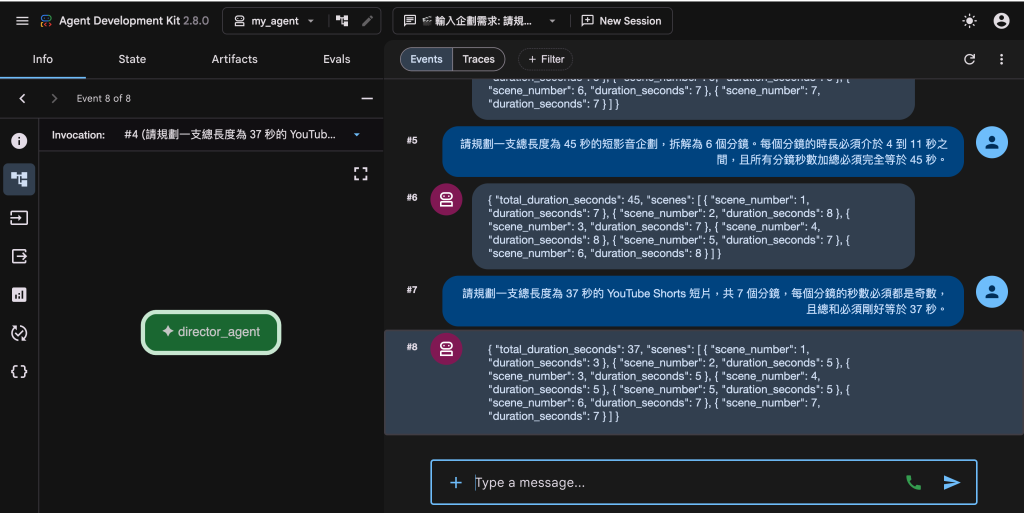
當你執行 generate_with_self_correction() 時,你會在終端機看到非常精彩的過程:
Agent 第一次可能粗心大意,配置了加總為 35 秒的分鏡。
系統攔截,並將 ValueError 中的那句 "邏輯錯誤:所有分鏡的秒數加總 (35s) 必須等於總時長 (30s)" 傳回給 Agent。
Agent 接收到明確的反饋 (Feedback),在第二次生成時,精準地削減了某些分鏡的秒數,最終完美過關!
小結
將大語言模型推向 Production 的關鍵,在於承認它會犯錯,並建立機制讓它自己修復錯誤。透過 Google ADK 結合 Pydantic 的驗證機制,我們賦予了 Agent「自我反思與除錯」的工程能力。


 iThome鐵人賽
 看影片追技術