
昨天用 Observer 讓庫存跟訂單的狀態變化,可以同步通知多個對象,今天我們繼續行為型 Pattern
柴咖啡的故事,也持續在連鎖店規模化的路上,客訴退款這件事,開始需要能撤銷、能重做
原文的定義,來自 Design Patterns: Elements of Reusable Object-Oriented Software
Encapsulate a request as an object, thereby letting you parameterize clients with different requests, queue or log requests, and support undoable operations.
用中文理解可以是
將一個請求封裝成一個物件,讓你可以用不同的請求參數化客戶端、把請求排入佇列或記錄下來,並支援可復原的操作
核心角色
Execute()/Undo(),通常也負責維護歷史紀錄,自己不知道指令實際內容Execute()(執行)與 Undo()(復原)等操作Execute() 委派 Receiver 做事,Undo() 執行相反的操作我們來看看 Command 的 UML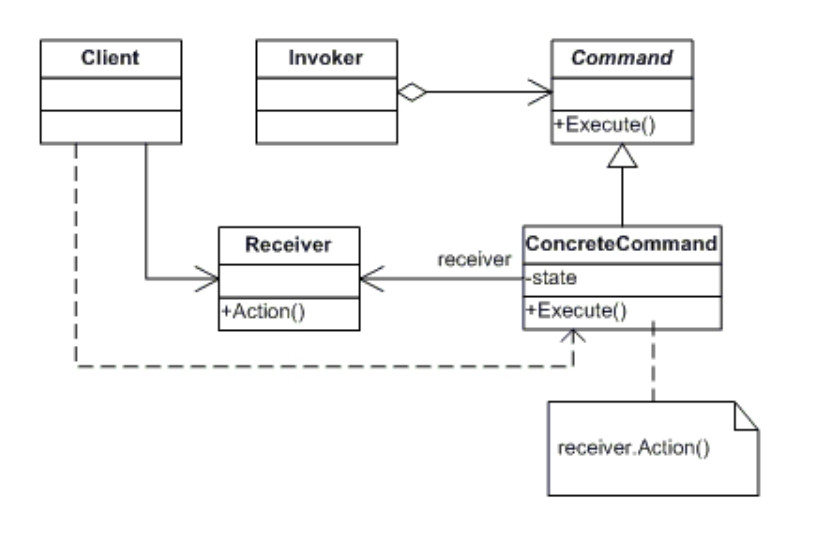
為什麼會有 Command ?
主要是為了解決物件導向開發中的限制:「傳統的方法呼叫只是當下一閃即逝的動作,無法被儲存、排程、撤銷或傳遞,將請求的物件和執行的物件分開」
舉個生活化的例子,餐廳點餐與廚房做菜
顧客(Client)想吃什麼,透過服務生(Invoker)點餐
點餐單(Command)本身記著要做哪一道菜
服務生不會自己下廚,只是把點餐單交給廚師(Receiver)
知道「牛排怎麼煎、義大利麵怎麼煮」的是廚師,服務生完全不需要懂
// 1. Command(共同介面):點餐單
public interface IDishCommand
{
    void Execute();
    void Undo();
}

// 2. Receiver:知道怎麼做菜的廚師
public class Cook
{
    public void MakeDish(string dishName) => Console.WriteLine($"[廚房] 開始製作 {dishName}");

    public void CancelDish(string dishName) => Console.WriteLine($"[廚房] 取消 {dishName},食材另作他用");
}
// 3. ConcreteCommand:每道菜寫成一個點餐單類別,記住要交給哪位廚師(_cook),Execute/Undo 被呼叫時,就自己去請那位廚師執行/取消這道菜
public class SteakOrder : IDishCommand
{
    private readonly Cook _cook;

    public SteakOrder(Cook cook) => _cook = cook;


    public void Execute() => _cook.MakeDish("牛排");

    public void Undo() => _cook.CancelDish("牛排");
}

public class PastaOrder : IDishCommand
{
    private readonly Cook _cook;

    public PastaOrder(Cook cook) => _cook = cook;

    public void Execute() => _cook.MakeDish("義大利麵");

    public void Undo() => _cook.CancelDish("義大利麵");
}
// 4. Invoker:服務生只負責把點餐單交給廚房、記錄點過什麼,不需要知道怎麼做菜
public class Waiter
{
    private readonly Stack<IDishCommand> _orderHistory = new();

    public void TakeOrder(IDishCommand order)
    {
        order.Execute();
        _orderHistory.Push(order);
    }

    public void CancelLastOrder()
    {
        if (_orderHistory.Count == 0) return;

        var order = _orderHistory.Pop();
        order.Undo();
    }
}
// 5. Client:顧客決定要點什麼菜,組好點餐單交給服務生
var cook = new Cook();
var waiter = new Waiter();

waiter.TakeOrder(new SteakOrder(cook));
waiter.TakeOrder(new PastaOrder(cook));

waiter.CancelLastOrder(); // 顧客改變心意,取消義大利麵
Waiter 只認識 IDishCommand,服務生觸發(呼叫 Execute/Undo)跟記錄歷史(Push/Pop),不需要知道廚師怎麼料理
這也是 Command 的核心:把「發出請求」跟「執行請求」拆成兩個各自獨立的角色,中間用一張標準化的點餐單串起來
我們來看看 Mermaid 的類別架構圖(Class Diagram)會怎麼呈現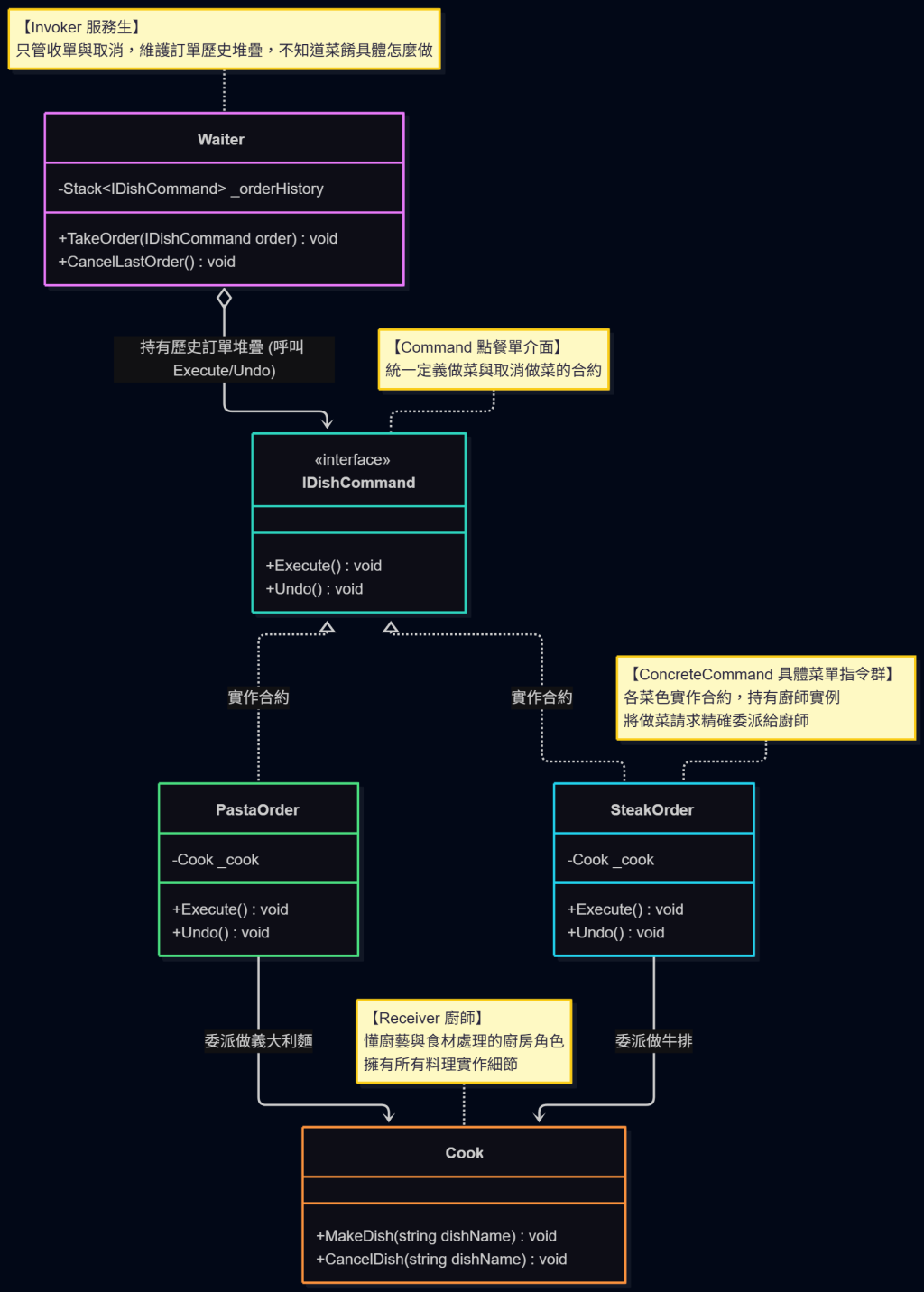
朋友如果你第一次看 Mermaid 架構圖,這是小指南
方框內部三層結構:
上層:類別或介面名稱(標註 <<interface>> 代表介面合約)
中層:屬性與私有欄位(- / +  代表 private / public)
下層:對外提供的方法 (- / +  代表 private / public)

箭頭符號的意義:
◄--(虛線箭頭):實作介面,代表類別遵守合約規定
—►(實線箭頭):依賴/呼叫,箭頭指向被使用的一方
⟣—►(實線菱形):菱形持有/組合箭頭方的實例,代表內部包含該物件的參考
為了讓讀者更能了解流程該怎麼跑,這裡也準備了 Mermaid Flowchart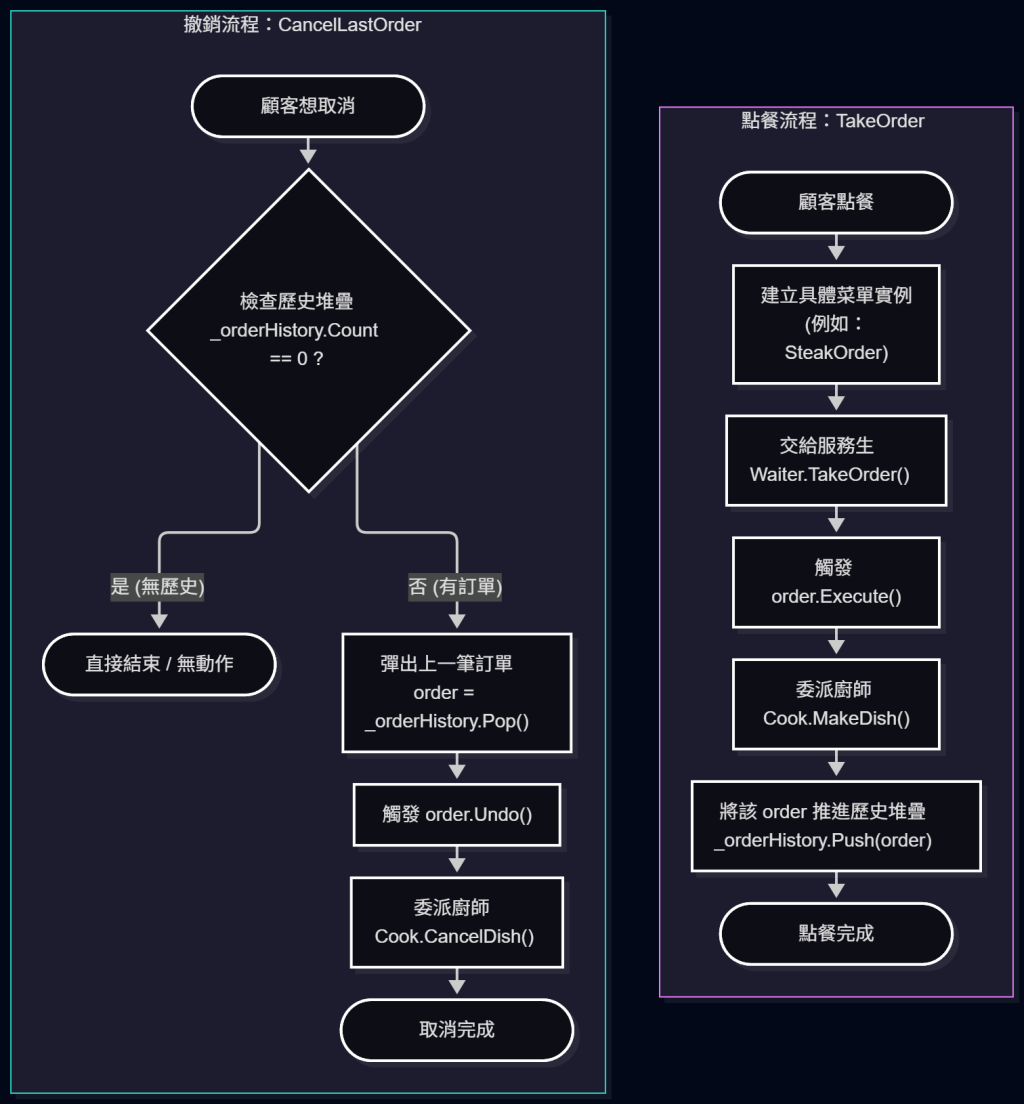
柴咖啡擴展到連鎖店規模,以前小店時期,客人客訴飲料做錯了,通常是店員直接退現金,金額小、處理完就結束,沒有紀錄的必要
但連鎖後不一樣了:退款開始牽涉會員點數、外送平台的金流對帳等等
操作本身也有金錢風險,店員一旦按錯金額、或退錯款項,需要能撤銷這筆操作
有時候店長先擋下一筆退款重新確認,確認沒問題後又要重新執行,也需要能重做
這種「操作會影響金流、需要正式記錄、還可能要撤銷/重做」的情境,阿柴用 Command 來設計客訴處理台
PaymentGateway(金流閘道)跟 MemberPointsLedger(會員點數帳本)扮演 Receiver,分別是知道「退款」「補償點數」實際上要怎麼執行的物件
public class PaymentGateway
{
    public void Refund(string orderId, int amount) => Console.WriteLine($"[金流] 退款 {amount} 元給訂單 {orderId}");

    public void ReverseRefund(string orderId, int amount) => Console.WriteLine($"[金流] 撤銷退款,向訂單 {orderId} 補收回 {amount} 元");
}

public class MemberPointsLedger
{
    public void AddBonusPoints(string phoneNumber, int points) => Console.WriteLine($"[會員] 補償 {points} 點給 {phoneNumber}");

    public void RevokeBonusPoints(string phoneNumber, int points) => Console.WriteLine($"[會員] 收回補償的 {points} 點({phoneNumber})");
}
每一種客訴處理方式各自包成一個指令物件(ConcreteCommand),Execute() 跟 Undo() 綁在同一個類別裡、互為鏡像操作
public interface ICommand
{
    void Execute();
    void Undo();
}

public class RefundCommand : ICommand
{
    private readonly PaymentGateway _paymentGateway;
    private readonly string _orderId;
    private readonly int _amount;

    public RefundCommand(PaymentGateway paymentGateway, string orderId, int amount)
    {
        _paymentGateway = paymentGateway;
        _orderId = orderId;
        _amount = amount;
    }

    public void Execute() => _paymentGateway.Refund(_orderId, _amount);

    public void Undo() => _paymentGateway.ReverseRefund(_orderId, _amount);
}

public class BonusPointsCommand : ICommand
{
    private readonly MemberPointsLedger _pointsLedger;
    private readonly string _phoneNumber;
    private readonly int _points;

    public BonusPointsCommand(MemberPointsLedger pointsLedger, string phoneNumber, int points)
    {
        _pointsLedger = pointsLedger;
        _phoneNumber = phoneNumber;
        _points = points;
    }

    public void Execute() => _pointsLedger.AddBonusPoints(_phoneNumber, _points);

    public void Undo() => _pointsLedger.RevokeBonusPoints(_phoneNumber, _points);
}
SupportConsole(Invoker,客服/店員的客訴處理台)只認識 ICommand
不管實際上是哪一種處理方式,靠兩個堆疊分別記錄「可以撤銷的」跟「可以重做的」歷史
public class SupportConsole
{
    private readonly Stack<ICommand> _undoStack = new();
    private readonly Stack<ICommand> _redoStack = new();

    public void ExecuteCommand(ICommand command)
    {
        command.Execute();
        _undoStack.Push(command);
        _redoStack.Clear(); // 有新操作時,先前被撤銷掉的重做歷史就作廢
    }

    public void Undo()
    {
        if (_undoStack.Count == 0) return;

        var command = _undoStack.Pop();
        command.Undo();
        _redoStack.Push(command);
    }

    public void Redo()
    {
        if (_redoStack.Count == 0) return;

        var command = _redoStack.Pop();
        command.Execute();
        _undoStack.Push(command);
    }
}
var paymentGateway = new PaymentGateway();
var support = new SupportConsole();

support.ExecuteCommand(new RefundCommand(paymentGateway, "ORD-1001", 150));

support.Undo(); // 主管覺得金額不對,先撤銷這筆退款
support.ExecuteCommand(new RefundCommand(paymentGateway, "ORD-1001", 90)); // 確認後改成退九折金額
這套 ICommand 還能組合成更大的操作單位。有些客訴不只要退款,還要補償會員點數
阿柴把這兩個操作包成一個巨集指令,一次執行、也一次整組撤銷
public class MacroCommand : ICommand  // 巨集指令
{
    private readonly List<ICommand> _commands;

    public MacroCommand(List<ICommand> commands) => _commands = commands;

    public void Execute() => _commands.ForEach(c => c.Execute());

    public void Undo() => _commands.AsEnumerable().Reverse().ToList().ForEach(c => c.Undo());
    // 執行時順序是 A -> B,撤銷時必須是 B -> A
}
var pointsLedger = new MemberPointsLedger();

var complaintCombo = new MacroCommand(new List<ICommand>
{
    new RefundCommand(paymentGateway, "ORD-1002", 90),
    new BonusPointsCommand(pointsLedger, "0912345678", 50)
});

support.ExecuteCommand(complaintCombo); // 退款 + 補償點數一次執行
support.Undo(); // 一次整組撤銷
對 SupportConsole 來說,MacroCommand 跟單一指令長得一模一樣,都只是一個 ICommand,完全不需要為了「巨集指令」另外寫特殊邏輯
我們來看看 Mermaid 類別圖(Class Diagram)跟 Flowchart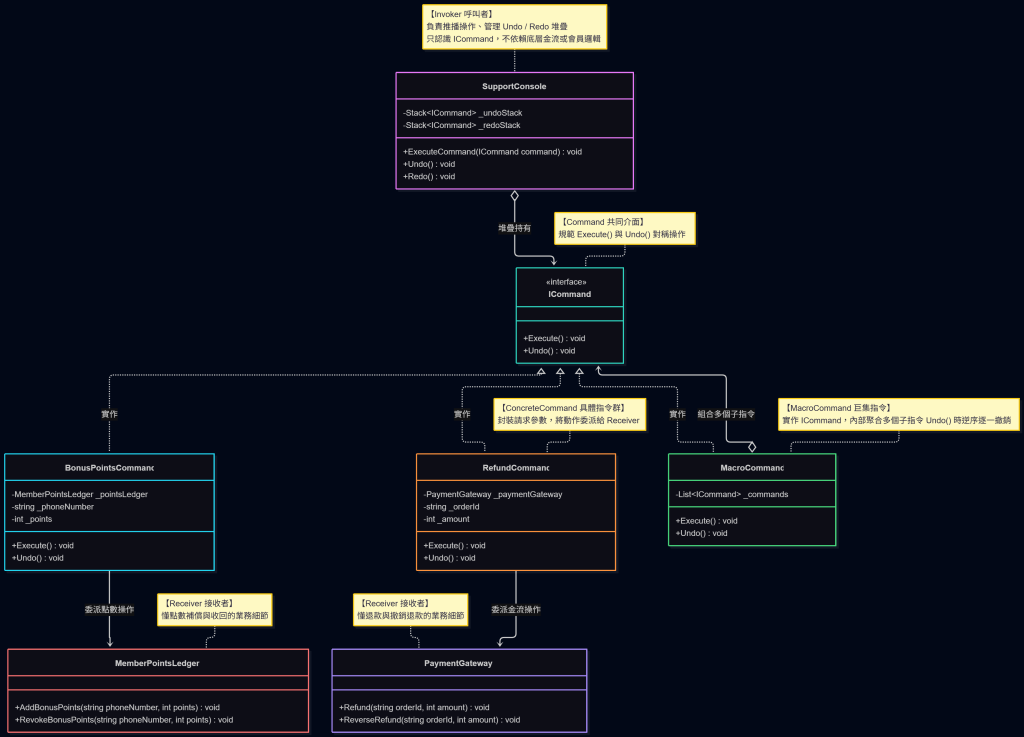
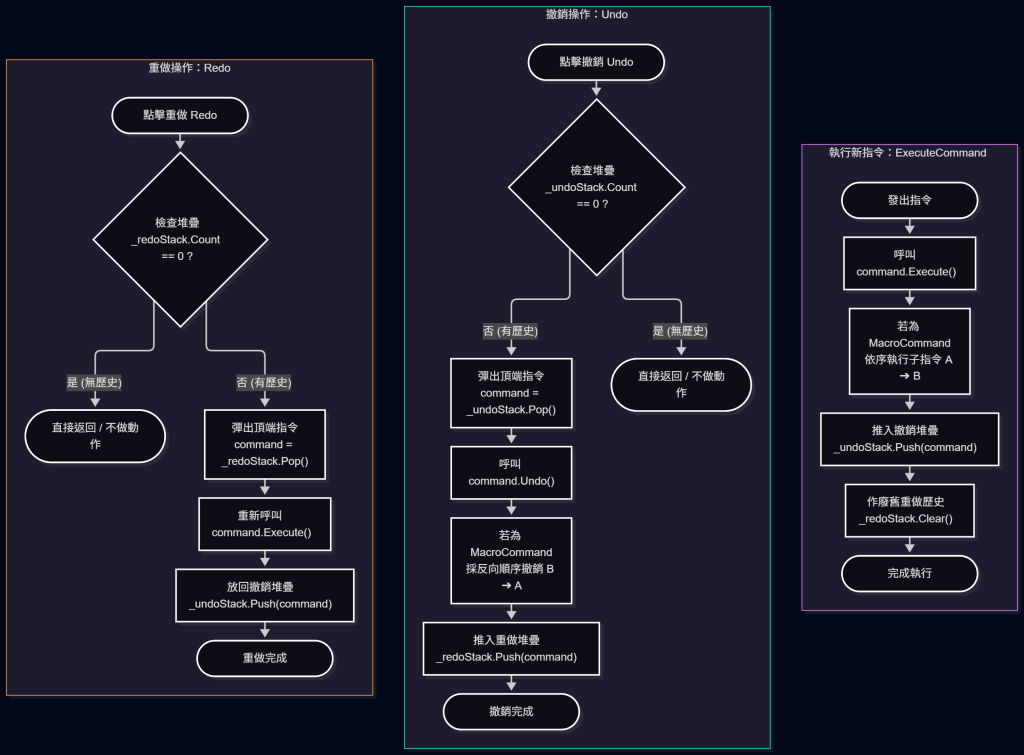
操作種類固定、不需要復原/重做/記錄歷史時,不一定划算:如果柴咖啡的客訴處理只有「全額退款」這一種方式,不需要撤銷也不需要重做,直接呼叫方法會比拉一整組 ICommand 介面跟兩個堆疊更省事
操作種類一多,類別數量也跟著膨脹:每多一種處理方式,就要多寫一個 ConcreteCommand 類別,種類夠多的時候,光是指令類別本身就會佔掉一大片程式碼
優點:
缺點:
Command 就是把「叫別人做事(動詞)」包裝成「一張可以傳遞的單子(名詞)」
明天,柴咖啡每一杯飲料的製作流程,不管是拿鐵還是美式
其實都是同一套固定步驟:磨豆、萃取、加料、封蓋,只有其中幾步會因為飲料不同而有差異,這種「大部分步驟固定、少數步驟需要客製化」的情境,換 Template Method 樣板方法模式上場



 iThome鐵人賽
 看影片追技術