

架構審查在整個軟體開發生命週期中至關重要,可作為各個成長階段的檢查點。隨著我的 Angular 應用程式現在整合了 Firebase 基礎設施、使用者介面、服務以及 AI 功能,這正是執行 improve-codebase-design 技能以找出關鍵改進領域的最佳時機。
此技能依賴於 codebase-design 技能,作者 Matt Pocock 開發它是為了走訪程式碼庫以找出多達三個改進候選方案。這些候選方案被分類為「需要探索(need to explore)」、「值得探索(worth exploring)」或「可以探索(nice to explore)」。接著,代理人會產生一份 HTML 報告,並將其儲存至作業系統的暫存目錄中。最後,在瀏覽器中開啟該報告以進行審查。
我喜歡審查所有的候選方案,挑選其中複雜的方案,並與 Gemini 進行雙人夥伴程式設計(pair-program)來解決它。至於簡單的方案,我會自己處理,並要求 code-review 技能審查我的變更以確保正確性。
讓我們來逐步走過這個流程,並尋找可以進行程式碼變更的地方。
在 Antigravity CLI 中,輸入技能名稱並等待子代理人(sub-agent)走訪程式碼庫。
/improve-codebase-design
該技能找到了四個需要修復的候選方案,這超出了我的預期。終端機輸出了候選方案的摘要,且瀏覽器顯示了 HTML 報告。視覺化呈現比純文字更易於理解。
### Summary of Candidates

  1. [Candidate 01] Consolidate Linear PCM & WAV Conversion into a Deep Audio Codec Module (Strong, in-process)
      ...
  2. [Candidate 02] Deepen Speech Synthesis to Unify Playback & Streaming Behind a Clean Seam (Strong, ports & adapters)
      ...
  3. [Candidate 03] Deepen Image Analysis Pipeline to Absorb File Parsing and Metadata Grounding (Worth exploring, ports &
  adapters)
      ...
  4. [Candidate 04] Encapsulate Audio Prompt Formatting and Vocal Customization (Worth exploring, in-process)
      ...
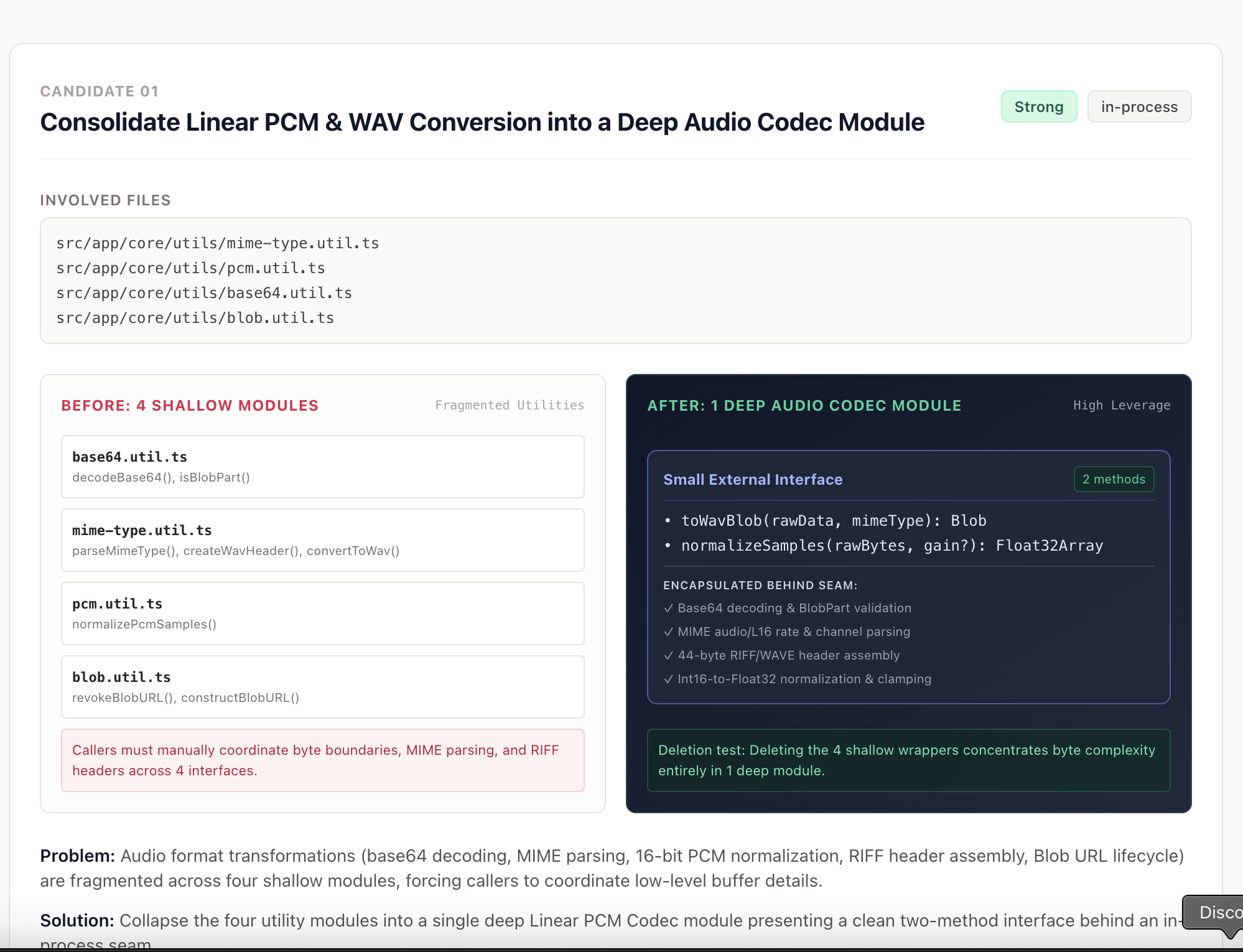
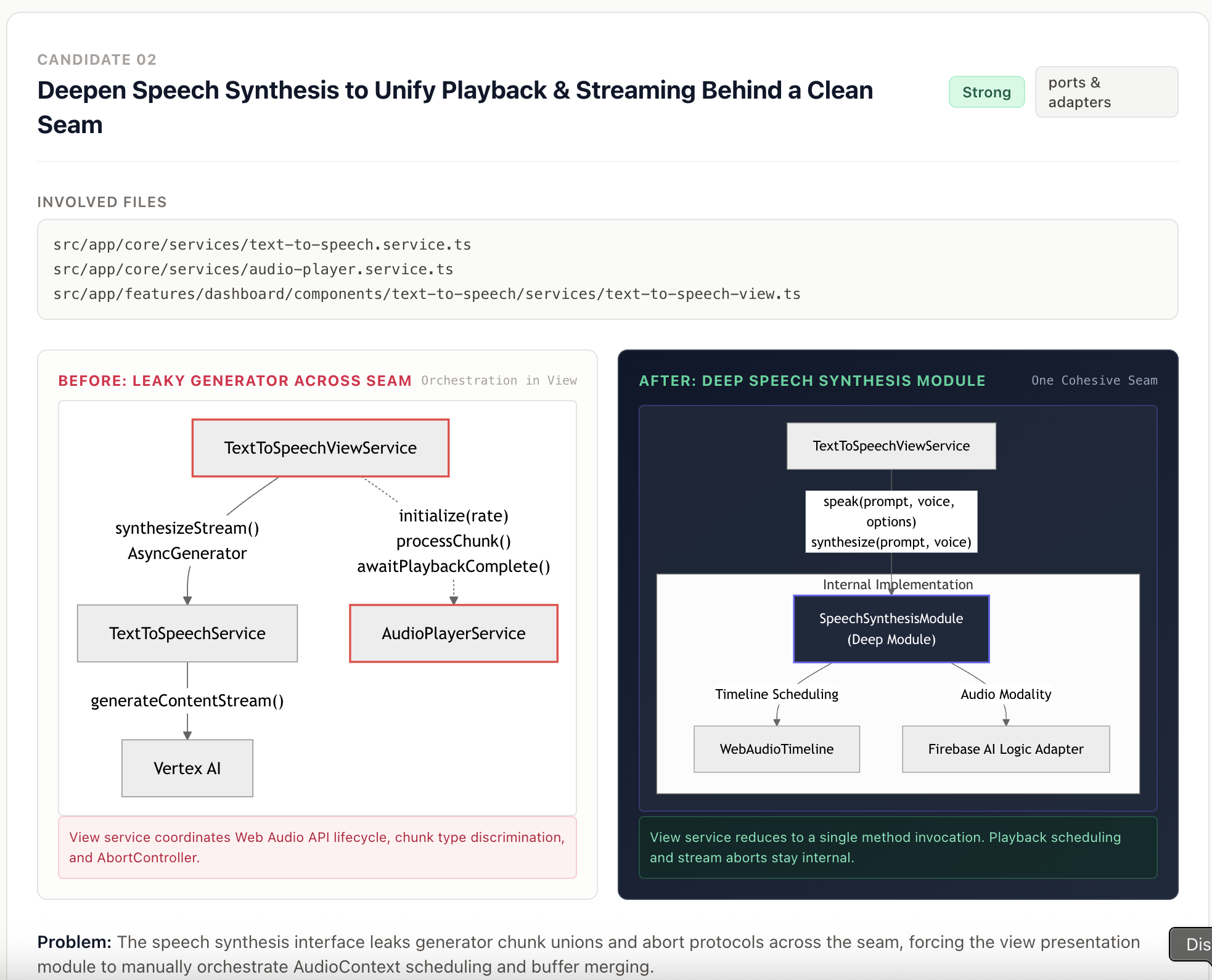
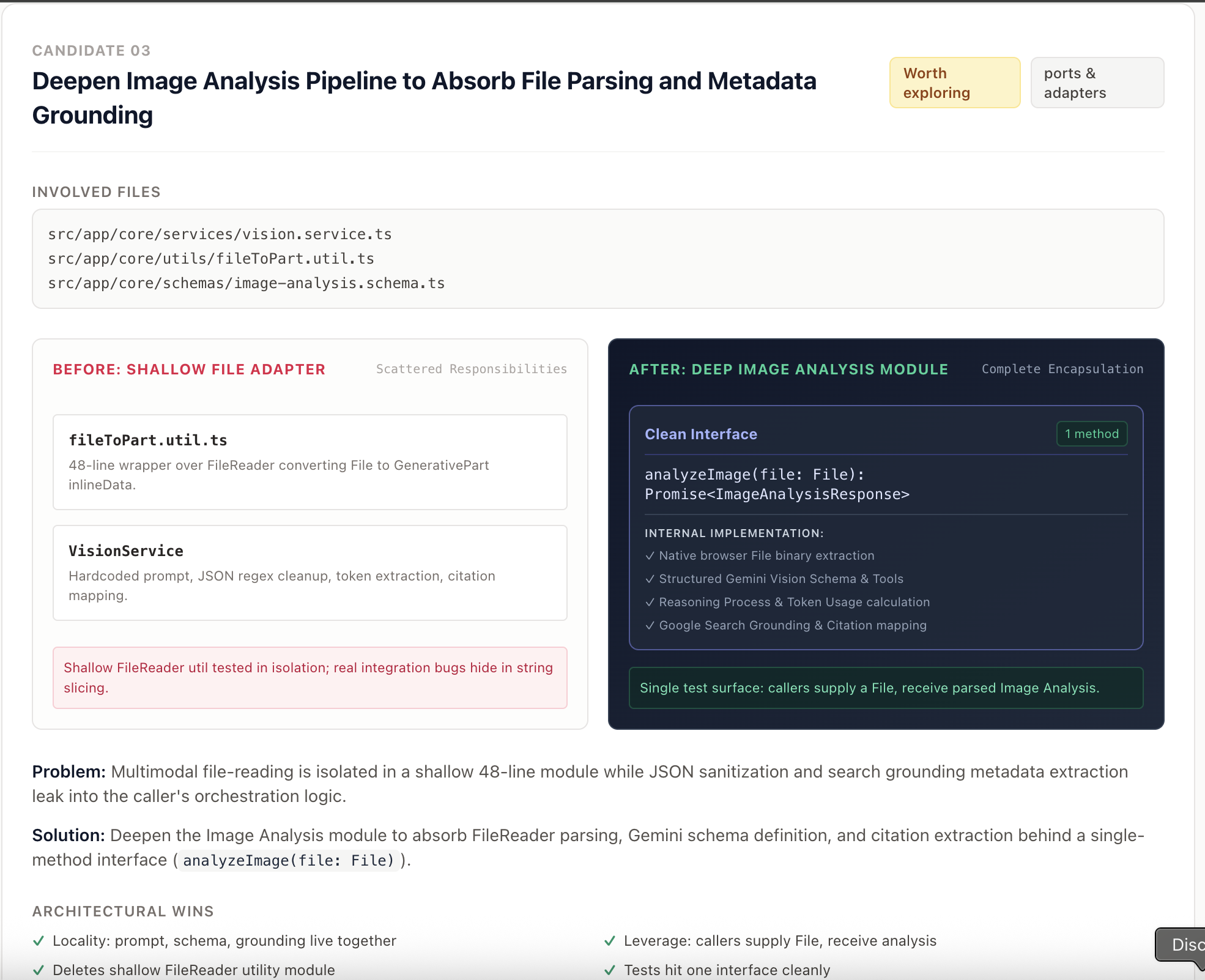
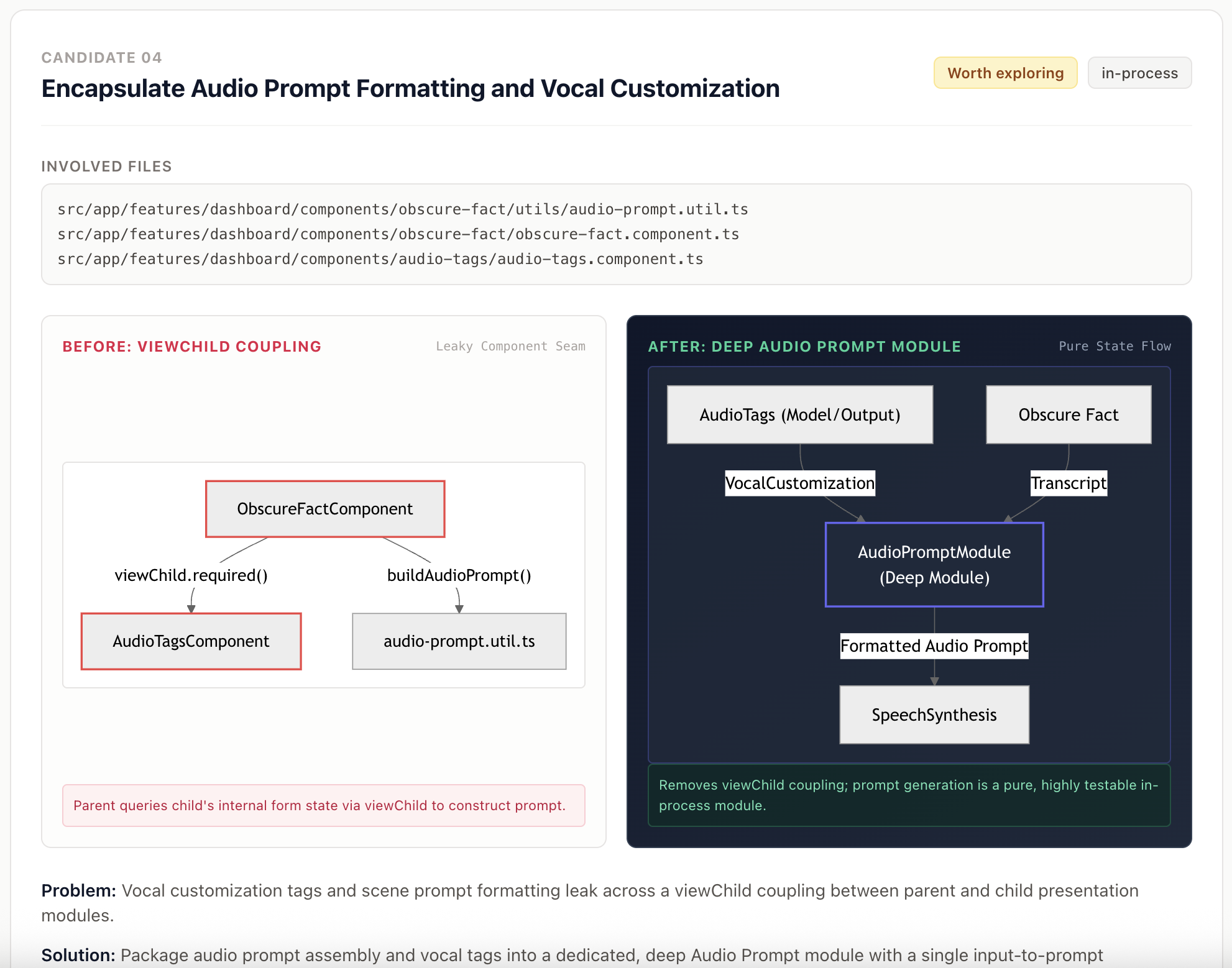
前兩個候選方案建議強度為「強烈(Strong)」,後兩個候選方案則是「值得探索(Worth exploring)」。
讓我們來修復候選方案 1,該方案將公用程式檔案(mime-type.util.ts、pcm.util.ts、base64.util.ts 和 blob.util.ts)整合到一個深層音訊轉碼器模組(Deep Audio Codec Module)中。接著,我們可以解決試圖刪除 fileToPart.util.ts 並將檔案解析邏輯合併至 VisionService 的候選方案 3。候選方案 2 再次回報了 AudioPlayService、TextToSpeechService 以及 TextToSpeechViewService 中存在介面洩漏(leaky interfaces)的問題。我們應該深入探討該設計,以免它們日後為我們帶來麻煩。
Problem: Audio format transformations (base64 decoding, MIME parsing, 16-bit PCM normalization, RIFF header assembly, Blob URL lifecycle) are fragmented across four shallow modules, forcing callers to coordinate low-level buffer details.

Solution: Collapse the four utility modules into a single deep Linear PCM Codec module presenting a clean two-method interface behind an in-process seam.
程式碼變更涉及將公用程式函式整合到一個深層公用程式檔案以及一個單元測試 spec 檔案中。各個服務也將進行重構,以呼叫新公用程式檔案中的新公用程式函式。
improve-codebase-design-skill 的審查階段(grilling session)並不像 grill-with-docs 那樣嚴格。我最終採用了 grill-with-docs 的建議。
### Analysis

Through our grilling review, we established:

1. Consolidate 3 audio utilities (base64.util.ts, pcm.util.ts, mime-type.util.ts) into audio.util.ts.
2. Reuse the existing domain model text-to-speech.interface.ts:6-9 without introducing redundant interfaces.
3. Keep extractInlineData private inside text-to-speech.service.ts to keep Firebase AI SDK dependencies out of
generic audio utils.
4. Keep blob.util.ts generic (revokeBlobUrl) and adopt it in both asset-registry.service.ts (images) and
text-to-speech-view.ts (audio).
5. Consolidate test suites into audio.util.spec.ts and blob.util.spec.ts.
Gemini 建立了 audio.util.ts 完整檔案 的完整清單以及單元測試 spec 檔案。
該公用程式檔案公開了三個函式,並隱藏了內部的函式與常數。
export function decodeAudioChunk(base64Data: string, mimeType?: string): RawAudioBinary;

export function toWavBlob(rawData: Uint8Array | string, mimeType: string): Blob;

export function normalizePcmSamples(rawBytes: Uint8Array, gain?: number): Float32Array<ArrayBuffer>;
藉由重新命名匯入路徑與函式名稱,對 AudioPlayerService 和 TextToSpeechService 的影響降到了最低。
我們改進了候選方案 1,接著可以藉由將檔案解析邏輯整合到服務中來處理候選方案 3。
Problem: Multimodal file-reading is isolated in a shallow 48-line module while JSON sanitization and search grounding metadata extraction leak into the caller's orchestration logic.

Solution: Deepen the Image Analysis module to absorb FileReader parsing, Gemini schema definition, and citation extraction behind a single-method interface (analyzeImage(file: File)).
解決方案是捨棄 fileToPart.util.ts 並將該函式轉換為 VisionService 的私有方法。
我們也發現 TextDecoder 是一個無用分支,且當字串很大時,fileReaderResult.split(',') 是一個低效的操作。使用 indexOf(',') 和切片(slicing)的速度更快且對記憶體更友善。
private async fileToGenerativePart(file: File): Promise<{ inlineData: { data: string; mimeType: string } }> {
    const data = await new Promise<string>((resolve, reject) => {
      const reader = new FileReader();
      reader.onloadend = () => {
        if (typeof reader.result !== 'string') {
          reject(new Error('FileReader returned null result'));
          return;
        }
        const commaIndex = reader.result.indexOf(',');
        if (commaIndex === NOT_FOUND_INDEX) {
          reject(new Error('FileReader result is not in expected format'));
          return;
        }
        resolve(reader.result.slice(commaIndex + PAYLOAD_OFFSET));
      };
      reader.onerror = () => reject(reader.error ?? new Error('Disk read failure'));
      reader.readAsDataURL(file);
    });

    return {
      inlineData: { data, mimeType: file.type },
    };
  }
這個 49 行的公用程式檔案被一個 20 多行的私有方法所取代。
候選方案 2 的發生是由於不良的架構設計,其中 TextToSpeechService 被要求累積解碼後的音訊資料、轉換為 WAV 格式,並回傳給 TextToSpeechViewService。而 TextToSpeechViewService 則包含一個 if-else 敘述來檢查 Blob 並設定 audioUrl,以在串流中顯示 HTML Audio 元素。
以下是 grill-with-docs 的分析:
### Analysis

#### 1. Context & Architectural Findings

• **Leaky Types in text-to-speech.interface.ts**:
    • SpeechChunkData ({ data: string; mimeType: string }) is an internal helper type for unpacking raw Gemini responses from
    GenerateContentResponse. It should not be an exported shared domain interface.
    • TextVoiceInput contains shouldWait?: boolean, which is a UI-level playback preference that inappropriately couples caller playback decisions into backend API calls.
    • RawAudioBinary ({ decodedData: Uint8Array; sampleRate: number }) lacks mimeType, which forced text-to-speech.service.ts to retain state across stream chunks and build the WAV header internally.
• Leaky Async Generator Union:
    • TextToSpeechService.synthesizeStream currently returns AsyncGenerator<RawAudioBinary | Blob | undefined>, forcing the view service to do runtime type discrimination (if (chunk instanceof Blob)).
• Option C Separation of Concerns:
    • text-to-speech.service.ts: Acts as a pure Gemini network streaming client. Yields pure AudioStreamChunk objects without UI flags, array merging, or Blob returns.
    • audio-player.service.ts: Acts as a pure Web Audio API output driver (initialize, processChunk, stopAll,
    awaitPlaybackComplete). Has zero knowledge of WAV formats or network streams.
    • text-to-speech-view.ts: Owns consumeStream(). Feeds chunks to AudioPlayerService for real-time playback, and conditionally accumulates chunks into a local array Uint8Array[] only when mode === 'stream' requires creating an <audio> tag WAV Blob.
解決方案是讓 TextToSpeechViewService 來累積解碼後的資料,並在 consumeStream 方法中進行 WAV 轉換。如此一來,TextToSpeechService 只需要產生(yield)資料、MIME 類型和採樣率。AudioPlayerService 則維持不變。
export function toWavBlob(rawData: Uint8Array | Uint8Array[] | string, mimeType: string): Blob {
  let pcmBytes: Uint8Array;

  if (Array.isArray(rawData)) {
    const totalLength = rawData.reduce((acc, chunk) => acc + chunk.length, 0);
    pcmBytes = new Uint8Array(totalLength);
    let offset = 0;
    for (const chunk of rawData) {
      pcmBytes.set(chunk, offset);
      offset = offset + chunk.length;
    }
  } else if (typeof rawData === 'string') {
    pcmBytes = decodeBase64(rawData);
  } else {
    pcmBytes = rawData;
  }

  const options = parseMimeType(mimeType);
  const wavHeader = createWavHeader(pcmBytes.length, options);
  return new Blob([wavHeader, pcmBytes], { type: 'audio/wav' });
}
toWavBlob 將 Blob 轉換為 Uint8Array,並將位元組轉換為 WAV 資料。
private async consumeStream(
    stream: AsyncGenerator<AudioStreamChunk>,
    collectBlob: boolean,
    abortSignal: AbortSignal,
  ): Promise<Blob | undefined> {
    const audioPlayer = await this.#asyncAudioPlayerService();
    const pcmChunks: Uint8Array[] = [];
    let mimeType = '';
    let isInitialized = false;

    for await (const chunk of stream) {
      if (abortSignal.aborted) {
        return undefined;
      }

      if (!isInitialized) {
        audioPlayer.initialize(chunk.sampleRate, this.#playbackRate());
        isInitialized = true;
      }
      audioPlayer.processChunk(chunk.decodedData);

      if (collectBlob) {
        pcmChunks.push(chunk.decodedData);
        if (!mimeType) {
          mimeType = chunk.mimeType;
        }
      }
    }

    return collectBlob && pcmChunks.length > 0 ? toWavBlob(pcmChunks, mimeType) : undefined;
}
consumeStream 方法將解碼後的音訊資料附加到 pcmChunks 快取區(buffer),並委派給 toWavBlob 來處理轉換。
async *synthesizeStream({ text, voice }: SpeechPrompt) {
    const aiBackend = await this.#configService.getAiBackend();
    const model = this.createModel(aiBackend, voice);
    const responseStream = await model.generateContentStream([text]);

    for await (const chunk of responseStream.stream) {
      const chunkData = this.extractValidChunkData(chunk);
      if (chunkData) {
        const { data, mimeType } = chunkData;
        yield decodeAudioChunk(data, mimeType);
      }
    }
}
synthesizeStream 產生器(generator)經過精簡,僅產生區塊(chunk)、MIME 類型和採樣率。
這個候選方案難度最低,甚至我可以手動解決。
export class ObscureFactComponent {
  interestingFact = input<string | undefined>(undefined);

  audioTags = viewChild.required(AudioTagsComponent);

  ttsError = signal<string>('');

  audioPrompt = computed(() =>
    buildAudioPrompt({
      ...this.audioTags().audioPromptModel(),
      transcript: this.interestingFact() || '',
    }),
  );
}
耦合問題在於 audioTags = viewChild.required(AudioTagsComponent);,這可以透過使用 model 訊號(signal)來解決。
在 AudioTagsComponent 中,改為使用 model.required 而不是定義一個訊號。
audioPromptModel = model.required<AudioPromptData>();
接著,我們在 ObscureFactComponent 中定義 audioPromptModel 訊號,並將其指派給 AudioTagsComponent 作為雙向資料繫結(two-way data binding)。
audioPromptModel = signal<AudioPromptData>({
    scene: 'A news anchor reading the news in a busy newsroom',
    emotion: 'professional, slightly serious',
    pace: 'moderate, clear enunciation',
    voiceOption: DEFAULT_VOICE,
});
<app-audio-tags [(audioPromptModel)]="audioPromptModel" />
audioTags 範本參照(template ref)可以永久移除。
所有四個候選方案皆已解決。
讓我們在此暫停。明天我們將分析軟體包(bundle),並使用 injectAsync 功能來縮減主軟體包(main bundle)。


 iThome鐵人賽
 看影片追技術