
Tool Description 用來說明工具的用途與使用時機。今天把三個搜尋工具分成 A、B 兩種描述,使用相同 Prompt,觀察 Agent 的選擇與傳入參數。
今天示範 Tool Description 的 A/B 測試方法:固定 Tool Name、Schema、資料與測試 Prompt,比較不同 Description 下 Agent 選了哪個 Tool。本次展示的一組對照中,A、B 都選對了;這篇的重點是建立實驗方法,並如實記錄結果。
準備三個 Tools:
search_posts
search_products
search_orders
Schema 都只有 keyword,故意讓它們看起來有點像。Demo 使用固定的本地文章、商品與訂單資料,會員身分也是模擬狀態,不涉及真實登入或訂單。
以下 toolsA、toolsB 是 Description 的比較片段;實際註冊與執行由 Demo 的 app.js 處理。
const toolsA = [
  {
    name: 'search_posts',
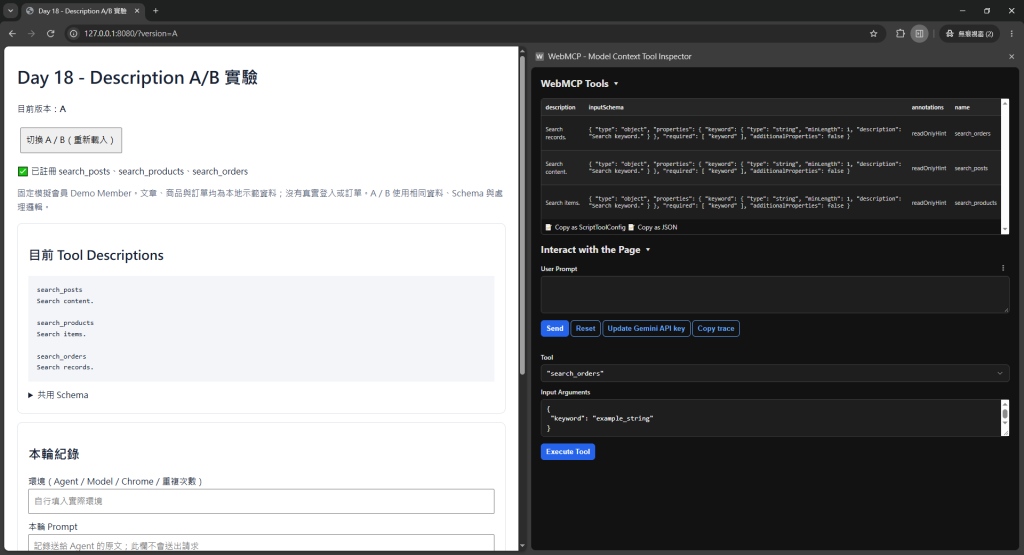
    description: 'Search content.'
  },
  {
    name: 'search_products',
    description: 'Search items.'
  },
  {
    name: 'search_orders',
    description: 'Search records.'
  }
];
const toolsB = [
  {
    name: 'search_posts',
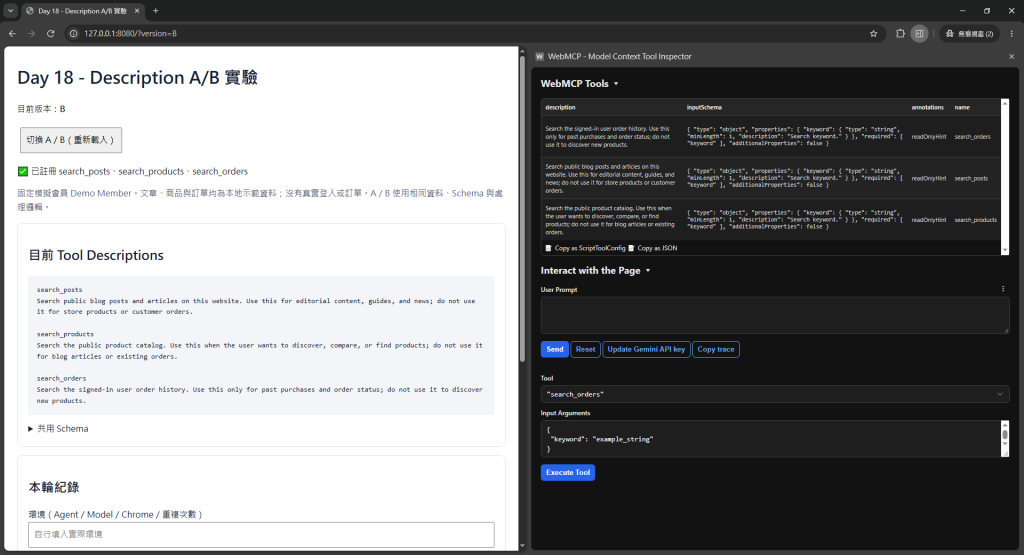
    description: 'Search public blog posts and articles on this website. Use this for editorial content, guides, and news; do not use it for store products or customer orders.'
  },
  {
    name: 'search_products',
    description: 'Search the public product catalog. Use this when the user wants to discover, compare, or find products; do not use it for blog articles or existing orders.'
  },
  {
    name: 'search_orders',
    description: 'Search the signed-in user order history. Use this only for past purchases and order status; do not use it to discover new products.'
  }
];
比較時應固定 Schema、Tool Name、資料、Agent/Model 與瀏覽器設定,每輪使用新的對話上下文。
本實驗比較 Demo 的 A、B 兩個版本;工具描述與頁面上的描述文字會同步切換。
📸 圖片 1|只改 Description 的 A/B Test
http://localhost:8080/?version=A,確認頁面顯示 A,且三個 Tools 都已註冊。AI calling tool,記下實際 Tool 名稱、Arguments、回傳結果及 Agent 回答。Inspector 下方的 Execute Tool 是手動指定 Tool 執行,只能確認功能能否運作。要觀察 Agent 自己選哪個 Tool,必須使用上方的 User Prompt 與 Send。
1. 幫我找 WebMCP 的教學文章。
2. 找 2000 元以下的耳機。
3. 我上個月買的鍵盤出貨了嗎?
4. 找 WordPress 相關內容。
5. 我想買一個滑鼠。
6. 查一下訂單 #1234。
7. 有沒有介紹 WooCommerce 的文章?
8. 我之前買過什麼耳機?
9. 你們有賣機械鍵盤嗎?
10. 找「AI Agent」相關資訊。
這份清單涵蓋文章搜尋、商品搜尋與訂單查詢。本文以第 1 題示範完整 A/B 流程;第 8 題的「之前買過」對應訂單紀錄,使用 search_orders。
Schema 使用 keyword 搜尋資料,價格與日期條件則透過回傳內容核對。測試第 2 題時檢查商品價格;測試第 3 題時,以測試日期換算「上個月」,再核對訂單日期與出貨狀態。Demo 使用固定的訂單日期。
不要只記「成功/失敗」,至少記:
| Prompt | Expected | A Selected | B Selected | Note |
|---|---|---|---|---|
| 找 WebMCP 教學 | search_posts | search_posts | search_posts | 本次兩組皆傳入 keyword: WebMCP,找到 1 篇文章 |
Arguments 與 Tool 名稱一起記錄。本次實測的紀錄如下:
{
  "tool": "search_posts",
  "arguments": {
    "keyword": "WebMCP"
  }
}
Generative AI 是 probabilistic system。
同一個 Prompt 跑一次:
成功
不代表穩定。
至少可以:
每個 Prompt × 多次執行
再看:
selection accuracy
argument accuracy
unexpected tool call rate
真正次數要看成本與需求,不用迷信固定 10 次或 100 次。
Search the public product catalog.
Use this when the user wants to discover or compare products.
Do not use it for existing customer orders.
Returns product ID, name, and price.
不一定每個 Description 都要四段寫滿,但用途重疊時,負面邊界很有幫助。
Chrome Security Guidance 提供字元預算建議,供撰寫描述時參考。核心精神是:簡潔、明確,讓用途與邊界容易辨認。
Description 太長可能:
所以 A/B Test 的目標不是證明「越長越好」,而是「語意邊界越清楚越好」。
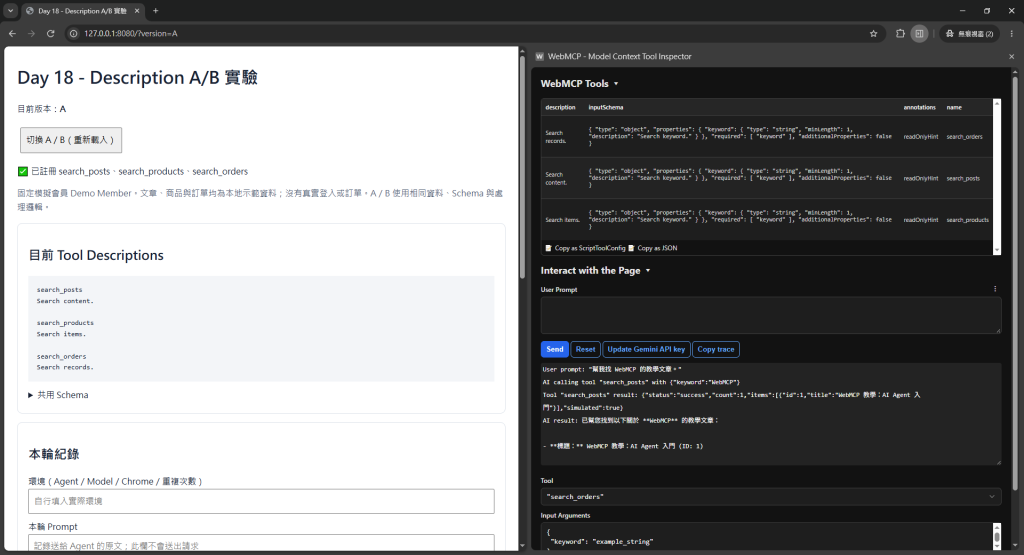
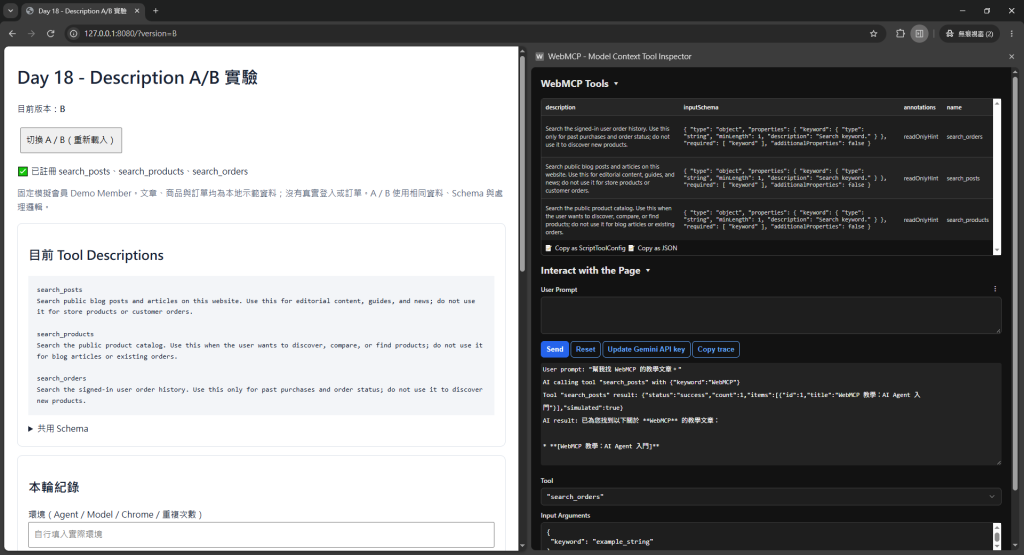
本次使用 Chrome 的 WebMCP Inspector,在 A、B 版本送出相同 Prompt:「幫我找 WebMCP 的教學文章。」這次的對照結果如下:
| Version | 實際 Tool | Arguments | 結果 |
|---|---|---|---|
| A | search_posts | {"keyword":"WebMCP"} |
success,找到 1 篇文章 |
| B | search_posts | {"keyword":"WebMCP"} |
success,找到 1 篇文章 |
在「幫我找 WebMCP 的教學文章。」這題中,A、B 都選擇 search_posts,傳入相同的 keyword,並找到「WebMCP 教學:AI Agent 入門」。這次兩組的 Tool 選擇、搜尋參數與回傳文章一致。
📸 圖片 2|Description A/B 的實際 Tool Selection 結果
比較 A/B 時,依序核對 Tool 名稱、Arguments、回傳資料與最終回答,便能清楚看出兩組在哪個環節相同、在哪個環節不同。



 iThome鐵人賽
 看影片追技術