
從 syscall 到 k8s_audit——KOAD 的 26 條自訂偵測規則如何涵蓋 10 個戰術。
完成本日實作後,你將能夠:
本篇會深入 Falco 規則設計。建議的最低閱讀量:
| 等級 | 天數 | 內容 |
|---|---|---|
| 必備 | Day 1 | ATT&CK 概念 + 靶場部署(需要 Falco 已部署) |
| 必備 | Day 24 | Kill Chain 全自動攻擊(理解 Falco 告警的來源) |
| 攻擊理解 | Day 2、4、8 | Initial Access、Execution、Escape(規則對應的攻擊行為) |
| 可跳過 | Day 3、5、7 | 防禦對策(本篇聚焦偵測,不涉及防禦配置) |
快速路徑:如果時間有限,至少讀完 Day 1 → 24 → 本篇。
在寫規則之前,先理解 Falco 的底層架構——知道事件從哪來、怎麼處理,才能寫出高效的偵測規則。
eBPF(Extended Berkeley Packet Filter)是 Linux kernel 內建的虛擬機。它允許在不修改 kernel 原始碼、不載入 kernel module 的前提下,在 kernel 內部安全地執行自訂程式:
eBPF 之於安全監控,就像 JavaScript 之於瀏覽器——讓你在受控環境中擴展核心平台的能力。
Falco 需要一個 driver 從 kernel 擷取事件。三種 driver 的差異:
| 特性 | kmod(Kernel Module) | eBPF Probe | modern_ebpf |
|---|---|---|---|
| 安裝方式 | 編譯 .ko 載入 | 編譯 BPF 程式載入 | 內嵌於 Falco 二進位 |
| Kernel 版本要求 | 任意 | >= 4.14 | >= 5.8 |
| 安全性 | 低(kernel module 可 crash kernel) | 中(eBPF verifier 保護) | 高(CO-RE,不需編譯) |
| 維護成本 | 高(每次 kernel 升級需重新編譯) | 中 | 低(推薦) |
| 效能 | 最快 | 快 | 快(使用 ring buffer) |
| KOAD 使用 | ✗ | ✗ | ✓ |
KOAD 選擇 modern_ebpf 因為它不需要額外的 kernel headers 或編譯步驟,在 Minikube 環境中最容易部署。
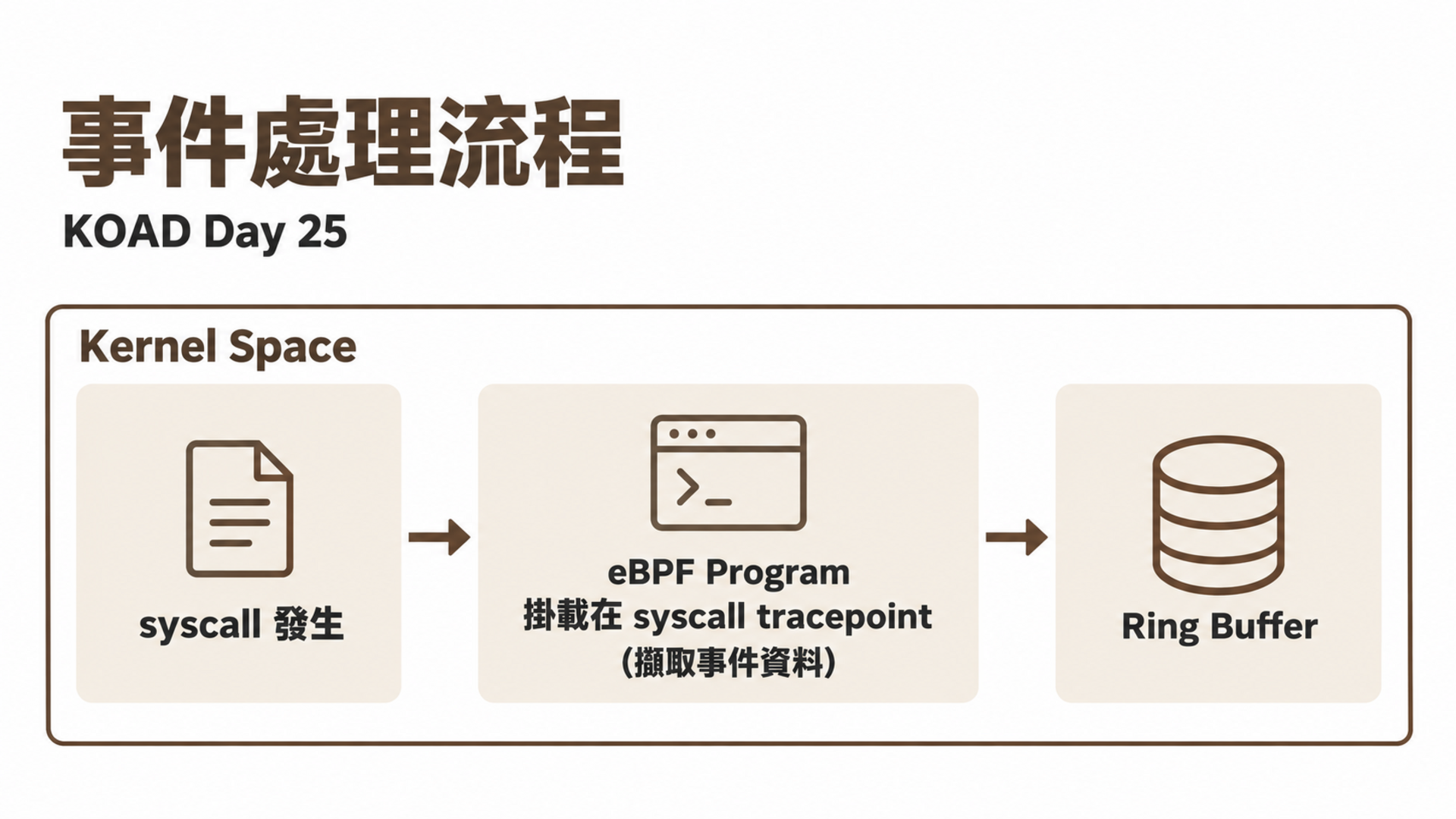
Falco 支援兩種事件來源,它們偵測的層面不同、互相補充:
| 特性 | syscall 來源 | k8s_audit 來源 |
|---|---|---|
| 偵測層面 | 容器內部行為(程式執行、檔案讀寫、網路連線) | K8s API 操作(建立 Pod、修改 RBAC、刪除資源) |
| 來源 | kernel syscall tracepoint | K8s API Server Audit Log |
| 延遲 | 即時(微秒級) | 近即時(秒級,取決於 audit log 寫入) |
| 範例 | 容器內啟動 bash、讀取 /etc/shadow | 建立特權 Pod、綁定 cluster-admin |
| KOAD 規則數 | 18 條 | 8 條 |
KOAD 的 26 條規則中,syscall 規則偵測「容器內的惡意行為」(如逃逸、挖礦),k8s_audit 規則偵測「對叢集的惡意操作」(如 RBAC 竄改、刪除安全工具)。
Falco 在生產環境中的 CPU 開銷通常在 1–3%。需注意:
falco --stats-interval=5 監控buf_size_preset: 4(預設)適合大多數環境,高流量環境可調到 6–8and 比 or 高效——把最能過濾的條件放前面macro 抽取共用條件,Falco engine 會最佳化重複判斷每條 Falco 規則由五個核心欄位組成:
- rule: Rule Name              # 規則名稱(唯一識別)
  desc: Description            # 描述
  condition: <布林表達式>       # 觸發條件(核心)
  output: <告警輸出格式>        # 告警內容(支援變數替換)
  priority: <嚴重程度>          # EMERGENCY ~ DEBUG
  source: syscall              # 事件來源:syscall 或 k8s_audit
  tags: [tag1, tag2]           # 標籤(用於分類和過濾)
  enabled: true                # 是否啟用
| 欄位 | 說明 | 範例 |
|---|---|---|
| condition | 觸發條件(Falco filter 語法) | spawned_process and proc.name = bash |
| output | 告警內容(支援變數替換) | Shell in container (user=%user.name) |
| priority | 嚴重程度 | EMERGENCY / ALERT / CRITICAL / ERROR / WARNING / NOTICE / INFO / DEBUG |
| source | 事件來源 | syscall(預設) / k8s_audit |
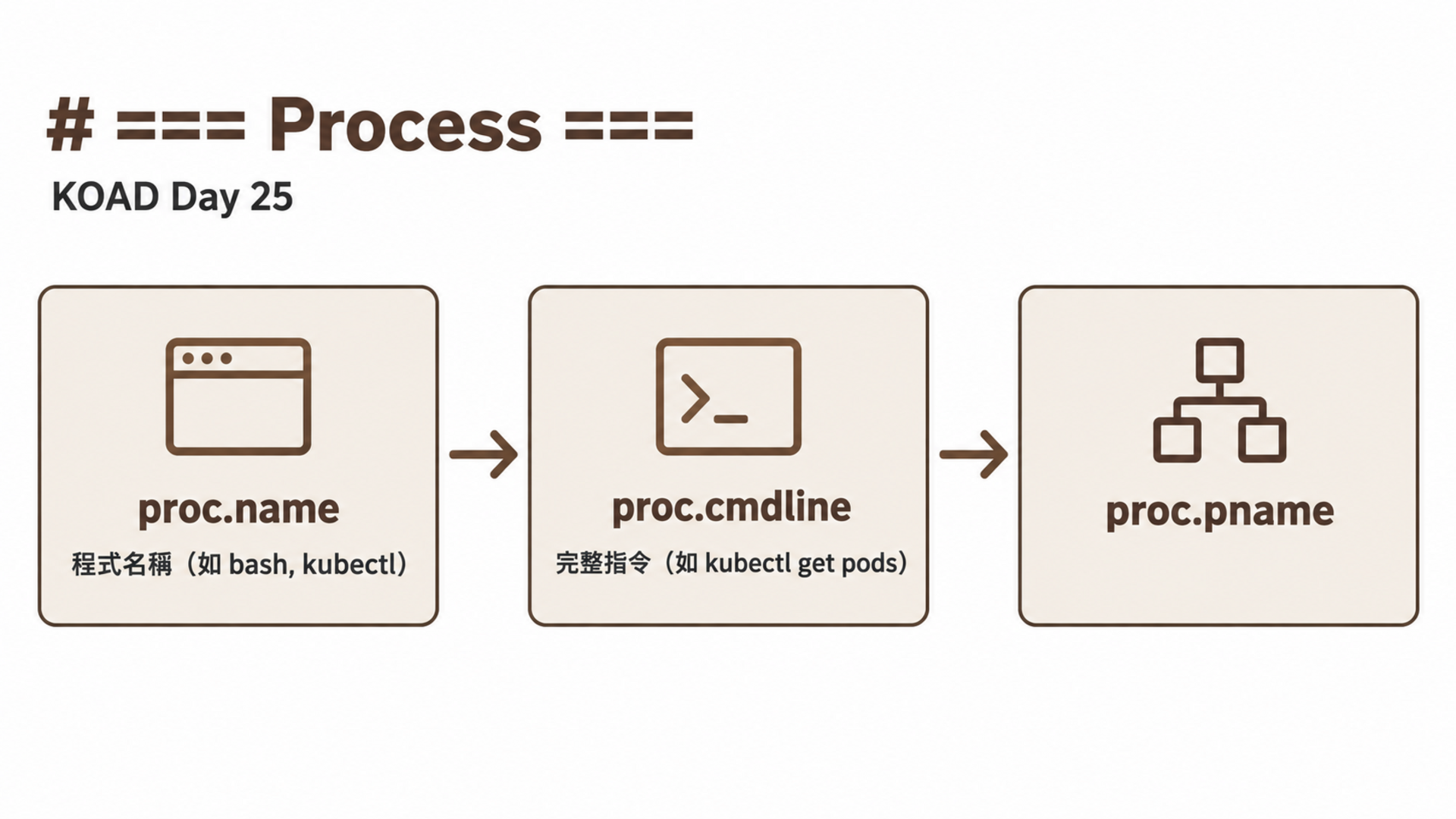
Falco 支援 macro(可重用條件)和 list(可重用的值列表),減少重複:
# 定義 List
- list: shell_binaries
  items: [bash, sh, dash, zsh, csh, ksh, fish]

- list: attack_tools
  items: [nmap, masscan, hydra, medusa, ncrack, john, hashcat]

# 定義 Macro
- macro: container_shell
  condition: spawned_process and container and proc.name in (shell_binaries)

# 在規則中使用
- rule: Shell in Container
  condition: container_shell and not proc.pname in (shell_binaries)
KOAD 共有 26 條自訂規則:20 條 syscall 規則 + 6 條 k8s_audit 規則。
- rule: KOAD S04 Shell Spawned in Container
  desc: Detect shell execution inside containers (Jupyter RCE)
  condition: >
    spawned_process and
    container and
    proc.name in (bash, sh, dash, zsh, csh, ksh) and
    not proc.pname in (bash, sh, dash)
  output: >
    Shell spawned in container
    (pod=%k8s.pod.name ns=%k8s.ns.name user=%user.name
     cmd=%proc.cmdline image=%container.image.repository)
  priority: WARNING
  source: syscall
  tags: [koad, execution, T1059]
設計思路:偵測容器內啟動 shell。排除 shell 呼叫 shell 的情況(not proc.pname in (bash, sh))以減少噪音——這是因為很多合法的 entrypoint 腳本會用 shell 呼叫子 shell。
- rule: KOAD S05 kubectl Execution in Container
  desc: Detect kubectl usage inside containers
  condition: >
    spawned_process and
    container and
    proc.name = kubectl
  output: >
    kubectl executed in container
    (pod=%k8s.pod.name ns=%k8s.ns.name
     cmd=%proc.cmdline user=%user.name)
  priority: ALERT
  source: syscall
  tags: [koad, execution, T1609]
設計思路:容器內不應該出現 kubectl。任何容器內的 kubectl 執行都是高度可疑的。優先級設為 ALERT(比 shell 高),因為 kubectl 出現在容器內幾乎 100% 是攻擊。
這是規則數量最多的戰術(7 條),因為容器逃逸有多種手法,每種需要專門的偵測規則。
- rule: KOAD S13 Privileged Container Activity
  desc: Detect activity in privileged containers
  condition: >
    spawned_process and
    container and
    container.privileged = true
  output: >
    Process in privileged container
    (pod=%k8s.pod.name ns=%k8s.ns.name
     cmd=%proc.cmdline image=%container.image.repository)
  priority: CRITICAL
  source: syscall
  tags: [koad, privilege-escalation, T1611]
- rule: KOAD S14 Cgroup Escape Attempt
  desc: Detect cgroup release_agent manipulation for container escape
  condition: >
    open_write and
    container and
    fd.name contains "release_agent"
  output: >
    Cgroup release_agent written
    (pod=%k8s.pod.name ns=%k8s.ns.name
     file=%fd.name cmd=%proc.cmdline)
  priority: CRITICAL
  source: syscall
  tags: [koad, privilege-escalation, T1611]
設計思路:寫入 release_agent 是 cgroup escape 的必要步驟(Day 9)。這個操作在正常容器中絕不應該發生,所以零誤報。
- rule: KOAD S15 Docker Socket Access
  desc: Detect access to Docker socket from container
  condition: >
    (open_read or open_write) and
    container and
    fd.name = /var/run/docker.sock
  output: >
    Docker socket accessed from container
    (pod=%k8s.pod.name ns=%k8s.ns.name cmd=%proc.cmdline)
  priority: CRITICAL
  source: syscall
  tags: [koad, privilege-escalation, T1611]
- rule: KOAD S16 Core Pattern Modification
  desc: Detect modification of /proc/sys/kernel/core_pattern
  condition: >
    open_write and
    container and
    fd.name = /proc/sys/kernel/core_pattern
  output: >
    core_pattern modified from container
    (pod=%k8s.pod.name cmd=%proc.cmdline)
  priority: CRITICAL
  source: syscall
  tags: [koad, privilege-escalation, T1611]
- rule: KOAD S17 Ptrace Detected in Container
  desc: Detect ptrace syscall usage in container
  condition: >
    evt.type = ptrace and
    container and
    evt.arg.request in (PTRACE_ATTACH, PTRACE_SEIZE)
  output: >
    Ptrace attach detected
    (pod=%k8s.pod.name ns=%k8s.ns.name
     target_pid=%evt.arg.pid cmd=%proc.cmdline)
  priority: CRITICAL
  source: syscall
  tags: [koad, privilege-escalation, T1611]
- rule: KOAD S18 Mknod in Container
  desc: Detect device node creation in container (lxcfs escape)
  condition: >
    evt.type in (mknod, mknodat) and
    container
  output: >
    Device node created in container
    (pod=%k8s.pod.name file=%fd.name cmd=%proc.cmdline)
  priority: CRITICAL
  source: syscall
  tags: [koad, privilege-escalation, T1611]
- rule: KOAD S19 Exploit Binary Execution
  desc: Detect execution of known exploit binaries
  condition: >
    spawned_process and
    container and
    proc.name in (exploit, dirty_pipe, dirtypipe, cve_exploit)
  output: >
    Exploit binary executed
    (pod=%k8s.pod.name cmd=%proc.cmdline image=%container.image.repository)
  priority: EMERGENCY
  source: syscall
  tags: [koad, privilege-escalation, T1068]
設計思路:EMERGENCY 是最高優先級——已知 exploit 執行意味著攻擊已經在發生。
- rule: KOAD S20 Docker Build in Container
  desc: Detect docker build commands from within container
  condition: >
    spawned_process and
    container and
    proc.name = docker and
    proc.cmdline contains "build"
  output: >
    Docker build from container
    (pod=%k8s.pod.name cmd=%proc.cmdline)
  priority: ALERT
  source: syscall
  tags: [koad, stealth, T1612]
- rule: KOAD S21 History File Deletion
  desc: Detect deletion of shell history files
  condition: >
    (open_write or evt.type in (unlink, unlinkat, rename)) and
    container and
    fd.name pmatch (/root/.bash_history, /home/*/.bash_history,
                     /root/.ash_history, /tmp/*)
    and proc.cmdline contains "history"
  output: >
    History file tampered
    (pod=%k8s.pod.name file=%fd.name cmd=%proc.cmdline)
  priority: WARNING
  source: syscall
  tags: [koad, stealth, T1070]
- rule: KOAD S24 Brute Force Tool Detected
  desc: Detect brute force tools execution
  condition: >
    spawned_process and
    container and
    proc.name in (hydra, medusa, ncrack, john, hashcat)
  output: >
    Brute force tool detected
    (pod=%k8s.pod.name tool=%proc.name cmd=%proc.cmdline)
  priority: ALERT
  source: syscall
  tags: [koad, credential-access, T1110]
- rule: KOAD S26 Service Account Token Read
  desc: Detect reading of service account tokens
  condition: >
    open_read and
    container and
    fd.name startswith /var/run/secrets/kubernetes.io/serviceaccount/ and
    proc.name != pause
  output: >
    SA token read
    (pod=%k8s.pod.name ns=%k8s.ns.name
     file=%fd.name cmd=%proc.cmdline user=%user.name)
  priority: NOTICE
  source: syscall
  tags: [koad, credential-access, T1552]
設計思路:很多合法程式會讀取 SA Token(如 K8s client 庫),所以優先級設為 NOTICE 而不是 ALERT。排除 pause container 以減少噪音。
- rule: KOAD S28 Network Scan Detected
  desc: Detect network scanning tools
  condition: >
    spawned_process and
    container and
    proc.name in (nmap, masscan, zmap, netcat, nc)
  output: >
    Network scan tool detected
    (pod=%k8s.pod.name tool=%proc.name cmd=%proc.cmdline)
  priority: ALERT
  source: syscall
  tags: [koad, discovery, T1046]
- rule: KOAD S32 Stress Tool Detected
  desc: Detect resource exhaustion tools
  condition: >
    spawned_process and
    container and
    proc.name in (stress, stress-ng, cpuburn, memburn)
  output: >
    Resource stress tool detected
    (pod=%k8s.pod.name tool=%proc.name cmd=%proc.cmdline)
  priority: ALERT
  source: syscall
  tags: [koad, impact, T1499]
- rule: KOAD S35 Cryptocurrency Miner Detected
  desc: Detect cryptocurrency mining processes
  condition: >
    spawned_process and
    container and
    (proc.name in (xmrig, minerd, minergate, cpuminer, ethminer)
     or proc.cmdline contains "stratum+tcp"
     or proc.cmdline contains "mining-pool")
  output: >
    Cryptominer detected
    (pod=%k8s.pod.name miner=%proc.name cmd=%proc.cmdline
     image=%container.image.repository)
  priority: CRITICAL
  source: syscall
  tags: [koad, impact, T1496]
設計思路:除了偵測已知程式名稱,也偵測 Stratum 協議的 URL pattern——即使攻擊者重新命名了挖礦程式,只要命令列中有 stratum+tcp 就會被抓到。
k8s_audit 規則透過 K8s Audit Log 偵測 API 操作,使用 jevt.value 語法讀取 JSON 欄位。這些規則偵測的是「K8s API 操作」而非「容器內行為」。
- rule: KOAD S07 CronJob Created
  desc: Detect CronJob creation (potential persistence)
  condition: >
    jevt.value[/verb] = "create" and
    jevt.value[/objectRef/resource] = "cronjobs"
  output: >
    CronJob created
    (user=%jevt.value[/user/username]
     name=%jevt.value[/objectRef/name]
     ns=%jevt.value[/objectRef/namespace])
  priority: WARNING
  source: k8s_audit
  tags: [KOAD, T1053, execution]
- rule: KOAD S09 ClusterRoleBinding Created
  desc: Detect ClusterRoleBinding creation (RBAC privilege escalation)
  condition: >
    jevt.value[/verb] = "create" and
    jevt.value[/objectRef/resource] = "clusterrolebindings"
  output: >
    ClusterRoleBinding created
    (user=%jevt.value[/user/username]
     name=%jevt.value[/objectRef/name])
  priority: CRITICAL
  source: k8s_audit
  tags: [KOAD, T1098, persistence]
ClusterRoleBinding 建立 = RBAC 提權。攻擊者建立新的 cluster-admin 綁定是最常見的持久化手法。
- rule: KOAD S10 ServiceAccount in kube-system
  desc: Detect ServiceAccount creation in kube-system
  condition: >
    jevt.value[/verb] = "create" and
    jevt.value[/objectRef/resource] = "serviceaccounts" and
    jevt.value[/objectRef/namespace] = "kube-system"
  output: >
    SA created in kube-system
    (user=%jevt.value[/user/username]
     name=%jevt.value[/objectRef/name])
  priority: CRITICAL
  source: k8s_audit
  tags: [KOAD, T1136, persistence]
- rule: KOAD S22 Pod in kube-system Without System Label
  desc: Detect non-system Pod creation in kube-system
  condition: >
    jevt.value[/verb] = "create" and
    jevt.value[/objectRef/resource] = "pods" and
    jevt.value[/objectRef/namespace] = "kube-system" and
    not jevt.value[/user/username] startswith "system:"
  output: >
    Non-system pod in kube-system
    (user=%jevt.value[/user/username]
     pod=%jevt.value[/objectRef/name])
  priority: CRITICAL
  source: k8s_audit
  tags: [KOAD, T1036, stealth]
- rule: KOAD S23 Security Tool Deletion
  desc: Detect deletion of security tools (Falco/Kyverno)
  condition: >
    jevt.value[/verb] = "delete" and
    jevt.value[/objectRef/resource] in ("daemonsets", "deployments") and
    jevt.value[/objectRef/namespace] in ("falco", "kyverno", "gatekeeper-system")
  output: >
    Security tool deleted!
    (user=%jevt.value[/user/username]
     resource=%jevt.value[/objectRef/resource]
     name=%jevt.value[/objectRef/name]
     ns=%jevt.value[/objectRef/namespace])
  priority: CRITICAL
  source: k8s_audit
  tags: [KOAD, T1562, defense-impairment]
- rule: KOAD S30 Cross-Namespace Secret Access
  desc: Detect cross-namespace Secret access (lateral movement)
  condition: >
    jevt.value[/verb] = "get" and
    jevt.value[/objectRef/resource] = "secrets" and
    jevt.value[/objectRef/namespace] !=
      jevt.value[/user/extra/authentication.kubernetes.io~1pod-namespace/0]
  output: >
    Cross-namespace Secret access
    (user=%jevt.value[/user/username]
     secret_ns=%jevt.value[/objectRef/namespace]
     pod_ns=%jevt.value[/user/extra/authentication.kubernetes.io~1pod-namespace/0])
  priority: CRITICAL
  source: k8s_audit
  tags: [KOAD, T1550, lateral-movement]
| 戰術 | syscall | k8s_audit | 合計 | 覆蓋場景 |
|---|---|---|---|---|
| TA0001 Initial Access | 2 | 0 | 2 | S01-S03 |
| TA0002 Execution | 2 | 1 | 3 | S04-S07 |
| TA0003 Persistence | 1 | 2 | 3 | S08-S10 |
| TA0004 Privilege Escalation | 7 | 0 | 7 | S13-S19 |
| TA0005 Stealth | 2 | 1 | 3 | S20-S22 |
| TA0112 Defense Impairment | 0 | 1 | 1 | S23 |
| TA0006 Credential Access | 3 | 0 | 3 | S24-S26 |
| TA0007 Discovery | 1 | 0 | 1 | S27-S29 |
| TA0008 Lateral Movement | 0 | 1 | 1 | S30 |
| TA0040 Impact | 2 | 0 | 2 | S31-S35 |
| 合計 | 20 | 6 | 26 | S01-S35 |
| 策略 | 精準度 | 覆蓋度 | 適用場景 | 範例 |
|---|---|---|---|---|
| 程式名稱比對 | 高 | 低 | 已知工具 | proc.name = nmap |
| 行為模式比對 | 中 | 高 | 通用攻擊行為 | spawned_process and container |
| 檔案路徑比對 | 高 | 中 | 特定攻擊 | fd.name contains release_agent |
| 命令列比對 | 中 | 中 | 變體偵測 | proc.cmdline contains stratum |
# 誤報多的寫法
condition: spawned_process and container

# 降低誤報:排除已知合法程式
condition: >
  spawned_process and container and
  not proc.pname in (containerd-shim, runc, tini) and
  not container.image.repository in (known/images)
| Priority | 適用場景 | KOAD 範例 | 建議行動 |
|---|---|---|---|
| EMERGENCY | 已確認的攻擊 | CVE exploit 執行 | 立即隔離 + 通知 |
| CRITICAL | 高風險操作 | 特權容器 + 容器逃逸 | 立即調查 |
| ALERT | 需要立即關注 | kubectl + 暴力破解 | 5 分鐘內回應 |
| WARNING | 可疑行為 | Shell spawn | 記錄 + 人工審查 |
| NOTICE | 需要記錄 | SA Token 讀取 | 記錄供稽核 |
# 使用 exception 排除已知合法行為(Falco 0.28+)
- rule: KOAD S04 Shell Spawned in Container
  condition: container_shell and not proc.pname in (shell_binaries)
  exceptions:
    - name: known-maintenance
      fields: [k8s.pod.name, proc.cmdline]
      comps: [=, contains]
      values:
        - [maintenance-pod, health-check]
# 主機終端
# 測試 S04 Shell in Container
$ kubectl exec -n koad attacker -- bash -c 'echo "test shell"'
# 應觸發 S04

# 測試 S05 kubectl in Container
$ kubectl exec -n koad attacker -- kubectl get pods
# 應觸發 S05

# 測試 S26 SA Token Read
$ kubectl exec -n koad attacker -- cat /var/run/secrets/kubernetes.io/serviceaccount/token
# 應觸發 S26

# 查看 Falco 日誌確認觸發
$ kubectl logs -n falco -l app.kubernetes.io/name=falco \
    --tail=10 | jq '{rule: .rule, output: .output, priority: .priority}'
# 主機終端 — 儲存為 test-falco-rules.sh 並執行
#!/bin/bash
# test-falco-rules.sh — 測試所有 KOAD 規則

PASS=0; FAIL=0

test_rule() {
  local rule_name=$1
  local trigger_cmd=$2

  # 執行觸發命令
  eval "$trigger_cmd" 2>/dev/null
  sleep 2

  # 檢查 Falco 日誌
  if kubectl logs -n falco -l app.kubernetes.io/name=falco --tail=5 | \
     grep -q "$rule_name"; then
    echo "[✓] $rule_name"
    PASS=$((PASS+1))
  else
    echo "[✗] $rule_name"
    FAIL=$((FAIL+1))
  fi
}

test_rule "KOAD S04" "kubectl exec -n koad attacker -- bash -c 'echo test'"
test_rule "KOAD S05" "kubectl exec -n koad attacker -- kubectl version"
test_rule "KOAD S26" "kubectl exec -n koad attacker -- cat /var/run/secrets/kubernetes.io/serviceaccount/token"

echo "Results: $PASS passed, $FAIL failed"
# falco.yaml 效能相關設定
syscall_event_drops:
  actions:
    - log
    - alert
  rate: 0.03333          # 每 30 秒檢查一次事件丟失
  max_burst: 1

outputs:
  rate: 1                # 每秒最多 1 條輸出(避免日誌爆量)
  max_burst: 1000        # burst 上限

# modern_ebpf driver 效能比 kernel module 好
engine:
  kind: modern_ebpf      # ← 推薦
  ebpf:
    buf_size_preset: 4    # 0-7,越大緩衝越大,丟事件越少
# 慢:每個 syscall 都要評估 container check
condition: container and proc.name = kubectl

# 快:先用 spawned_process 過濾
condition: spawned_process and container and proc.name = kubectl
# spawned_process 把事件量從百萬/秒降到數百/秒
# 主機終端
# k8s_audit 規則需要安裝 k8s_audit plugin
# Helm 安裝時啟用:
$ helm install falco falcosecurity/falco \
    --set falcosidekick.enabled=true \
    --set "falcoctl.config.artifact.install.refs={falco-rules:3,k8s-audit-rules:0.7}"
# 主機終端
# 修改規則檔後,需要重啟 Falco 或發送 SIGHUP
$ kubectl exec -n falco $(kubectl get pod -n falco -l app.kubernetes.io/name=falco -o name) \
    -- kill -1 1

# 或重新部署
$ kubectl rollout restart daemonset/falco -n falco
# S26 SA Token Read 每次 kubectl 都會觸發
# 在攻擊鏈中產生 85 條告警
# 解法:降低 priority 或加 rate limit

# 或用 Falco 的 output rate limiting
outputs:
  rate: 0.2      # 每 5 秒最多 1 條同類告警
| 考點 | 本日內容 | 權重 |
|---|---|---|
| Falco 規則語法 | condition / output / priority | Monitoring 20% |
| syscall 偵測 | spawned_process, open_read/write | Monitoring 20% |
| 自訂規則 | 針對特定場景撰寫偵測 | Monitoring 20% |
| 誤報處理 | exception / not 條件排除 | Monitoring 20% |
核心觀念:偵測規則要基於攻擊行為,不是基於攻擊工具。 偵測 spawned_process + container 比偵測特定 exploit 名稱更通用——攻擊者可以重新命名工具,但無法繞過 syscall。
明天 Day 26 整合完整的偵測堆疊——Falco Talon 自動回應 + Tetragon eBPF 深度偵測。



 iThome鐵人賽
 看影片追技術