
前一篇我從 join 看到 shuffle 如何增加 Stages 與 tasks。這次沒有 join、沒有 skew,也沒有昂貴的 UDF;我只把同一份資料寫成不同數量的 Parquet files,卻讓讀取它的 scan Stage 從 8 個 tasks 變成 160 個。
小檔案問題常被簡化成「檔案太多所以慢」,但真正需要先確認的是:這些 files 被 Spark 規劃成多少 scan partitions?一個 partition 又會對應多少 tasks?這次我要沿著 file count、scan partition 與 Spark UI 的 task 數,建立這條可驗證的路徑。
spark.sql.files.maxPartitionBytes 與 spark.sql.files.openCostInBytes 如何影響 file scan planning。Ep22:從 Jobs、Stages、Tasks、Executors 建立診斷順序
↓
Ep23:key skew 讓少數 shuffle task 拖住 Stage
↓
Ep24:join strategy 決定資料是否要 shuffle
↓
Ep25:small files 改變 scan partitions 與 task 數
↓
Ep26:memory、GC、spill 與 Executor failure 的證據
這篇專注在 read-side 的 file layout。它不會把 spark.sql.files.* 設定包裝成萬用修正,也不會展開 compaction、table format 或上游寫入策略;先學會辨識症狀,才能回到實際 pipeline 選擇合適的整理方式。
我生成兩份完全相同的資料:各有 960,000 rows、相同 schema、相同 deterministic values。唯一差別是寫出時使用的 output partitions:
large-files input
960,000 rows → 8 個 Parquet files → 8 個 scan partitions → 8 個 scan tasks

small-files input
960,000 rows → 160 個 Parquet files → 160 個 scan partitions → 160 個 scan tasks
每個 phase 都只讀取 value 欄位並做 sum(value)。因此最後還會有一個單 task 的 global aggregate Stage;它只負責合併 partial sums,和這次要看的 Parquet scan Stage 是兩件不同的事。
小檔案不是抽象的「檔案很多」;它會先反映在 scan partitions,接著才成為 Spark UI 裡的 tasks。
實務上 Spark 會用 file size、可切分性、spark.sql.files.maxPartitionBytes 與spark.sql.files.openCostInBytes 將 files 打包成 scan partitions。多個小 files 可能被放進同一個
partition,所以「160 個 files 就一定有 160 個 tasks」不是通用規則。
這次為了讓差異清楚可見,我特意設定:
spark.sql.files.maxPartitionBytes=1m
spark.sql.files.openCostInBytes=4m
每個 file 的估算開啟成本已高於 1 MiB,planner 不會把多個 files 放進同一個 scan partition。這是觀察裝置,不是 production 的設定建議;真實環境常見的預設 max partition bytes 是 128 MiB,實際打包結果還要看 storage、檔案大小與 cluster 的可用平行度。
openCostInBytes 是 scan planning 的 heuristic,不是 Spark 真正讀取了額外 4 MiB。Spark 用「實際 file bytes 加上估算開檔成本」決定能否再將另一個 file 放入同一個 partition;Spark 3.4.4 的預設值本來就是 4 MiB,這次明確寫出它只為固定實驗條件。這批 files 本身小於 1 MiB,沒有被拆分;它們各自形成一個 scan partition 的原因是估算開檔成本已超過這次特意縮小的目標上限。
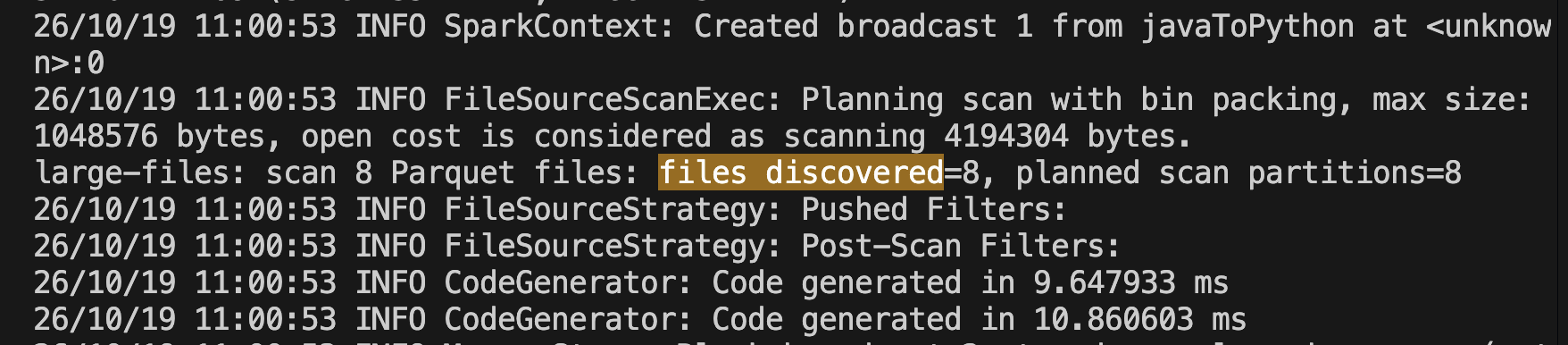
Driver log 直接記錄了這組條件。large-files phase 發現 8 個 Parquet files,並規劃為 8 個 scan partitions。
large-files Job 的 DAG 有兩個 Stages。Stage 1 包含 Scan parquet,有 8 個 tasks,讀取 1119.5 KiB input;它寫出 472.0 B 的 partial sum。Stage 2 只有一個 task,讀回這 472.0 B,完成最後彙總。
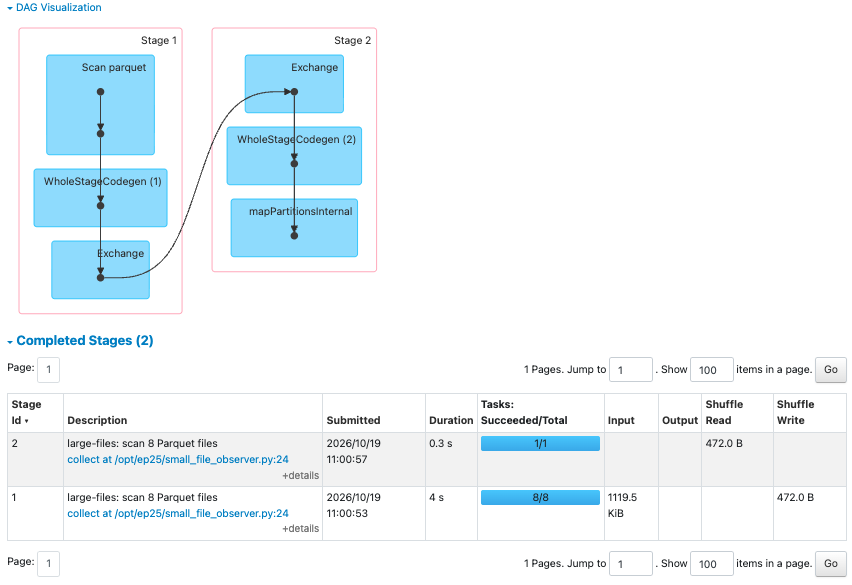
兩個 Executors 合計有四個 task slots,所以這 8 個 scan tasks 最多同時跑四個,會分成兩批完成。這種 task 數量和資料量的比例,讓每個 task 都有相對明確的資料處理工作可做。
small-files phase 讀取同樣 960,000 rows,Job details 卻顯示 Scan parquet Stage 有 160 個 tasks。接著仍是一個單 task Stage 負責合併結果,所以整個 Job 共 161 個 tasks。
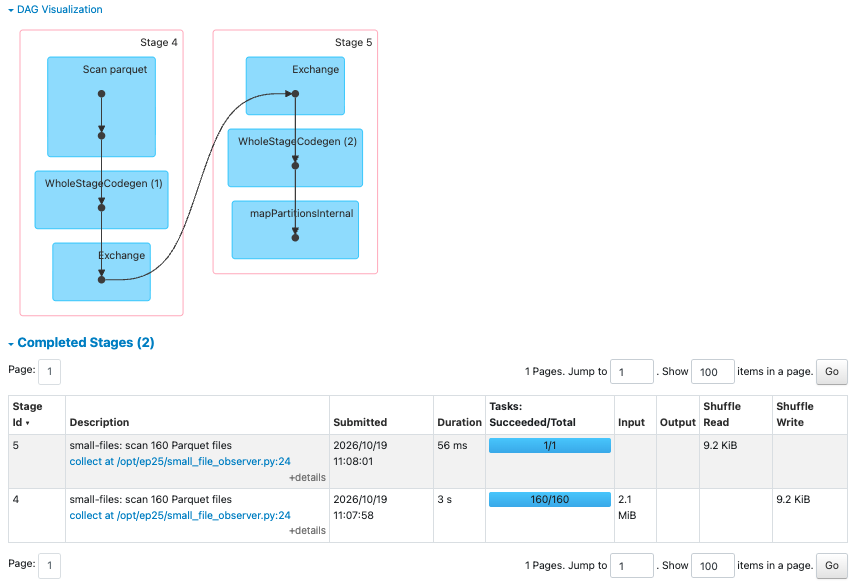
這次 UI 顯示 small-files scan Stage 讀取 2.1 MiB,高於 large-files 的 1119.5 KiB。logical rows 和欄位沒有改變,實體檔案 layout 卻會改變:每個 Parquet file 都有自己的 footer、metadata 與壓縮/編碼邊界。這張畫面無法把多出的 bytes 精確拆分到每一種成本,但它提醒我,file count 增加不只會增加 task 數,也可能增加實際需要處理的檔案層資料。
在只有四個 task slots 的環境中,160 個 scan tasks 不可能同時開始;它們必須由 Driver 分成許多批派送。這正是小檔案讓 task launch、scheduler 與 Executor 開檔工作相對變重要的原因。要量化其中哪一段佔多少時間,還需要看 task-level timeline、scheduler delay、storage latency 與更接近 production 的資料量;本次沒有把這些未截到的數字寫成結論。
Jobs 頁同時保留兩個主要 action:large-files Job 有 2 Stages、9 個 tasks,duration 為 4 秒;small-files Job 同樣有 2 Stages,卻有 161 個 tasks,duration 顯示 3 秒。
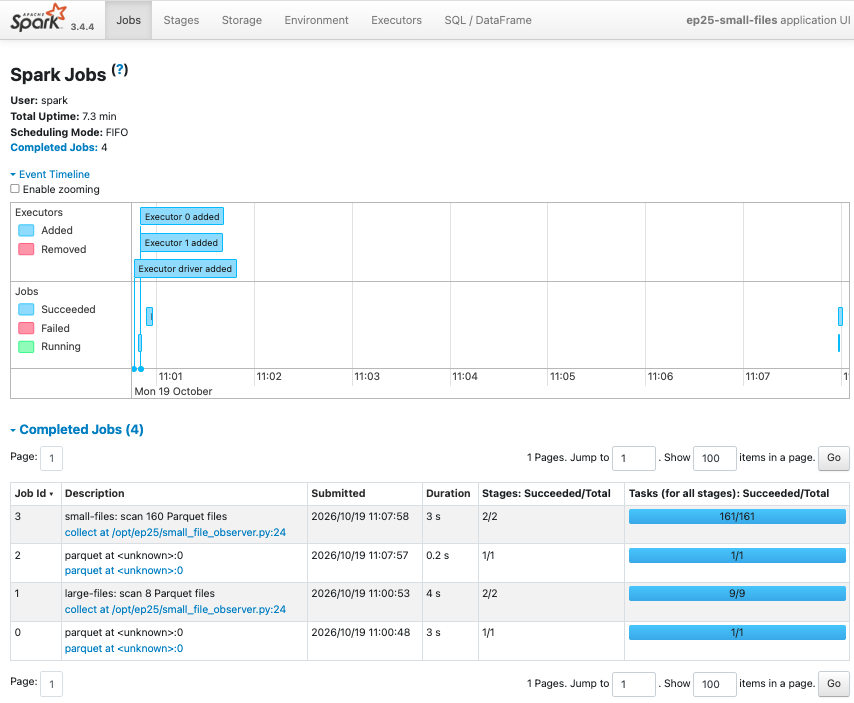
這個畫面很重要,因為它阻止我用直覺寫成「160 個小檔案一定在這次跑得更慢」。large-files 是 application 取得 Executors 後的第一個主要 action,會混入 warm-up、JVM code generation 與環境當下狀態;兩份資料也非常小。兩個 Job 的秒數不適合做前後效能比例。
我能確認的是結構性差異:在同一組四個 task slots 下,small-files 將同樣的 scan 工作切成 160 個 units。若真實 job 有大量短 task,即使每個 task 都不慢,重複的排程、task launch、檔案列舉、開檔與 metadata 工作也可能成為整體時間的一大部分。
Executors 頁將整個 application 的數字彙總:兩個 phase 加上其他準備工作一共完成 172 個 tasks、讀取 3.2 MiB input。它能確認本次確實由四個 cores 處理大量 tasks,但這裡看不到每個 task 對應哪個 file,也無法將 task time 自動拆成 scan、排程或開檔時間。
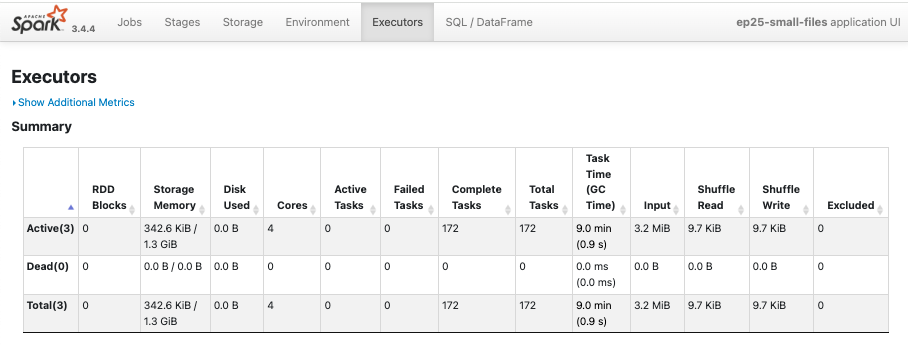
因此,判讀小檔案時我會先從 files discovered、scan partition/task count、scan Stage 的 Input 與 task shape 開始;Executors 頁只用來補充總量與資源背景。
| 先看到的證據 | 下一個要驗證的問題 |
|---|---|
| file count 很高,scan task count 也高 | files 是否來自頻繁、細粒度的 append 或每次寫入的 partition 數太多? |
| 每個 task Input 很小,task duration 也短 | 是否被 task launch、排程、開檔或 metadata 操作主導? |
| task 數高,但 Spark 已把多個 files 合併進 partition | maxPartitionBytes、open cost 與目前 cluster parallelism 如何影響打包結果? |
| scan task 數不高,job 仍很慢 | 問題可能在 filter、shuffle、join、storage latency 或後續 operators;不要先把 file count 當成原因。 |
修正方向通常不只在 read-side config。確認 file layout 是原因後,才回到上游輸出 partition、批次頻率、compaction 或 table format 的維護策略,找能讓資料長期維持合理檔案大小的方式。
小檔案的診斷起點是 file count 如何變成 scan tasks;先看這條路徑,再決定是否值得處理檔案 layout。
同樣 960,000 rows 的 Parquet input,因為寫成 8 或 160 個 files,就讓主要 scan Stage 從 8 tasks 變成 160 tasks。這個差異已經足以改變 Driver 排程和 Executors 接收工作的形狀,即使這次小型實驗的 Job duration 沒有呈現可用的效能比例。
下一篇會從 task 很多回到另一種資源症狀:當 Executor memory、GC 與 spill 開始異常時,Spark 在記憶體與磁碟之間如何處理資料,以及該從哪些 UI 指標和 logs 追查。
🚀 GitHub:
Ep25|小檔案為什麼讓 Spark 忙著啟 task?從 scan partitions 看 file layout 的成本
🚀 spark-learning-lab 系列文章與實作:
https://github.com/jeffery5bai/spark-learning-lab
Apache Spark 3.4.4 — Performance Tuning:
https://archive.apache.org/dist/spark/docs/3.4.4/sql-performance-tuning.html
Apache Spark 3.4.4 — Configuration:
https://archive.apache.org/dist/spark/docs/3.4.4/configuration.html

 jeffery5bai

 iThome鐵人賽
 看影片追技術