

在 Spring JDBC 中,query() 方法的用途是「執行 SELECT SQL 語法」,因此我們就可以使用 query() 方法,去查詢資料庫中的數據。
而 query() 的用法其實和前一篇文章我們所介紹的 update() 方法非常相似,前兩個參數都和 update() 方法一樣,都是先放入「想要執行的 SQL 語法」,接著再放入「動態決定 SQL 變數的 map 參數」。
不過 query() 方法特別的地方,就在於他的第三個參數 RowMapper。
在 query() 方法中的第三個參數 RowMapper,他的用途是「將資料庫查詢出來的數據,轉換成是 Java object(物件)」。
舉例來說,我們可以創建一個新的 class,名字叫做 StudentRowMapper,並且讓這個 class 去 implements RowMapper interface,接著我們可以在這個 class 中點擊右鍵,然後選擇「Generate...」,並且選擇「Implement Methods」,然後選擇實作 mapRow() 這個方法,接著按下 OK 鍵。
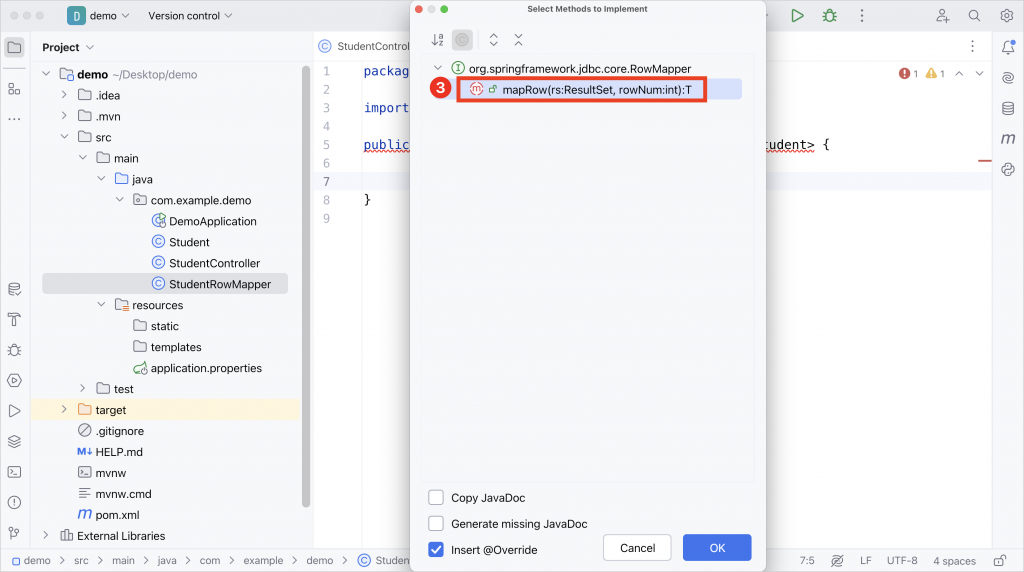
在這個 RowMapper 的實作中,我們的目的是「將資料庫中所查詢出來的數據,轉換成是一個 Java 物件」,因此我們的目標,就是要提取出下面這條 SQL 語法中的 id 和 name 的欄位的值,並且將他轉換成 Student 物件中的 id 和 name 變數。
SELECT id, name FROM student
所以在 StudentRowMapper 中,我們可以依照下面的方式來實作 mapRow() 方法,這樣子就可以將資料庫中查詢出來的 id 和 name 的欄位,轉換成是 Student 物件中的 id 和 name 變數的值了。
public class StudentRowMapper implements RowMapper<Student> {

    @Override
    public Student mapRow(ResultSet rs, int rowNum) throws SQLException {
        Student student = new Student();
        student.setId(rs.getInt("id"));
        student.setName(rs.getString("name"));
        return student;
    }
}


 iThome鐵人賽
 看影片追技術