
Firebase 推出了伺服器端提示詞範本(Server Prompt Templates),以在其基礎設施中代管提示詞範本。此範本遵循 DotPrompt 格式與語法,因此內容可以包含以下一項或多項:
此外,官方提供了 TemplateGenerativeModel 類別,這讓工程師能夠使用範本 ID(template ID)和選填的範本變數(template variables)來呼叫 generateContent 或 generateContentStream 方法以產生回應。這簡化了以程式化方式建構文字與內聯資料(inline data)部分的程序,不需像以往一樣將部分(parts)陣列與產生組態傳遞給 GenerativeModel 來取得相同的結果。
伺服器端提示詞範本解決了幾個企業級 AI 應用的關鍵痛點。
| 痛點 | 說明 |
|---|---|
| 更好的安全性 | 提示詞文字儲存在伺服器端,因此不會在網路呼叫中暴露。使用者無法開啟 Chrome 瀏覽器的「網路(Network)」分頁並在資料內容(payload)中檢查提示詞文字。 |
| 更好的安全防護 | 提示詞文字不會被揭露,因此惡意使用者無法輕易修改提示詞來對 Gemini 模型觸發提示詞注入與其他攻擊。 |
| 無提示詞偏差 | 工程師 A 在本地編輯了提示詞,但忘記提交便部署了程式碼變更。工程師 B 則使用舊的提示詞進行開發,導致兩個版本散落各處。伺服器端提示詞範本可確保工程師使用同一個版本進行開發。當提示詞在伺服器端更新時,它會傳播到用戶端應用程式的所有執行個體。 |
| 在主控台進行測試 | 工程師可以在編寫任何程式碼之前,先在 Firebase 主控台中驗證提示詞是否正常運作。 |
| 減少部署次數 | 當在伺服器端更新提示詞時,用戶端應用程式無需重新部署即可接收提示詞更新。 |
以上列出了 Firebase AI Logic 伺服器端提示詞範本的好處。接下來,我將示範如何在 Angular 中使用相依性注入將現有的提示詞遷移至伺服器端提示詞範本。
注意: 目前 Firebase AI Logic 伺服器端提示詞範本仍處於預覽版(Preview)階段,在達到正式啟用(GA)狀態之前,請勿將其用於生產環境。然而,這是一項非常值得探索的有趣技術。
npm i -g firebase-tools
使用 npm 全域安裝 firebase-tools。
firebase logout
firebase login
登出 Firebase 並重新登入,以進行正確的 Firebase 驗證。
firebase init
執行 firebase init 並按照畫面引導,以設定 Firebase Cloud Functions、Firebase 本地模擬器套件(Local Emulator Suite)和 Firebase Remote Config。
如果您有現有專案或多個專案,可以在命令列指定專案 ID。
firebase init --project <PROJECT_ID>
完成逐步設定後,Firebase 工具將會產生 Cloud Functions 與 Remote Config 範本,以及 .firebaserc 和 firebase.json 等組態檔案。
下一節將提供實作存放庫的詳細資訊。
此專案的完整原始碼已託管於 NG Firebase AI Nano Banana 專案,然而,以下章節將說明為遷移至 Firebase 伺服器端提示詞範本所做出的程式碼變更。
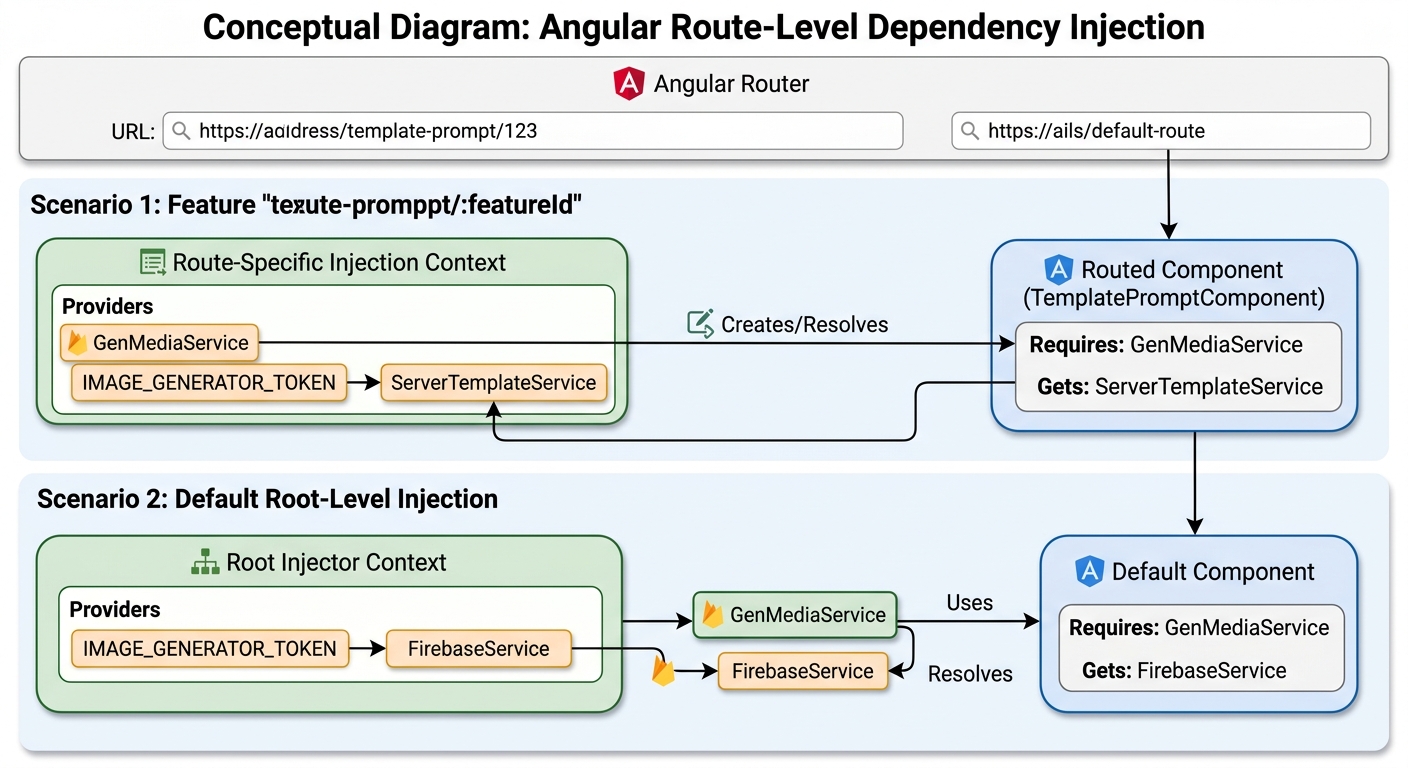
應用程式會比對 URL 路徑並路由至不同的元件。當 URL 路徑符合 template-prompt/:featureId 時,路由會在路由層級建立 GenMediaService,並使用該路由的注入上下文(injection context)注入 IMAGE_GENERATOR_TOKEN。此 Token 會被對應至 ServerTemplateService。另一方面,其他路由則會使用根注入器(root injector)中的 GenMediaService,並注入對應至 FirebaseService 的全域 IMAGE_GENERATOR_TOKEN。實作細節將在部落格後續內容中展示。
您可以在 Firebase 主控台中建立伺服器端提示詞範本。本指南假設您已有一個名為 vertexai-firebase 的 Firebase 專案。請點擊左側選單的「AI Logic」,然後點擊「Prompt templates (PREVIEW)」分頁。
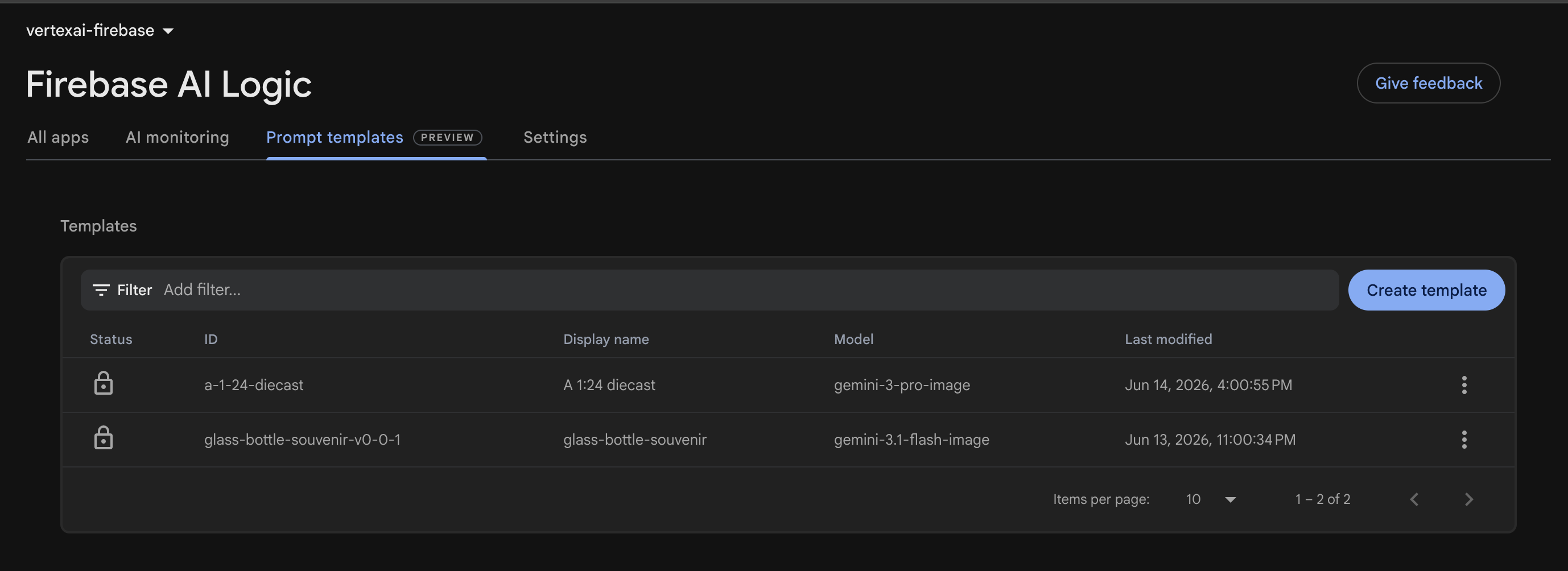
使用者可以點擊 Create Template 按鈕在伺服器端建立新的提示詞。
A template is configured to generate a glass bottle image from inline image data. The unique template ID is glass-bottle-souvenir-v0-0-1, and the template name is glass-bottle-souvenir.
---
model: "gemini-3.1-flash-image"
config:
  candidateCount: 1
  safetySettings:
    - category: HARM_CATEGORY_HARASSMENT
      threshold: BLOCK_ONLY_HIGH
    - category: HARM_CATEGORY_HATE_SPEECH
      threshold: BLOCK_ONLY_HIGH
    - category: HARM_CATEGORY_SEXUALLY_EXPLICIT
      threshold: BLOCK_ONLY_HIGH
    - category: HARM_CATEGORY_DANGEROUS_CONTENT
      threshold: BLOCK_ONLY_HIGH
input:
  schema:
    inlineImages?(array, inline image data):
      type: object
      properties:
        mimeType: string
        data: string  # inline data must be base64-encoded
    aspectRatio?: string, the aspect ratio of the image
    resolution?: string, the resolution of the image
---
此組態指定了模型名稱、模型設定,以及輸入 Schema 與驗證。
| 區段 | 組態 | 說明 |
|---|---|---|
| model | gemini-3.1-flash-image | Nano Banana 2 的 Gemini 模型名稱。 |
| config | candidateCount: 1 | 模型最多返回 1 張圖片 |
| safetySettings | BLOCK_ONLY_HIGH | 針對騷擾、仇恨言論、露骨色情內容和危險內容的安全類別 |
| input | schema | 輸入 Schema 與驗證 |
此提示詞預期一個 object 類型的 inlineImages 陣列。每個內聯圖片都包含一個 MIME 類型和內聯資料。此外,該提示詞還接受選填的長寬比與解析度。
提示詞部分使用 {{role "system"}} 語法來指定系統指示詞,並使用 {{role "user"}} 來指定使用者提示詞。
{{role "user"}}
A 1/7 scale ... lighting and shadows.
{{#if aspectRatio}}
Apply this aspect ratio to the image: {{aspectRatio}}.
{{/if}}
{{#if resolution}}
Apply this resolution to the image: {{resolution}}.
{{/if}}

{{#each inlineImages}}
  {{media type="mimeType" data="data"}}
{{/each}}
使用者提示詞會根據上傳的內聯圖片產生紀念玻璃瓶圖片。
當提供長寬比時,"Apply this aspect ratio to the image: {{aspectRatio}}." 會被附加到提示詞中。
當提供解析度時,"Apply this resolution to the image: {{resolution}}." 會被附加到提示詞中。
此迴圈會疊代 inlineImages 清單以指定 MIME 類型與內聯資料。
// Prompt Input
{
   "inline_images": [{
    "mime_type": "image/png",
    "contents": "iVBORw0KGgoAAAANSUhEUgAAARAAAABcCAYAAACm5+q2AAAXGElEQVR4Ae1dC5QcVZm..."
  }],
   "aspectRatio": "4:1",
   "resolution": "512"
}
提示詞輸入包括圖片、長寬比和解析度,以便在編寫程式碼之前進行測試。
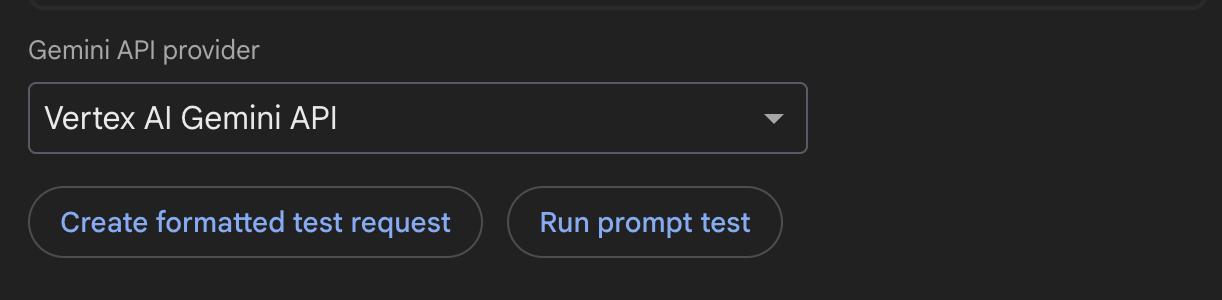
在 Firebase UI 主控台中,從下拉式清單中選擇 Gemini API 供應商。Create formatted test request 按鈕可讓使用者在實際執行前驗證請求是否正確。Run prompt text 按鈕會執行該請求以產生一張 512px 且長寬比為 4:1 的圖片。
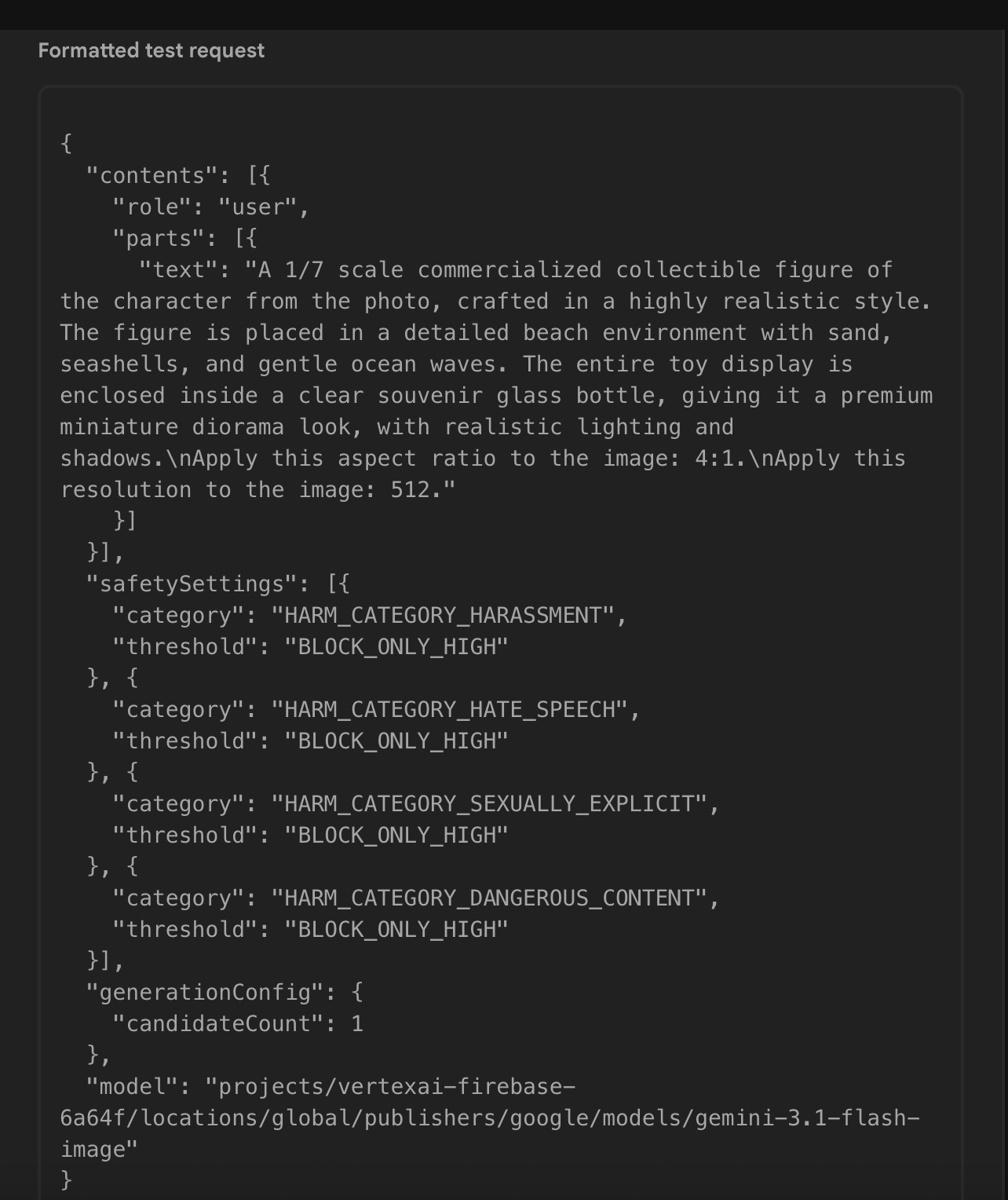
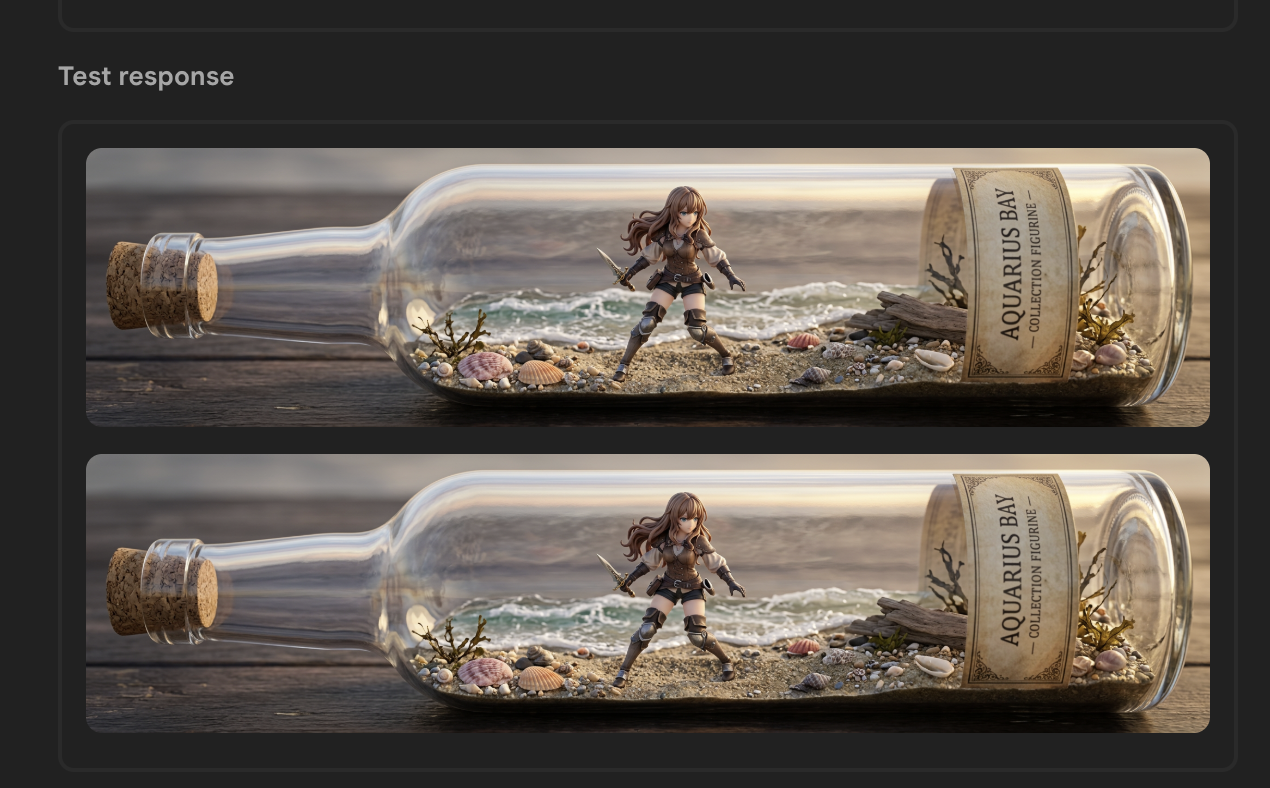
測試請求會產生具有預期長寬比的紀念玻璃瓶。
接下來,我將定義兩個新的注入 Token:第一個注入圖片產生器,第二個注入 TemplateGenerativeModel。我還會建立一個新的伺服器端提示詞範本服務,以根據範本 ID(template ID)和範本變數(template variables)來產生圖片。
export type BaseGenerateParam = {
  aspectRatio?: string;
  resolution?: string;
  imageFiles: File[];
}

export type GenerateImageParam = BaseGenerateParam &  {
  prompt?: string;
  templateId?: string;
}
GenerateImageParam 類型將長寬比、解析度、上傳的圖片以及範本 ID 提供給 Gemini 模型以產生圖片。
export type ImageResponseWithoutId = {
  data: string;
  mimeType: string;
  inlineData: string;
}

export type ImageResponse = ImageResponseWithoutId & {
  id: number;
}

export type ImageTokenUsage = {
  image: ImageResponse,
}
ImageTokenUsage 類型儲存內聯圖片資料、MIME 類型和虛擬圖片 ID。
import { GenerateImageParam } from '@/features/ai/types/generate-image-param.type';
import { ImageTokenUsage } from '@/features/ai/types/image-response.type';

export interface ImageGenerator {
  generateImage(param: GenerateImageParam): Promise<ImageTokenUsage | undefined>;
}
ImageGenerator 介面是一個契約,必須實作 generateImage 方法以接受 GenerateImageParam 參數,並輸出一個包含 ImageTokenUsage 或 undefined 的 Promise。
import { FirebaseService } from '@/features/ai/services/firebase.service';
import { ImageGenerator } from '@/shared/ui/gen-media/interfaces/image-generator.interface';
import { InjectionToken, inject } from '@angular/core';

export const IMAGE_GENERATOR_TOKEN = new InjectionToken<ImageGenerator>('IMAGE_GENERATOR_TOKEN', {
  providedIn: 'root',
  factory: () => inject(FirebaseService)
});
IMAGE_GENERATOR_TOKEN 注入 Token 預設使用工廠函式來注入 FirebaseService。當 URL 路徑為 template-prompt/:featureId 時,可以將其覆寫以使用 ServerTemplateService。
import { InjectionToken } from '@angular/core';
import { AI, TemplateGenerativeModel } from 'firebase/ai';

export const SERVER_TEMPLATE_MODEL = new InjectionToken<TemplateGenerativeModel>('SERVER_TEMPLATE_MODEL');
SERVER_TEMPLATE_MODEL 注入 Token 會注入 TemplateGenerativeModel 的執行個體。
然後,更新 provideFirebase 函式以具體化並提供 TemplateGenerativeModel。
export function provideFirebase() {
    return makeEnvironmentProviders([
        {
          provide: VERTEX_AI_BACKEND,
          useFactory: () => {
            const configService = inject(ConfigService);
            const vertexAILocation = getValue(configService.remoteConfig, 'vertexAILocation').asString();
            const ai = getAI(configService.app, {
              backend: new VertexAIBackend(vertexAILocation)
            });

            return ai;
          }
        },
        {
          provide: SERVER_TEMPLATE_MODEL,
          useFactory: () => {
            const ai = inject(VERTEX_AI_BACKEND);
            return getTemplateGenerativeModel(ai);
          }
        }
    ]);
}
export async function makeTemplateVariables({ imageFiles, aspectRatio, resolution }: GenerateImageParam) {
  const imageParts = await resolveImageParts(imageFiles);
  const inlineImages = imageParts.map(part => part.inlineData);
  return {
    inlineImages,
    aspectRatio,
    resolution
  }
}
makeTemplateVariables 函式在返回包含內聯圖片、長寬比和解析度的物件之前,先將 File[] 轉換為內聯圖片資料陣列。
function processImageGeneratedContent(result: GenerateContentResult): ImageTokenUsage {
  const response = result.response;
  const inlineDataParts = response.inlineDataParts();

  if (inlineDataParts?.length) {
    const images = inlineDataParts.map(({inlineData}, index) => {
      const { data, mimeType } = inlineData;
      return {
        id: index,
        mimeType,
        data,
        inlineData: `data:${mimeType};base64,${data}`
      };
    });

    if (images.length <= 0) {
      throw new Error('Error in generating the image.');
    }

    return {
      image: images[0],
    };
  }

  throw new Error('Error in generating the image.');
}

export async function getTemplateBase64Images({ model, templateId, templateVariables }: TemplateImageOptions): Promise<ImageTokenUsage> {
  const result = await model.generateContent(templateId, templateVariables);
  return processImageGeneratedContent(result);
}
getTemplateBase64Images 函式使用 model 產生圖片,呼叫 processImageGeneratedContent 對結果進行後處理,並返回 ID、MIME 類型、內聯資料和 Base64 編碼字串。
import { SERVER_TEMPLATE_MODEL } from '@/features/ai/constants/firebase.constant';
import { GenerateImageParam } from '@/features/ai/types/generate-image-param.type';
import { ImageTokenUsage } from '@/features/ai/types/image-response.type';
import { getTemplateBase64Images } from '@/features/ai/utils/generate-image.util';
import { makeTemplateVariables } from '@/features/ai/utils/inline-image-data.util';
import { inject, Injectable } from '@angular/core';

@Injectable({
  providedIn: 'root'
})
export class ServerTemplateService  {
    private readonly serverTemplateModel = inject(SERVER_TEMPLATE_MODEL);

    async generateImage(genImageParameter: GenerateImageParam): Promise<ImageTokenUsage | undefined> {
        const { templateId } = genImageParameter;
        if (!templateId) {
          return undefined;
        }

        const templateVariables = await makeTemplateVariables(genImageParameter);
        return getTemplateBase64Images({
          model: this.serverTemplateModel,
          templateId,
          templateVariables,
        });
    }
}
ServerTemplateService 履行了 ImageGenerator 的契約,並實作了 generateImage 來呼叫 serverTemplateModel。
import { ServerTemplateService } from '@/features/ai/services/server-template.service';
import { IMAGE_GENERATOR_TOKEN } from '@/shared/ui/gen-media/constants/image-generator.token';
import { GenMediaService } from '@/shared/ui/gen-media/services/gen-media.service';
import { Routes } from '@angular/router';

export const routes: Routes = [
  {
    path: 'predefined-prompt/:featureId',
    loadComponent: () => import('./features/predefined-prompt-editor/predefined-prompt-editor.component'),
  },
  {
    path: 'template-prompt/:featureId',
    loadComponent: () => import('./features/predefined-prompt-editor/predefined-prompt-editor.component'),
    providers: [
      GenMediaService,
      { provide: IMAGE_GENERATOR_TOKEN, useExisting: ServerTemplateService }
    ],
  },
  ... other routes ...
];
routes 陣列指定了路由至不同元件的路徑清單,以示範圖片產生的使用案例。PredefinedPromptEditorComponent 包含一個上傳器,允許使用者上傳至少一張圖片,以提示 gemini-3.1-flash-image 產生新圖片。
在兩種情境下使用此元件:以程式化方式傳遞提示詞文字,或使用 Firebase 伺服器端提示詞範本。
當路徑為 predefined-prompt/:featureId 時,提示詞文字會直接提交給 gemini-3.1-flash-image。當路徑為 template-prompt/:featureId 時,則會使用伺服器端提示詞範本。
在前者的情況下,元件會使用 IMAGE_GENERATOR_TOKEN 在其工廠函式中提供的 FirebaseService。在後者的情況下,路由會建立 GenMediaService 的執行個體,而不是使用全域的執行個體。它還會向 IMAGE_GENERATOR_TOKEN 提供 ServerTemplateService。
@Injectable({
  providedIn: 'root'
})
export class GenMediaService {
  private readonly imageGenerator = inject(IMAGE_GENERATOR_TOKEN);

  ... the rest of the service ...
}
當 GenMediaService 注入 IMAGE_GENERATOR_TOKEN 時,imageGenerator 將會對應至 ServerTemplateService 而不是 FirebaseService。
接下來,更新導覽功能表以使用 /template-prompt/bottle 來呼叫新範本。
"modeling": {
    "figurine": {
      "path": "/predefined-prompt/figurine",
      "customPrompt": "... custom prompt ..."
    },
    "bottle": {
      "path": "/template-prompt/bottle",
      "templateConfigName": "glassBottleSouvenirTemplateId"
    },
  }
在功能 JSON 檔案中,將 bottle 的路徑更新為 /template-prompt/bottle。刪除 customPrompt 並新增 templateConfigName 以儲存 Firebase Remote Config 名稱。

glassBottleSouvenirTemplateId 參照範本 ID glass-bottle-souvenir-v0-0-1,以載入該範本來產生圖片。
當 Angular 應用程式對 Firebase AI Logic 發出請求時,網路資料內容不會揭露提示詞文字。
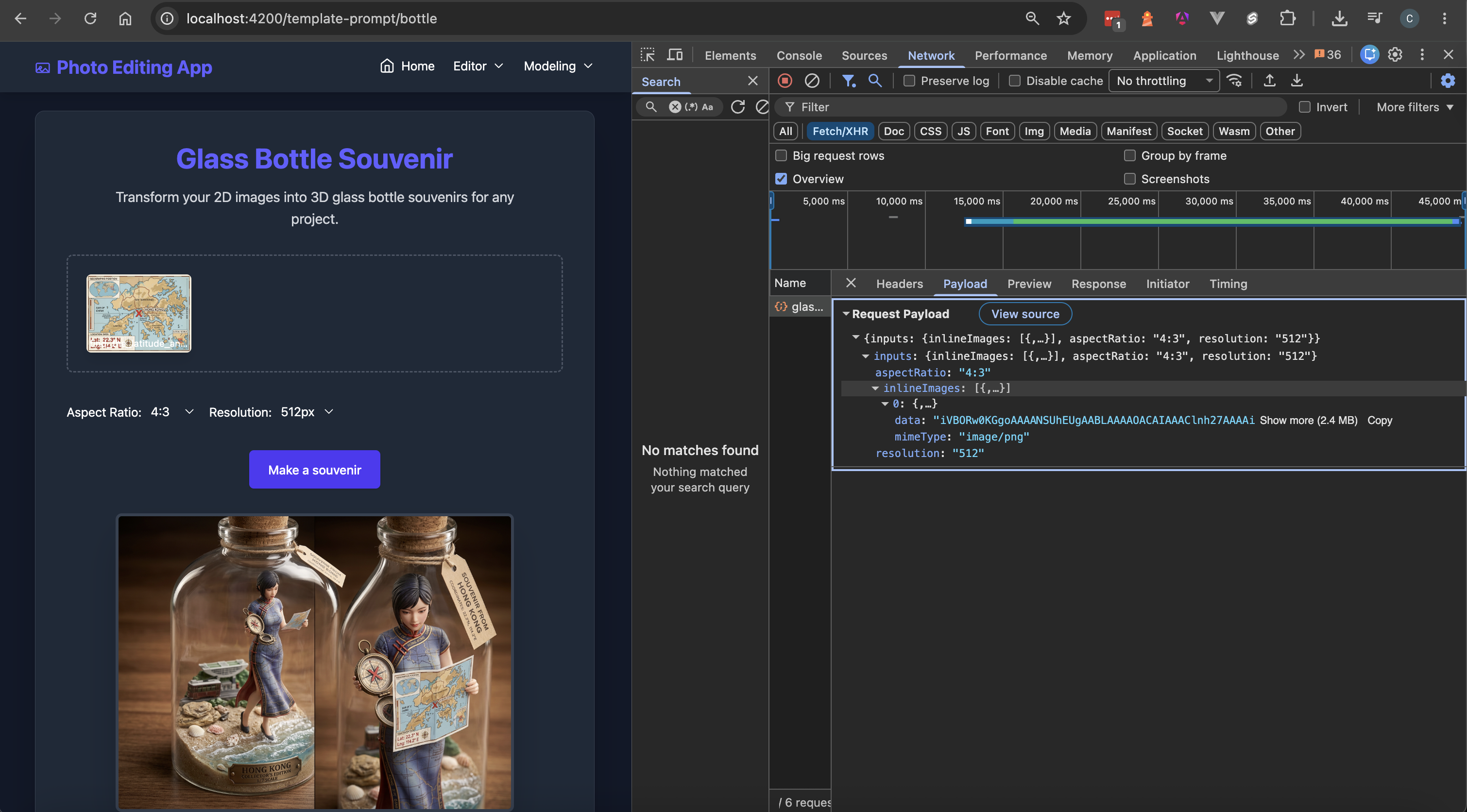
網路資料內容包括長寬比、解析度和內聯圖片資料。Firebase 會隱藏提示詞文字,防止其像以前一樣作為靜態值儲存在 JSON 檔案中。如果提示詞文字是應用程式的敏感資料,它會在 Firebase 的基礎設施中得到安全保護。
至此,將靜態提示詞文字遷移至 Firebase AI Logic 伺服器端提示詞範本的工作就告一段落了。
遷移之後,當伺服器端提示詞被修改時,Angular 應用程式不需要重新部署。使用者重新整理頁面,即可使用最新提示詞來產生圖片。
工程師可以使用 Firebase AI Logic 伺服器端提示詞範本來建置 AI 應用程式,以執行圖片產生以外的任務,例如摘要、文字產生,以及透過 Google 搜尋和 Google 地圖進行工具使用。

 Connie

 iThome鐵人賽
 看影片追技術