
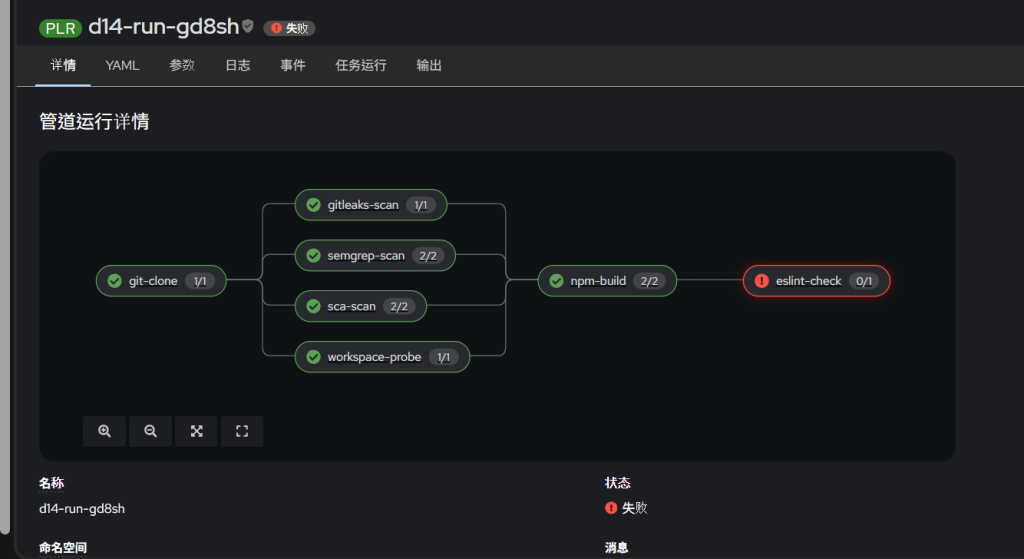
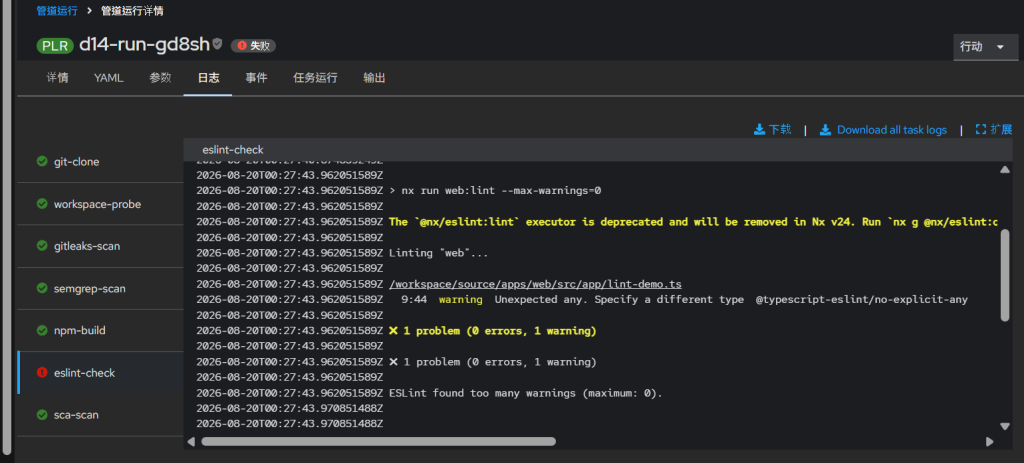
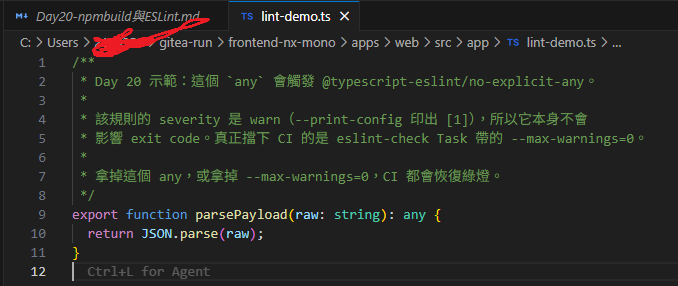
情境:阻擋團隊成員的可通過編譯,但不符合團隊規則的程式
圖片為失敗的示意
(修改了task順序,build太吃資源被放到其他檢查完成後做)
今天做兩件事:
dist/,順帶把 npm ci 從直連改成走 NexusESLint 是 JavaScript / TypeScript 的靜態檢查工具(linter)。它讀原始碼、比對規則、把不符合的地方印出來 —— 不執行程式碼,也不改變 build 的產物。
它管的是兩類事:
any、宣告了沒用到的變數核心規則之外,大部分規則來自外掛。這個 workspace 裝了兩組:typescript-eslint 管型別相關的,@nx/eslint-plugin 管專案邊界的 —— §8 那三條規則有兩條就是它們提供的。
規則報出來,不等於 CI 會停。 中間隔著一個 severity,那才是本篇的重點(§4 展開)。
順序上 ESLint 一定要等 npm-build,因為 eslint 本體與外掛都裝在 node_modules 裡 —— 沒跑過 npm ci 就沒有 eslint 可用。
要做的事其實很短,五步:
| # | 做什麼 | 關鍵 | 節 |
|---|---|---|---|
| 1 | 修 lock 檔 | npm install --package-lock-only,用與 CI 同版的 npm |
§0 |
| 2 | 建 npm-build Task |
兩個 step:寫 .npmrc(有憑證)→ 裝依賴+build(沒憑證) |
§3 |
| 3 | 建 eslint-check Task |
一個 step,一行指令 | §4 |
| 4 | 接進 Pipeline | npm-build 接 git-clone;eslint-check 接 npm-build |
§5 |
| 5 | push 一次 | 六個 Task 全綠,86 秒 | §6 |
真正在做事的就這三行:
# npm-build / step 2 —— 關鍵是這個環境變數,讓 .npmrc 待在工作區外
npm_config_userconfig=/npmcfg/npmrc
npm ci --no-audit --no-fund && npx nx build web

# eslint-check —— 全部
npx nx run-many --target=lint --projects=web --parallel=1 -- --max-warnings=0
其餘篇幅是「為什麼」:§1–§2 選 image,§7 算每次 CI 多付的成本,§8–§12 解釋三條規則為什麼擋不下來。
這篇的技術說明只講一件事:這條 pipeline 的閘門是 error。
只擋 error 是取捨,不這樣切,管道會被一堆「知道就好」的東西卡住跑不動。代價是三條看起來有防護的規則都擋不下 CI:兩條沒被歸到 error,一條歸到了卻沒有管轄對象。
CRC 2.61.0+6eb443
OpenShift 4.21.14 / Kubernetes v1.34.6(單節點 crc)
Red Hat OpenShift Pipelines Operator 1.23.1
Node v22.23.2 / npm 10.9.8(node:22-alpine,musl)
Nx 23.1.1 / Angular 22
Nexus Repository 3.93.0-06(COMMUNITY)
用戶端:Windows 11 Pro + PowerShell 5.1
package.json 與 package-lock.json 不同步,npm ci 直接失敗:
npm error code EUSAGE
npm error `npm ci` can only install packages when your package.json and package-lock.json are in sync.
npm error Missing: yaml@2.9.0 from lock file
只有這一項。 不是「第一項」—— npm ci 會把缺漏全部列出來,這裡就是只缺一個。
npm install --package-lock-only --no-audit --no-fund
結果:
lock 檔 1,011,046 -> 1,010,347 bytes      ← 縮小 699 bytes
npm ci --no-audit --no-fund → exit 0
added 1727 packages in 3m
檔案變小是正常的。 --package-lock-only 不是「補上缺的那筆」,是依 package.json 重算整棵樹。
「不要在 Windows 上修 lock 檔」是常見說法。這次補測之後不成立。
同一份壞掉的 lock 檔、同一個 package.json,只換重算環境:
| 重算環境 | lock 檔 | 條目 | 巢狀 yaml@2.9.0 |
npm ci |
|---|---|---|---|---|
| 原始(壞的) | 1,011,046 | 1876 | ✗ | EUSAGE |
| Windows + npm 10.9.8 | 1,010,347 | 1877 | ✓ | exit 0 |
| Windows + npm 11.13.0 | 1,011,114 | 1876 | ✗ | EUSAGE |
| alpine + npm 10.9.8 | 1,010,347 | 1877 | ✓ | exit 0 |
看第二列與第四列 —— byte 數完全相同。
只要 npm 同版,Windows 與 alpine 的產出一字不差:平台變體也一樣(win32 101 次、darwin 82 次,就是 §12 的那兩個數字),@nx/nx-linux-x64-musl 與 @rspack/binding-linux-x64-musl 都在。
平台不是變因。
版本。這台主機的預設是 npm 11.13.0(跟著 node 24 裝的),跟 CI 容器的 10.9.8 不同版。
用 11.13.0 重算完再驗一次:
npm error Missing: yaml@2.9.0 from lock file
跟修之前一字不差 —— 等於沒修。 巢狀的 yaml@2.9.0 沒被加進去,條目停在 1876。
所以「在容器裡做」的理由不是躲開 Windows,是拿到與 CI 相同的 npm。
主機上裝的是哪個版本你控制不了;容器的 image tag 寫死在 Task 裡。
npm 10.9.8 會剝掉 81 筆條目的 libc 欄位(libc: ["glibc"] / ["musl"]),npm 11 保留。
加上新的 yaml 條目之後,淨減 699。
把新的 lock 檔帶回主機推上去。
取回來的東西要有下界檢查 —— > 600,000 bytes、首字元是 {。理由見 Day 18 §13。
推上去會觸發一次 CI。gitleaks-scan 對一百萬 bytes 的 JSON 變更沒有意見:
1 commits scanned.
scanned ~1061807 bytes (1.06 MB) in 65.4ms
no leaks found
$OC = (Get-ChildItem "$env:USERPROFILE\.crc\cache" -Recurse -Filter "oc.exe" | Select-Object -First 1).FullName
$kc = "$env:USERPROFILE\.crc\machines\crc\kubeconfig"
$NEXUS_ROUTE = "nexus-nexus-proxy.apps-crc.testing"
$NEXUS_SVC   = "nexus-nexus3.nexus-proxy.svc.cluster.local:8081"
ci 已經有 Day 15 複製過去的 ci-npm-credentials,這篇直接用。
node:22-alpine裡面長這樣:
node v22.23.2      npm 10.9.8
uid=0(root)
Alpine Linux       /bin/sh -> busybox
沒有 git、沒有 bash
libc = musl
node:22-alpine |
node:22(Debian) |
|
|---|---|---|
| 層數 / 大小 | 4 層 / 55.1 MB | 8 層 / 389.5 MB |
| 最大層 | 50.2 MB | 201.9 MB |
關鍵是最大層那一列,不是總大小。
Day 19 §11.2 那個吃到 504 的 blob 是 159.5 MB。Debian 版的最大層比它還大 —— 第一次拉很可能撞上同一個 Route timeout。
| 特性 | 後果 |
|---|---|
| 跑起來是 root | 不需要 safe.directory(Day 18 §11.1 的兩根支柱一樣成立) |
| 沒有 git | 要用 git 指令得先 apk add git |
/bin/sh 是 busybox |
date -d、PIPESTATUS、bash 專屬語法都不能用(Day 19 §11.3) |
細節在 §12。
apiVersion: tekton.dev/v1
kind: Task
metadata:
  name: npm-build
  namespace: ci
spec:
  params:
    - name: NX_PROJECT
      type: string
      default: web
  workspaces:
    - name: source
  volumes:
    - name: npmcfg
      emptyDir: {}
  stepTemplate:
    volumeMounts:
      - name: npmcfg
        mountPath: /npmcfg
  steps:
    - name: write-npmrc
      image: nexus-nexus-proxy.apps-crc.testing/docker-proxy/library/node:22-alpine
      env:
        - name: NPM_USER
          valueFrom:
            secretKeyRef: { name: ci-npm-credentials, key: username }
        - name: NPM_PASS
          valueFrom:
            secretKeyRef: { name: ci-npm-credentials, key: password }
        - name: NEXUS_SVC
          value: nexus-nexus3.nexus-proxy.svc.cluster.local:8081
      script: |
        #!/bin/sh
        set -e
        AUTH=$(printf '%s:%s' "$NPM_USER" "$NPM_PASS" | base64 -w0)
        cat > /npmcfg/npmrc <<EOF
        registry=http://${NEXUS_SVC}/repository/npm-group/
        always-auth=true
        //${NEXUS_SVC}/repository/npm-group/:_auth=${AUTH}
        EOF
        chmod 600 /npmcfg/npmrc
        echo "已產生 /npmcfg/npmrc:"
        sed 's/_auth=.*/_auth=<redacted>/' /npmcfg/npmrc

    - name: install-and-build
      image: nexus-nexus-proxy.apps-crc.testing/docker-proxy/library/node:22-alpine
      workingDir: $(workspaces.source.path)
      env:
        - name: npm_config_userconfig
          value: /npmcfg/npmrc
      script: |
        #!/bin/sh
        set -e
        echo "=== registry ==="
        npm config get registry

        echo "=== npm ci ==="
        npm ci --no-audit --no-fund
        du -sh node_modules

        echo "=== nx build ==="
        npx nx build $(params.NX_PROJECT)
        du -sh dist
        ls -la dist/apps/$(params.NX_PROJECT)/browser
跟 Day 19 的 semgrep 同形:Tekton 的 env 是 per-step。
憑證只注入第一步,install-and-build 從頭到尾看不到 npm 密碼。
npm_config_userconfig.npmrc 預設要跟 package.json 同層。那樣的話第二步一定碰得到憑證,隔離做不成。
npm_config_userconfig 讓 .npmrc 可以放在工作區外。它是 npm 標準的環境變數形式(npm_config_<key>),實測在 10.9.8 上有效:
export npm_config_userconfig=/npmcfg/npmrc
npm config get registry → http://…/repository/npm-group/
npm ci                  → exit 0
工作區沒有 .npmrc(正確)
額外的好處:工作區不殘留 .npmrc,不會被後面的 Task 讀到,也不會被 git status 當成未追蹤檔案。
直連 registry.npmjs.org    206 秒
走 Nexus 第一次             43 秒
走 Nexus 第二次             29 秒
第一次就快,是因為快取早就熱了 —— Day 15 那次安裝已經把大部分套件灌進 npm-proxy。在一個全新的 Nexus 上第一次會慢得多。
lock 檔的
resolved不用改。
1877 個條目裡有resolved的那 1876 筆全部指向registry.npmjs.org,但npm ci會把主機部分換成當下設定的 registry、只保留路徑。
lock 檔保持與來源無關,換 registry 只是換設定。
dist/apps/web/browser     index.html, main-*.js, styles-*.css, favicon.ico
dist/apps/web/server      server.mjs, main.server.mjs, assets-chunks/
dist 總計                  2.2 MB      build 耗時 18 秒
dist/apps/web/browser 跟 repo 裡現有 Dockerfile 的 COPY 路徑一致,之後接 buildah 不用改。
注意:這個 app 有 SSR(
server/與 prerendered route)。
現有的 Dockerfile 只服務browser/,nginx 跑不了server.mjs。要上 SSR 的話 Dockerfile 與 base image 都要換 —— 本篇不處理。
每條 ESLint 規則有三個等級:
| 等級 | 數字 | 報不報 | exit code |
|---|---|---|---|
off |
0 | 不檢查 | 0 |
warn |
1 | 報 | 0 |
error |
2 | 報 | 1 |
CI 的閘門就是那個 exit code。 有 error → exit 1 → Task 失敗 → Pipeline 停;只有 warning → exit 0 → 一路綠燈。
所以「規則有沒有設」跟「規則會不會擋」是兩件事,中間隔著一個 severity。
只擋 error 是預設,也是刻意的取捨。 把每個建議都升成 error,管道會被技術債卡到跑不動;只擋 error,管道跑得動,代價是 warn 那一層形同沒有閘門。這條 pipeline 到目前為止都是這個政策——§6 的 semgrep 也是用 --severity=ERROR 把 200 多條規則篩到 24 條。
--max-warnings=<n> 是唯一的例外:warning 數超過 n 也會 exit 1。下面這支 Task 就是用它,替 ESLint 這一格把閘門往下挪一階。
apiVersion: tekton.dev/v1
kind: Task
metadata:
  name: eslint-check
  namespace: ci
spec:
  params:
    - name: NX_PROJECT
      type: string
      default: web
  workspaces:
    - name: source
  steps:
    - name: lint
      image: nexus-nexus-proxy.apps-crc.testing/docker-proxy/library/node:22-alpine
      workingDir: $(workspaces.source.path)
      script: |
        #!/bin/sh
        set -e
        test -d node_modules || { echo "沒有 node_modules,npm-build 沒跑過"; exit 1; }

        npx nx run-many --target=lint \
          --projects="$(params.NX_PROJECT)" \
          --parallel=1 \
          -- --max-warnings=0
--max-warnings=0這個 workspace 目前 0 個 warning,所以加上去不會先卡住一輪技術債。
實測它確實會擋,旗標也確實穿過 nx 傳到了 eslint —— 三組對照的證據放在 §9,這裡不重複。
沒有這個旗標的話,no-explicit-any 只會警告、不會擋。 它的 severity 是 [1](warn)。
這是「規則存在但不生效」的典型,§8–§11 會展開。
npm-build 直接接 git-clone,跟兩個掃描並行;eslint-check 接在 npm-build 之後。
[
  {"op":"add","path":"/spec/tasks/-","value":{
    "name":"npm-build",
    "runAfter":["git-clone"],
    "taskRef":{"name":"npm-build"},
    "workspaces":[{"name":"source","workspace":"shared-workspace"}]
  }},
  {"op":"add","path":"/spec/tasks/-","value":{
    "name":"eslint-check",
    "runAfter":["npm-build"],
    "taskRef":{"name":"eslint-check"},
    "workspaces":[{"name":"source","workspace":"shared-workspace"}]
  }}
]
& $OC --kubeconfig $kc patch pipeline.v1.tekton.dev d15-happy-path -n ci `
    --type=json --patch-file pipeline-patch.json
PowerShell 5.1 的坑:JSON patch 一定要走
--patch-file,不要用-p '[...]'。內層雙引號會被吃掉。
確認:
git-clone <-
workspace-probe <- ["git-clone"]
gitleaks-scan <- ["git-clone"]
semgrep-scan <- ["git-clone"]
npm-build <- ["git-clone"]
eslint-check <- ["npm-build"]
接在 git-clone 之後的有四個:workspace-probe(Day 13 留下的)、gitleaks-scan、semgrep-scan、npm-build。其中三個會實際碰到工作區內容,而 pipeline-source-pvc 是 RWO,靠 affinity assistant 排到同一節點。
要問的是:npm ci 寫 775 MB node_modules 的期間,掃描 Task 會不會被影響?
光看正式跑一次看不出來 —— gitleaks-scan 與 semgrep-scan 十幾秒就結束,那時 node_modules 才剛開始長。
所以另外寫了一個刻意拉長的探測:semgrep 掃一次、sleep 60、再掃,重複四輪,跨越整個 npm ci 的過程。
node_modules=1MB     Scanning 21 files → 12 files   exit=0
node_modules=346MB   Scanning 21 files → 12 files   exit=0
node_modules=646MB   Scanning 21 files → 12 files   exit=0
node_modules=776MB   Scanning 21 files → 12 files   exit=0
四次完全相同。 --exclude=node_modules 擋得乾淨,node_modules 從 1 MB 長到 776 MB 對 semgrep 的掃描範圍沒有任何影響。
別被那個秒數騙了:那次探測的 Task 耗時 203 秒,是三次
sleep 60加起來的,不是 semgrep 的耗時。正式 Pipeline 裡semgrep-scan只要 16 秒 —— 見 §6。
git commit -am "docs: note Day 20 npm-build and eslint-check"
git push origin main
TASK              STATUS      START                  END
git-clone         Succeeded   2026-08-15T04:12:29Z   2026-08-15T04:12:38Z     9 秒
gitleaks-scan     Succeeded   2026-08-15T04:12:38Z   2026-08-15T04:12:45Z     7 秒
semgrep-scan      Succeeded   2026-08-15T04:12:38Z   2026-08-15T04:12:54Z    16 秒
workspace-probe   Succeeded   2026-08-15T04:12:38Z   2026-08-15T04:13:24Z    46 秒
npm-build         Succeeded   2026-08-15T04:12:38Z   2026-08-15T04:13:38Z    60 秒
eslint-check      Succeeded   2026-08-15T04:13:38Z   2026-08-15T04:13:54Z    16 秒

PipelineRun  True/Succeeded   Tasks Completed: 6 (Failed: 0, Cancelled 0), Skipped: 0
總耗時       04:12:28 → 04:13:54 = 86 秒
時間戳就是 DAG。 四個並行的 Task 都在 git-clone 結束的同一秒(04:12:38)起跑;eslint-check 在 npm-build 結束的同一秒(04:13:38)起跑。
npm-build / write-npmrc
  已產生 /npmcfg/npmrc:
  registry=http://nexus-nexus3.nexus-proxy.svc.cluster.local:8081/repository/npm-group/
  //…/repository/npm-group/:_auth=<redacted>

npm-build / install-and-build
  added 1727 packages in 33s
  775.3M  node_modules
  Output location: /workspace/source/dist/apps/web
  2.2M  dist
  -rw-r--r-- 1 root 1000860000  19623  index.html
  -rw-r--r-- 1 root 1000860000 257728  main-L44NG7NU.js

semgrep-scan / fetch-rules
  content-type  = text/x-yaml
  size          = 214313
  last-modified = Sat, 15 Aug 2026 02:34:20 GMT
  規則快照年齡 = 0 天

semgrep-scan / scan
  Ran 24 rules on 12 files: 0 findings.

eslint-check
  With additional flags:
    --max-warnings=0
  > nx run web:lint --max-warnings=0
  ✔ All files pass linting
| 觀察 | 意思 |
|---|---|
npm ci 只花 33 秒 |
探測時是 43 秒,快取又更熱了 |
| semgrep 只跑 24 條規則 | 規則檔有 200 多條,--severity=ERROR 篩到 24 條。掃 12 個檔案,與 Day 19 §5 一致 |
content-type 是 text/x-yaml 不是 text/yaml |
semgrep.dev 回的是 text/yaml,存進 Nexus 再讀出來就變了 |
--max-warnings=0 確實傳到了 eslint |
看 With additional flags: 與 > nx run web:lint --max-warnings=0 兩行 |
第三列是差點踩到的坑。 Day 19 的
fetch-rules用的是case "$CT" in *yaml*)這種萬用比對,所以擋得住。
當初若寫成= "text/yaml"的等值比較,這一步每次都會誤擋。
git-clone 的 DELETE_EXISTING 預設是 true,用 rm -rfv 清空工作區。上一次留下的 775 MB node_modules 要逐檔刪掉。
---> Phase: Deleting all contents of checkout-dir '/workspace/output/'...
removed '/workspace/output//node_modules/@algolia/abtesting/LICENSE'
removed '/workspace/output//node_modules/@algolia/abtesting/dist/src/abtestingV3Client.cjs'
...
要看的不只是秒數。 rm -rfv 逐檔印出,真正要看的 clone 結果被埋在六萬行後面。
同一支 Task,差別只在工作區有沒有 node_modules:
工作區有 node_modules(775 MB)   git-clone 22 秒   log 60,662 行
工作區沒有                        git-clone  9 秒   log    185 行
接上 npm-build 之後,每一次 CI 都會落在第一列。
§6 為什麼量到 9 秒? 因為那是
npm-build上線後的第一跑,工作區還沒有上一輪留下的node_modules。從第二跑起就是 22 秒。
# 1. npm-build 的憑證只在第一個 step
& $OC --kubeconfig $kc get task npm-build -n ci -o json | ConvertFrom-Json |
    ForEach-Object { $_.spec.steps } |
    Select-Object name, @{n='secret';e={$_.env.valueFrom.secretKeyRef.name}}
# 期望:write-npmrc 有 ci-npm-credentials;install-and-build 沒有

# 2. .npmrc 有被移到工作區外
& $OC --kubeconfig $kc get task npm-build -n ci -o jsonpath='{.spec.steps[1].env[*].name}'
# 期望看到 npm_config_userconfig

# 3. eslint 有帶 --max-warnings=0
& $OC --kubeconfig $kc get task eslint-check -n ci -o jsonpath='{.spec.steps[0].script}' |
    Select-String -Pattern "max-warnings"

# 4. DAG
& $OC --kubeconfig $kc get pipeline.v1.tekton.dev d15-happy-path -n ci `
    -o jsonpath="{range .spec.tasks[*]}{.name}{' <- '}{.runAfter}{'\n'}{end}"

# 5. 流量真的走 Nexus(不要看 blobstore 增量)

& $OC --kubeconfig $kc logs nexus-nexus3-0 -n nexus-proxy -c tail-request-log --tail=2000 |
    Select-String -Pattern "npm-group" | Select-Object -Last 5
# 期望看到 ci-npm 的 GET,user agent 是 npm/10.9.8
第 5 項的判準是請求 log,不是 blobstore 增量。
快取熱的時候增量很小(這次只有 +93.4 MB),看不出走沒走。
error:三條規則各差在哪閘門設在 error(§4),這個 workspace 有三處「規則設好了、看起來有防護」,沒有一條擋得下 CI。三條差的地方都不一樣:
| 規則 | 設定 | 差在哪 | 補起來要 | 詳見 |
|---|---|---|---|---|
@typescript-eslint/no-explicit-any |
severity warn |
沒歸到 error,不影響 exit code |
一個旗標(--max-warnings=0) |
§9 |
@nx/enforce-module-boundaries |
severity error |
歸到了,但範圍是空的 —— 只有一個專案,沒有邊界可跨 | 建第二個專案+收緊 tags | §10 |
| Angular build budget | 超標 | 工具的 error 門檻沒設,只有 warning 門檻 |
改 project.json 的門檻 |
§11 |
分野不是「有沒有失效」,是補起來要花多少力氣。 第一條一個旗標就升級了(本篇就這樣做),另外兩條旗標救不了。
第二列最值得注意。 它設在 error,而且真的會擋 —— 只是這個 workspace 裡沒有它管得到的東西。
嚴格度看得見,作用範圍看不見。
這跟 Day 16 那三個回收機制是同一個形狀:機制都在、都正常運轉,各自因為一個不同的理由沒有發生作用。
no-explicit-any:severity 是 warnnpx eslint --print-config apps/web/src/main.ts
@typescript-eslint/no-explicit-any = [1]      ← 1 = warn
@nx/enforce-module-boundaries      = [2, {…}] ← 2 = error
實測放一個 any:
14:26  warning  Unexpected any. Specify a different type  @typescript-eslint/no-explicit-any
✖ 1 problem (0 errors, 1 warning)
exit=0
規則存在、會報、不擋。
誰把它降成
warn的,我沒有查證。
typescript-eslint 的recommended會啟用這條規則,但這台讀到的是[1]。可能來自 Nx 或 Angular 的預設集,也可能是產生器寫的 —— 沒有確認就不寫成結論。
warn 的設計本意是暫時的ESLint 官方在討論 severity 用法時的立場很明確:建議只在你正在處理該規則的報告期間暫時使用 warn;長期使用會讓開發者把它當成噪音而無視。
這比追究誰設的更重要。
在只擋 error 的閘門下,一條長期停在 warn 的規則,實際效果跟 off 差不多 —— 差別只在它會在 log 裡佔幾行。除非把閘門往下挪一階,那正是下一小節做的事。
這個 workspace 目前 0 個 warning,所以加 --max-warnings=0 不會先卡住一輪技術債。
但 0 warning 的基準測不出旗標有沒有真的傳到 eslint,所以另外造了一個 warning:
| # | 做法 | exit | 輸出 |
|---|---|---|---|
| C1 | 不加旗標 | 0 |
✖ 1 problem (0 errors, 1 warning) |
| C2 | nx run-many … -- --max-warnings=0 |
1 |
✖ 1 problem (0 errors, 1 warning) |
| C3 | npx eslint <file> --max-warnings=0 |
1 |
ESLint found too many warnings (maximum: 0). |
C2 與 C3 是必要的。
只跑 C1 那種「基準測試」看不出旗標有沒有生效 —— exit=0 在「旗標沒傳到」和「真的沒有 warning」兩種情況下長得一模一樣。
C3 那句 ESLint found too many warnings 是最直接的證據。C2 的輸出裡也看得到 > nx run web:lint --max-warnings=0 —— 旗標確實穿過 nx 傳到了 eslint。
enforce-module-boundaries:severity 是 error,但沒有邊界可跨這條規則設在 error,直覺上它應該是三條裡最嚴的。實測兩次都沒觸發。
A. 相對路徑深入 import:
14:10  warning  'x' is defined but never used  @typescript-eslint/no-unused-vars
✖ 1 problem (0 errors, 1 warning)
exit=0
唯一的 warning 是 no-unused-vars,不是 enforce-module-boundaries。
這裡最容易誤判。
如果只看「有沒有報錯」,會以為規則生效了 —— 實際上報的是完全不同的規則。
要看 RuleID。
B. import 一個不存在的專案(@frontend-nx-mono/nonexistent-lib):一樣沒觸發。
Nx 官方對這條規則的描述是:它強制的是專案的 public API —— 每個專案在 index.ts 定義自己的公開介面,若另一個專案試圖從別的專案深處匯入變數,lint 時會報錯。
關鍵是「另一個專案」。
這個 workspace 的現況:
專案清單                apps/web           ← 只有一個
apps/web 的 tags        []                 ← 空陣列
depConstraints          [{ sourceTag: '*', onlyDependOnLibsWithTags: ['*'] }]
apps/web/src/app/… → apps/web/src/main.ts)是同一個專案內部,本來就不在管轄範圍@frontend-nx-mono/nonexistent-lib 解析不成任何專案,沒有東西可比對
所以舊做法裡「相對路徑 import 會被擋」這個示範,在這個 repo 上做不出來 —— 不是規則寬鬆,是沒有邊界可跨。
tags: [] 也不是中性的Nx 文件另有一句:「沒有任何 tag 的專案不能依賴任何其他專案。」
聽起來很嚴,但那要 depConstraints 真的在比對 tag 才成立。
這台是萬用字元 sourceTag: '*',* 匹配所有專案(包含沒有 tag 的),所以連這一層也被關掉了。
| 層 | 現況 | 要補什麼 |
|---|---|---|
| 專案數 | 只有一個(範圍空) | 建第二個專案 |
| tags | [] |
給兩邊 tags |
| depConstraints | 萬用字元 | 從 * 收緊 |
三者任何一層補上都不夠 —— 要三個都補。
值得帶走的:規則的嚴格度(severity)與它的作用範圍是兩件事。前者看得見,後者看不見。
--print-config印出[2](error)讓人以為它很嚴,但那個數字完全不含「它管得到什麼」的資訊。
nx build 的輸出裡有一則警告:
▲ [WARNING] angular:styles/component:scss;… exceeded maximum budget.
  Budget 4.00 kB was not met by 3.03 kB with a total of 7.03 kB.
不影響 exit code。 build 照樣成功。
Angular 的 budget 有 warning 與 error 兩個門檻。angular.json / project.json 裡沒設 error 的話,超標永遠只是警告。
要把 build 當成關卡,得另外處理 —— 這篇不做,但要知道它跟前兩條一樣,屬於「設定看起來有防護」那一類。
node:22-alpine 選對了,但它的三個特性會直接影響 Task 怎麼寫。
一、沒有 git。 Nx 的 affected 偵測需要 git 歷史,要用的話得先 apk add --no-cache git。這篇的 Task 沒用到。
二、/bin/sh 是 busybox。 date -d 不吃 RFC-1123、沒有 PIPESTATUS、bash 專屬語法全部不能用。Day 19 §11.3 那個坑就是這樣來的。
三、執行身分是 root。 所以不需要 git config --global --add safe.directory —— Day 18 §11.1 的兩根支柱在這裡一樣成立(pipelines-scc 的 RunAsAny + image 的 USER 是 root)。
換一個 non-root 的 Node image 就要加回來。
npm ci 在 alpine 上裝的是 -musl 變體:
@nx/nx-linux-x64-musl-23.1.1.tgz              8,699,845 bytes
@rspack/binding-linux-x64-musl-2.1.8.tgz     25,675,405 bytes
而重算的 lock 檔保留了所有平台的 optional 變體 —— musl 與 gnu 各三筆、darwin 82 次、win32 101 次。
npm 記錄全部變體,安裝時依 os / cpu / libc 選。所以 lock 檔在 alpine、Debian、macOS、Windows 之間通用(這也是 §0 那張表的另一面)。
@esbuild/linux-x64        存在
@esbuild/linux-x64-musl   上游根本沒出這個套件
esbuild 沒有分開的 musl 建置,它的 linux-x64 二進位在兩種 libc 上都能跑。
「原生模組 = 一定要 musl 版」不成立,要看各套件自己怎麼發布。
三件值得帶走的。
一、CI 的閘門是 severity,不是「設定檔裡有沒有這條規則」。
預設只擋 error,這是取捨:管道跑得動,代價是 warn 那一層沒有閘門。三條規則都通得過「設定檔裡有這條規則」的檢查,沒有一條擋得下 CI —— 但三條的差距不一樣。no-explicit-any 只是沒歸到 error,一個 --max-warnings=0 就升級了,本篇也真的加了;enforce-module-boundaries 是範圍空的,Angular budget 是門檻沒設,這兩條旗標救不了。
要判斷一條規則會不會擋,看的是 severity 加上作用範圍,不是它在不在設定檔裡。
二、嚴格度看得見,作用範圍看不見。
--print-config 印出 [2] 讓人以為 enforce-module-boundaries 很嚴,但那個數字完全不含「它管得到什麼」的資訊。
要知道它有沒有在管,只能故意違反一次 —— 而且要看 RuleID,不是看「有沒有報錯」。那次實驗真的報了一個 warning,但報的是 no-unused-vars。
三、證明「有沒有走 Nexus」不能看間接指標。
blobstore 只增加 93.4 MB,因為快取早就熱了 —— 那個數字既不能證明走了,也不能證明沒走。直接證據是 tail-request-log 裡 1739 筆 ci-npm 的請求。
間接指標在環境穩定之後會失去鑑別力,要看的是請求本身。
ESLint / typescript-eslint / Nx
| 文件 | 用到的結論 |
|---|---|
| ESLint — Configure Rules | severity 的三種值與數字對應(0/1/2) |
| eslint/eslint discussion #16512 | 官方立場:warn 建議只在處理該規則報告的期間暫時使用,長期使用會讓開發者把它當噪音無視 |
| typescript-eslint — no-explicit-any | 這條規則由 recommended 啟用;any 是型別系統的逃生門 |
| Nx — Enforce Module Boundaries | 規則強制的是專案的 public API,管的是跨專案的 import;「沒有任何 tag 的專案不能依賴任何其他專案」 |
| Nx — enforce-module-boundaries ESLint 規則 | depConstraints 的結構;sourceTag / onlyDependOnLibsWithTags |
npm
| 文件 | 用到的結論 |
|---|---|
| npm config | npm_config_<key> 環境變數形式;userconfig 的用途 |
| npm ci | 要求 package.json 與 lock 檔同步,否則 EUSAGE |



 iThome鐵人賽
 看影片追技術