iT邦幫忙

2026 iThome 鐵人賽

DAY 19
0
Software Development

從0開始的資料結構旅程!系列 第 19

Day 19 - 林(Forest) & 堆積(Heap)

  • 分享至 

  • xImage
  •  

前幾天我們介紹了樹狀結構、二元樹、BST,今天我們要來學之前提過的林 (Forest)還有簡單提到一下 堆積(Heaps)!

雖然 Heaps 的名字看起來跟樹狀結構完全沒關係,但他其實也是樹的一種

林(forest)是什麼 ?

林(forest)是由 n個 (n>=0)相異樹所組成的集合
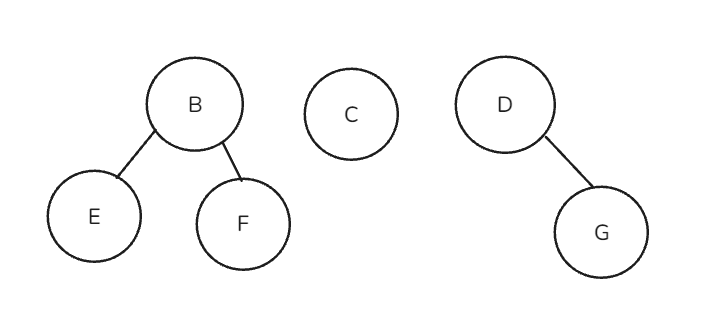
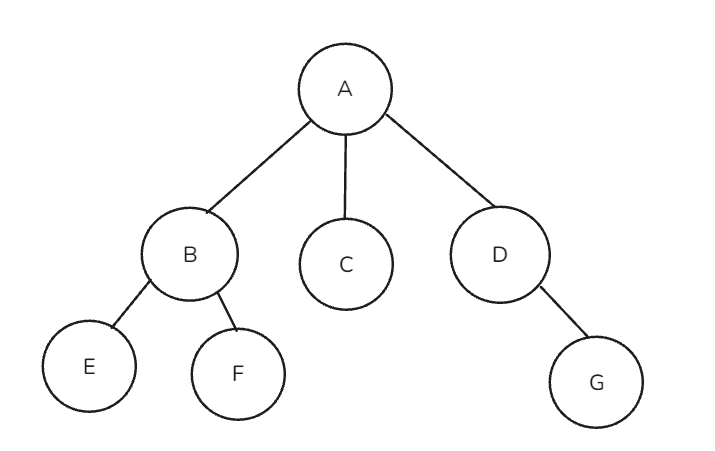
如果你把一棵樹的「根」拿掉,剩下的每個子樹,合起來就是一座林
反之,如果有好幾棵獨立的樹(彼此沒有任何節點重疊),把它們放在一起看,也可以稱為林

例如 :
https://ithelp.ithome.com.tw/upload/images/20260825/20183494hRhglfpfgI.png

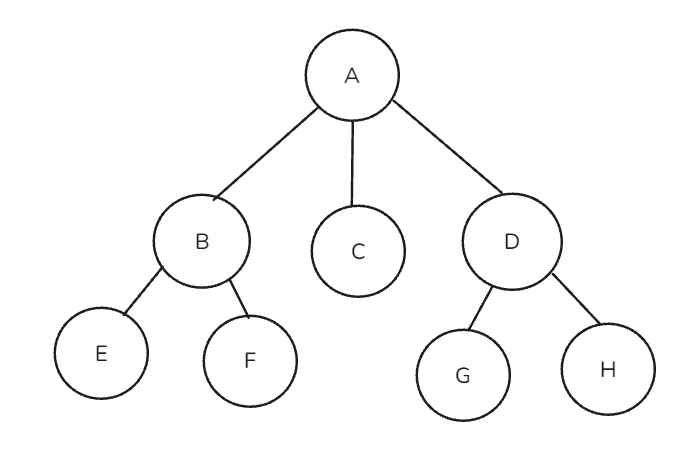
把根節點 A 拿掉之後,B C D三顆子樹合在一起就是林
https://ithelp.ithome.com.tw/upload/images/20260825/20183494WL8AJnXD0o.png

將樹轉換成二元樹

因為一般的樹可以有很多子節點,可是二元樹最多只能有兩個節點,所以要轉換
通常是用 左子右弟法(left-child right-sibling)

left-child right-sibling

Q : 給定以下的樹,將他轉為二元樹
https://ithelp.ithome.com.tw/upload/images/20260825/20183494xzRhMygivH.png

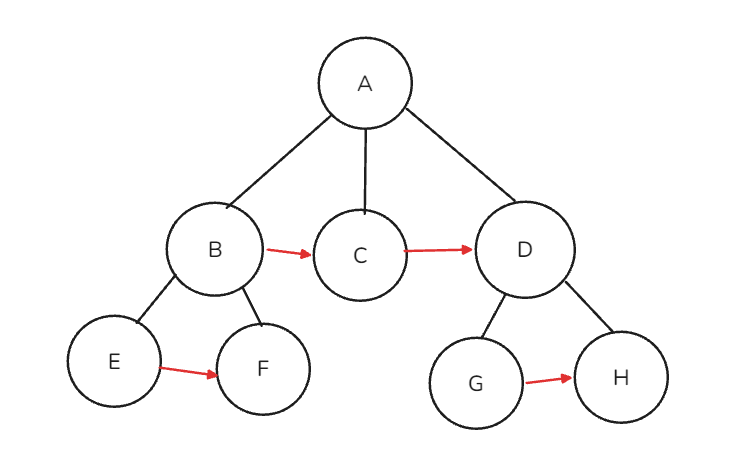
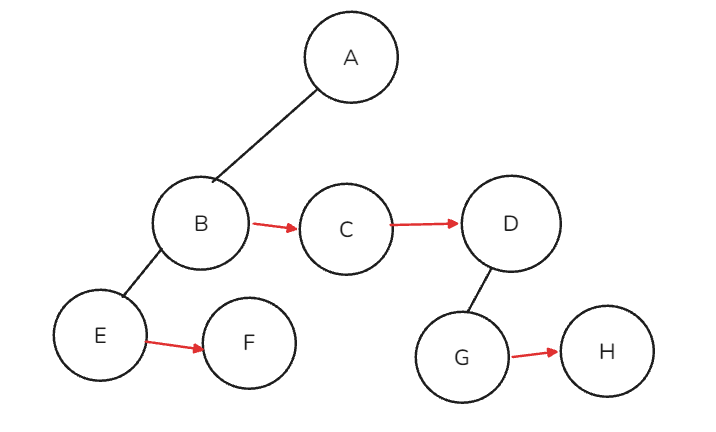
  1. Right siblings (加線)
  • C 是 B 的右兄弟
  • D 是 C 的右兄弟
  • F 是 E 的右兄弟
  • H 是 G 的右兄弟
    https://ithelp.ithome.com.tw/upload/images/20260825/20183494RUlXwt5wij.png
  1. left child (去線)
    留下左子(Left child)其餘的Parent - Child連線刪掉 如下圖
    https://ithelp.ithome.com.tw/upload/images/20260825/20183494n2FuHnDurf.png

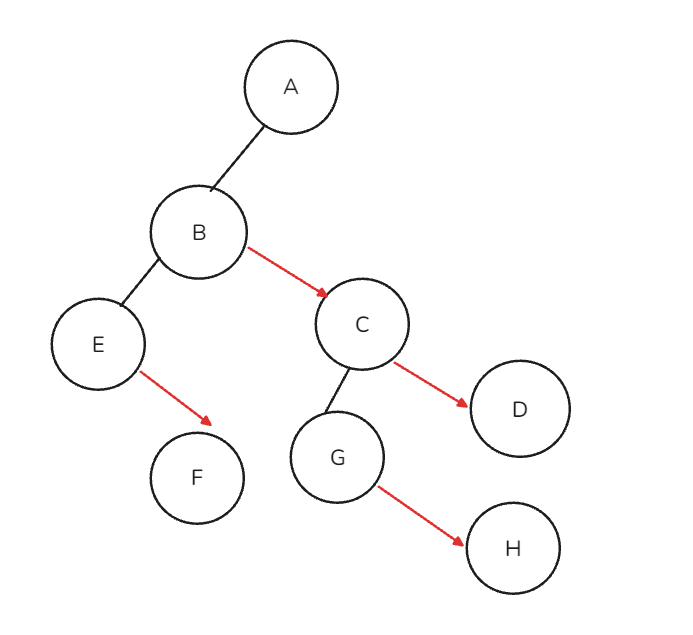
  2. 旋轉 (rotation)
    這邊純粹方便閱讀跟畫圖,不會改變節點之間的父子/兄弟關係,也可以不做
https://ithelp.ithome.com.tw/upload/images/20260825/20183494P2MR51yM2r.png

將林轉換成二元樹

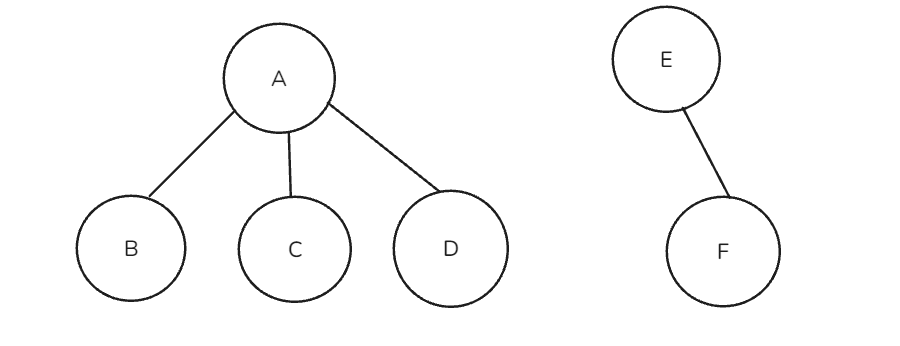
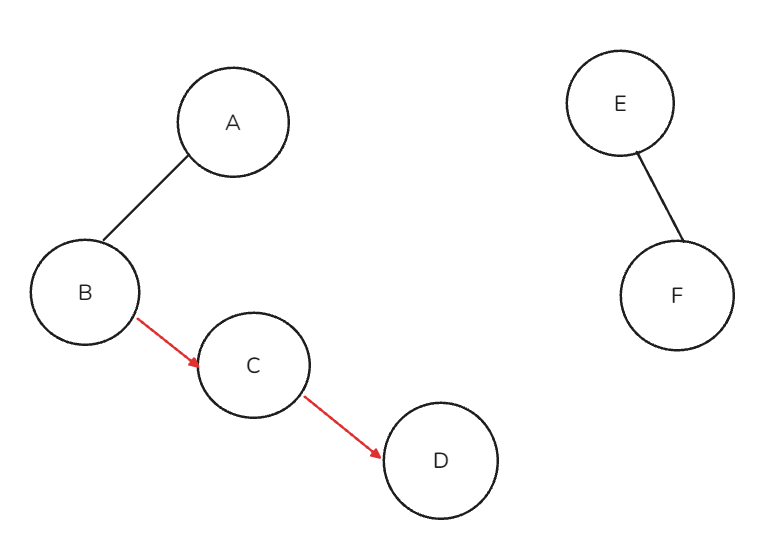
假設今天有一個林
https://ithelp.ithome.com.tw/upload/images/20260825/20183494toVoEsCnWN.png

  1. 先把各自的樹轉成二元樹
    https://ithelp.ithome.com.tw/upload/images/20260825/20183494iM8Mo2IxTA.png

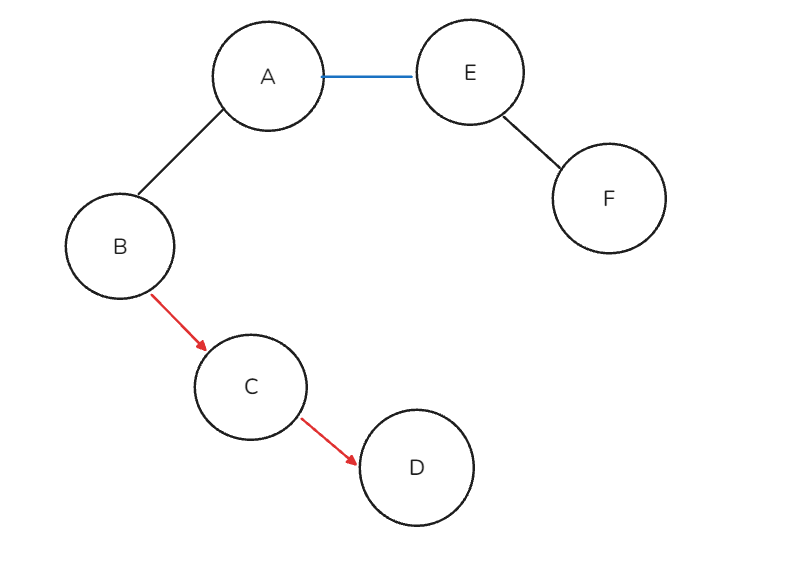
  2. 把兩棵樹的根接起來(A 的右邊接 E)
    https://ithelp.ithome.com.tw/upload/images/20260825/20183494VkBRiCEBdz.png

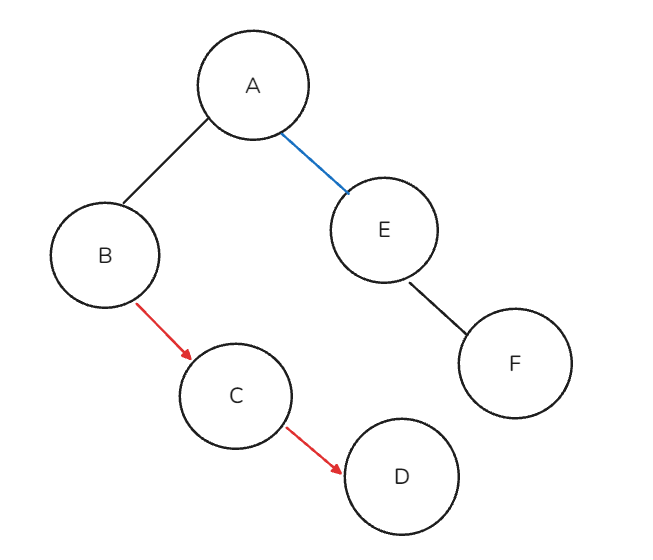
  3. 旋轉45度
    https://ithelp.ithome.com.tw/upload/images/20260825/20183494GOc2Ig03Tq.png

最後就變成一棵二元樹了


堆積 (Heap)

堆積是一種特殊的完整二元樹 (Full binary tree),也是一種常用的資料結構
常見應用有優先權佇列 (priority queue)和最大堆積(Max heap)跟最小堆積(Min heap)

heap 不需要像一般二元樹那樣用指標(left/right pointer)去串節點,而是可以直接用一維陣列來儲存

用陣列儲存時,節點之間的關係可以用索引算出來
如果某個節點儲存於索引 i 處:
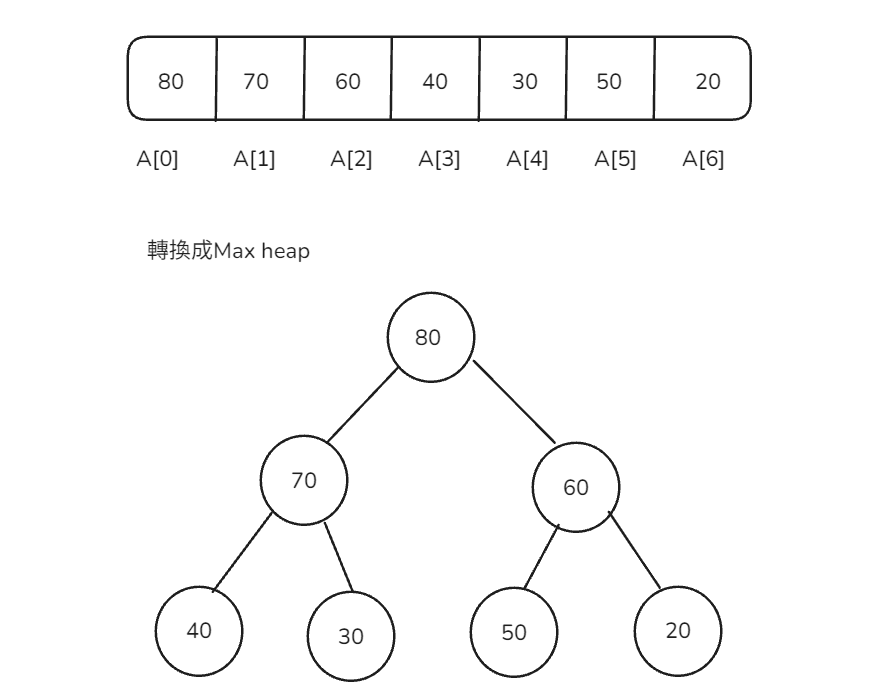
  • 節點 i 的父節點 : (i - 1) / 2
  • 節點 i 的左子節點 : 2 * i + 1
  • 節點 i 的右子節點 : 2 * i + 2

Max heap : 父節點 >= 子節點

https://ithelp.ithome.com.tw/upload/images/20260825/20183494E6FiBz15Ew.png

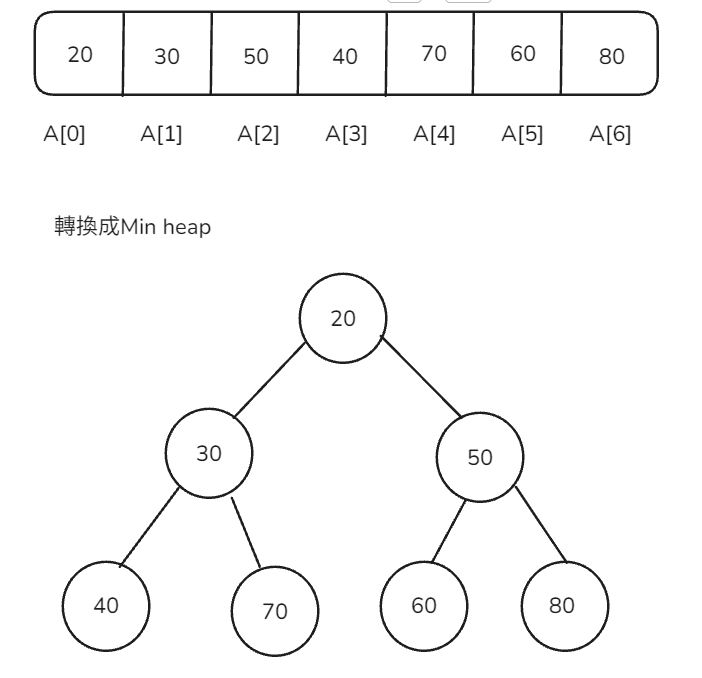
min heap : 父節點 <= 子節點

https://ithelp.ithome.com.tw/upload/images/20260825/20183494eTJ009y3co.png

程式碼實作

以下用陣列實作一個簡單的 Max-heap

插入(Insert / Sift Up)

新元素先加到陣列最後面
接著跟父節點比較,如果比父節點大就交換,直到滿足 heap 性質為止

#include <iostream>
#include <vector>
using namespace std;

class MaxHeap {
private:
    vector<int> heap;

    void siftUp(int i) {
        while (i > 0) {
            int parent = (i - 1) / 2;
            if (heap[i] <= heap[parent]) break;
            swap(heap[i], heap[parent]);
            i = parent;
        }
    }

public:
    void insert(int val) {
        heap.push_back(val);       // 先放到陣列最後面
        siftUp(heap.size() - 1);   // 再往上調整
    }

    void print() {
        for (int i = 0; i < heap.size(); i++) {
            cout << heap[i] << " ";
        }
        cout << endl;
    }
};

int main() {
    MaxHeap maxHeap;
    vector<int> values = {9, 5, 13, 1, 2, 3};

    for (int i = 0; i < values.size(); i++) {
        maxHeap.insert(values[i]);
        cout << "插入 " << values[i] << " 到max-heap: ";
        maxHeap.print();
    }

    return 0;
}

時間複雜度 : O(log n)


參考資料和書籍

  1. 資料結構初學指引 : 入門精要版(第四版)
  2. https://www.geeksforgeeks.org/dsa/left-child-right-sibling-representation-tree/
  3. https://notes.boshkuo.com/docs/C++/STL/priority_queue
  4. https://www.geeksforgeeks.org/dsa/introduction-to-max-heap-data-structure/

上一篇
Day 18 - 二元搜尋樹 (Binary Search Tree, BST)
下一篇
Day 20 - 圖狀結構(Graph)
系列文
從0開始的資料結構旅程!25
圖片
  熱門推薦
圖片
{{ item.channelVendor }} | {{ item.webinarstarted }} |
{{ formatDate(item.duration) }}
直播中

尚未有邦友留言

立即登入留言