

在過去兩天中,我們完成了後端 GOAP Agent 的雙 Goal 建模(Day 27),並搭建了強大的 SseProgressBroker 串流管線(Day 28)。
今天,我們將把戰場正式拉回前端 React + TypeScript 應用層!
我們的任務是:打造一個現代、優雅、具備即時思維鏈動態進度反饋的 Generative UI 儀表板頁面。
前端必須在接收到 SSE 串流時,無縫完成三件事:
status 與 plan 即時轉化為清晰的步驟勾選進度條。lenientParse 與 sanitizeSpec,在 JSON 串流傳輸過程中,讓儀表板從骨架屏(Skeleton)到指標卡、再到表格逐一長出來,徹底告別生硬的閃爍與整頁重繪。children 包含尚未抵達的子節點 Key,直接傳給 React 導致 Cannot read properties of undefined。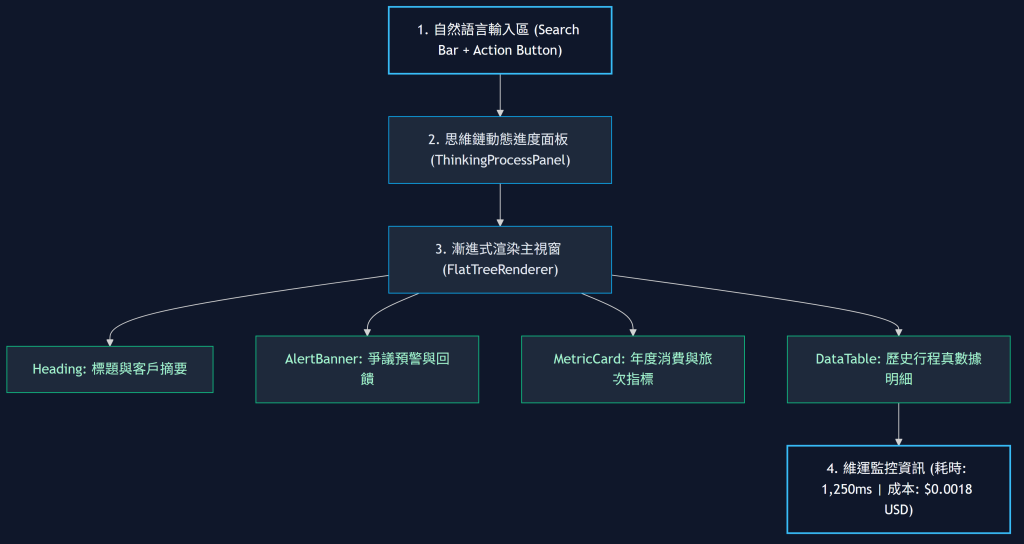
useDashboardStream 狀態機綁定前端的核心狀態機由以下變數驅動:
spec: 當前經過淨化後最完整的 DashboardSpec(可直接傳給 FlatTreeRenderer)。progress: 包含當前 Agent 階段(ANALYZING、RENDERING、COMPLETED)與步驟勾選清單。isStreaming: 布林值,用於控制按鈕 Disable 與微光動畫(Shimmer Effect)。在 json-render 中,我們不讓 LLM 寫 onClick={() => {...}},而是讓元件 Props 攜帶宣告式的事件描述:
{
  "type": "Button",
  "props": { "label": "重新整理", "action": { "type": "RELOAD_METRICS", "payload": { "id": 1001 } } }
}
前端透過 Context 提供 ActionProvider,當使用者點擊按鈕時,統一由 React 調度派發,實現 100% 安全的動態互動。
透過 Tailwind CSS 的 animate-pulse 與深色模式(Dark Mode)調色盤,在資料尚未抵達前優雅展示骨架屏,達到 Apple / Vercel 等級的精緻體驗。
以下實作完整的 React 主應用程式:DashboardApp.tsx。
// src/components/DashboardApp.tsx
import React, { useState } from 'react';
import { useDashboardStream } from '../hooks/useDashboardStream';
import { FlatTreeRenderer } from './renderer/FlatTreeRenderer';
import { useCatalogReconciliation } from './renderer/CatalogReconciler';
import { dashboardRegistry } from './dashboard/dashboardCatalog';
/**
* 智慧生成式儀表板全端主應用
*/
export const DashboardApp: React.FC = () => {
const [queryInput, setQueryInput] = useState("查詢客戶 1001 的年度消費與旅遊偏好");
const { spec, progress, isLoading, startStream } = useDashboardStream();
// 1. 前端啟動期 Catalog 契約自動對帳
const { isAligned, missingInFrontend } = useCatalogReconciliation(Object.keys(dashboardRegistry));
/**
* 發起生成請求
*/
const handleGenerate = (e: React.FormEvent) => {
e.preventDefault();
if (!queryInput.trim() || isLoading) return;
startStream(queryInput.trim());
};
return (
<div className="min-h-screen bg-slate-950 text-slate-100 flex flex-col items-center p-6 font-sans">
{/* 頂部 Header */}
<header className="w-full max-w-5xl mb-8 flex justify-between items-center border-b border-slate-800 pb-4">
<div>
<h1 className="text-2xl font-bold bg-gradient-to-r from-teal-400 to-blue-500 bg-clip-text text-transparent">
Antechinus Travel Generative Dashboard
</h1>
<p className="text-xs text-slate-400 mt-1">
Embabel GOAP Backend × json-render Streaming Frontend
</p>
</div>
{!isAligned && (
<span className="text-xs px-2.5 py-1 rounded bg-amber-500/20 text-amber-300 border border-amber-500/40">
⚠ Catalog 漂移: 缺少 [{missingInFrontend.join(', ')}]
</span>
)}
</header>
{/* 自然語言輸入區 */}
<section className="w-full max-w-5xl mb-8">
<form onSubmit={handleGenerate} className="flex gap-3">
<input
type="text"
value={queryInput}
onChange={(e) => setQueryInput(e.target.value)}
placeholder="輸入自然語言查詢需求,例如:列出近一年消費超過 10 萬的高價值常客..."
className="flex-1 bg-slate-900 border border-slate-700 rounded-xl px-4 py-3 text-sm focus:outline-none focus:border-teal-500 transition-colors shadow-inner"
disabled={isLoading}
/>
<button
type="submit"
disabled={isLoading || !queryInput.trim()}
className="bg-gradient-to-r from-teal-500 to-blue-600 hover:from-teal-400 hover:to-blue-500 text-white font-medium px-6 py-3 rounded-xl text-sm transition-all shadow-lg shadow-teal-500/20 disabled:opacity-50 disabled:cursor-not-allowed flex items-center gap-2"
>
{isLoading ? (
<>
<span className="w-4 h-4 border-2 border-white border-t-transparent rounded-full animate-spin"></span>
<span>規劃中...</span>
</>
) : (
<span>🚀 智慧生成</span>
)}
</button>
</form>
</section>
{/* Agent 即時思維鏈與進度面板 */}
{progress.phase !== 'IDLE' && (
<section className="w-full max-w-5xl mb-6 p-4 bg-slate-900/60 border border-slate-800 rounded-xl">
<div className="flex items-center justify-between text-xs font-semibold text-slate-300 mb-2">
<span className="flex items-center gap-2">
<span className={`w-2 h-2 rounded-full ${isLoading ? 'bg-teal-400 animate-ping' : 'bg-emerald-400'}`}></span>
<span>Agent 階段: {progress.phase}</span>
</span>
{progress.costUsd > 0 && (
<span className="text-slate-400">
預估費用: ${progress.costUsd.toFixed(5)} USD
</span>
)}
</div>
{/* 思維步驟清單 */}
{progress.steps.length > 0 && (
<div className="flex flex-wrap gap-2 mt-2">
{progress.st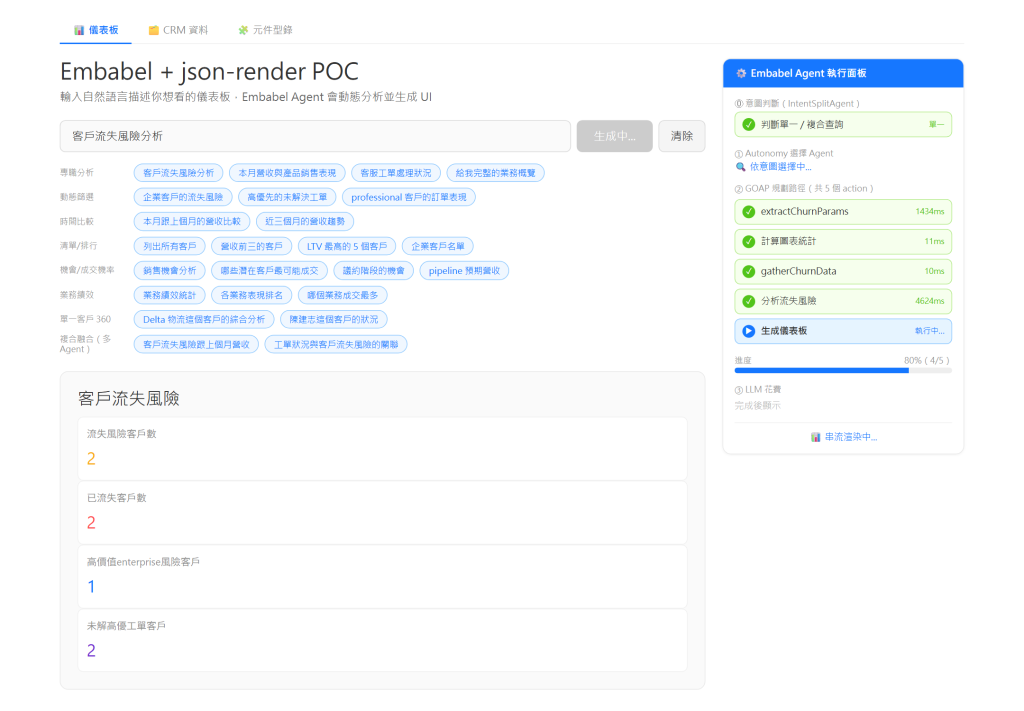eps.map((step, idx) => (
<span
key={idx}
className={`text-xs px-3 py-1 rounded-full flex items-center gap-1.5 ${
step.status === 'DONE'
? 'bg-emerald-950/60 border border-emerald-800 text-emerald-300'
: step.status === 'RUNNING'
? 'bg-teal-950/60 border border-teal-700 text-teal-300 animate-pulse'
: 'bg-slate-800 text-slate-400'
}`}
>
{step.status === 'DONE' && '✔'}
{step.status === 'RUNNING' && '⏳'}
<span>{step.name}</span>
</span>
))}
</div>
)}
</section>
)}
{/* 儀表板漸進渲染主視窗 */}
<main className="w-full max-w-5xl bg-slate-900/40 border border-slate-800/80 rounded-2xl p-6 min-h-[400px] shadow-2xl flex flex-col justify-center">
{spec ? (
<FlatTreeRenderer spec={spec} />
) : isLoading ? (
<div className="flex flex-col items-center justify-center gap-3 text-slate-500 py-16">
<div className="w-8 h-8 border-2 border-teal-500 border-t-transparent rounded-full animate-spin"></div>
<span className="text-sm">正在依據意圖建構儀表板規格 (Flat Spec)...</span>
</div>
) : (
<div className="text-center text-slate-500 py-16 text-sm">
請於上方輸入自然語言需求,系統將透過 Embabel + json-render 生成動態儀表板。
</div>
)}
</main>
</div>
);
};
renderNode 中沒有使用穩定唯一 key
<Component key={nodeKey} />)。text-slate-100、bg-slate-900),不要讓 LLM 生成隨機 CSS Hex 顏色。error SSE 事件,前端一直停留在 isLoading = true。fetch 配置 30 秒超時 AbortController,並在 catch 區塊強制執行 setIsLoading(false)。| 評估維度 | ❌ 傳統粗糙渲染 (Bad) | ✅ json-render 漸進渲染 (Good) |
|---|---|---|
| 等待反饋 | 只有單一 Loading 轉圈,不知道在幹嘛 | 即時呈現 Agent 思維步驟與進度標籤 |
| 生長體驗 | 8 秒後瞬間啪一聲彈出全部內容 | 隨著 Chunk 接收,卡片與表格漸進式滑入長出 |
| 容錯性 | 後端語法少一個括號直接全頁噴紅字 | lenientParse 自動補齊引號括號,保留可用部分 |
| 契約安全 | 前端遇到沒看過的 Tag 直接 Crash | 自動降級為 SmartFallbackComponent 標記 |
與 Day 25 同一次查詢、僅隔數百毫秒:spec 仍在串流(進度 80%、狀態「串流渲染中…」),但左側已經從單一標題長出四張指標卡——每收到一個完整的 element chunk 就多渲染一塊,永遠不會因為 JSON 還沒收完而白屏。
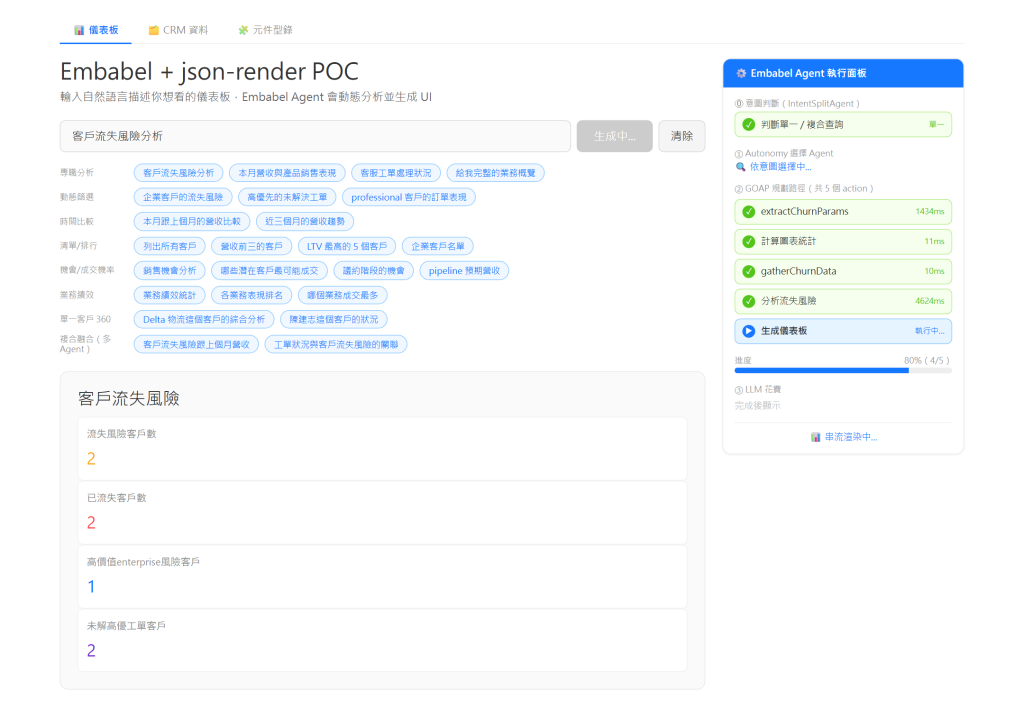
DashboardApp.tsx,結合 Tailwind CSS 打造現代深色風格介面。


 iThome鐵人賽
 看影片追技術