

在昨天(Day 26)的規格收斂中,我們將專案的邊界釘死在「3/5/3/1」原則下,並確立了前後端共用的 DashboardSpec 扁平契約。
今天,我們正式進入後端 Embabel Agent 的全面實作!我們的目標是:建立一個完整的 Spring AI + Embabel GOAP Agent,它能接收自然語言輸入,自主推導最佳行動路徑,呼叫 Java 查詢 CRM 旅程資料庫,利用 LLM 產生專業洞察,並在最後由純 Java 組裝出符合規格的 DashboardSpec。
今天我們將揭示 GOAP 最核心的工程護欄——為什麼一個健全的 Agent 必須設計「雙 Goal(成功目標 vs 安全降級目標)」?
@AchievesGoal(例如 DashboardSpec),當遇到「查無此客戶」或「外部 API 嚴重逾時」時,A* 演算法在狀態空間中找不到任何可以抵達該 Goal 的路徑,導致 Agent 拋出 NoPlanFoundException 或陷入無限重新規劃的死循環。DashboardSpec)與一個安全退出降級 Goal(EscalationTicket)。Map<String, Object> 破壞強型別推導:
record 中。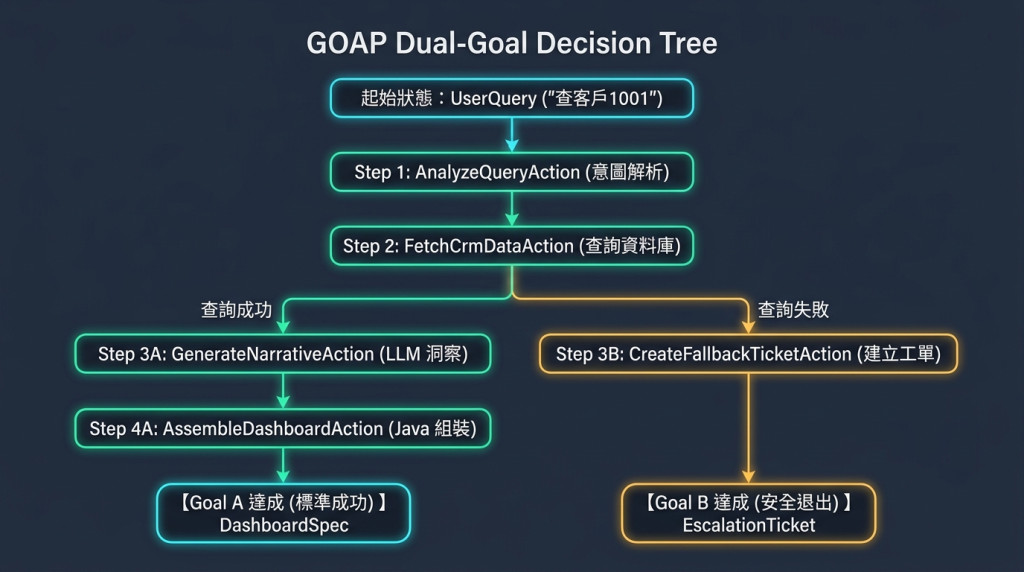
GenerateNarrativeAction(LLM 洞察)$\rightarrow$ AssembleDashboardAction(Java 組裝)$\rightarrow$ 達成 Goal A: DashboardSpec。CreateFallbackTicketAction(建立人工工單)$\rightarrow$ 達成 Goal B: EscalationTicket(安全退出)。每個 Action 都是一個具備明確工程語義的 Java 方法:
CustomerMetrics)。Blackboard 上必須存在該物件,Action 才能被啟用。InsightNarrative)。執行完畢後會自動寫入 Blackboard。@Cost(1),LLM 調用標註 @Cost(15)。在 GenerateNarrativeAction 中,我們使用 Embabel 的 ai.withDefaultLlm().createObject(prompt, TargetRecord.class),底層直接透過 Spring AI 的 JSON Schema Mode 強制模型輸出符合 Record 欄位的結構化資料,徹底告別傳統的正則表達式(Regex)提取字串。
@AchievesGoal(description = "正常生成客戶視覺化儀表板") $\rightarrow$ 回傳 DashboardSpec
@AchievesGoal(description = "查無資料或異常時建立人工工單") $\rightarrow$ 回傳 EscalationTicket
以下實作完整的後端 TravelDashboardAgent 及其領域 Record。
package com.antechinus.travel.domain;

import com.antechinus.travel.spec.DashboardSpec;
import java.time.Instant;
import java.util.List;

// 1. 輸入物件
public record UserQuery(String rawQuery) {}

// 2. 中間狀態物件
public record ParsedQuery(Long customerId, String queryType) {}

public record CustomerMetrics(
    Long customerId,
    String customerName,
    double totalSpend,
    int tripCount,
    List<TripRecord> trips,
    boolean exists
) {
    public record TripRecord(String destination, String date, double amount) {}
}

public record InsightNarrative(
    String headline,
    String executiveSummary,
    String riskWarning
) {}

// 3. 雙 Goal 定義
// Goal A: DashboardSpec (已在 Day 22 定義)
// Goal B: 安全退出工單
public record EscalationTicket(
    String ticketId,
    String reason,
    String fallbackMessage,
    Instant createdAt
) {}
package com.antechinus.travel.agent;

import com.antechinus.travel.domain.*;
import com.antechinus.travel.spec.DashboardSpec;
import com.antechinus.travel.spec.DashboardSpecBuilder;
import com.embabel.agent.annotation.AchievesGoal;
import com.embabel.agent.annotation.Action;
import com.embabel.agent.annotation.Agent;
import com.embabel.agent.annotation.Cost;
import com.embabel.agent.api.Ai;
import org.springframework.stereotype.Component;

import java.time.Instant;
import java.util.List;
import java.util.Map;

/**
 * 旅遊儀表板生成 Agent
 * 採用 GOAP 規劃,支援雙 Goal(正常儀表板 vs 安全降級工單)
 */
@Component
@Agent(description = "旅遊客戶數據分析與視覺化儀表板生成 Agent")
public class TravelDashboardAgent {

    /**
     * Action 1: 自然語言意圖解析
     */
    @Action
    @Cost(5)
    public ParsedQuery parseQuery(UserQuery query, Ai ai) {
        String prompt = "請從使用者查詢中提取客戶 ID (若無則預設為 1001) 與意圖類型:" + query.rawQuery();
        return ai.withDefaultLlm().createObject(prompt, ParsedQuery.class);
    }

    /**
     * Action 2: 查詢 CRM 真實旅程資料庫 (純 Java 確定性服務)
     */
    @Action
    @Cost(1)
    public CustomerMetrics fetchCrmData(ParsedQuery parsed) {
        if (parsed.customerId() == null || parsed.customerId() <= 0) {
            return new CustomerMetrics(0L, "未知客戶", 0, 0, List.of(), false);
        }

        // 模擬 CRM 資料庫查詢
        return new CustomerMetrics(
            parsed.customerId(),
            "陳大文",
            143000.0,
            4,
            List.of(
                new CustomerMetrics.TripRecord("日本東京五日遊", "2026-03-12", 45000),
                new CustomerMetrics.TripRecord("法國巴黎深度遊", "2026-06-20", 98000)
            ),
            true
        );
    }

    /**
     * Action 3A: 生成專業洞察文案 (LLM 創意敘事)
     */
    @Action
    @Cost(15)
    public InsightNarrative generateNarrative(CustomerMetrics metrics, Ai ai) {
        if (!metrics.exists()) {
            return null; // 若查無資料,此路徑不通
        }

        String prompt = String.format(
            "客戶姓名: %s,近一年總消費: %.0f,總旅次: %d 次。請產出一段引人入勝的總結標題 (headline)、簡要業務摘要 (executiveSummary) 與潛在預警 (riskWarning)。",
            metrics.customerName(), metrics.totalSpend(), metrics.tripCount()
        );

        return ai.withDefaultLlm().createObject(prompt, InsightNarrative.class);
    }

    /**
     * Action 4A (Goal A): 純 Java 組裝最終 DashboardSpec
     */
    @AchievesGoal(description = "成功產出標準 JSON UI Spec 儀表板")
    @Action
    @Cost(1)
    public DashboardSpec assembleDashboard(CustomerMetrics metrics, InsightNarrative narrative) {
        DashboardSpecBuilder builder = DashboardSpecBuilder.create("root_stack");

        builder.addElement("root_stack", "Stack", Map.of("direction", "vertical", "gap", 6),
                List.of("elem_head", "elem_alert", "elem_metrics", "elem_table"));

        builder.addLeaf("elem_head", "Heading", Map.of("text", narrative.headline(), "level", "h2"));
        builder.addLeaf("elem_alert", "AlertBanner", Map.of("severity", "info", "message", narrative.executiveSummary()));

        builder.addElement("elem_metrics", "Stack", Map.of("direction", "horizontal", "gap", 4),
                List.of("card_spend", "card_trips"));

        builder.addLeaf("card_spend", "MetricCard", Map.of(
                "title", "近一年總消費",
                "value", "NT$ " + String.format("%,.0f", metrics.totalSpend()),
                "trend", "up",
                "change", "+18%"
        ));

        builder.addLeaf("card_trips", "MetricCard", Map.of(
                "title", "累積旅程數",
                "value", metrics.tripCount() + " 次"
        ));

        // 注入真實 Table Rows
        List<Map<String, Object>> rows = metrics.trips().stream()
                .map(t -> Map.<String, Object>of(
                        "destination", t.destination(),
                        "date", t.date(),
                        "amount", "NT$ " + String.format("%,.0f", t.amount())
                )).toList();

        builder.addLeaf("elem_table", "DataTable", Map.of(
                "columns", List.of(
                        Map.of("key", "destination", "label", "目的地"),
                        Map.of("key", "date", "label", "出發日期"),
                        Map.of("key", "amount", "label", "行程金額")
                ),
                "rows", rows
        ));

        return builder.build();
    }

    /**
     * Action 3B (Goal B - 安全退出): 查無資料時建立降級工單
     */
    @AchievesGoal(description = "查無客戶資料時的安全退出降級機制")
    @Action
    @Cost(2)
    public EscalationTicket createFallbackTicket(CustomerMetrics metrics) {
        if (metrics.exists()) {
            return null; // 若客戶存在,此降級路徑不觸發
        }

        return new EscalationTicket(
            "TICK-ERR-" + System.currentTimeMillis(),
            "CRM 系統中查無該客戶編號之消費記錄",
            "抱歉,系統找不到您指定的客戶資訊,已為您建立人工查驗工單。",
            Instant.now()
        );
    }
}
DashboardSpec 的路徑,系統拋出 PlannerStuckException。EscalationTicket 作為第二個 @AchievesGoal,讓系統在例外時優雅退出。assembleDashboard 裡又寫了一次 ai.createObject(...),造成前端 Table 資料被二度改寫竄改。| 評估維度 | ❌ 傳統單一 Agent 寫法 (Bad) | ✅ Embabel 雙 Goal GOAP 架構 (Good) |
|---|---|---|
| 目標可達性 | 只有單一成功目標,異常時直接拋例外 | 具備「成功產出」與「降級工單」雙 Goal,100% 確保可達 |
| 資料流動 | 透過全域動態 Map 傳參,隱蔽且易出錯 | 透過 Java 21 Record 方法簽章明確表達前置與後置條件 |
| 維護性 | 數百行業務程式碼全部混在單一類別中 | Action 高度原子化,每個 Action 可獨立單元測試 |
| Token 效率 | 將所有資料重複餵給 LLM 產出 JSON | 僅有純敘事 Action 調用 LLM,節省 80% 以上 Token |
「客戶流失風險分析」執行完成後的畫面:右側面板記錄了完整的 GOAP 規劃路徑——extractChurnParams → 計算圖表統計 → gatherChurnData → 分析流失風險 → 生成儀表板 共 5 個 action(各自帶耗時,確定性步驟只需個位數毫秒),最終 action 輸出的 DashboardSpec 直接被前端渲染成左側的儀表板。
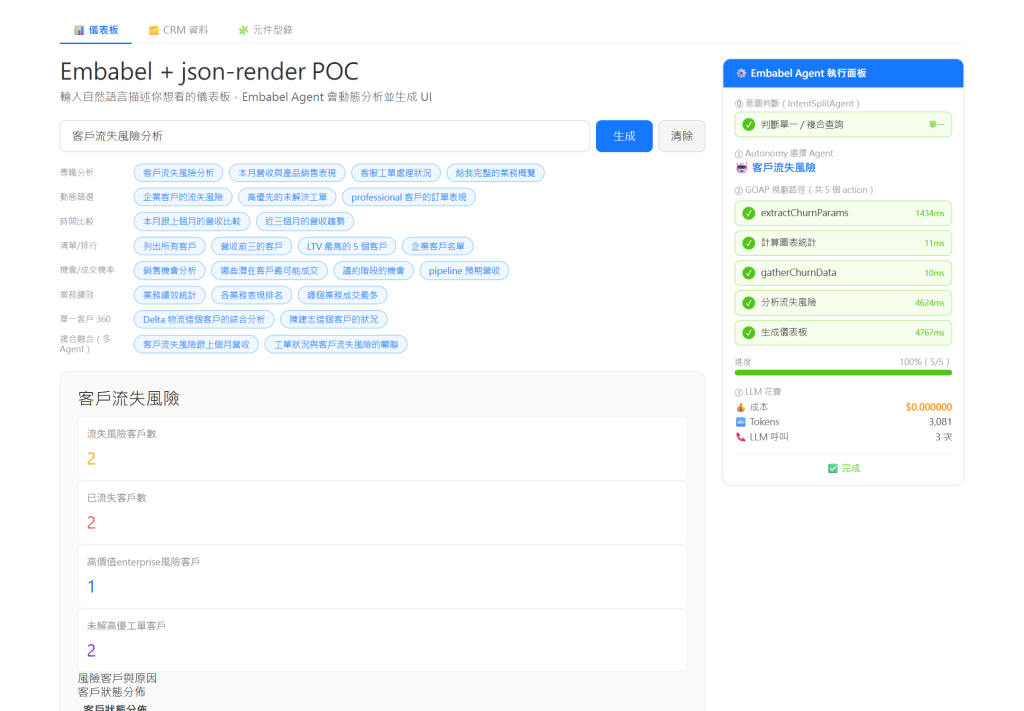
customerId = 1001,驗證系統是否順利抵達 DashboardSpec Goal。customerId = -1,驗證系統是否自動走入 EscalationTicket 安全降級 Goal。


 iThome鐵人賽
 看影片追技術