
第 14 章讓玩家完成任務並取得 Gold。第 16 章讓玩家取得 WindDash 能力。現在要把這兩件事接起來:玩家用任務獎勵購買能力升級。
這一章的商店不是 Roblox 付費商城,也不是 Developer Product。它是遊戲內 progression shop:玩家在遊戲裡賺到貨幣,再用貨幣解鎖或強化能力。
本章的核心問題是:按鈕可以在 client,但購買結果必須由 server 決定。玩家按下「Buy」只是在提出請求,server 要檢查價格、Gold、升級是否存在、是否已經買過,然後才扣款與套用升級。
完成本章後,你會得到:
ShopConfig ModuleScript。PurchaseUpgrade RemoteEvent。ShopUpdate RemoteEvent。ShopService。AbilityService 可以讀取升級狀態,調整 WindDash 效果。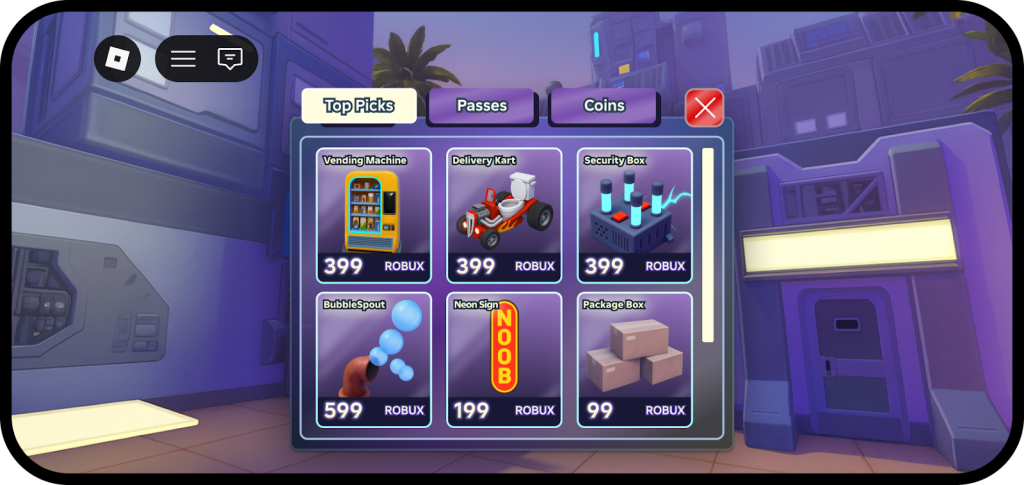
圖 17-1 商店 UI 必須清楚呈現商品、價格與效果;購買判定和升級狀態則由 server 驗證。
本章使用下列 Roblox 官方文件作為 context:
本章採用這些文件中的幾個原則:
本章建立的是使用遊戲內 Gold 的 progression shop。Roblox 官方文件中的 Shop 則會呈現 Pass 與符合資格的 Developer Product,並使用平台購買流程。兩者名稱相近,但交易責任完全不同:
| 項目 | 本章 Gold 商店 | Roblox 官方 Shop |
|---|---|---|
| 貨幣 | 遊戲內 Gold | Robux 或符合資格的平台付款方式 |
| 商品 | WindDash 升級 | Pass、Developer Product 等 |
| 交易入口 | PurchaseUpgrade |
Roblox 平台購買流程 |
| 交付 | ShopService |
ownership 或 server-side receipt flow |
| 本章是否實作 | 是 | 否,留到第 33–34 章 |
因此本章不使用 MarketplaceService、ProcessReceipt,也不修改 ExperienceShop 或 Creator Hub 的 Monetization 設定。第八部會從第 32 章開始完整處理平台商品、交易交付、分析與廣告。
官方升級範例使用 RemoteFunction 讓 client 同步取得購買結果。本書前面已經用 QuestUpdate、AbilityUpdate 建立了 RemoteEvent update pattern,所以本章會用兩個 RemoteEvent:
PurchaseUpgrade: client -> server
ShopUpdate: server -> client
這樣做能保持本書架構一致,也能避免 UI script 因等待 server 回傳而卡住。
玩家完成 Guide 的水晶任務後得到 25 Gold。如果之後任務或收集物讓玩家累積更多 Gold,就需要一個消耗 Gold 的地方。最自然的第一個消耗點,就是升級第 16 章剛建立的 WindDash。
本章先做兩個一次性升級:
DashCooldown1
Cost = 40 Gold
Effect = WindDash cooldown from 6.0 to 4.5 seconds

DashSpeed1
Cost = 60 Gold
Effect = WindDash speed from 28 to 34
這兩個升級故意很小。現在的目標不是做龐大的技能樹,而是建立一條可以驗證的商店管線。
Button Activated
-> PurchaseUpgrade:FireServer(upgradeId)
-> ShopService validates
-> deduct leaderstats.Gold
-> set player attribute
-> ShopUpdate:FireClient(...)
請 Assistant 建立最小可用商店與升級流程。
【Ch17 主任務|建立升級商店】
我們要繼續開發 Roblox Studio 專案「AI Adventure Island」。

現有背景:
- 玩家已經有 leaderstats.Gold。
- 第 16 章建立了 WindCharm 與 WindDash。
- ReplicatedStorage.Remotes 已經存在。
- StarterGui.AdventureHUD 已經存在。
- ServerScriptService.AbilityService 負責處理 WindDash。
- 目前不要加入 DataStore;這會留到第 18 章。
- 不要加入 Roblox Marketplace、Developer Products、Robux 購買或任何真實貨幣營利功能。

請建立第一套遊戲內商店與升級系統:
1. 在 ReplicatedStorage 建立名為 ShopConfig 的 ModuleScript。
2. ShopConfig 應定義兩個一次性升級:
   - DashCooldown1:
     - Cost = 40
     - AttributeName = "WindDashCooldownLevel"
     - AttributeValue = 1
     - DisplayName = "風之衝刺冷卻"
     - Description = "將 WindDash cooldown 從 6.0 秒縮短為 4.5 秒。"
   - DashSpeed1:
     - Cost = 60
     - AttributeName = "WindDashSpeedLevel"
     - AttributeValue = 1
     - DisplayName = "風之衝刺速度"
     - Description = "將 WindDash 速度從 28 提高到 34。"
3. 在 ReplicatedStorage.Remotes 建立名為 PurchaseUpgrade 的 RemoteEvent。
4. 在 ReplicatedStorage.Remotes 建立名為 ShopUpdate 的 RemoteEvent。
5. 建立 ServerScriptService.ShopService。
6. ShopService 必須在 server 驗證:
   - upgradeId 是 string
   - ShopConfig 中存在這個 upgradeId
   - 玩家擁有 leaderstats.Gold
   - 玩家有足夠的 Gold
   - 玩家尚未購買過這個一次性升級
7. 購買成功時:
   - 從 leaderstats.Gold 扣除 Cost
   - 根據 ShopConfig.AttributeName 與 ShopConfig.AttributeValue 設定玩家 attribute
   - 透過 ShopUpdate:FireClient 傳送成功狀態、upgradeId、剩餘 Gold 與訊息
8. 購買失敗時:
   - 不要扣除 Gold
   - 透過 ShopUpdate:FireClient 傳送失敗原因與訊息
9. 更新 ServerScriptService.AbilityService,讓 WindDash 使用以下數值:
   - 玩家 WindDashCooldownLevel 為 1 時,cooldown 設為 4.5
   - 玩家 WindDashSpeedLevel 為 1 時,速度設為 34
   - 否則沿用第 16 章的原始數值
10. 在 StarterGui.AdventureHUD 裡建立最小可用的 ShopPanel:
   - BuyDashCooldownButton
   - BuyDashSpeedButton
   - ShopStatusLabel
11. 新增或更新 LocalScript,讓兩個按鈕分別傳送:
   - PurchaseUpgrade:FireServer("DashCooldown1")
   - PurchaseUpgrade:FireServer("DashSpeed1")
12. client 不得傳送價格、等級、速度、cooldown 或 Gold 數量。

請維持小型 prototype 的規模。目前不要加入 DataStore、可捲動商店頁面、多種貨幣或升級樹。
這個 prompt 對商店很重要。你不是只要求 Assistant 「做一個商店」,而是指定 server 要驗證哪些事情,以及 client 不能傳哪些資料。
尤其這句不能省:
client 不得傳送價格、等級、速度、cooldown 或 Gold 數量。
client 只傳 upgradeId。其他所有價格與效果都由 server 從 ShopConfig 讀取。
Assistant 可能會建立這樣的結構:
ReplicatedStorage
├── ShopConfig (ModuleScript)
└── Remotes
    ├── PurchaseUpgrade (RemoteEvent)
    └── ShopUpdate (RemoteEvent)

ServerScriptService
├── AbilityService
└── ShopService

StarterGui
└── AdventureHUD
    └── ShopPanel
        ├── BuyDashCooldownButton
        ├── BuyDashSpeedButton
        └── ShopStatusLabel
ShopConfig 可能長得像這樣:
local ShopConfig = {}

ShopConfig.Upgrades = {
	DashCooldown1 = {
		Cost = 40,
		AttributeName = "WindDashCooldownLevel",
		AttributeValue = 1,
		DisplayName = "Wind Dash Cooldown",
		Description = "Reduce WindDash cooldown from 6.0 to 4.5 seconds.",
	},
	DashSpeed1 = {
		Cost = 60,
		AttributeName = "WindDashSpeedLevel",
		AttributeValue = 1,
		DisplayName = "Wind Dash Speed",
		Description = "Increase WindDash speed from 28 to 34.",
	},
}

return ShopConfig
這份 config 同時給 server 和 client 讀取是可以的,因為價格與描述不是秘密。重點是:就算 client 讀得到,也不能由 client 決定購買是否成功。
ShopService 的核心流程可能像這樣:
local ReplicatedStorage = game:GetService("ReplicatedStorage")

local remotes = ReplicatedStorage:WaitForChild("Remotes")
local purchaseUpgrade = remotes:WaitForChild("PurchaseUpgrade")
local shopUpdate = remotes:WaitForChild("ShopUpdate")

local ShopConfig = require(ReplicatedStorage:WaitForChild("ShopConfig"))

local function sendShopUpdate(player, success, upgradeId, message, remainingGold)
	shopUpdate:FireClient(player, {
		success = success,
		upgradeId = upgradeId,
		message = message,
		remainingGold = remainingGold,
	})
end

local function getGoldValue(player)
	local leaderstats = player:FindFirstChild("leaderstats")
	if not leaderstats then
		return nil
	end

	return leaderstats:FindFirstChild("Gold")
end

local function hasPurchased(player, upgrade)
	return player:GetAttribute(upgrade.AttributeName) == upgrade.AttributeValue
end

local function purchase(player, upgradeId)
	if typeof(upgradeId) ~= "string" then
		sendShopUpdate(player, false, nil, "Invalid upgrade request.", nil)
		return
	end

	local upgrade = ShopConfig.Upgrades[upgradeId]
	if not upgrade then
		sendShopUpdate(player, false, upgradeId, "Upgrade does not exist.", nil)
		return
	end

	if hasPurchased(player, upgrade) then
		sendShopUpdate(player, false, upgradeId, "Already purchased.", nil)
		return
	end

	local gold = getGoldValue(player)
	if not gold then
		sendShopUpdate(player, false, upgradeId, "Gold stat is missing.", nil)
		return
	end

	if gold.Value < upgrade.Cost then
		sendShopUpdate(player, false, upgradeId, "Not enough Gold.", gold.Value)
		return
	end

	gold.Value -= upgrade.Cost
	player:SetAttribute(upgrade.AttributeName, upgrade.AttributeValue)

	sendShopUpdate(player, true, upgradeId, "Purchased " .. upgrade.DisplayName .. ".", gold.Value)
end

purchaseUpgrade.OnServerEvent:Connect(purchase)
這段程式的重點是順序:
upgradeId 型別。不要先扣款再檢查,也不要讓 client 告訴 server 價格。
AbilityService 需要讀取升級狀態。第 16 章原本有:
local WIND_DASH_COOLDOWN = 6
local WIND_DASH_WALK_SPEED = 28
本章可以改成 helper:
local function getWindDashCooldown(player)
	if player:GetAttribute("WindDashCooldownLevel") == 1 then
		return 4.5
	end

	return 6
end

local function getWindDashWalkSpeed(player)
	if player:GetAttribute("WindDashSpeedLevel") == 1 then
		return 34
	end

	return 28
end
然後在使用能力時改成:
local cooldown = getWindDashCooldown(player)
local dashSpeed = getWindDashWalkSpeed(player)
這樣 ShopService 不需要 require AbilityService,AbilityService 也不需要 require ShopService。兩者透過 player attribute 交接狀態。
client UI 則只送出 upgrade id:
local ReplicatedStorage = game:GetService("ReplicatedStorage")

local remotes = ReplicatedStorage:WaitForChild("Remotes")
local purchaseUpgrade = remotes:WaitForChild("PurchaseUpgrade")
local shopUpdate = remotes:WaitForChild("ShopUpdate")

local shopPanel = script.Parent:WaitForChild("ShopPanel")
local cooldownButton = shopPanel:WaitForChild("BuyDashCooldownButton")
local speedButton = shopPanel:WaitForChild("BuyDashSpeedButton")
local statusLabel = shopPanel:WaitForChild("ShopStatusLabel")

cooldownButton.Activated:Connect(function()
	purchaseUpgrade:FireServer("DashCooldown1")
end)

speedButton.Activated:Connect(function()
	purchaseUpgrade:FireServer("DashSpeed1")
end)

shopUpdate.OnClientEvent:Connect(function(result)
	statusLabel.Text = result.message
end)
這段 client code 很短,這是好事。商店 UI 不應該塞滿價格計算、扣款邏輯、升級狀態判斷。
ShopConfig 是本章最重要的整理點。
如果不用 config,Assistant 很可能把資料寫成這樣:
Button text says 40 Gold
LocalScript checks 40
ShopService checks 40
AbilityService knows cooldown becomes 4.5
這會造成未來調整價格時要改很多地方。只要有一個地方漏改,UI 顯示、server 扣款和實際效果就會不一致。
集中成 ShopConfig 後,價格與效果只有一份來源:
ShopConfig.Upgrades.DashCooldown1.Cost
TextButton 是玩家觸發購買的 UI。它可以處理 click、tap 和 gamepad UI selection activation。
本章用 Activated:
button.Activated:Connect(function()
	purchaseUpgrade:FireServer("DashCooldown1")
end)
Activated 是 UI 入口,不是購買完成。按鈕被按下,只代表玩家提出購買請求。
本章用兩個 RemoteEvent:
PurchaseUpgrade
ShopUpdate
PurchaseUpgrade 是 client -> server:
purchaseUpgrade:FireServer("DashCooldown1")
ShopUpdate 是 server -> client:
shopUpdate:FireClient(player, result)
官方升級範例使用 RemoteFunction,那也是合理選擇。RemoteFunction 的優點是 client 可以直接拿到回傳值;缺點是 client script 會等待 server 回覆。本書目前多數系統採用 RemoteEvent request / update pattern,所以本章沿用它,讓讀者看到一致的資料流。
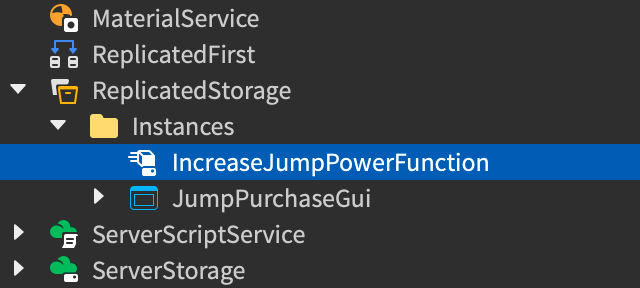
圖 17-2 RemoteFunction 必須放在 client 與 server 都能存取的位置。無論使用 RemoteFunction 或 RemoteEvent,價格與升級結果都要由 server 驗證。
商店系統最容易犯的錯,是相信 client。
錯誤設計:
purchaseUpgrade:FireServer("DashCooldown1", 40, 4.5)
server 如果相信第二個與第三個參數,就等於讓 client 決定價格與效果。
正確設計:
purchaseUpgrade:FireServer("DashCooldown1")
server 自己查:
local upgrade = ShopConfig.Upgrades[upgradeId]
client 只傳 id。id 本身也要驗證,必須存在於 ShopConfig.Upgrades。
第 14 章已建立 leaderstats.Gold。本章直接沿用它,先不引入新的貨幣系統。
扣 Gold 的順序必須清楚:
if gold.Value < upgrade.Cost then
	return
end

gold.Value -= upgrade.Cost
player:SetAttribute(upgrade.AttributeName, upgrade.AttributeValue)
先確認足夠,再扣款,再套用升級。不要把扣款放在 client,也不要讓 UI 顯示的 Gold 當作實際 Gold。
本章用 player attribute 暫存升級狀態:
player:SetAttribute("WindDashCooldownLevel", 1)
這很適合 prototype。它讓 AbilityService 可以讀取目前玩家升級,而不需要和 ShopService 互相 require。
第 18 章會把這些狀態接到 DataStore。現在先不要混進存檔,否則很難判斷商店 bug 是來自購買流程還是資料保存流程。
本章至少做四輪測試。
第一輪:Gold 不足
Gold 小於 40。BuyDashCooldownButton。Gold 不應改變。WindDashCooldownLevel = 1。第二輪:Gold 足夠
Gold 設成 40 或更多。BuyDashCooldownButton。Gold 應扣除 40。WindDashCooldownLevel = 1。第三輪:重複購買
DashCooldown1 後再次按同一按鈕。Gold 不應再次扣除。第四輪:能力效果
DashCooldown1。WindDash。DashSpeed1。WindDash。測試時切換到 Server 檢查:
ShopService 是否在 server。Gold 是否由 server 扣除。如果 client 傳了價格或效果,使用:
【Ch17 修正 1|移除 Client 商品資料】
商店 LocalScript 目前會將價格、cooldown、速度或 Gold 數量傳送到 server。

預期結果:
- client 只能傳送 PurchaseUpgrade:FireServer(upgradeId)。
- ShopService 應該從 ReplicatedStorage.ShopConfig 讀取價格與效果。
- server 不得信任 client 傳入的價格或效果數值。

請更新商店請求流程。
不要修改 upgrade id 或 UI 按鈕名稱。
如果 Gold 不足仍然能購買,使用:
【Ch17 修正 2|玩家在 Gold 不足時仍然可以購買升級】
玩家在 Gold 不足時仍然可以購買升級。

預期結果:
- ShopService 在 server 檢查 leaderstats.Gold。
- 如果 Gold.Value < ShopConfig.Upgrades[upgradeId].Cost,購買應該失敗。
- Gold 不應改變。
- 不應設定任何玩家升級 attribute。

請只檢查 ServerScriptService.ShopService 與 ShopConfig。
如果同一升級可以重複買,使用:
【Ch17 修正 3|阻止重複購買升級】
同一個一次性升級目前可以重複購買。

預期結果:
- DashCooldown1 與 DashSpeed1 都是一次性升級。
- 如果玩家的 attribute 已經等於升級的 AttributeValue,ShopService 應該拒絕購買。
- 不應再次扣除 Gold。

請在 ShopService 加入防止重複購買的檢查。
如果購買成功但 WindDash 沒有變強,使用:
【Ch17 修正 4|套用 WindDash 升級】
商店購買成功,但 WindDash 仍然使用舊的 cooldown 或速度。

預期結果:
- AbilityService 應該讀取以下玩家 attributes:
  - WindDashCooldownLevel
  - WindDashSpeedLevel
- WindDashCooldownLevel 為 1 時,cooldown 應該是 4.5。
- WindDashSpeedLevel 為 1 時,Dash 速度應該是 34。

請只更新 AbilityService。
不要讓 ShopService require AbilityService。
使用玩家 attributes 作為兩個 service 之間的界線。
完成本章後,Explorer 應接近這樣:
ReplicatedStorage
├── ShopConfig
└── Remotes
    ├── RequestGuideHint
    ├── QuestUpdate
    ├── RequestAbility
    ├── AbilityUpdate
    ├── PurchaseUpgrade
    └── ShopUpdate

StarterGui
└── AdventureHUD
    ├── DashButton
    ├── DashCooldownBar
    └── ShopPanel
        ├── BuyDashCooldownButton
        ├── BuyDashSpeedButton
        └── ShopStatusLabel

ServerScriptService
├── QuestService
├── EnemyAIService
├── AbilityService
└── ShopService
整理時檢查:
ShopConfig 是價格與效果的單一來源。ShopService 不相信 client 傳來的價格、Gold、cooldown 或 speed。ShopService 不 require AbilityService。AbilityService 不 require ShopService。如果要把這套 UI 延伸成真實 Robux 商品,不能只把 Gold 按鈕換成價格。請接續第 32–34 章,重新建立商品型別、平台購買流程、receipt、權益與可靠交付。
這個邊界能讓第 18 章接存檔時更清楚:DataStore 只需要保存玩家 Gold 與 upgrade attributes,不需要重寫商店邏輯。
本章把 Gold 變成有用途的資源,也讓 WindDash 從固定能力變成可以升級的系統。
你建立了:
ShopConfig。ShopService。PurchaseUpgrade / ShopUpdate。本章最重要的觀念是:
Button 只是入口。
Config 是資料來源。
Server 才能完成購買。
下一章會處理這套系統目前最大的缺口:玩家離開後,Gold 與已購買升級都會消失。第 18 章會把任務進度、Gold 與升級狀態接到 DataStore。
嗨!我是 Wolke,曾任 Google Developer Expert(GDE,2019–2023) 與 LINE API Expert。
我熱衷於研究 AI Agent、n8n 自動化工作流與全端開發架構,致力於將 AI 技術轉化為真正能落地的生產力工具。
如果你喜歡這篇文章,歡迎透過以下方式與我交流:
📚 技術著作
《實用的 Gemini API 開發點子書》:帶你運用 Gemini App、Google AI Studio、Gemini CLI 與 Antigravity IDE,打造 AI Agent 與實用產品。
📝 技術部落格
歡迎追蹤我的 Medium,我會持續分享 Agentic Automation、架構設計與實際開發的踩坑心得。
🎤 技術講座與合作
我持續受邀至技術社群及研討會,分享 AI Agent、自動化工作流、DevOps 與全端開發實戰。
我曾於 DevOpsDays Taipei 2026 主講「不再只是寫腳本!讓 AI 代理人成為你的 SRE 最佳夥伴」工作坊。
如果你的企業、社群或學校正在尋找相關主題講者,歡迎私訊聯繫,洽談講座與工作坊合作!
🎮 我的 Roblox 遊戲
🎁 免費贈送 OpenAI 或 Claude AI 額度
為了鼓勵大家實際動手打造自己的 Roblox 體驗,我每個月會開放:
參加方式:
確認完成後,我會邀請你加入並設定 50 點額度。名額有限,歡迎把握機會!


 iThome鐵人賽
 看影片追技術