
第 28 章處理聲音。第 29 章處理圖像。
但「圖像」不是一種素材。
Roblox 裡的 2D 圖像至少可能是:
Game icon
Thumbnail
UI icon
ImageLabel
ImageButton
Texture
Decal
Material reference
Texture reference
Quest board poster
Shop sign
這些用途不一樣,尺寸不一樣,審核風險不一樣,玩家看到的情境也不一樣。
所以本章不會教你把 AI 生成圖直接貼進 Roblox。它會建立一條 2D 美術管線:
用途定義
外部 AI 生成候選圖
篩選與裁切
去背與壓縮
命名
授權與來源記錄
Roblox 匯入
ImageLabel / ImageButton / Texture / Decal / Material 套用
Icon / thumbnail 審核
跨裝置檢查
asset register
完成本章後,你會得到:
AI Adventure Island 2D art brief。本章不保證任何外部 AI 圖像都能商用,也不保證一定通過 Roblox moderation。你要在每次發布前重新確認工具條款、輸入權利、輸出權利與平台審核狀態。
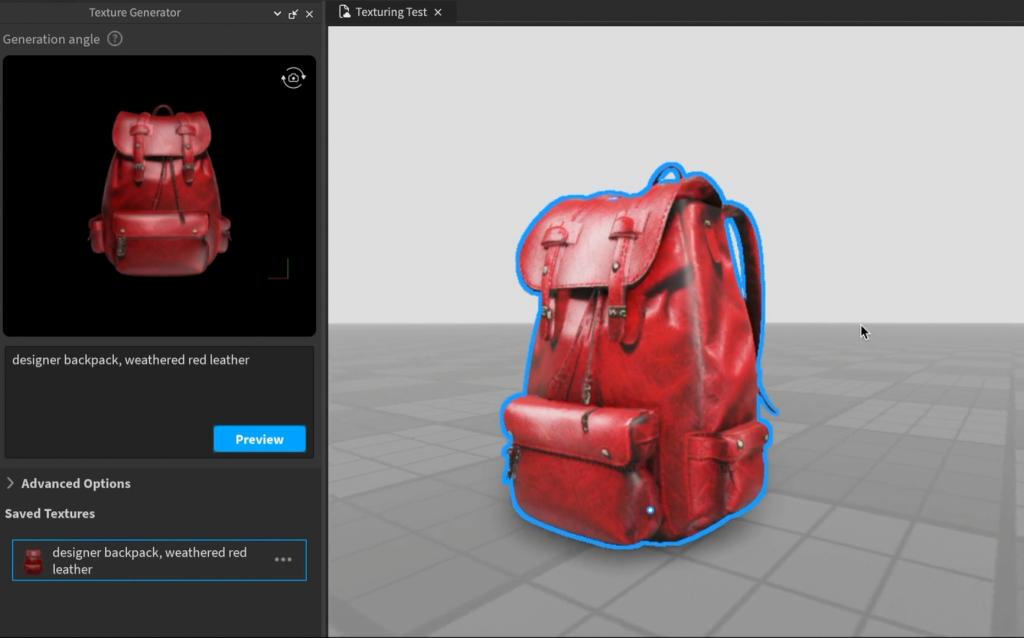
圖 29-1 生成貼圖後要檢查接縫、解析度、可讀性與實際材質效果,不能只看平面預覽。
請先把以下 context 給 Assistant:
【Ch29 Context|規劃 AI 2D 素材】
我們要為「AI Adventure Island」加入 2D visual assets。

目前遊戲:
- 明亮、適合初學者的 Roblox 冒險島嶼。
- 玩家收集水晶、賺取 Gold、幫助 Guide NPC、使用 WindDash、購買升級並保存進度。
- 現有 UI 包含 HUD、QuestPanel、AbilityPanel、ShopPanel。
- 第 28 章已建立 audio asset workflow。

目標:
- 為 game icon、thumbnail、UI icons、item icons、decals、texture references 與 material references 建立 2D art workflow。
- 外部 AI image outputs 只能視為候選 assets。
- 將每一張生成圖片記錄到 asset register。
- 只匯入已確認有權使用的圖片。
- 宣傳圖片必須如實反映實際玩法。

不要:
- 模仿真實 brands、games、movies、characters、artists 或受保護 IP。
- 未取得權利時使用受著作權保護的 reference images。
- 未檢查目前工具條款就宣稱擁有商業使用權。
- 在審查權利、格式、命名、moderation 與用途前,將圖片上傳到 Roblox。
- 使用 AI thumbnails 顯示遊戲中不存在的功能。
https://openai.com/policies/terms-of-use/
https://developers.openai.com/api/docs/guides/images-vision
https://www.adobe.com/products/firefly.html
.png、.jpg、.gif、.tga、.bmp 等 image formats。假設你想為 AI Adventure Island 做一張 thumbnail。
你對外部 AI 工具輸入:
製作一張史詩級 Roblox 遊戲 thumbnail,畫面包含巨大飛龍、飛行島、五名玩家戰鬥,以及巨大的寶藏爆炸。
這張圖可能很好看,但它有幾個問題。
第一,AI Adventure Island 目前沒有巨大龍,也沒有多人戰鬥,也沒有飛行島,也沒有寶藏爆炸。如果你用它當 thumbnail,就是誤導玩家。
第二,AI 圖常常在小尺寸中失去細節。Roblox thumbnail 會出現在不同位置,不是每個玩家都會看到 1920x1080 大圖。
第三,thumbnail 底部可能被玩家數、metadata 或平台 UI 遮住。重要資訊放錯位置會被蓋掉。
第四,外部工具輸出不等於 Roblox 允許使用。你還需要確認授權、來源、格式、審核與 asset register。
比較好的 Prompt 是:
【Ch29 生成|製作真實玩法縮圖】
為一款真實存在的 Roblox 冒險島嶼遊戲建立 thumbnail 概念。

顯示:
- 明亮的熱帶島嶼小徑
- 發光的藍色水晶
- 位於任務板附近的友善 Guide NPC
- 小型商店攤位
- 低調的 WindDash 軌跡效果

不要顯示:
- 飛龍
- 武器
- 爆炸
- 多人戰鬥
- 遊戲中不存在的功能
- 真實 brands 或受保護 characters

構圖:
- 16:9
- 中央有清楚的視覺焦點
- 重要內容避開底部 metadata 區域
- 小尺寸仍清楚可讀
- 明亮、友善且適合初學者的調性
這個 Prompt 不只是更安全,也更誠實。
先讓 Assistant 建立 2D art brief。
【Ch29 主任務|規劃 AI 2D 素材】
為「AI Adventure Island」建立 2D art brief。

遊戲事實:
- 明亮的冒險島嶼。
- 玩家收集水晶與 Gold。
- 玩家幫助 Guide NPC。
- 玩家使用 WindDash。
- 玩家在商店購買升級。
- 遊戲包含 HUD、QuestPanel、AbilityPanel 與 ShopPanel。

輸出:
1. Asset 類別:
   - game icon
   - thumbnail
   - UI icons
   - item icons
   - decals / signs
   - texture references
   - material references
2. 每一個 asset 包含:
   - 用途
   - 建議尺寸/aspect ratio
   - transparent 或 opaque
   - 在 Roblox 中的使用位置
   - moderation/IP risks
   - Playtest 檢查
3. 每個類別的 Prompt 草稿。
4. 命名規則。
5. Asset register 欄位。
6. 匯入檢查清單。

限制:
- 不要模仿真實 brands、games、movies、characters、artists 或受保護 IP。
- 不要顯示遊戲中不存在的玩法。
- 不要宣稱可安全用於商業用途。
- 標示必須由創作者本人確認目前工具條款的位置。
這個 Prompt 的目的不是讓 Assistant 直接畫圖,而是讓它先幫你定義素材規格。
Assistant 可能整理出這樣的 brief:
AI Adventure Island 2D Art Brief

Game icon:
- Purpose: represent the game on Roblox Home / details pages.
- Size: 512x512 square.
- Content: island path, crystal, Guide silhouette or shop stall.
- Risk: must remain readable at 150x150.
- Avoid: tiny text, fake features, brand-like symbols.

Thumbnail:
- Purpose: show real gameplay promise.
- Size: 1920x1080, 16:9.
- Content: island path, crystals, Guide NPC, shop, WindDash trail.
- Risk: bottom metadata overlap.
- Avoid: features not in game.

UI icons:
- Purpose: HUD readability.
- Size: source 512x512 or 256x256, displayed smaller.
- Transparent: yes.
- Icons: Crystal, Gold, Quest, WindDash, Shop, Settings.
- Risk: small-size clarity.

Item icons:
- Purpose: shop and upgrade panels.
- Transparent: yes.
- Icons: WindDash upgrade, crystal pouch, Guide token.

Decals / signs:
- Purpose: in-world posters and labels.
- Use: Decal or SurfaceGui / ImageLabel.
- Risk: stretch distortion and moderation.

Texture references:
- Purpose: reference images for paths, wood, stone, crystals.
- Use: Material Generator, Texture Generator, Texture object, or manual art direction.
- Risk: not seamless unless designed to tile.
這份 brief 會讓你知道:每張圖的用途、尺寸、透明需求、Roblox 使用位置都不同。
Assistant 也可能產生 prompt pack:
【Ch29 生成|製作遊戲圖像素材】
Game icon prompt:
明亮 Roblox 冒險島嶼的正方形 game icon。中央構圖:陽光熱帶小徑上的發光藍色水晶、友善探索者氛圍、stylized low-poly game art、清楚輪廓、高對比、沒有文字、沒有真實品牌、沒有受著作權保護的角色。

Thumbnail prompt:
真實 Roblox 冒險島嶼遊戲的 16:9 宣傳圖片。顯示有發光水晶的熱帶島嶼小徑、任務板附近的友善 Guide NPC、小型升級商店攤位,以及低調的 WindDash 軌跡。明亮、友善、小尺寸仍清楚可讀。重要主體避開底部邊緣。不要顯示飛龍、武器、爆炸或遊戲中不存在的功能。

UI 水晶 icon prompt:
透明背景的簡單藍色水晶 UI icon,stylized Roblox-friendly low-poly shape、粗輪廓、高對比,在 32x32 仍清楚可讀,沒有文字。

WindDash icon prompt:
代表 wind dash 能力的透明背景 UI icon,簡單的旋轉箭頭與移動軌跡,明亮 cyan 與白色,在 32x32 仍清楚可讀,沒有人物臉孔,沒有文字。

Quest board decal prompt:
友善冒險島嶼的木製任務板海報設計,簡單羊皮紙形狀與水晶符號,沒有可辨識的現實世界文字,適合作為 Roblox decal。
注意:UI icon 要能在 32x32 或 48x48 仍看得懂。不要把細節畫滿。
Icon 是 Roblox experience 的第一個識別。
官方建議:
512x512
square
clear at small sizes
reflects theme, tone, genre
passes moderation
AI Adventure Island 的 icon 不應該塞太多東西。
不好的構圖:
整座島 + NPC + 商店 + 敵人 + UI + 長文字 + logo
比較好的構圖:
中央一顆 glowing crystal
背後有簡化島嶼或木牌輪廓
高對比
無文字
小尺寸可讀
Icon 是識別,不是海報。
Thumbnail 是玩家對遊戲內容的期待。
官方建議:
16:9
1920x1080
truthful to gameplay
avoid unclear imagery
avoid bottom critical elements
Thumbnail 可以比 icon 複雜,但不能騙。
可以展示:
Guide NPC
crystals
shop stall
WindDash trail
island route
不要展示:
大型 boss
多人戰鬥
飛行載具
未實作寵物
不存在的地圖
外部真實素材
第 24 章講過內容安全,第 25 章講過發布。第 29 章的 thumbnail 也要回到同一個原則:發布素材要真實。
UI icon 和 promotional art 不同。
UI icon 的工作是快速傳達資訊:
Crystal count
Gold count
Quest
WindDash
Shop
Settings
UI icon 需要:
transparent background
clear silhouette
high contrast
limited color count
readable at small size
consistent style
不要用過度複雜的 AI 圖當 UI icon。AI 很容易產生漂亮但不可讀的小圖。
Roblox UI 中,ImageLabel 用來顯示 image asset,ImageButton 則可以接收玩家點擊或觸控。
ImageButton 還可以有:
Image
HoverImage
PressedImage
這很適合按鈕狀態:
Shop normal
Shop hover
Shop pressed
但在手機上沒有 hover,所以 pressed state 和 active feedback 更重要。
Texture 和 Decal 最容易混淆。
Texture:
- 會重複鋪在表面。
- 適合石路、木板、布料、圖樣。
- 可調 StudsPerTileU / StudsPerTileV。

Decal:
- 會伸展填滿 surface。
- 適合海報、標誌、招牌、單一圖案。
如果你把一張不是 seamless 的 AI 圖當 Texture,貼到地板上就會看到接縫。
如果你把寬高比例不對的圖當 Decal,放到不同 Part 面上就會被拉伸。
Roblox 內建工具很重要。
Material Generator 適合:
beach sand
mossy stone path
weathered wood
bright fantasy crystal surface
leaf fabric
因為它產生的是可作為 material variant 的材質。
Texture Generator 適合:
custom treasure chest mesh
Guide sign mesh
crystal statue mesh
shop stall mesh
因為它會依 MeshPart 或 mesh Model 的形狀生成 texture。
外部 AI image 更適合做:
style reference
concept art
UI icon draft
thumbnail draft
decal draft
不要所有事都靠外部圖像工具。Roblox 內建 material / texture 工具在 Studio 物件上下文中更有用。
Images、Decals、Meshes 受 Asset Privacy 影響。
如果 Image 是 Restricted,但 game 沒有 permission,runtime 可能無法載入,Output 會出現錯誤。
要記住:
Open Use is irreversible.
Game grants are permanent.
Asset Privacy does not affect every asset type.
It mainly controls Images, Decals, and Meshes.
第 29 章產生的圖像一定要進 asset register,並記錄:
Restricted / Open Use
Game permission
Where used
Moderation status
2D 圖像的 Playtest 不只是「看得到」。
Before Roblox import:
- Tool name recorded.
- Account plan recorded.
- Generation date recorded.
- Prompt saved.
- Reference image rights confirmed.
- No protected IP / brand / artist references.
- Local file name follows naming convention.
- File format supported.
- Transparency checked if needed.
- Cropping checked.
- Compression checked.
- Small-size readability checked.
- Intended Roblox use recorded.
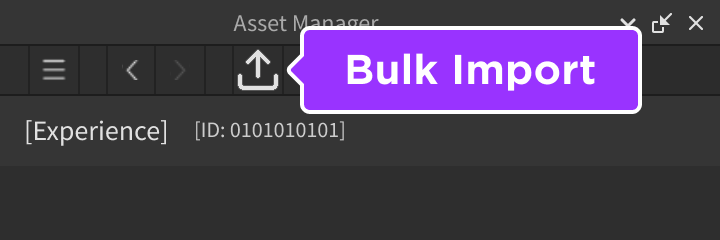
圖 29-2 在 Asset Manager 使用 Import 匯入篩選後的圖片;匯入前先完成格式、尺寸、授權與用途檢查,避免把所有候選圖都送審。
1. Open Asset Manager.
2. Import selected images.
3. Wait for import status.
4. Confirm moderation queue / approval status.
5. Rename aliases clearly.
6. Copy asset IDs.
7. Update image asset register.
8. Apply only reviewed assets.
先匯入一小組:
- one icon draft
- one thumbnail draft
- three UI icons
- one decal
- one texture reference
不要一次匯入大量未篩選圖像。
UI Visual Checklist

HUD:
- Crystal icon readable at actual HUD size.
- Gold icon visually different from Crystal.
- Quest icon does not look like Shop icon.
- WindDash icon communicates movement.

Buttons:
- ImageButton normal state clear.
- Pressed state visible on mobile.
- Hover state not required for mobile.
- Button icon does not hide text or count.

Scaling:
- Desktop UI looks clear.
- Mobile UI icons not blurry.
- Tablet layout still aligned.
- Gamepad focus state still visible.

Accessibility:
- Important feedback not color-only.
- Icons supported by text or layout where needed.
- Contrast sufficient.
Icon:
- 512x512 source.
- Clear at 150x150.
- Clear at 64x64.
- No tiny text.
- No fake features.
- Theme is obvious.

Thumbnail:
- 1920x1080 source.
- 16:9.
- Key subject centered.
- Bottom area not critical.
- Represents actual gameplay.
- No exaggerated external content.
- Works with Roblox page metadata.
Texture:
- Repeats cleanly.
- No obvious seam.
- Scale fits part size.
- Does not create visual noise.
- Texture streaming does not make important details unreadable.

Decal:
- Not stretched badly.
- Correct face.
- Visible from intended angle.
- Not too text-heavy.
- Does not include unsafe or misleading content.
【Ch29 修正 1|移除縮圖誇大內容】
檢查這個 thumbnail prompt 是否如實反映 Roblox 發布內容。

遊戲事實:
- 玩家探索一座島嶼。
- 玩家收集水晶。
- 玩家幫助 Guide NPC。
- 玩家使用 WindDash。
- 玩家購買升級。
- 沒有飛龍、槍械、寵物、載具、raids 或多人戰鬥。

Prompt:
[貼上 prompt]

任務:
- 移除遊戲中不存在的所有功能。
- 讓圖片令人期待,但仍如實呈現遊戲。
- 重要內容避開底部 metadata 區域。
- 產出修改後的 16:9 prompt。
【Ch29 修正 2|提高小尺寸圖示可讀性】
檢查這些 UI icon prompts 在小尺寸下是否清楚可讀。

Icons:
[貼上 prompts]

目標:
- 在 Roblox HUD 中以 32x32 與 48x48 顯示。
- 透明背景。
- 風格一致。

任務:
- 簡化每一個 icon。
- 提升輪廓辨識度。
- 減少微小細節。
- 讓 Crystal、Gold、Quest、Shop 與 WindDash 在視覺上容易區分。
【Ch29 修正 3|修復貼圖重複接縫】
這個 texture candidate 重複鋪在 Roblox part 上時會出現接縫。

Asset:
- 用途:
- 來源 prompt:
- 目前問題:

任務:
- 將 prompt 改寫成 seamless tiled texture。
- 建議是否更適合使用 Roblox Material Generator。
- 建議 StudsPerTileU 與 StudsPerTileV 的測試設定。
【Ch29 修正 4|補齊 Image Asset Register】
為這些生成圖片建立 image asset register entries。

圖片:
[貼上清單]

每筆紀錄包含:
- Internal name
- 類別
- 預定 Roblox 用途
- 工具
- Prompt
- Reference image 來源
- 生成日期
- Account plan/license note
- 本機檔名
- Roblox asset ID
- Moderation 狀態
- Asset Privacy status
- Game permission status
- DataModel 用途
- Playtest 狀態
- 風險/筆記
Game:
AI Adventure Island

Visual direction:
Bright, readable, friendly, low-poly inspired, clear silhouettes, no fake features.

Icon:
- glowing crystal + island path
- square
- no text

Thumbnail:
- island path + crystals + Guide + shop + WindDash trail
- 16:9
- true to gameplay

UI icons:
- Crystal
- Gold
- Quest
- WindDash
- Shop
- Settings

Item icons:
- WindDash upgrade
- Crystal pouch
- Guide token

Decals:
- Guide sign
- Shop sign
- Quest board poster

Texture / material references:
- mossy stone
- weathered wood
- island sand
- crystal surface
| Asset Type | Suggested Source Size | Aspect | Transparent | Roblox Use |
| --- | --- | --- | --- | --- |
| Game icon | 512x512+ | 1:1 | No / optional | Creator Dashboard icon |
| Thumbnail | 1920x1080 | 16:9 | No | Creator Dashboard thumbnails |
| UI icon | 256x256 or 512x512 | 1:1 | Yes | ImageLabel / ImageButton |
| Item icon | 256x256 or 512x512 | 1:1 | Yes | ShopPanel / inventory UI |
| Decal | Depends on surface | Match target | Often no | Decal on Part |
| Texture | Power-of-two recommended | Tileable | Usually no | Texture / Material reference |
| Material reference | 1024x1024+ | 1:1 | No | Material Generator / art style reference |
Format:
[category]_[system]_[description]_[version]

Examples:
icon_game_crystal_island_v01.png
thumb_main_island_guide_shop_v01.png
ui_crystal_counter_v01.png
ui_gold_counter_v01.png
ui_winddash_ability_v01.png
item_winddash_upgrade_v01.png
decal_guide_sign_v01.png
texture_mossy_stone_tile_v01.png
ref_material_weathered_wood_v01.png
不要用:
image.png
ai_art_final.png
thumbnail_new_new.png
chatgpt_export_123.png
| Internal Name | Category | Tool | Prompt ID | Plan / License Note | Local File | Roblox Asset ID | Asset Privacy | Game Permission | DataModel Use | Moderation | Playtest | Risk |
| --- | --- | --- | --- | --- | --- | --- | --- | --- | --- | --- | --- | --- |
| icon_game_crystal_island_v01 | Icon | ChatGPT / Firefly / other | P-IMG-001 | Verify current terms before release | icon_game_crystal_island_v01.png | TBD | TBD | TBD | Creator Dashboard Icon | Pending | Pending | Small-size readability |
| ui_crystal_counter_v01 | UI | ChatGPT / Firefly / other | P-IMG-002 | Verify current terms before release | ui_crystal_counter_v01.png | TBD | Restricted | Grant to game | StarterGui.AdventureHUD | Pending | Pending | 32x32 clarity |
Creator Dashboard:
- Game icon
- Thumbnails

StarterGui:
- UI icons as ImageLabel / ImageButton
- Shop item icons
- QuestPanel decorative icon

Workspace:
- Guide sign Decal
- Shop sign Decal
- Quest board poster

Materials:
- Use Material Generator for tileable surfaces.
- Use Texture Generator for MeshPart contextual textures.
- Use external images as references only when rights are clear.
當 image asset ID 準備好後,再請 Assistant 幫你套用:
【Ch29 實作|套用核准圖片素材】
將已核准的 image assets 套用到「AI Adventure Island」。

已核准 assets:
- UI_CrystalCounter: rbxassetid://...
- UI_GoldCounter: rbxassetid://...
- UI_WindDashAbility: rbxassetid://...
- UI_Shop: rbxassetid://...
- Decal_GuideSign: rbxassetid://...
- Decal_ShopSign: rbxassetid://...

需求:
- 只更新 AdventureHUD ImageLabels。
- 不要更改 RemoteEvent 名稱。
- 不要更改 gameplay scripts。
- 只將 decals 加到指定的 sign parts。
- 保留 mobile layout。
- 列出每一個修改的 instance。
- 提供視覺 Playtest 步驟。
不要讓 Assistant 在沒有 asset ID 與 register 的狀態下「自己找圖自己貼」。
本章把外部 AI 圖像工具接進 Roblox 美術管線。
你現在應該記住:
下一章會處理 3D 建模與外部 AI 模型匯入。第 29 章建立的素材治理方式會繼續適用:AI 生成只是第一步,真正讓素材進入 Roblox 專案的是匯入、尺寸、碰撞、材質、效能、授權與測試。
嗨!我是 Wolke,曾任 Google Developer Expert(GDE,2019–2023) 與 LINE API Expert。
我熱衷於研究 AI Agent、n8n 自動化工作流與全端開發架構,致力於將 AI 技術轉化為真正能落地的生產力工具。
如果你喜歡這篇文章,歡迎透過以下方式與我交流:
📚 技術著作
《實用的 Gemini API 開發點子書》:帶你運用 Gemini App、Google AI Studio、Gemini CLI 與 Antigravity IDE,打造 AI Agent 與實用產品。
📝 技術部落格
歡迎追蹤我的 Medium,我會持續分享 Agentic Automation、架構設計與實際開發的踩坑心得。
🎤 技術講座與合作
我持續受邀至技術社群及研討會,分享 AI Agent、自動化工作流、DevOps 與全端開發實戰。
我曾於 DevOpsDays Taipei 2026 主講「不再只是寫腳本!讓 AI 代理人成為你的 SRE 最佳夥伴」工作坊。
如果你的企業、社群或學校正在尋找相關主題講者,歡迎私訊聯繫,洽談講座與工作坊合作!
🎮 我的 Roblox 遊戲
🎁 免費贈送 OpenAI 或 Claude AI 額度
為了鼓勵大家實際動手打造自己的 Roblox 體驗,我每個月會開放:
參加方式:
確認完成後,我會邀請你加入並設定 50 點額度。名額有限,歡迎把握機會!


 iThome鐵人賽
 看影片追技術