
第 28 章,我們把 AI 生成音樂與音效帶進 Roblox。
第 29 章,我們把 AI 生成的 2D 圖像變成 icon、thumbnail、UI 圖示、Texture、Decal 和材質參考。
第 30 章,我們把外部 AI 生成或外部工具整理過的 3D 模型匯入 Studio,並檢查 MeshPart、SurfaceAppearance、碰撞、效能和 Asset Privacy。
現在問題變成:
這些素材半年後還能不能被追蹤、維護、授權確認、重新匯入、替換或交給別人接手?
如果答案是否定的,那第 28-30 章只是做出一批漂亮素材,還不是可維護的專案。
第 31 章要把外部 AI 素材工程化。
我們會建立一份 AI Adventure Island External AI Asset Register,把聲音、圖像、貼圖、縮圖、3D 模型全部放進同一套治理流程。
本章不提供法律意見,也不保證 Roblox moderation 結果。它提供的是一套創作者可以執行的技術與專案管理流程:
來源
Prompt
工具方案
Terms snapshot
輸出檔
Roblox asset ID
DataModel path
Asset Privacy
Moderation
Playtest
Release gate
替換與 rollback
這是第七部的收束,也是整本書最後一個重要觀念:
AI 可以幫你生成素材,但專案要靠你建立責任邊界。
完成本章後,你會得到:
Draft -> Candidate -> Imported -> Playtested -> Approved release gate。AI Adventure Island 第七部收束 checklist。本章成果:
AI Adventure Island的外部 AI 素材全部被整理成可追蹤、可審核、可發布前凍結、可替換的 asset register。
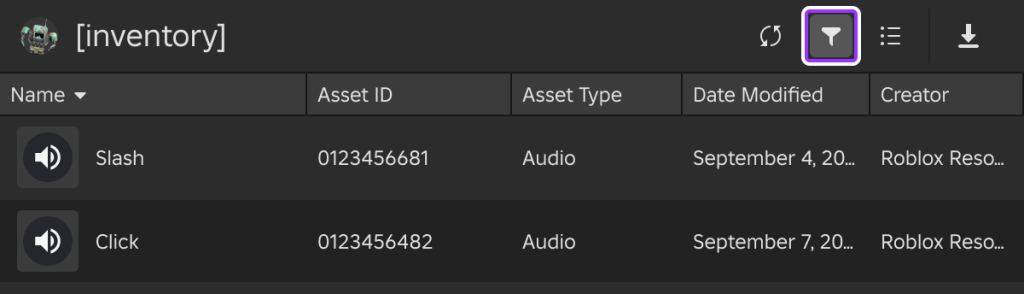
圖 31-1 Asset Manager 能協助整理已匯入素材;團隊仍需另外保存來源、授權、prompt、審核與使用位置。
本章請先把以下 context 給 Assistant:
【Ch31 Context|治理外部 AI 素材】
我們要完成「AI Adventure Island」的外部 AI asset governance workflow。

前面章節已加入:
- AI-generated 或 AI-assisted 音樂與 SFX。
- AI-generated 或 AI-assisted 圖片、UI icons、textures、decals、thumbnails 與 material references。
- 匯入 Roblox Studio 的 AI-generated 或經外部工具整理的 3D models。

目標:
- 建立一份統一的外部 AI asset register。
- 追蹤 source tools、prompts、plans、terms snapshots、output files、Roblox asset IDs、moderation、Asset Privacy、game permissions、DataModel paths、Playtest 證據與 release status。
- 除非有明確證據,否則不要宣稱任何 asset 在法律上安全或已通過 moderation。
- 將不確定的項目標示為 TBD 或 Blocked。

遊戲:
- AI Adventure Island.
- 適合初學者的冒險島嶼。
- 玩家收集水晶、完成 Guide 任務、避開簡單的巡邏敵人、使用 WindDash、購買升級並保存進度。
- 遊戲使用 Roblox Studio Assistant 開發。
- 目前遊戲不包含面向玩家的生成式 AI interactions。
音訊:
https://help.suno.com/en/articles/2416769
https://suno.com/terms
https://elevenlabs.io/sound-effects
https://elevenlabs.io/docs/overview/capabilities/sound-effects
圖像:
https://openai.com/policies/terms-of-use/
https://developers.openai.com/api/docs/guides/images-vision
https://www.adobe.com/products/firefly.html
3D:
https://www.meshy.ai/features/text-to-3d
https://www.meshy.ai/terms-of-use
https://www.tripo3d.ai/terms
https://lumalabs.ai/legal/terms-of-service
Asset Privacy 只控制 Images、Decals、Meshes 的預設 privacy state。Restricted asset 需要授權 creator 或 game 才能載入;Open Use 不可逆;game grant 是永久的。
Creator Store asset 可能包含 scripts。若你要插入 asset 但不想讓它的 scripts 執行,可以在 Explorer 對物件使用 Disable Scripts。
Content Maturity questionnaire 要依玩家能遇到的最成熟或最極端內容回答。若發布更新改變答案,就必須更新 questionnaire。
Uploaded assets such as images and meshes 有額外規範,可能被 moderation,不能只依 experience maturity label 判斷。
Publish to Roblox 會把 start place DataModel 存到 Roblox cloud。新 game 預設 Private。Audience 可設定 Private、Limited、Public。
Version History 可追蹤 saved / published versions,並可用 version notes 建立 release checkpoint。Restore previous version 不會自動取代 live game,仍需 publish 與必要的 server restart。
外部 AI 工具 terms 會變,所以 register 需要記錄 Terms Checked Date 與 Plan / License Note,不能只寫「AI 生成」。
假設你現在準備投稿或公開 AI Adventure Island。
你的專案裡可能已經有:
Audio:
- island exploration BGM
- crystal pickup SFX
- UI click SFX
- WindDash whoosh

Images:
- game icon
- thumbnail draft
- crystal counter icon
- quest marker icon
- guide sign decal

3D:
- AncientCrystalGate
- imported stone prop
- generated material texture
如果你只記在腦中,問題很快會出現。
某個音效是哪個方案生成的?
縮圖是不是有誇大遊戲裡不存在的場景?
某張貼圖是不是 Restricted,但 game 沒有 permission?
某個 3D 模型是 Free plan output,需要 attribution 嗎?
某個 Creator Store asset 裡是不是有 script?
某個素材被 Roblox moderation 擋住時,替代品在哪裡?
如果你回答不出來,這些素材就還不能進公開發布版。
這不是要你害怕 AI 工具。
這是要你把素材變成工程資產,而不是下載資料夾裡的偶然成果。
先讓 Assistant 幫你建立總 register,不要讓它替你判定所有素材都可用。
【Ch31 主任務|治理外部 AI 素材】
為「AI Adventure Island」建立一份統一的外部 AI asset register。

範圍:
- 來自 Suno 與 ElevenLabs 的 audio assets。
- 來自 ChatGPT/OpenAI image tools、Adobe Firefly 或其他圖片工具的 image assets。
- 來自 Meshy、Tripo、Luma、Blender cleanup 或 Roblox Studio import workflows 的 3D assets。
- 依賴外部 AI source files 的 Roblox generated 或 imported assets。

不要:
- 沒有明確證據就宣稱 asset 在法律上安全。
- 沒有方案與條款筆記就宣稱允許商業使用。
- 未記錄狀態就宣稱已通過 Roblox moderation。
- 取代人工審查。

輸出:
1. Register schema。
2. Release status 定義。
3. 每一種狀態需要的證據。
4. 以下項目的範例列:
   - 島嶼探索 BGM
   - 水晶拾取 SFX
   - Game icon
   - Thumbnail
   - UI 水晶 icon
   - Guide sign decal
   - AncientCrystalGate 3D prop
5. 需要人工確認的 blocked/TBD 欄位清單。
這個 prompt 的關鍵是:
沒有明確證據時,不要宣稱 asset 在法律上安全。
Assistant 可以整理資訊。
Assistant 不能替你簽名負責。
Assistant 應該先給一份 register schema。
External AI Asset Register

Core fields:
- Internal Name
- Asset Type
- In-Game Purpose
- Source Tool
- Tool Plan
- Generated Date
- Terms Checked Date
- Terms Source URL
- Prompt ID
- Prompt Summary
- Source Input
- Output File
- Edited By
- Local Archive Path
- Roblox Asset ID
- DataModel Path
- Asset Privacy
- Game Permission
- Moderation Status
- Content Maturity Impact
- Attribution Required
- Commercial Use Note
- Risk Level
- Release Status
- Replacement Asset
- Reviewer
- Review Date
- Notes
接著它可能定義 release status:
Draft:
  素材需求剛建立,還沒有可用 output。

Candidate:
  有 AI output,但尚未匯入 Roblox。

Imported:
  已匯入 Roblox 或 Studio,但尚未 playtest。

Playtested:
  已在 Studio / published private version 測試。

Blocked:
  缺少授權、權限、moderation、品質或技術證據。

ApprovedForPrivate:
  可放在 private build 測試。

ApprovedForLimited:
  可給 playtesters / limited audience 測試。

ApprovedForPublic:
  可進 public release candidate。

Replaced:
  已由其他素材取代。

Removed:
  已從 DataModel / asset plan 移除。
再產生範例 row:
| Internal Name | Asset Type | Source Tool | Prompt ID | Roblox Asset ID | Asset Privacy | Moderation | Release Status | Risk |
|---|---|---|---|---|---|---|---|---|
| bgm_island_exploration_v01 | Audio | Suno | P-AUD-001 | TBD | N/A | Pending | Candidate | Terms / loop / moderation TBD |
| sfx_crystal_pickup_v01 | Audio | ElevenLabs | P-SFX-001 | TBD | N/A | Pending | Candidate | Duration / loudness TBD |
| icon_game_crystal_island_v01 | Image | ChatGPT / Firefly | P-IMG-001 | TBD | Restricted / TBD | Pending | Candidate | Thumbnail truthfulness / terms TBD |
| decal_guide_sign_v01 | Decal | Image tool + Roblox import | P-IMG-004 | TBD | Restricted / TBD | Pending | Imported | Game permission TBD |
| AncientCrystalGate | 3D Prop | Meshy / Blender | P-3D-001 | TBD | Restricted / TBD | Pending | Imported | Collision / terms / mesh count TBD |
注意:這些範例大多不是 ApprovedForPublic。
這是對的。
Register 的價值不是把東西全部蓋章通過,而是讓你看見還缺什麼。
很多人會把 asset register 做成檔名清單:
music.mp3
button.wav
icon.png
gate.glb
這不夠。
你真正需要的是證據表。
每一列都要回答:
如果表格回答不了這些問題,它只是素材目錄,不是治理系統。
音訊風險:
圖像風險:
3D 風險:
Creator Store asset 風險:
這些風險不能用同一個 OK 欄位解決。
所以 register 要有不同類型的欄位,也要有 Risk Level 和 Notes。
建議使用這套狀態:
| Status | 意義 | 可以做什麼 |
|---|---|---|
| Draft | 只有需求,還沒有素材 | 可以規劃,不可匯入發布版 |
| Candidate | 有 output,尚未匯入 Roblox | 可以審查,不可發布 |
| Imported | 已匯入 Studio / Roblox | 可在 private build 測試 |
| Playtested | 已測過基本行為 | 可考慮 Limited 測試 |
| Blocked | 缺少必要證據或有明確問題 | 不可進 release |
| ApprovedForPrivate | 可留在 private build | 不代表可公開 |
| ApprovedForLimited | 可給 playtesters | 不代表可公開 |
| ApprovedForPublic | 可進 public release candidate | 仍需整體 release review |
| Replaced | 已被替代 | 不再使用,但保留紀錄 |
| Removed | 已移除 | 確認 DataModel 不再引用 |
這裡最重要的是:
ApprovedForPrivate != ApprovedForPublic
Private build 可以容忍一些待確認素材,因為只有創作者或團隊測試。
Public release 不行。
公開前每個外部 AI 素材都至少要有:
缺任何核心證據,就不要標 ApprovedForPublic。
外部 AI 工具 terms 會變。
所以 register 不能只寫:
Suno Pro
或:
Meshy free
要寫成:
Tool: Suno
Plan: Pro
Generated Date: 2026-07-13
Terms Checked Date: 2026-07-13
Terms Source URL: https://suno.com/terms
Commercial Use Note: Pro/Premier generated while subscribed; verify account state and terms snapshot.
Attribution Required: TBD / No / Yes
Reviewer: human name
圖像與 3D 也一樣。
Tool: Meshy
Plan: Free
Generated Date: 2026-07-13
Terms Checked Date: 2026-07-13
Commercial Use Note: Free output may require CC BY 4.0 attribution according to checked terms; verify before release.
Attribution Required: Yes / TBD
你不需要在 register 裡複製整份條款。
你需要記錄足以讓未來的你回查的資訊。
Prompt 也是來源的一部分。
如果你的 prompt 寫:
製作一首像 [真實 artist] 的主題曲。
或:
製作包含 [知名角色] 的 game icon。
那個素材風險很高。
即使 output 看起來不像,也不應該進發布版。
所以 register 要保存 prompt。
建議 prompt 檔案:
prompts/
  audio/
    P-AUD-001-island-exploration-bgm.md
    P-SFX-001-crystal-pickup.md
  image/
    P-IMG-001-game-icon.md
    P-IMG-002-crystal-counter-icon.md
  3d/
    P-3D-001-ancient-crystal-gate.md
每個 prompt 檔至少包含:
Prompt ID:
工具:
日期:
用途:
Positive prompt:
Negative constraints:
Source inputs:
設定:
Output files:
審查筆記:
Negative constraints 很重要。
例如:
不要模仿真實 artists、既有歌曲、brands、logos、characters、films、games 或可辨識人物。
這句不是形式。
它是素材來源證據的一部分。
外部 terms 通過,不代表 Roblox 端 ready。
Roblox 端至少要檢查:
特別注意 Asset Privacy:
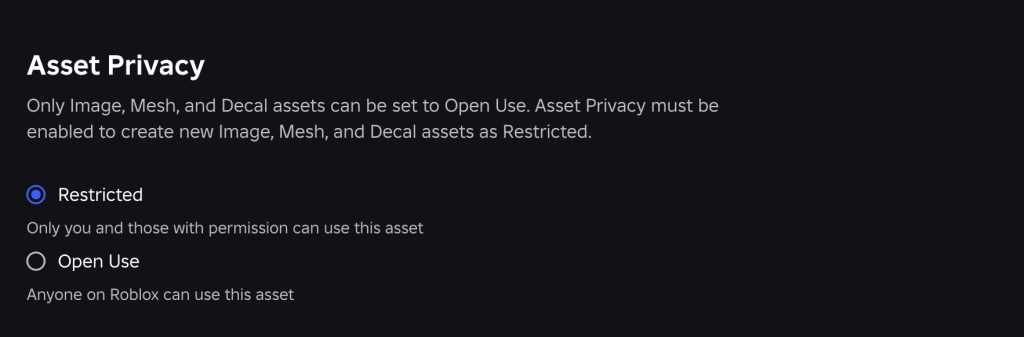
圖 31-2 Asset Privacy 決定圖片、Decal 與 Mesh 預設為 Restricted 或 Open Use;Restricted asset 還要另外確認目標 game 權限。
Images, Decals, Meshes
這三類受 Asset Privacy 控制。
Audio 不受 Asset Privacy 這個設定控制,但 audio 仍有自己的上傳、moderation、權限與使用流程。
不要把 Asset Privacy 當成所有素材問題的答案。
第 24 章已經講過發布前內容安全。
第 31 章只補一個和外部 AI 素材相關的規則:
新素材可能改變 Content Maturity questionnaire 的答案。
例如:
只要素材改變玩家能看到、聽到或理解的內容,就要回到 Content Maturity 與 metadata review。
不要只看程式碼有沒有改。
素材也是內容。
很多 Roblox 專案會同時使用:
這很正常。
但 register 要分清楚來源。
Creator Store asset 需要記:
外部 AI asset 需要記:
不要把 Creator Store asset 寫成外部 AI asset。
不要把外部 AI asset 寫成 Creator Store asset。
來源不同,責任不同。
第 31 章的 Playtest 不是測某一個功能。
它是測素材治理是否能發現問題。
從 register 隨機挑 5 個素材:
1 audio
2 images
1 decal or texture
1 3D model
對每個素材問:
如果回答不了,register 不合格。
進 Play mode 或 private published version,打開 Output / Developer Console。
檢查:
任何載入錯誤都要回 register:
Release Status = Blocked
Notes = Output error observed in Playtest YYYY-MM-DD
不要只修場景,不改 register。
看 icon、thumbnail、description。
問:
如果 metadata 不真實,就算素材本身可用,也不能進公開發布。
選一個素材,假設它突然不能用。
例如:
bgm_island_exploration_v01
你要能回答:
如果替換一個素材會讓你在 Explorer 裡亂找,代表治理還不夠。
如果 register 有缺口,可以請 Assistant 幫你產生 audit report。
【Ch31 修正 1|稽核這份外部 AI asset register】
稽核這份外部 AI asset register。

針對每一列:
- 檢查是否缺少必要欄位。
- 判斷 asset 應維持 Draft、Candidate、Imported、Playtested、ApprovedForPrivate、ApprovedForLimited、ApprovedForPublic、Blocked、Replaced 或 Removed。
- 除非具備所有必要證據,否則不要將任何 asset 升級為 ApprovedForPublic。
- 分別標示 legal、plan、terms、moderation、Asset Privacy、game permission、DataModel path 與 Playtest 缺口。
- 產出我需要人工驗證項目的優先順序清單。
如果你要檢查素材是否可以公開發布:
【Ch31 修正 2|檢查 asset register 是否已準備好】
檢查 asset register 是否已準備好用於公開發布。

規則:
- 任何缺少 Tool Plan、Terms Checked Date、Prompt ID、Output File、Roblox Asset ID、Moderation Status 或 Playtest Result 的 asset,都必須標示為 Blocked 或不得為 ApprovedForPublic。
- Images、Decals 與 Meshes 必須包含 Asset Privacy 與 Game Permission status。
- Audio 必須包含 moderation 與遊戲內 volume/Playtest notes。
- 3D models 必須包含 collision/performance notes。
- Thumbnails 與 icons 必須包含 truthfulness review。
- 不要提供法律建議。
- 除非已有紀錄,否則不要宣稱已通過 Roblox moderation。

輸出:
1. ApprovedForPublic candidates。
2. Blocked assets。
3. TBD fields。
4. 人工驗證檢查清單。
5. 建議的 version notes。
如果要修一個缺少來源的素材:
【Ch31 修正 3|重建 Asset Provenance】
協助我重建這個 asset 的 provenance。

Asset:
- Internal Name:
- 目前 Roblox Asset ID:
- DataModel Path:
- 已知的本機檔案:
- 已知的來源工具:

輸出:
- 必須由我人工回答的問題。
- 應標示為 Unknown 的欄位。
- 問題解決前,這個 asset 是否應標示為 Blocked。
- 如果無法重建 provenance,提供替換計畫。
這個 prompt 很實用。
因為真實專案常常不是從第一天就管理得很好。你可能已經有幾個素材來源不清。不要假裝它們沒問題。
先標 Blocked。
再補證據。
補不到,就替換。
建議使用一張主表:
| Field | Required for Public | 說明 |
|---|---|---|
| Internal Name | Yes | 專案內唯一名稱 |
| Asset Type | Yes | Audio / Image / Decal / Texture / 3D / CreatorStore / Other |
| In-Game Purpose | Yes | 在遊戲中的用途 |
| Source Category | Yes | External AI / Creator Store / Roblox Generated / Manual |
| Source Tool | Yes if AI | Suno / ElevenLabs / OpenAI / Firefly / Meshy / Tripo / Luma / other |
| Tool Plan | Yes if AI | Free / Pro / Team / Enterprise / TBD |
| Generated Date | Yes if AI | 生成日期 |
| Terms Checked Date | Yes if AI | 條款確認日期 |
| Terms Source URL | Yes if AI | 官方條款或說明頁 |
| Prompt ID | Yes if AI | 可追到 prompt file |
| Prompt File | Yes if AI | 本地 prompt 紀錄 |
| Source Input | If applicable | 上傳給工具的 image/audio/text/source |
| Output File | Yes | 本機保存檔 |
| Edited By | If edited | Blender / Audacity / image editor / manual |
| Roblox Asset ID | If imported | 上傳後 ID |
| DataModel Path | If used | 在 Studio 中使用位置 |
| Asset Privacy | Images/Decals/Meshes | Restricted / Open Use / N/A / TBD |
| Game Permission | Restricted assets | Granted / Not Granted / N/A / TBD |
| Moderation Status | Yes | Pending / Passed / Rejected / Unknown |
| Playtest Result | Yes | Passed / Failed / Not Tested |
| Content Maturity Impact | Yes | None / Review Needed / Requires Update |
| Attribution Required | Yes | Yes / No / TBD |
| Commercial Use Note | Yes | 簡短結論與不確定性 |
| Risk Level | Yes | Low / Medium / High / Blocked |
| Release Status | Yes | Draft / Candidate / Imported / Playtested / Approved... |
| Replacement Asset | If risk | 替代素材 |
| Reviewer | Yes for release | 人工審核者 |
| Review Date | Yes for release | 審核日期 |
| Notes | Optional | 補充 |
這張表可以先用 Markdown。
如果專案變大,再搬到 spreadsheet。
| Internal Name | Asset Type | Source Tool | Tool Plan | Prompt ID | Roblox Asset ID | Asset Privacy | Game Permission | Moderation | Playtest | Release Status | Risk |
|---|---|---|---|---|---|---|---|---|---|---|---|
| bgm_island_exploration_v01 | Audio | Suno | Pro / TBD | P-AUD-001 | TBD | N/A | N/A | Pending | Not Tested | Candidate | Terms / import TBD |
| sfx_crystal_pickup_v01 | Audio | ElevenLabs | Paid / TBD | P-SFX-001 | TBD | N/A | N/A | Pending | Not Tested | Candidate | Loudness / moderation TBD |
| icon_game_crystal_island_v01 | Image | OpenAI / Firefly / other | TBD | P-IMG-001 | TBD | Restricted / TBD | TBD | Pending | Not Tested | Candidate | Terms / truthfulness TBD |
| decal_guide_sign_v01 | Decal | Image tool | TBD | P-IMG-004 | TBD | Restricted / TBD | TBD | Pending | Not Tested | Imported | Permission TBD |
| AncientCrystalGate | 3D | Meshy / Blender | TBD | P-3D-001 | TBD | Restricted / TBD | TBD | Pending | Not Tested | Imported | Collision / terms TBD |
Public release gate:
For every external AI asset:
- No required field is TBD.
- No moderation status is Pending / Rejected / Unknown.
- No Asset Privacy game permission is TBD.
- No Playtest Result is Not Tested / Failed.
- No Content Maturity Impact is Review Needed without questionnaire update.
- No Commercial Use Note is Unknown.
- No thumbnail/icon truthfulness review is missing.
- No Creator Store script review is missing.
如果任何一條不通過:
Release Status = Blocked
或:
ApprovedForPrivate only
第 25 章提過 Version History。
第 31 章要把素材變更寫進 version notes。
範例:
v0.2.0-external-ai-assets

Added:
- bgm_island_exploration_v01
- sfx_crystal_pickup_v01
- icon_game_crystal_island_v01
- decal_guide_sign_v01
- AncientCrystalGate

Asset governance:
- External AI asset register created.
- Terms checked dates recorded.
- Prompt IDs recorded.
- Asset Privacy fields added for Images, Decals, Meshes.
- Public release blocked until moderation and game permissions are confirmed.

Testing:
- Private Studio playtest required.
- Published private smoke test required.
Version notes 不需要寫很長。
但要讓未來的你知道這一版改了哪些素材,以及 release gate 是否通過。
公開發布前,做一次素材凍結。
流程:
凍結不是不准修改。
凍結是建立一個可審查的時間點。
素材出問題時,不要只刪掉。
流程:
1. Register row -> Release Status = Blocked
2. Notes -> 寫明原因
3. DataModel -> 找出引用位置
4. Replacement Asset -> 指定替代品
5. Studio -> 替換 asset ID 或移除物件
6. Playtest -> 確認沒有 missing reference
7. Version notes -> 記錄替換
8. 若已發布 -> 視情況 publish / restart servers
如果素材已在 public version 出問題,要回第 25 章的 release workflow:
素材治理不是表格工作而已。
它會直接影響 release operation。
第 31 章完成了第七部的最後一塊。
你現在不只是知道怎麼使用外部 AI 工具:
你也知道這些素材進 Roblox 前後要如何治理:
Tool
Plan
Terms Checked Date
Prompt ID
Output File
Roblox Asset ID
DataModel Path
Asset Privacy
Game Permission
Moderation
Playtest
Content Maturity
Release Status
Replacement Plan
Version Notes
這套流程看起來不像按一個 AI 按鈕那麼刺激。
但它才是讓 AI 生成工具真正進入遊戲專案的方法。
到這裡,全書的主線已經完整:
AI Adventure Island 不只是一本書裡的範例遊戲。
它是一套可以複製的 Roblox AI 開發方法:
Prompt
Generate
Inspect
Explain
Playtest
Fix
Organize
Record
Release
Maintain
如果你未來要做校園、太空、農場、商店、解謎、戰鬥或派對類型的 Roblox experience,也可以沿用同一套方法。
不要從背 API 開始。
從一個可驗收的 prompt 開始。
但也不要停在 AI 生成結果。
真正的作者,會把生成結果變成可理解、可測試、可維護、可發布的作品。
嗨!我是 Wolke,曾任 Google Developer Expert(GDE,2019–2023) 與 LINE API Expert。
我熱衷於研究 AI Agent、n8n 自動化工作流與全端開發架構,致力於將 AI 技術轉化為真正能落地的生產力工具。
如果你喜歡這篇文章,歡迎透過以下方式與我交流:
📚 技術著作
《實用的 Gemini API 開發點子書》:帶你運用 Gemini App、Google AI Studio、Gemini CLI 與 Antigravity IDE,打造 AI Agent 與實用產品。
📝 技術部落格
歡迎追蹤我的 Medium,我會持續分享 Agentic Automation、架構設計與實際開發的踩坑心得。
🎤 技術講座與合作
我持續受邀至技術社群及研討會,分享 AI Agent、自動化工作流、DevOps 與全端開發實戰。
我曾於 DevOpsDays Taipei 2026 主講「不再只是寫腳本!讓 AI 代理人成為你的 SRE 最佳夥伴」工作坊。
如果你的企業、社群或學校正在尋找相關主題講者,歡迎私訊聯繫,洽談講座與工作坊合作!
🎮 我的 Roblox 遊戲
🎁 免費贈送 OpenAI 或 Claude AI 額度
為了鼓勵大家實際動手打造自己的 Roblox 體驗,我每個月會開放:
參加方式:
確認完成後,我會邀請你加入並設定 50 點額度。名額有限,歡迎把握機會!


 iThome鐵人賽
 看影片追技術