

⬆️ 點上方縮圖或影片連結即可播放。
目前這個網站交給瀏覽器的,都是 build 時預先產生、給「人」看的 HTML 頁面。只看這些頁面,很容易把 Astro 當成純靜態網站產生器。
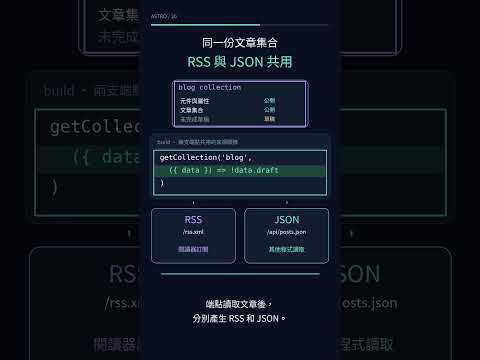
但 Astro 也能執行伺服器程式、回傳 HTML 以外的格式。這篇從 endpoint 開始,為內容站建立兩個「給程式讀」的資料出口:供閱讀器訂閱的 RSS feed,以及供外部程式抓取的 JSON feed。
這篇聚焦在最單純的情境:資料唯讀、內容在 build 時已完全確定。需要接收表單、寫入資料庫或即時計算的動態端點,留給後續的「Actions vs Endpoints」與資料庫篇章。
endpoint 就是一個 route,只是它有三點與頁面不同:
rss.xml.ts、api/posts.json.ts)。GET、POST 等)。Response 物件,而不是 Astro 元件模板。頁面回傳 HTML 給瀏覽器渲染;endpoint 則回傳自訂格式——XML、JSON 甚至二進位圖片 buffer 都可以。
prerender 決定 endpoint 什麼時候跑endpoint 有兩種執行時機:
/rss.xml、/api/posts.json),之後所有請求由 CDN 直接快取回傳。執行時機由 export const prerender 與專案的 output 設定決定:
專案 output |
endpoint 預設 | 要反向時 |
|---|---|---|
static(本專案預設) |
build 時產靜態檔 | 要即時動態 → export const prerender = false |
server |
每個 request 即時跑 | 要產靜態檔 → export const prerender = true |
本專案 astro.config.mjs 未設定 output,預設為 static。RSS 與 JSON 的資料全來自 content collection,在 build 時就已確定,因此完全不需要額外宣告 prerender,Astro 就會自動在 build 期間產生靜態檔案。
相對地,後續篇章中要接收 POST 表單並寫入資料庫的 feedback endpoint,就必須顯式宣告 export const prerender = false,才能在請求當下讀取 request body。判斷基準很單純:資料在 build 時已定就走靜態;需要即時讀取 request 或動態資料才走 server-rendered。
(若專案改用 output: 'server',預設值相反:endpoint 預設每次 request 即時執行,想產靜態 feed 則需手動加上 export const prerender = true。)
RSS 不需要手刻 XML 字串,使用 Astro 官方套件 @astrojs/rss 即可:
npm install @astrojs/rss
版本基準(2026-07-22 查證):
@astrojs/rss@4.0.19。
@astrojs/rss 提供 rss() helper,接收 feed 欄位並回傳 XML 格式的 Response。文章清單直接從 getCollection('blog') 取得,與部落格列表頁的資料來源完全一致:
// src/pages/rss.xml.ts
import rss from '@astrojs/rss';
import { getCollection } from 'astro:content';
import type { APIRoute } from 'astro';
import { SITE } from '../consts';

export const GET: APIRoute = async (context) => {
  // 跟 blog 列表走同一套:build 當下查全部、濾掉草稿。
  const posts = (await getCollection('blog', ({ data }) => !data.draft))
    .sort((a, b) => b.data.day - a.data.day); // RSS 慣例是最新在前

  return rss({
    title: SITE.title,
    description: SITE.description,
    // site 從 astro.config 的 site 帶入。
    site: context.site ?? context.url.origin,
    items: posts.map((post) => ({
      title: post.data.title,
      description: post.data.description,
      pubDate: post.data.pubDate,
      link: `/blog/${post.id}/`,     // 指向 blog 正式路徑
      categories: post.data.tags,
    })),
    customData: `<language>zh-tw</language>`, // 注入自訂 XML
  });
};
關鍵設定:
site 是必填項:RSS 的 <link> 必須是絕對網址,rss() 會讀取 context.site(即 astro.config.mjs 中的 site)拼出完整 URL。customData 注入自訂 XML:這裡用來宣告 <language>zh-tw</language>。stylesheet: '/rss/styles.xsl'。注意:部分舊教學使用
pagesGlobToRssItems(import.meta.glob('./**/*.md')),那是針對舊版「將 Markdown 直出為頁面」的模型;專案已採用 Content Collections,官方標準做法是getCollection搭配.map()。
JSON feed 更加純粹,不需專用套件,直接手寫 Response 物件即可。資料同樣從 getCollection('blog') 取得,並僅挑選對外需要的欄位:
// src/pages/api/posts.json.ts
import type { APIRoute } from 'astro';
import { getCollection } from 'astro:content';

export const GET: APIRoute = async ({ site }) => {
  const posts = (await getCollection('blog', ({ data }) => !data.draft))
    .sort((a, b) => a.data.day - b.data.day)
    // 只投影對外要用的欄位,不把整包 body 吐出去。
    .map((post) => ({
      day: post.data.day,
      title: post.data.title,
      description: post.data.description,
      tags: post.data.tags,
      pubDate: post.data.pubDate,
      url: new URL(`/blog/${post.id}`, site ?? 'http://localhost').href,
    }));

  return new Response(JSON.stringify(posts, null, 2), {
    headers: { 'Content-Type': 'application/json; charset=utf-8' },
  });
};
手寫 Response 有兩點要自己處理:手動設定 Content-Type: application/json(避免瀏覽器誤判為純文字),以及自行以 JSON.stringify 序列化資料。
Astro 過去調整過 endpoint 的回傳規範,參考舊教學時容易踩雷:
早期教學(如 Astro v3 前或部分線上文章)常將 endpoint 寫為小寫 export function get(),並回傳 { body: "..." } 物件。此寫法在 Astro v4 已全面移除,現行版本(v5–v7)會直接拋錯。官方遷移文件的核心規則為:
endpoints must now always return a
Responseobject directly.
此外,過渡期的 ResponseWithEncoding 也已廢棄。若要回傳二進位內容(如動態圖片),直接傳入 new Response(arrayBuffer) 即可。
這正是「持久知識 vs 易變知識」的典型對照:endpoint 的路由架構與 prerender 時機屬於持久知識;而具體函式簽名則是易變知識,遇到版本升級時查閱官方遷移指南即可,不需死記過期語法。
宣告為 static 的 endpoint 是否真在 build 期間產生靜態檔,用 npm run build 檢視最準確。以下為 2026-07-22 的實測結果。
執行 npm run build 時,終端機的 prerendering static routes 明確列出兩支端點:
prerendering static routes
  ├─ /api/posts.json (+12ms)
  ├─ /rss.xml (+11ms)
  ...
實際產出的檔案位置如下(Cloudflare adapter 預設將靜態資產置於 dist/client/、伺服器端 code 置於 dist/server/):
| 產出檔 | 大小 | 內容 |
|---|---|---|
dist/client/rss.xml |
11,189 bytes | 合法 RSS 2.0,15 個 <item>、64 個 <category> |
dist/client/api/posts.json |
9,082 bytes | 15 筆文章資料,包含 day/title/description/tags/url |
檔案全數落在 dist/client/,且完全不存在於 dist/server/。這證明它們已完全靜態化,部署至 Cloudflare 後由 CDN 直接回應,不會消耗任何 Worker 運算成本。
RSS 產出的前幾行結構如下:
<?xml version="1.0" encoding="UTF-8"?>
<rss version="2.0"><channel>
  <title>用 Astro 打造 Content-first 前端網站</title>
  <description>iThome 2026 鐵人賽系列…</description>
  <link>https://change-me.example.com/</link>
  <language>zh-tw</language>
  <item>…</item>
<link> 目前為 change-me.example.com,這是因為 astro.config.mjs 中的 site 尚為佔位網址。上線前務必將 site 更新為正式網域,否則 RSS feed 中的所有文章連結都會指向無效位置,訂閱者的閱讀器將無法開啟文章。
值得,核心衡量點在於「邊際成本」。
文章內容已經完整存放在 Content Collection 中,型別與欄位也已定義完畢。在此基礎上,產出一份標準 RSS feed 僅需約 20 行程式碼,幾乎沒有維護負擔,卻能直接照顧習慣使用 RSS 閱讀器的讀者。同理,JSON feed 也是以極低成本為內容站多開一道程式存取的資料出口。
rss.xml.ts 會編譯為 /rss.xml,但 HTTP Content-Type 仍應由 Response header 明確宣告,不依賴副檔名自動判斷。getCollection 僅限 build / server 端使用:endpoint 執行於建構或伺服器環境,可正常呼叫 getCollection;瀏覽器端 runtime 無法直接使用。sort 方向依需求調整。本篇完成的是「唯讀、內容衍生」的靜態 endpoint。當網站需要接收使用者輸入、將資料寫入後端儲存時,就必須處理動態請求與架構選型。下一篇將介紹 Astro Actions,探討表單提交情境下 Actions 與 Endpoints 的定位與取捨。
本日程式碼:step-20|只看這天的改動:step-19...step-20


 iThome鐵人賽
 看影片追技術