
今天我們要介紹 React 中看似簡單、實則極具彈性的 Hook:useRef。
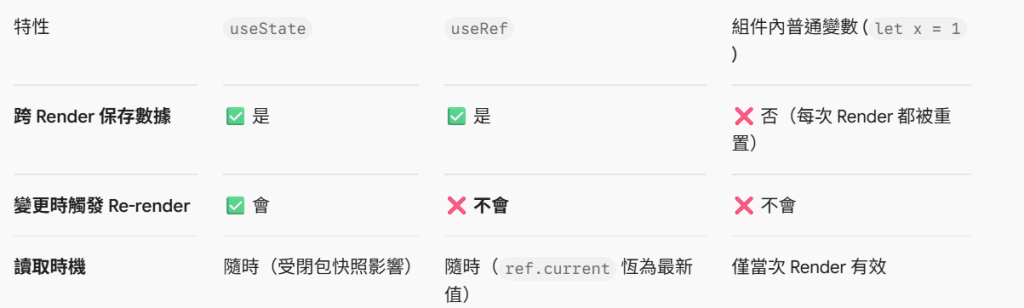
很多初學者把 useRef 當成單純「抓取 DOM 元素」的工具,但它真正的底層本質是一個「在組件整個生命週期中持續存在、且變更時『不會』觸發 Re-render 的通用容器」。
useRef(initialValue) 呼叫後,會回傳一個結構如下的 Plain JS Object:
{ current: initialValue }
兩大關鍵特性:
參考穩定性 (Reference Stability):每次組件 Re-render,useRef 回傳的物件永遠指向同一個記憶體位址。
無聲變更 (Silent Mutation):手動修改 ref.current = newValue 時,完全不會觸發組件重新渲染 (No Re-render)。
這是 useRef 最常見的用途。在 React 聲明式 UI 架構下,當我們需要進行瀏覽器原生操作(如 Focus、捲動、測量尺寸)時,必須透過 ref 取得 DOM:
import { useRef } from 'react';

function SearchBox() {
  const inputRef = useRef(null);

  const handleFocus = () => {
    // 透過 .current 存取真實 DOM 並呼叫原生 API
    inputRef.current?.focus();
  };

  return (
    <div>
      <input ref={inputRef} type="text" placeholder="搜尋..." />
      <button onClick={handleFocus}>聚焦輸入框</button>
    </div>
  );
}
有些數據我們需要跨 Render 保存,但數據的變更並不需要反映在畫面上。如果將這些數據放在 useState 中,每次更新都會引發不必要的 Re-render;這時就是 useRef 大顯身手的時刻!
常見情境:
保存 Timer ID(如 setInterval / setTimeout)
記錄舊的 State 快照(比對 Previews State)
計數器 / 防手震狀態 Flag(如防止重複發送 API 的 isSubmitting 旗標)
import { useState, useRef } from 'react';

function Timer() {
  const [seconds, setSeconds] = useState(0);
  // 使用 useRef 存放計時器 ID,避免觸發 Re-render
  const timerIdRef = useRef(null);

  const startTimer = () => {
    if (timerIdRef.current !== null) return;

    timerIdRef.current = setInterval(() => {
      setSeconds(prev => prev + 1);
    }, 1000);
  };

  const stopTimer = () => {
    clearInterval(timerIdRef.current);
    timerIdRef.current = null; // 清空 Ref
  };

  return (
    <div>
      <p>秒數:{seconds}</p>
      <button onClick={startTimer}>開始</button>
      <button onClick={stopTimer}>停止</button>
    </div>
  );
}



 iThome鐵人賽
 看影片追技術