
一些著名的公開函式庫,都有提供很多編譯選項可以做客製化。
像是 FFmpeg 函式庫,提供很多編譯選項,讓你可以刻意排除某些編碼器,不只節省編譯時間,還能避免授權問題,例如在商業專案中排除 GPL 授權的 x264 和 x265 這兩個編碼器。
著名的壓縮函式庫 libarchive 支援超多種壓縮演算法,但演算法越多,函式庫就越大越肥。假如某種演算法根本用不到,其實很想在編譯時把它剔除掉吧。
這種客製化功能在 vcpkg 裡就叫做 feature。
像是官方的 libarchive vcpkg port,就開了 7 個 feature:
// portfile.cmake 節錄內容
vcpkg_check_features(OUT_FEATURE_OPTIONS FEATURE_OPTIONS
    FEATURES
        bzip2   ENABLE_BZip2
        lz4     ENABLE_LZ4
        lzma    ENABLE_LZMA
        lzo     ENABLE_LZO
        zstd    ENABLE_ZSTD
        ...
)
今天我們就來說明該怎麼用 feature ,以及怎麼替我們自己的套件加上 feature。
我們先站在使用者的角度,看看 feature 怎麼「用」。
這是一個典型的消費端專案的 vcpkg.json ,我們引入了 libarchive 套件:
{
  "dependencies": ["libarchive"]
}
跑一下 vcpkg install --dry-run,看看 vcpkg 打算裝什麼:
vcpkg install --dry-run
終端機輸出中會看到 libarchive 後面的中括號內列出了啟用的 feature,預設會開六個 feature。
The following packages will be built and installed:
  * libarchive[bzip2,core,crypto,lz4,lzma,xar,zstd]:x64-linux@3.8.9
  ...
想開啟額外的 lzo 的話 (預設不開),就把它加入 features 列表:
{
  "dependencies": [
    { "name": "libarchive", "features": ["lzo"] }
  ]
}
接著安裝你會看到 lzo 出現在中括號裡,表示 lzo 函式庫也被拉進來了。
    libarchive[bzip2,core,crypto,lz4,lzma,lzo,xar,zstd]:x64-linux@3.8.9
  ...
  * lzo:x64-linux@2.10#9
如果我只要 zstd,其他格式通通排除呢?把 default-features 關掉,再寫下自己要的:
{
  "dependencies": [
    {
      "name": "libarchive",
      "default-features": false,
      "features": ["zstd"]
    }
  ]
}
這樣支援格式就從原本的十幾個瘦身到只剩 zstd 和 zlib 囉,編譯時間和函式庫大小都降下來了。
接下來,我們回到自己的 super-lib 函式庫。
身為套件作者,要怎麼加入 feature 來客製化函式庫呢?
首先要在在 my-ports/super-lib/vcpkg.json 加上 features 這個欄位:
{
  "name": "super-lib",
  "version": "0.1.0",
  "dependencies": [
    { "name": "vcpkg-cmake", "host": true },
    { "name": "vcpkg-cmake-config", "host": true }
  ],
  "features": {
    "debug-log": {
      "description": "Print debug messages"
    }
  },
}
注意:feature 名稱規定只能用小寫英文字母、數字和連字號-,不能用底線。
打開 my-ports/super-lib/portfile.cmake。
從這邊開始我們要寫一些 CMake Script 囉。
要做的事情很簡單,就是在跑 CMake configure 這個步驟之前,我們先去看看 debug-log 到底有沒有開,然後把開關的值傳遞給 CMake 設定變數:
if("debug-log" IN_LIST FEATURES)  # 判斷 feature ON/OFF
    set(ENABLE_DEBUG_LOG ON)
else()
    set(ENABLE_DEBUG_LOG OFF)
endif()

vcpkg_cmake_configure(
    SOURCE_PATH "${SOURCE_PATH}"
    OPTIONS
        "-DENABLE_DEBUG_LOG=${ENABLE_DEBUG_LOG}"
)
函式庫這邊,往 super-lib/CMakeLists.txt 裡面加入對應的選項:
if(ENABLE_DEBUG_LOG)
    target_compile_definitions(super-lib PRIVATE ENABLE_DEBUG_LOG)
endif()
然後修改原始碼 super-lib/src/super_lib.cpp:
void super_init() {
#ifdef ENABLE_DEBUG_LOG
    std::cerr << "[debug] super_init() called\n";
#endif
    std::cout << "Hello from super-lib/0.1.0\n";
}
這樣整條路就串起來囉:
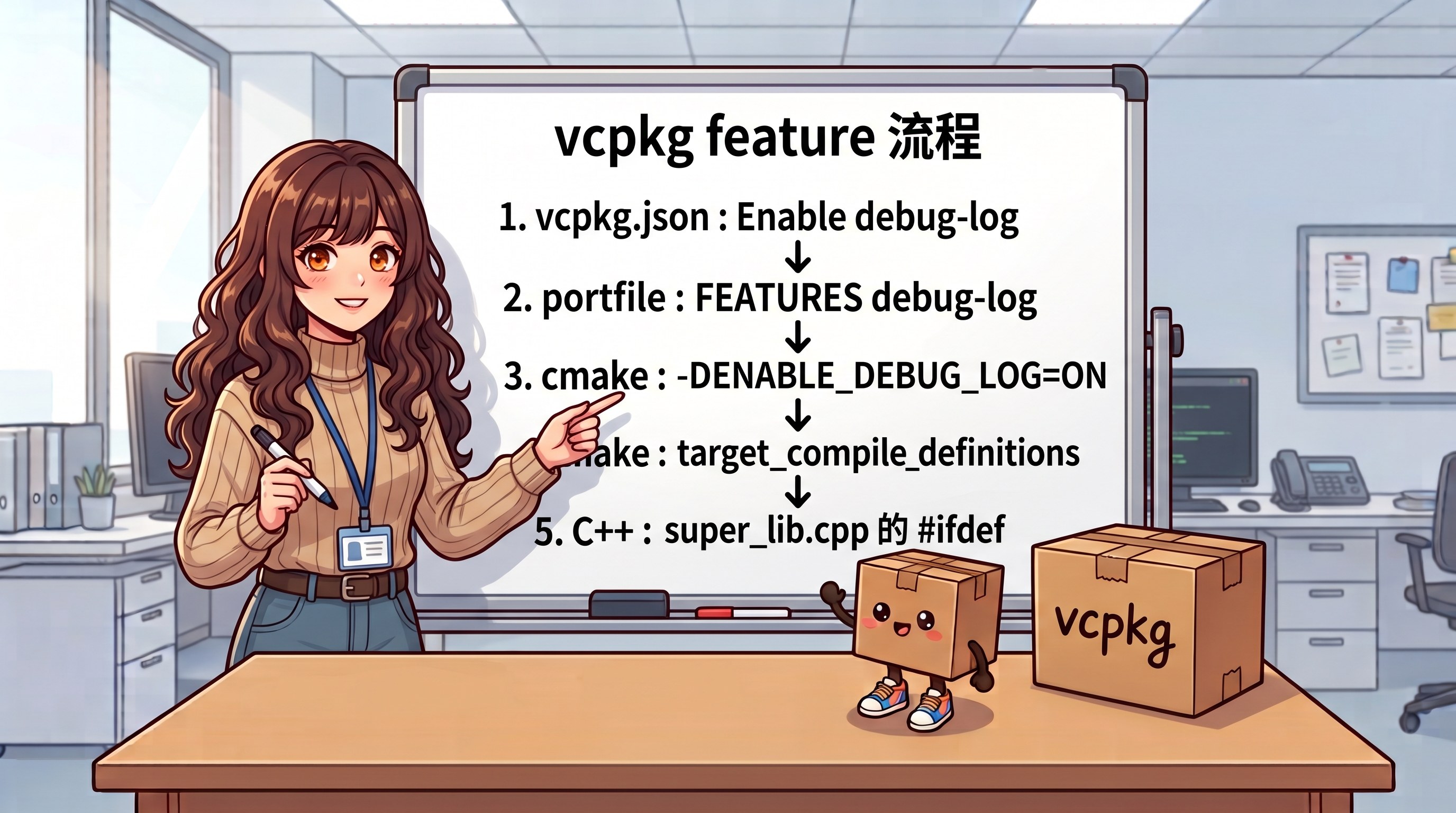
接著我們轉換角色為消費端的使用者,應用程式導入了 super-lib,要怎麼打開除錯訊息的客製化選項呢?
要打開除錯訊息,請打開 vcpkg.json 把依賴改成物件,並列出想要打開的 feature:
  "dependencies": [
    {
      "name": "super-lib",
      "features": [ "debug-log" ]
    }
  ]
接著重新呼叫 cmake configure。vcpkg 會自動發現 features 改變了,把舊的函式庫移掉、重新編譯並安帶著除錯功能的版本:
super-lib[core,debug-log]:x64-linux@0.1.0 -- .../my-ports/super-lib
Removing 1/2 super-lib:x64-linux
Installing 2/2 super-lib[core,debug-log]:x64-linux@0.1.0...
然後我們編譯應用程式並執行,你就會看到函式庫印出偵錯訊息囉!
[debug] super_init() called
Hello from super-lib/0.1.0
到目前為止,除錯輸出的功能預設是關閉的,消費端得自己主動開啟才能用。
假如我們希望反過來,預設就印出除錯訊息呢?
只要在 my-ports/super-lib/vcpkg.json 加上 default-features:
{
  "name": "super-lib",
  "version": "0.1.0",
  "features": {
    "debug-log": {
      "description": "Print debug messages"
    }
  },
  "default-features": [ "debug-log" ],
  "dependencies": [
    { "name": "vcpkg-cmake", "host": true },
    { "name": "vcpkg-cmake-config", "host": true }
  ]
}
這樣子,安裝就會自動打開這個功能囉!



 iThome鐵人賽
 看影片追技術