
昨天我們以非同步函數測試的例子說明單元測試/整合測試的差異,到目前為止後端的部分打算先到這。之後的幾天,我們開始進入研究前端。
在 Day 11 - 一周目- 開始玩轉前端(二) 中,我們用 create-react-app 建立了前端專案,並打出非同步的 request 向後端索取資料。
state 和 prop 的差異render() 中用箭頭函數key 屬性在動態的 react element array 應該要使用我們用 create-react-app 建立了前端專案,它幫我們產生了專案,資料夾如下: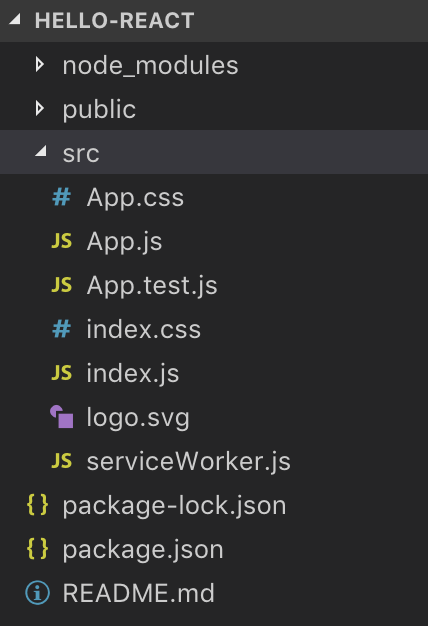
顯然只有基本的結構,我們未來要組織出自己的結構。
除了自己組識,上網找別人做好的也是個不錯的選擇,很多人會把初始專案結構放在 github 之類的,不過你得先知道你想要的組合套餐
Bundle tool: webpack / gulp
UI framework: React / Vue.js
State container: Redux / Vue.js
Asynchronous flow: redux-observable(rxjs) / redux-saga
CSS extension: sass / less
每個套件都有自己的特色、能不能搭配的問題、全部套件怎麼串起來、串起來的資料夾要怎麼組織…等問題,所以只能按照自己的需求查。
例如,上 google 查 webpack react redux sass,會看到
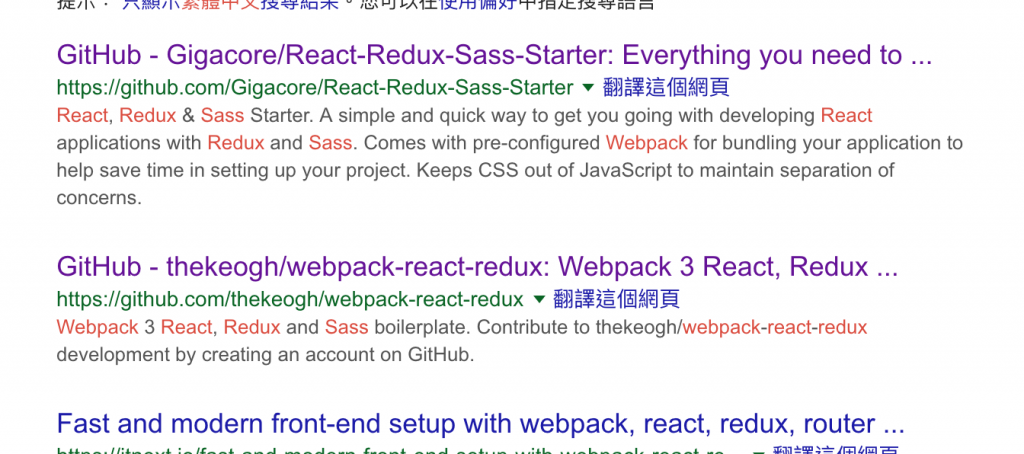
把它們下載看看,它們怎麼組織專案的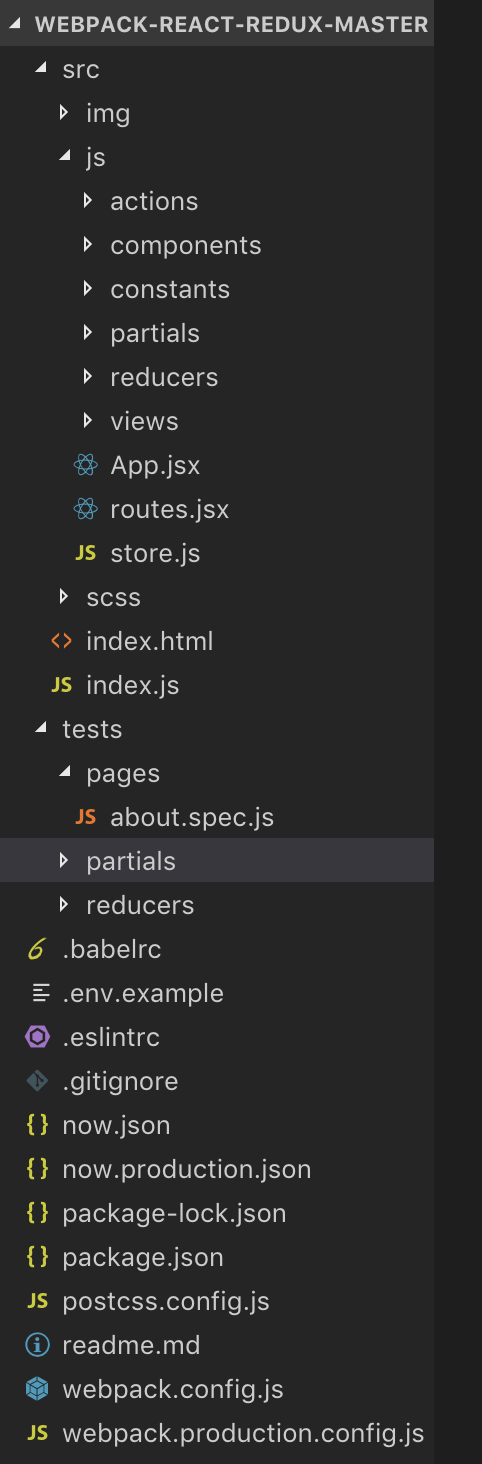
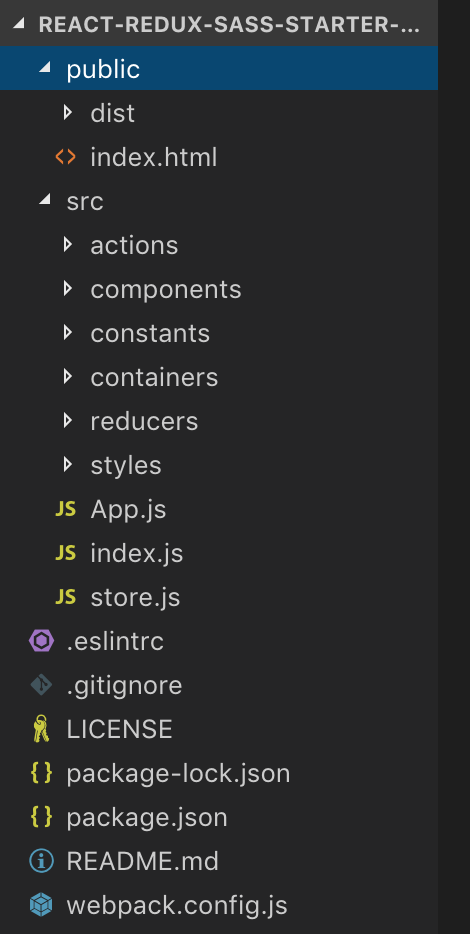
學習最快的方法就是模仿,從別人做好的專案架構學習、查文件資料,會學的很快的。
不過我們目前還是用 create-react-app 建立前端專案,沒有要下載別人的,未來會慢慢的建立起自己的專案架構。
HTML 和 CSS 基本知識可以自行上網查,但有點東西我覺得要了解才可以:
<div />、<input>
style, class
onClick
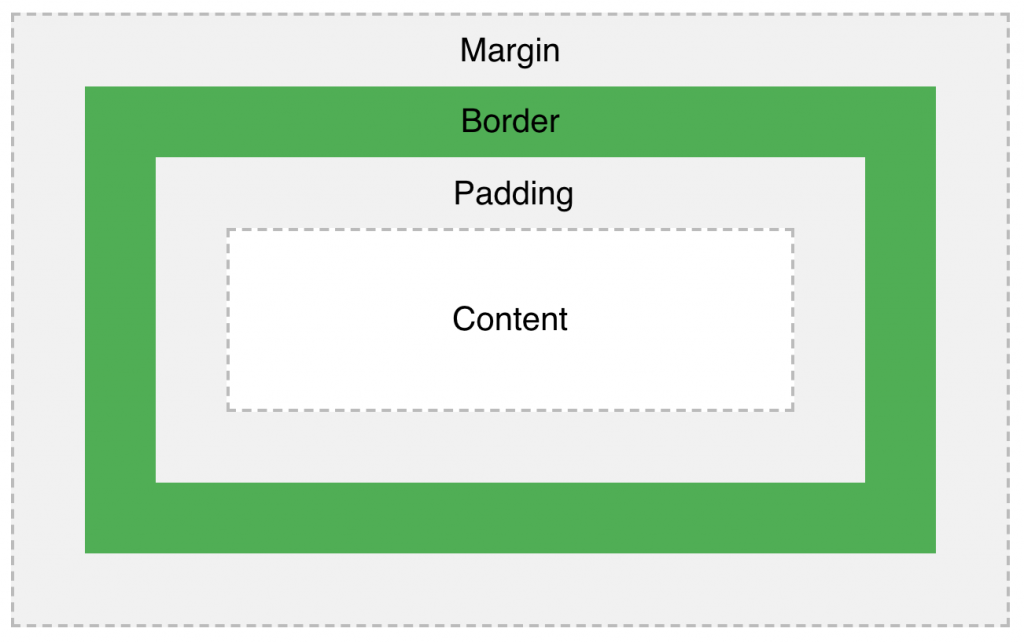
剩下的東西我覺得想要什麼再查就可以了。
下接來,我們要回到 javascript 的部分:前端框架 React
我們已經在 Day 10- 一周目- 開始玩轉前端(一)介紹過 React,之後會針對一些重要的概念說明。
我們舉個例子:
class LoginBox extends React.Component {
    render() {
        return (
            <div>
                <button onClick={this.props.onClickButton}>送出</button>
            </div>
        );
    }
}

class App extends React.Component {
  constructor(props) {
    super(props);
    this.handleClick = this.handleClick.bind(this); // 讓 handleClick() 裡的 this 是 App 自已
  }

  state = {
    message: '',
  }

  handleClick() {
    this.setState({
      message: 'hi',
    });
  }

  render() {
    return (
      <div>
        {this.state.message}
        <LoginBox onClickButton={this.handleClick} />
      </div>
    )
  }
}
請特別注意
this.handleClick = this.handleClick.bind(this)這行,它一定要寫,因為引起this.props.onClickButton(或者說this.handleClick) 執行的人不是App,所以handleClick裡面的this不是指向App。因此,在constructor()中用bind(this),可以把this綁定成App,如此this.setState()才能使用。
LobinBox 和 App 它們各自有兩個一定有的屬性:
props: 是由呼叫者(caller)所送入元件中。例如 LobinBox 的 onClickButton 的值是由 App 在 render()時送入。props 在 LoginBox 中不會改變,從 LoginBox 角度看,props 就像是常數。state: 是元件本身的狀態,它會隨著時間或行為改變。例如 App 的 state.message 點擊 <button /> 後會執行 this.props.onClickButton,又因為其值是 App 中的 handleClick,所以 handleClick() 會執行,導致 setState()執行使 App 的 state.message 改變。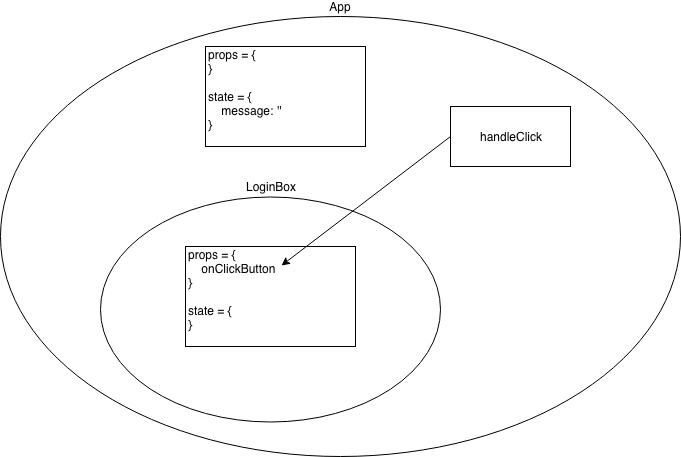
另外,props.children 這個很特別,它指向被 component 包著的內容,見下面
class LoginBox extends React.Component {
    render() {
        return (
            <div>
                <h3>in LoginBox</h3>
                {this.props.children}
                <button onClick={this.props.onClickButton}>送出</button>
            </div>
        );
    }
}

class App extends React.Component {
  ...略
  render() {
    return (
      <div>
        {this.state.message}
        <LoginBox onClickButton={this.handleClick}>
          <div>{this.state.message}</div>
        </LoginBox>
      </div>
    )
  }
}
LoginBox 裡面的 this.props.children 等於在 App 中被 LoginBox 標籤包著的所有內容。因此,為了渲染被 LoginBox 包著的內容,必需在 LoginBox 的 render 中 {this.props.children} 渲染,不然就看不到裡面的東西。
它們是 component 的在建立和渲染的過程 (見官方文件:Component lifecycle),以 component class 出發,react 會做以下的過程:
依照 component 被掛入 DOM 的過程分類,過程中會依序執行 component 的函數如下:
constructor()
static getDerivedStateFromProps()
render()
componentDidMount()
static getDerivedStateFromProps()
shouldComponentUpdate()
render()
getSnapshotBeforeUpdate()
componentDidUpdate()
componentWillUnmount()
componentDidCatch()
Live Demo - React lifecycle
範列中把所有的過程都印了出來,可以去看看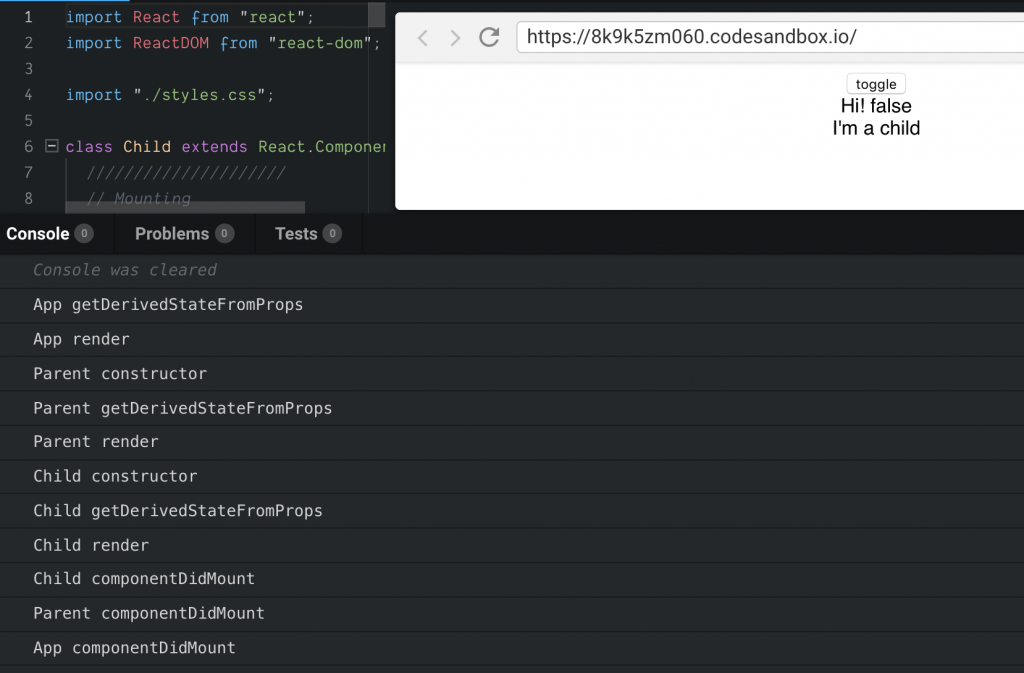
當你按下 toggle,就會看到 Updating 的過程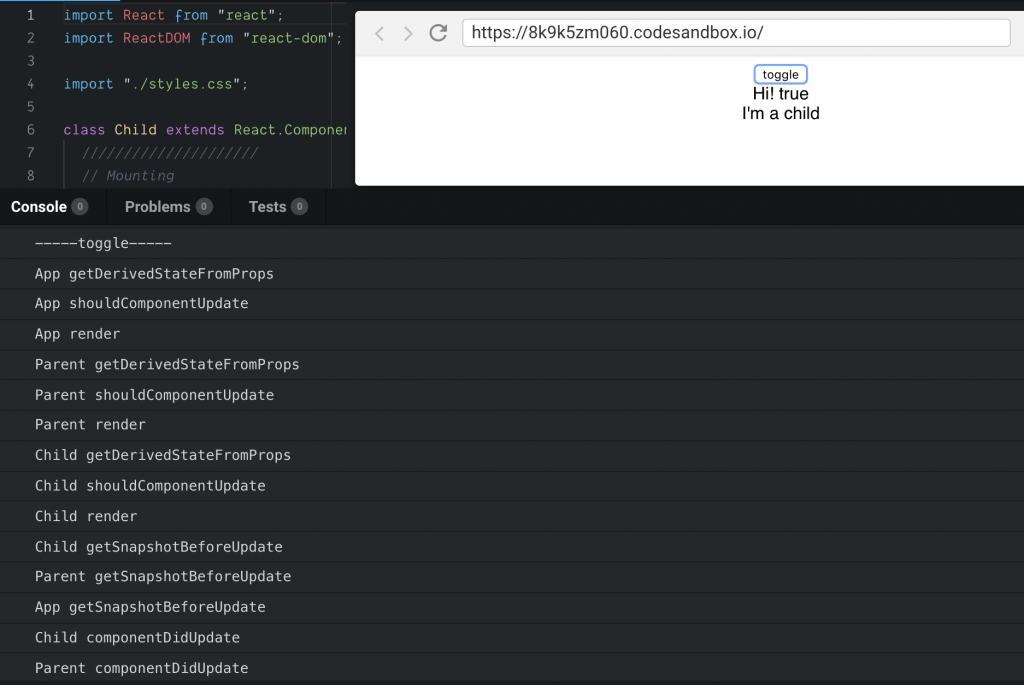
我們雖然不會一一解釋它們,但有東西要釐清一下:
getDerivedStateFromProps(props, state) 是指由使用者送入的 props(可能是Mounting 或 Updating 發生) 和目前 compoent 的 state 產生新的 state。我們之前過 state 是 compoent 本身的狀態,當有新 props 來到時自然需要改變。render()
render()。不過,比較常回傳一個 react element 或 react element array。render() 回傳的 react element,只能有最上層的標籤
render() {
  reutrn <root>{...}</root>
}
React.Fragment 可以讓你放更多 react element
render() {
  return (
    <React.Fragment>
      <ChildA />
      <ChildB />
      <ChildC />
    </React.Fragment>
  );
}
componentDidMount() 是react element 掛入 DOM 後才會被執行,適合拿來做為要求後端資料的觸發點getSnapshotBeforeUpdate() 回傳的值,會在 componentDidUpdate(prevProps, prevState, snapshot) 的參數拿到。可以拿來保留畫面更新前的資料。render() 中用箭頭函數:每次都有新的函數以前面的例子:
<LoginBox onClickButton={this.handleClick}>
  <div>{this.state.message}</div>
</LoginBox>
你可以寫成
<LoginBox onClickButton={() => {
    this.setState({
      message: 'hi',
    });
}}>
  <div>{this.state.message}</div>
</LoginBox>
是可以這樣做,也不用 .bind(this) 了,但要知道每次 render() 都會重新產生一個新的函數,有時對效能不是很好。因此,可以使用 this.handleClick 這個成員函數,這個就只有一個實體。記得! 若在this.handleClick實作中要用到 this,要記得 .bind(this)。
key我們考慮 react element 放在 array 中,React Virtual DOM 在進行比較(新舊React Virtual DOM 比較)決定是否要更新 DOM 時,它可能會參考屬性 key,這東西很特別。
          if (this.props.toggle) {
            return (
              <div>
                <Child text="3" />
                <Child text="4" />
                <Child text="5" />
              </div>
            );
          } else {
            return (
              <div>
                <Child text="3" />
                <Child text="5" />
              </div>
            );
          }
React Virtual DOM比較時是按照順序,若 toggle 從 false 到 true:
| false -> true | false | true | true -> false |
|---|---|---|---|
| updating | <Child text="3" /> |
<Child text="3" /> |
updating |
| updating | <Child text="5" /> |
<Child text="4" /> |
updating |
| mounting | null | <Child text="5" /> |
unmounting |
一開始toggle = false
Child => 3 constructor
Child => 3 getDerivedStateFromProps
Child => 3 render
Child => 5 constructor
Child => 5 getDerivedStateFromProps
Child => 5 render
Child => 3 componentDidMount
Child => 5 componentDidMount
由 false -> true
Child => 3 getDerivedStateFromProps
Child => 3 shouldComponentUpdate
Child => 3 render
Child => 4 getDerivedStateFromProps
Child => 5 shouldComponentUpdate
Child => 4 render
Child => 5 constructor
Child => 5 getDerivedStateFromProps
Child => 5 render
Child => 3 getSnapshotBeforeUpdate prev =3       -> updating, 一樣留著
Child => 4 getSnapshotBeforeUpdate prev =5       -> updating, 之前是 5
Child => 3 componentDidUpdate
Child => 4 componentDidUpdate
Child => 5 componentDidMount                     -> mounting, 5
由 true -> false
Child => 3 getDerivedStateFromProps
Child => 3 shouldComponentUpdate
Child => 3 render
Child => 5 getDerivedStateFromProps
Child => 4 shouldComponentUpdate
Child => 5 render
Child => 3 getSnapshotBeforeUpdate prev =3       -> updating, 一樣留著
Child => 5 getSnapshotBeforeUpdate prev =4       -> updating, 之前是 4
Child => 5 componentWillUnmount                  -> unmounting, 5
Child => 3 componentDidUpdate
Child => 5 componentDidUpdate
          if (this.props.toggle) {
            return (
              <div>
                <Child key="b3" text="b3" />
                <Child key="b4" text="b4" />
                <Child key="b5" text="b5" />
              </div>
            );
          } else {
            return (
              <div>
                <Child key="b3" text="b3" />
                <Child key="b5" text="b5" />
              </div>
            );
          }
當 react element key 新舊 key 都一樣,表示 DOM element 存在,只要進行 DOM element 更新
當 react element key 新出現,表示要進行插入新的 DOM element。
當 react element key 在新的 React Virtual DOM 消失,表示移除 DOM element。
| false -> true | false | true | true -> false |
|---|---|---|---|
| updating | <Child key="b3" text="3" /> |
<Child key="b3" text="3" /> |
updating |
| mounting | null | <Child key="b4" text="4" /> |
unmounting |
| updating | <Child key="b5" text="5" /> |
<Child key="b5" text="5" /> |
updating |
一開始toggle = false
Child => b3 constructor
Child => b3 getDerivedStateFromProps
Child => b3 render
Child => b5 constructor
Child => b5 getDerivedStateFromProps
Child => b5 render
Child => b3 componentDidMount
Child => b5 componentDidMount
由 false -> true
Child => b3 getDerivedStateFromProps
Child => b3 shouldComponentUpdate
Child => b3 render
Child => b4 constructor
Child => b4 getDerivedStateFromProps
Child => b4 render
Child => b5 getDerivedStateFromProps
Child => b5 shouldComponentUpdate
Child => b5 render
Child => b3 getSnapshotBeforeUpdate prev =b3             -> updating, 一樣留著
Child => b5 getSnapshotBeforeUpdate prev =b5             -> updating, 一樣留著
Child => b3 componentDidUpdate
Child => b4 componentDidMount                            -> mounting, 4
Child => b5 componentDidUpdate
由 true -> false
Child => b3 getDerivedStateFromProps
Child => b3 shouldComponentUpdate
Child => b3 render
Child => b5 getDerivedStateFromProps
Child => b5 shouldComponentUpdate
Child => b5 render
Child => b3 getSnapshotBeforeUpdate prev =b3             -> updating, 一樣留著
Child => b5 getSnapshotBeforeUpdate prev =b5             -> updating, 一樣留著
Child => b4 componentWillUnmount                         -> unmounting, 4
Child => b3 componentDidUpdate
Child => b5 componentDidUpdate
key。React 也會對沒加 key 的 react element array 發出警告,因為不加key可能會使舊的 react element 留下來,它可能會有殘留的 prop/state 導致畫面殘留。今天我們先談了如何找前端專案結構,再深入談 React 的 state 和 prop ,以及生命周期。最後以箭頭函數和 key 屬性的效能議題做為結尾。





 iThome鐵人賽
 看影片追技術