
Amazon EBS Volume & How to create EBS snapshot / AMI & restore?
跟著這部影片的步驟,學習EBS
在ec2的左邊選擇Volumn,然後create Volumn
Amazon EBS 磁碟類型:
Amazon EBS 功能
30天鐵人賽介紹 AWS 雲端世界 - 14: EC2的實體硬碟服務 Elastic Block Storage(EBS)
有關Region, Available Zone,Data Center:
30天鐵人賽介紹 AWS 雲端世界 - 3: 雲端服務上的Global, Region, Available Zone 與Edge 介紹
Region:多個Available Zone所組成,有實體位置,就像是us-west-1
Available Zone:一或多個Data Center所組成,就像是us-west-1a
Data Center:就是實際存在的主機
EBS硬碟的AZ要跟虛擬主機的AZ一樣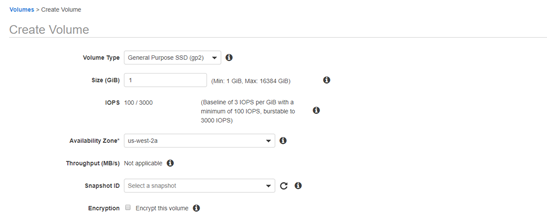
這邊可以選擇要不要加密硬碟,如果硬碟是用沒加密的snapshot製造,那硬碟就會自動是沒加密的,如果硬碟是用加密的snapshot製造,那硬碟就會自動是加密的,像這邊是,自己創建硬碟,就可以選擇硬碟要不要加密。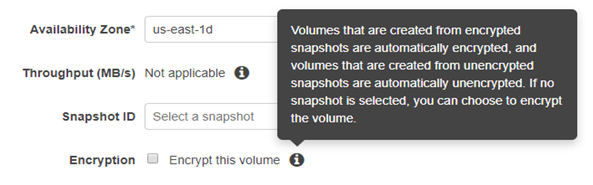
接著就可以選擇要把硬碟放到(attach)哪個虛擬主機,EBS是可以在主機開機的時候裝到主機,但是主機開機的時候不能刪掉主硬碟(一開始EC2都會有一顆EBS,用來放作業系統的內容)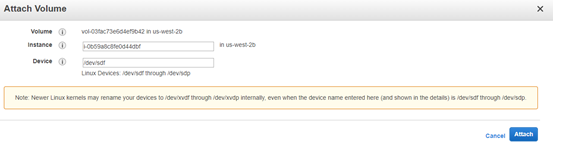
接著開啟虛擬主機,看有沒有新增硬碟
lsblk 可以看到xvdf就是新增的硬碟
lsblk 列出系統上的所有磁碟列表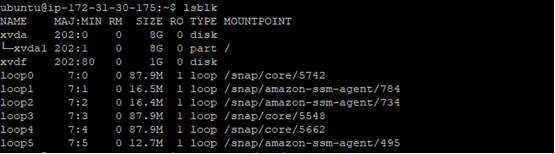
接著
mkfs-->創硬碟的檔案系統
什麼是檔案系統(File System)?
File System Concept
就是當使用者要使用某個檔案時,不必管硬碟到底把檔案存到哪,只要有檔案、檔案名稱、和目錄,就可以找到檔案。
能輕鬆找到檔案,都是因為有檔案系統,而不用直接去問硬碟檔案在哪
make filesystem
格式化-->建置檔案系統 (make filesystem)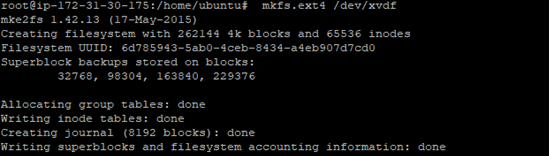
接著要檔案系統掛載,
所以創個資料夾,然後把檔案系統掛載到資料夾:
Linux 檔案系統掛載(mount)使用教學與範例
Linux系統所有可存取的檔案都被安置在根目錄「/」底下的某ㄧ個位置,如果要存取某個設備上的檔案,就必須先把這個設備掛載(mount),才能夠讀取或寫入資料,例如在新增硬碟時需要掛載。
lsblk: list block device,列出系統上的所有磁碟列表
而df:列出檔案系統的整體磁碟使用量
先創建資料夾app,把檔案系統掛載到app
最近試了一下,發現mount -t exe4 /dev/xvdf /app 有錯誤(unknown filesystem type 'exe4'),所以改成
mount UUID="ef58f8bd-a404-46ba-bae4 (換成自己的UUID)" /app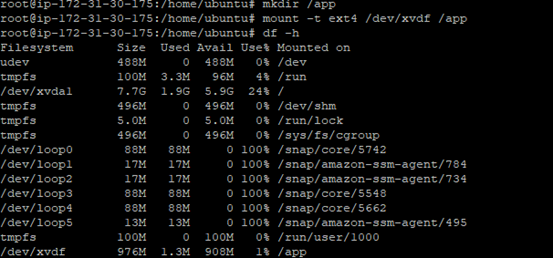
接著/app就可以當成C:、D:了,創了四個檔案a、b、c、d
然後ls查看目錄有甚麼檔案
ls 命令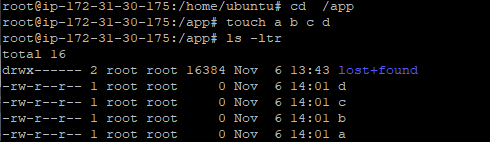
創建檔案是為了看備份的硬碟有沒有這些檔案,關於備份硬碟就要來創個snapshot
回到ec2畫面-->點選volumn-->actions-->create snapshot
snapshot翻成中文叫快照,應該就是紀錄磁碟的時間點,像是磁碟的資料變更了5GB,如果在這之後創了個snapshot,那就會是更新後的磁碟,變更後的磁碟的時間點 。
然後snapshot的資料是存到Amazon S3,snapshot不是硬碟,所以要顯示備份的硬碟內容,要再創一個硬碟,這個硬碟的AZ就不用跟主機的一樣了,因為這是備份的硬碟,所以可以存到別的AZ,也可以存到別的Region,但是那也要備份到不同主機才行,所以還是先選一樣的AZ,方便測試,所以同樣地,再把硬碟放到主機
接著測試:
lsblk就可以看到新增的硬碟了
然後 df –h還沒看到新增硬碟的檔案系統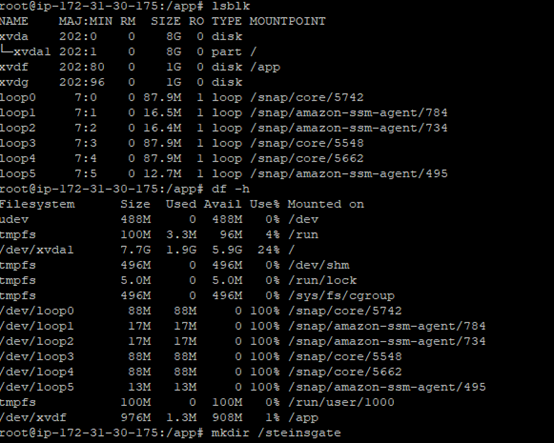
接著不用再創檔案系統了。因為是備份的硬碟。只要掛載就可以了
接著查看硬碟的檔案,有a、b、c、d,完成了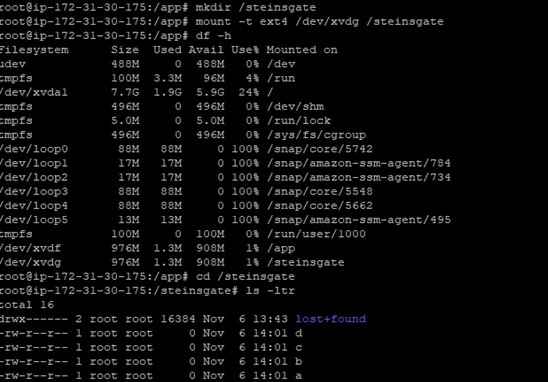
如果要在別的region備份,回到ec2-->snapshots-->action-->copy snapshot就可以了
如果想要再創一個EC2,然後硬碟內容跟之前的EC2一樣,使用AMI,這樣在新增一個主機的時候可以選擇AMI,這樣新主機就有原本主機的硬碟內容,全部都會複製,也不用管掛載問題。
snapshot只是單純備份 , 還要自己在創建EBS,再創EC2,很麻煩。 直接用AMI較方便 。
AMI的步驟:
回到ec2-->instances-->action-->image-->create image就可以: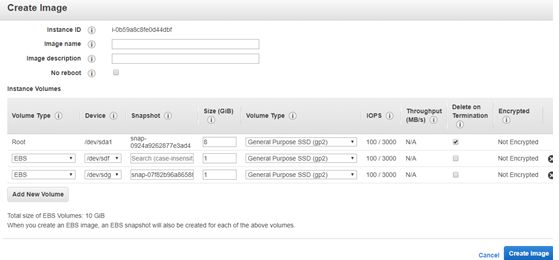
snapshot是一個備份的概念 , 定時創建snapshot,要用Lifecycle Policy(好像最多只能兩小時創一個snapshot):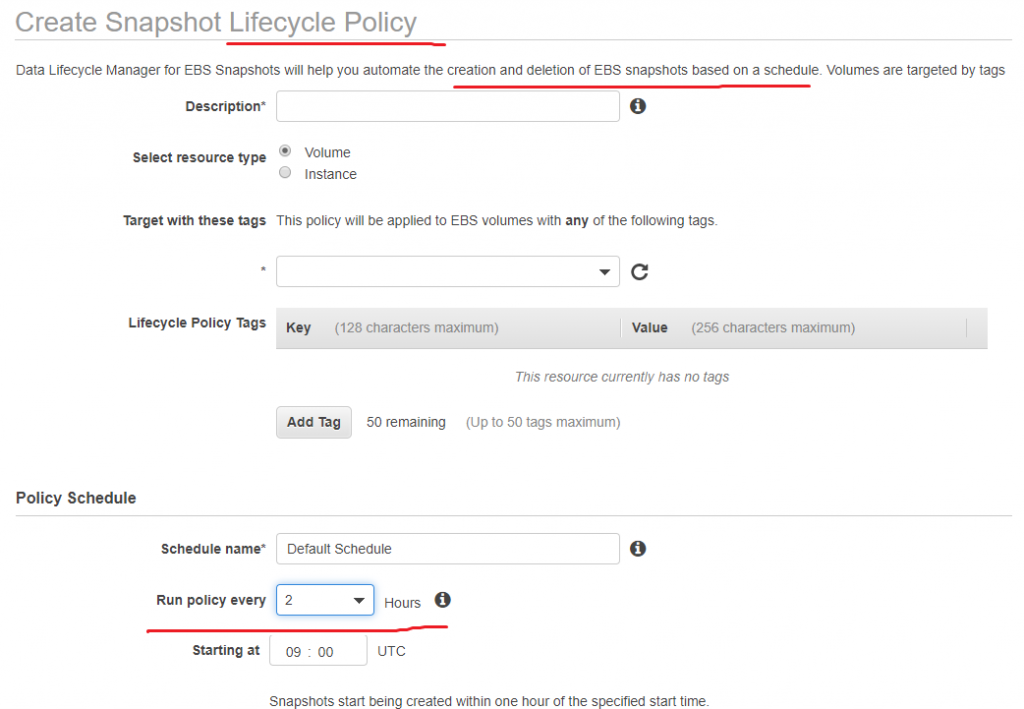
AWS Elastic Block Store Storage – EBS – Certification
看完這篇後,了解的一些事(可能會有錯誤,不太確定):
1 Root ebs能不能在主機開著的時候detach?
不能,但可以在主機關的時候,把主硬碟detach,但之後不能開機,如圖: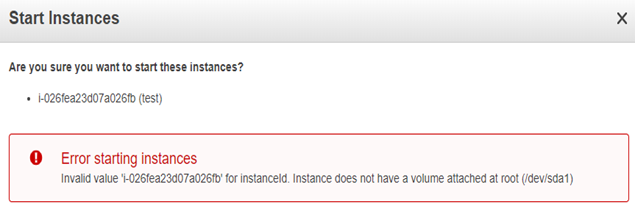
2 跟著主機一起創建的EBS,當主機刪掉的時候,EBS也會一起刪。如果想保留EBS,要改變DeleteOnTermination(不要打勾),一開始創EC2的時候的選項: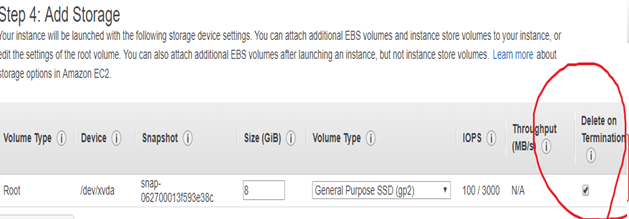
3 如果要把加密的EBS snapshots公開是不可以的,要用未加密的snapshots給別人。所以要加密要找其他方法,像是:第三方的程式、應用程式裡的資料加密、檔案系統的資料加密驅動程式
4 使用EBS的EC2,重新開機是不用當一小時計費的,但是關機在開機要在+1小時的計費
5
EBS volume會自動複製
EBS volume is automatically replicated in an Availability Zone to prevent data loss due to failure of any single hardware component.
6 EBS 加密用 AES-256
EBS encryption uses 256-bit Advanced Encryption Standard algorithms (AES-256) and an Amazon-managed key infrastructure.
7 要把四種硬碟記熟:
Amazon EBS 功能
AWS EBS Volume Types – Certification
磁碟區大小最大都16TB
I/O 密集型 NoSQL 和關聯式資料庫
high performance NoSQL cluster deployments
最大IOP:64,000
最大IOP:16,000
high throughput
大數據、資料倉儲、日誌處理
最大IOP:500
不常使用資料
最大IOP:200
類似google雲端硬碟的概念
整理
1
Do I need to use randomized hashes as a prefix to object key names in my Amazon S3 bucket?
原本要在命名檔案的時候 , 前面可以加些 亂數 ,來optimize performance(優化性能)。不過現在不用,像是可以直接以日期命名。
2
要傳大型檔案到AWS S3,可以分段上傳(Multipart uploads):
透過適用於 PHP 的 AWS 開發套件第 3 版使用 Amazon S3 分段上傳
3
讀:
AWS Simple Storage Service – S3 Overview
Amazon S3 簡介
一
All buckets and objects are by default private
所有東西預設都是只有自己可以用的。
二
S3 bucket names are globally unique, regardless of the AWS region in which you create the bucket
S3 bucket的名稱要是世界唯一的
三
Objects belonging to a bucket reside in a specific AWS region never leave that region, unless explicitly copied using Cross Region replication
S3 bucket的名稱要是世界唯一的,但是bucket只在那個region,所以要複製資料到別的region,要用Cross Region replication。
教學:How To Perform AWS Cross-Region Replication (CRR) Using S3
四:
AWS S3 Data Consistency Model
S3 provides eventual consistency for overwrite PUTS and DELETES in all regions.
eventual consistency(最終一致性)意思是指,如果更新或刪除資料,在還沒有完全改變好資料之前,都會讀到舊的內容
五:
版本控制:物件版本控制
就是檔案更新,舊的東西還會保留: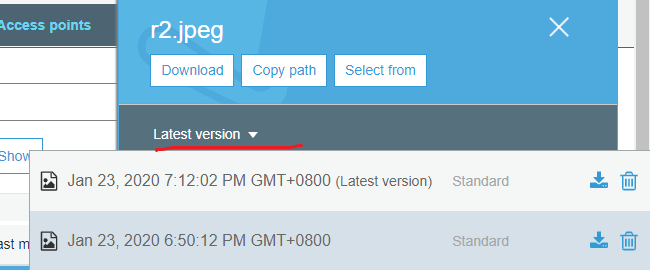
有版本控制的話,刪除檔案時 , 會在上面再多個 刪除的版本 , 但是舊的資料都還在,隨時可以復原。
六:
來源:Notes for AWS Certified Solutions Architect Associate
AWS S3 performance —
3,500 requests per second to add data (新增資料)
5,500 requests per second to retrieve data (獲得資料)
4
使用預先簽章的 URL 上傳物件 (AWS SDK for Java)
S3 - Presigned URLs
就是一般常用的資料庫,像是:MySQL、PostgreSQL。實際應該就是一個ec2,幫你灌資料庫軟體。
來源:AWS Relation Database Service – RDS – Certification
整理:
1
backup retention period 應該是指備份保留期? 一天 代表 備份的資料 只存活一天?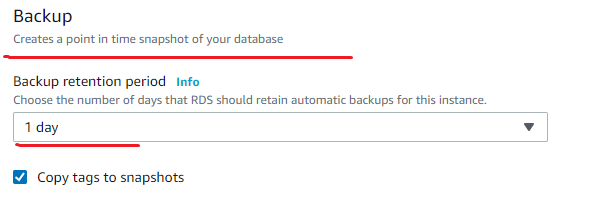
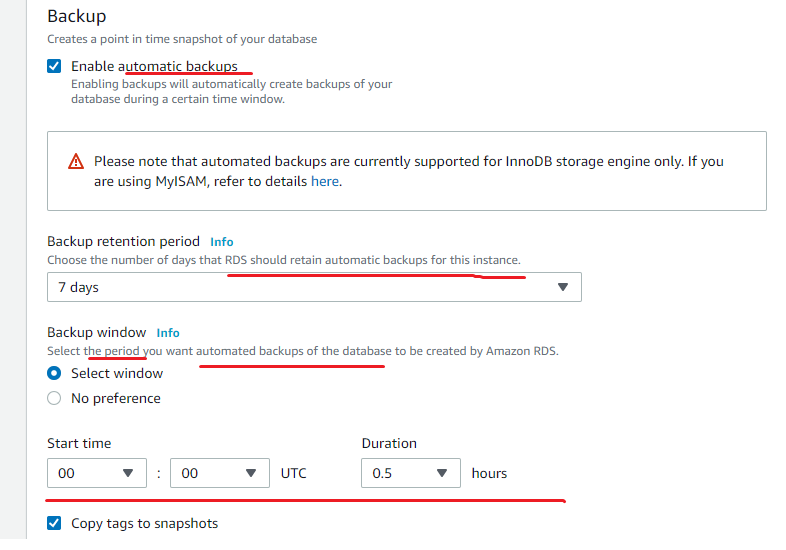
參考:RDS - Backups
RDS - Restoring Backups
2
不能使用ROOT帳號登入RDS,所以一些需要進階權限的系統TABLE 不能使用:
However, as it is a managed service, shell (root ssh) access to DB instances is not provided, and this restricts access to certain system procedures and tables that require advanced privileges.
3
同個az之間傳資料,不收錢:
data transferred in the same Availability Zone No charge. It is free.
(RDS Multi-AZ 是 synchronous ,關於 synchronous和 asynchronously : 非同步(Asynchronous)與同步(Synchronous)的差異)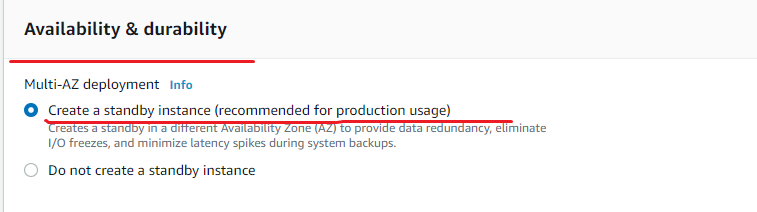
其實還不太懂這是什麼,但是這個影片很明白:
AWS RDS Multi AZ Failover
Multi-AZ:
RDS automatically provisions and manages a synchronous standby replica(複製品) in a different AZ (independent infrastructure in a physically separate location)
Select Create Replica in Different Zone to have Amazon RDS maintain a synchronous standby replica in a different Availability Zone than the DB instance. Amazon RDS will automatically fail over to the standby in the case of a planned or unplanned outage of the primary.
但是Multi-AZ的方法,好像不是流量增加的解決方案,需要增加讀取,要用read Replica:
standby replica can’t be used to serve read traffic. To service read-only traffic, use a Read Replica.
Multi-AZ使用場合:
Primary DB instance switches over automatically to the standby replica if any of the following conditions occur:
1 An Availability Zone outage
2 Primary DB instance fails
3 DB instance’s server type is changed (換 CPU 或 記憶體)
4 Operating system of the DB instance is undergoing software patching(作業系統改版)
5 A manual failover of the DB instance was initiated using Reboot with failover (also referred to as Forced Failover) 人工操作Reboot with failover(上面影片的方法)
6 Updates made to the source DB instance are asynchronously copied to the Read Replica.
只能讀取的rds
這個影片很明白:
AWS RDS Read Replica across AWS Region
Read Replica 的使用情況:
1 Scaling beyond the compute or I/O capacity of a single DB instance for read-heavy database workloads, directing excess read traffic to Read Replica(s)
2 Serving read traffic while the source DB instance is unavailable for e.g. If the source DB instance cannot take I/O requests due to backups I/O suspension or scheduled maintenance, the read traffic can be directed to the Read Replica(s). However, the data might be stale
(數據可能是陳舊的,因為Read Replica 是 asynchronously , 所以 如果 還是舊資料 , 會先傳給你 ).
3 Business reporting or data warehousing scenarios where business reporting queries can be executed against a Read Replica, rather than the primary, production DB instance.
(Business reporting 或是 data warehousing 只需要執行queries的話 ,就可以用 Read Replica)
來源:AWS Storage Gateway – Certification
How to Configure AWS Storage Gateway step by step
Storage Gateway - Introduction
這個不太懂,只知道是在自己的電腦,安裝虛擬機器,虛擬機器可以直接用Storage Gateway 跟aws 連線。檔案可以備份到s3(可能錯誤)。
所以 AWS Storage Gateway 的 File Gateways ,可以想像成 把 虛擬機器的 d槽 複製 到 s3(把檔案系統掛載到s3)?
provides access to objects in S3 as files or file share mount points. It can be considered as a file system mount on S3.

來源:AWS EC2 Instance Store Storage
EC2 : Instance Store by aws avinash reddy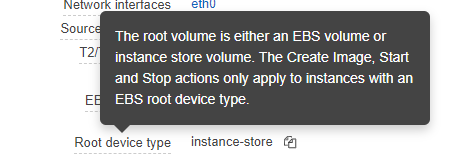
Instance Store Storage 是 temporary storage (暫時的硬碟?),所以當ec2 terminates時 ,Instance Store Storage就消失了。
REBOOT(重新開機?)時 , Instance Store Storage還存在,不會被刪掉。
因為下面說明,沒有提到REBOOT:
However, the data on the instance store does not persists if the
1 underlying disk drive fails(硬碟故障?)
2 instance stops i.e. if the EBS backed instance with instance store volumes attached is stopped
3 instance terminates





 iThome鐵人賽
 看影片追技術