

前幾篇都還在 View 裡打轉。
我慢慢搞懂了:
_Layout.cshtml
_ViewStart.cshtml
_ViewImports.cshtml
Partial View
RenderSection
但看懂 View 之後,我開始想一個更前面的問題:
我在瀏覽器輸入網址之後,
到底是誰決定要打開哪一頁?
以前寫 React 時,我會想到 Router。
例如:
<Route path="/home" element={<HomePage />} />
看到 /home,就知道要顯示 HomePage。
但 MVC 不太一樣。
例如我輸入:
/Home/Index
最後可能會進到:
HomeController
裡面的:
Index()
再由 Controller 決定要回傳哪個 View。
所以這篇就來把最基本的:
網址
↓
Route
↓
Controller
↓
Action
串起來。
假設我在瀏覽器輸入:
/Home/Index
MVC 常見的流程可以先理解成:
瀏覽器送出請求
↓
Route 解析網址
↓
找到 HomeController
↓
執行 Index()
↓
Action 決定要回傳什麼
所以網址不是直接去找:
Views/Home/Index.cshtml
中間還會先經過 Controller。
這也是 MVC 裡的 C:
Controller
Route 就是路由。
可以先把它理解成:
一套規則,用來判斷這個網址要交給哪個 Controller 和 Action。
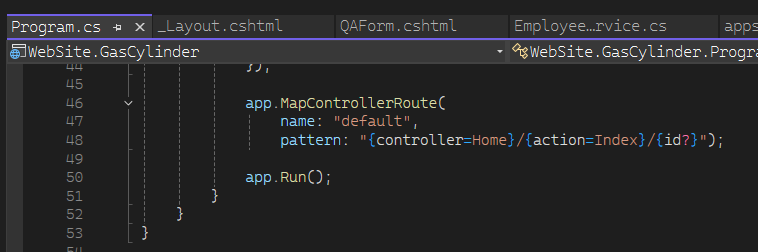
ASP.NET Core MVC 專案裡,常會在 Program.cs 看到:
app.MapControllerRoute(
    name: "default",
    pattern: "{controller=Home}/{action=Index}/{id?}");
第一次看到這串時,我其實只看到一堆:
{}
拆開後會比較好懂。
{controller=Home}
代表:
第一段是 Controller
如果沒有寫,預設使用 Home
接著:
{action=Index}
代表:
第二段是 Action
如果沒有寫,預設使用 Index
最後:
{id?}
代表:
第三段可以是一個 id
而且 ? 表示它可以沒有
/Home/Index 到底怎麼拆?拿:
/Home/Index
來看。
按照:
"{controller=Home}/{action=Index}/{id?}"
可以拆成:
Home
↓
controller

Index
↓
action
所以 MVC 接下來會找:
HomeController
再找裡面的:
Index()
可以先記成:
/Home/Index
↓
HomeController.Index()
HomeController,網址卻只寫 Home?因為 MVC 對 Controller 有命名慣例。
例如:
public class HomeController : Controller
{
}
網址裡不需要寫:
/HomeController/Index
而是寫:
/Home/Index
MVC 會把:
Home
和:
HomeController
對應起來。
所以:
網址中的 Home
↓
HomeController
例如:
/User/Index
↓
UserController
/Product/List
↓
ProductController
這也是為什麼 Controller 類別名稱通常會以:
Controller
結尾。
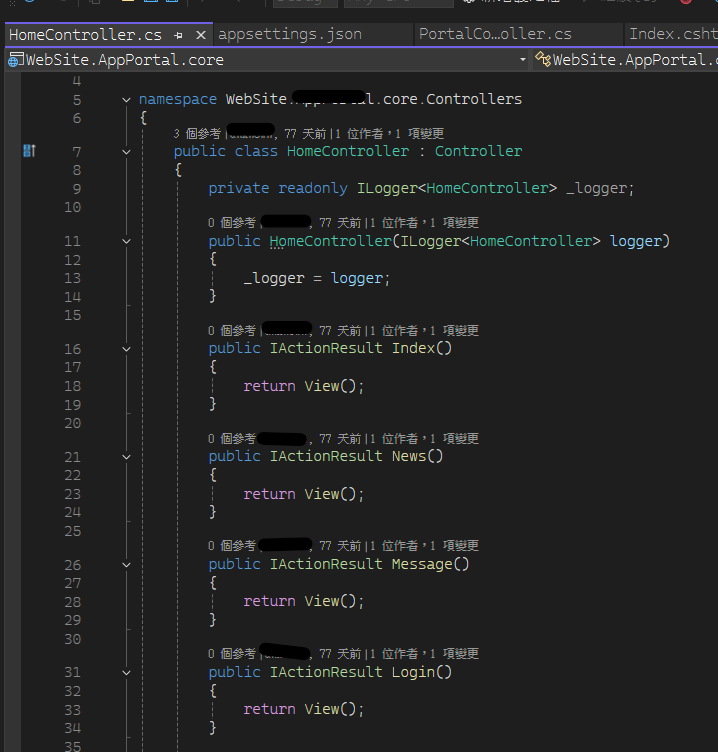
Controller 裡會有很多方法。
例如:
public class HomeController : Controller
{
    public IActionResult Index()
    {
        return View();
    }

    public IActionResult About()
    {
        return View();
    }

    public IActionResult Contact()
    {
        return View();
    }
}
這些可以處理請求的方法,就可以先把它理解成 Action。
所以:
/Home/Index
會對應:
Index()
而:
/Home/About
會對應:
About()
整理成:
HomeController

├── Index()
├── About()
└── Contact()
可以先這樣記:
Controller
負責一組相關功能

Action
負責其中某一個請求
假設路由設定是:
pattern: "{controller=Home}/{action=Index}/{id?}"
裡面已經寫:
controller 預設 Home
action 預設 Index
所以當我只輸入:
https://localhost:xxxx/
沒有提供 Controller,也沒有提供 Action。
MVC 就可能使用預設值:
Home
Index
等於:
/Home/Index
流程就是:
/
↓
沒有 controller
→ 使用 Home

沒有 action
→ 使用 Index

↓
HomeController.Index()
所以有時候網址列根本看不到:
/Home/Index
實際卻還是跑進:
HomeController.Index()
id? 又是什麼?假設網址是:
/Product/Detail/10
依照:
"{controller}/{action}/{id?}"
可以拆成:
Product
↓
Controller

Detail
↓
Action

10
↓
id
Controller 可能寫:
public IActionResult Detail(int id)
{
    return View();
}
這時:
10
就有機會被帶進:
id
所以:
/Product/Detail/10
↓
ProductController
↓
Detail(10)
至於 MVC 怎麼把網址中的資料自動放進參數,後面談 Model Binding 時再深入。
這篇先知道:
Route 不只可以找 Controller 和 Action
也可以帶參數
不是。
目前這篇看到的是很常見的:
app.MapControllerRoute(...)
也就是 Conventional Routing,可以先理解成:
大家遵守同一套路由規則
但實際專案裡,也可能直接在 Controller 或 Action 上寫路由。
例如:
[Route("users")]
public class UserController : Controller
{
    [Route("detail/{id}")]
    public IActionResult Detail(int id)
    {
        return View();
    }
}
這時網址可能是:
/users/detail/10
這類做法通常稱為 Attribute Routing。
所以實際追企業專案時,不要看到:
/Home/Index
的規則後,就認為所有網址都一定長:
/Controller/Action
比較安全的做法還是:
先看 Program.cs 的 Route
↓
再看 Controller 或 Action 上有沒有 Route Attribute
例如我輸入:
/Test/Index
Route 可以正常把它拆成:
controller = Test
action = Index
但如果專案根本沒有:
TestController
那最後還是找不到可以處理這個請求的地方。
就可能得到:
404
所以:
Route 成功解析網址
不代表:
Controller 一定存在
例如專案有:
public class HomeController : Controller
{
    public IActionResult Index()
    {
        return View();
    }
}
但我輸入:
/Home/History
如果沒有對應的:
History()
同樣可能找不到可以執行的 Action。
所以追網址時,可以先拆成:
第一段
Controller 有沒有?

第二段
Action 有沒有?
假設目前瀏覽器網址是:
/Home/Index
我現在會先這樣找。
/Home/Index
先猜:
Home
↓
Controller

Index
↓
Action
Controllers 找專案裡可能有:
Controllers
└── HomeController.cs
打開它。
Index()public IActionResult Index()
{
return View();
}
這時就可以把:
網址
和:
實際 C# 方法
對起來。
企業專案不一定每個網址都這麼乾淨。
可能看到:
/System/User/Edit/10
也可能用了:
Areas
Attribute Routing
自訂 Route
這時候不要硬猜。
可以:
查看 Program.cs 的 Route
↓
搜尋網址中的關鍵字
↓
查看 Controller 上的 [Route]
↓
查看 Action 上的 [HttpGet]、[HttpPost]、[Route]
例如:
[HttpGet("user/edit/{id}")]
public IActionResult Edit(int id)
{
return View();
}
那真正決定網址的,就不只是方法名稱 Edit()。
所以:
網址 ≠ 永遠直接等於 Controller / Action
最基本專案常這樣,但企業專案還是要看實際 Route。
光靠檔名和網址推理還不夠。
最直接的方法就是:
下中斷點
例如:
public IActionResult Index()
{
    return View();
}
在:
return View();
這一行左邊下 Breakpoint。
接著:
啟動 Debug
↓
重新開啟 /Home/Index
如果 Visual Studio 停在這裡,就代表:
這個請求真的有進到 HomeController.Index()
這比單純猜:
應該就是這支吧
可靠很多。
中斷點後面會再另外用一篇完整整理。
目前先知道:
Route 可以幫我推理
Breakpoint 可以幫我確認
Index() 裡的 return View() 又是什麼?找到 Action 後,通常又會看到:
public IActionResult Index()
{
    return View();
}
這時又會出現下一個問題:
View() 裡面明明什麼都沒寫

它到底要回傳哪一支 .cshtml?
這就是下一篇要處理的問題。
目前先把流程停在:
瀏覽器
↓
Route
↓
Controller
↓
Action
下一步才是:
Action
↓
View
如果以前寫 React,可能會看到:
<Route path="/home" element={<HomePage />} />
流程比較像:
瀏覽器網址
↓
React Router
↓
React Component
而 MVC 常見流程是:
瀏覽器網址
↓
伺服器端 Route
↓
Controller
↓
Action
↓
後續決定回傳什麼
所以兩邊都有「路由」概念。
但 React Router 主要在前端決定顯示哪個 Component。
MVC Route 則是在伺服器端決定:
這個 HTTP Request
要交給哪個 Controller / Action 處理
這個差異對我來說蠻重要的。
因為一開始真的很容易把:
網址
=
直接打開某個 cshtml
想成同一件事。
其實中間還隔著 Controller。
如果今天接到一個需求:
修改某個頁面的功能
而我只知道瀏覽器目前的網址。
我現在會先:
1. 看網址
↓
2. 看 Program.cs 的 Route 規則
↓
3. 推測 Controller
↓
4. 找到 Controller 檔案
↓
5. 找 Action
↓
6. 看 Controller 或 Action 上有沒有額外 Route
↓
7. 不確定就下中斷點實際確認
這樣比直接在方案總管裡:
一支一支亂點 .cshtml
快很多。
最基本的 MVC Route 可以先理解成:
瀏覽器送出網址
↓
Route 解析網址
↓
找到 Controller
↓
找到 Action
↓
執行這個方法
例如:
/Home/Index
常見對應是:
Home
↓
HomeController

Index
↓
Index()
所以:
/Home/Index
↓
HomeController.Index()
而:
app.MapControllerRoute(
    name: "default",
    pattern: "{controller=Home}/{action=Index}/{id?}");
裡面的:
controller=Home
代表預設 Controller 是 Home。
action=Index
代表預設 Action 是 Index。
id?
代表還可以再帶一個可選參數。
不過企業專案還可能有:
Attribute Routing
Areas
自訂 Route
所以實際追程式時,還是要回到專案確認,而不是只靠網址猜。
到這裡,總算從 View 往 Controller 前進了一步。
但找到 Controller 後,我馬上又看到:
return View();
然後又卡住:
連 Index.cshtml 都沒寫,
MVC 到底怎麼知道要開哪一頁?
下一篇就來拆:
return View()沒寫檔名,MVC 怎麼找到對應的.cshtml?


 iThome鐵人賽
 看影片追技術