
⬆️ 點上方縮圖或影片連結即可播放。
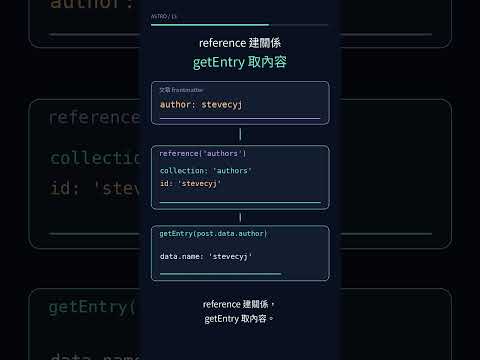
Content Collection 的 reference() 會把文章欄位從任意字串變成跨 entry 關係。frontmatter 只填作者或分類的 ID,schema 會轉成 { collection, id },頁面再用 getEntry()/getEntries() 取得完整資料。名稱與其他 metadata 因此集中在各自的 collection,但引用目標是否存在,仍要在查詢端處理。
Day 12:Schema/Zod驗證的是一篇文章自己的欄位:標題是不是字串、日期能不能轉換、Day 是否為正整數。跨 entry 時,還要確認 ID 是否真的對應到另一個 collection 的 entry:author: stevecyj 即使通過 z.string(),也不能證明 stevecyj 真的是 authors collection 裡的一筆資料。
本文以 Astro 7.1.1、Zod 4.4.3、Node 24.16.0 為實測基準,查證日期為 2026-07-24。
reference()、getEntry()與getEntries()的介面以 Astro Content API 官方文件為準。
z.string() 為什麼不夠?假設十篇文章都直接寫:
author: stevecyj
category: 內容建模
schema 最多只能確認這兩欄是字串。作者顯示名稱一改,十篇文章都要跟著改;其中一篇打成 stevecjy,仍是合法字串;分類日後想補說明、網址或分享圖,也沒有集中維護的位置。
同一個 YAML 字串經過 reference 後,查詢對象就明確了:
| 層次 | author 的值 |
能回答的問題 |
|---|---|---|
| frontmatter | stevecyj |
想指向哪個 ID? |
| schema parse 後 | { collection: 'authors', id: 'stevecyj' } |
要去哪個 collection 查哪一筆? |
getEntry() 後 |
完整 author entry | 作者名稱與其他欄位是什麼? |
這跟 Day 10:Content Collections的概念相同:內容仍是檔案,但 entry 進入 Content Layer 後有明確契約。reference 只把契約延伸到另一個 entry,不會把完整作者資料複製進文章。
一位作者和兩個分類就能呈現完整的 reference 資料流;增加資料筆數不會改變 API 行為。兩份 JSON 都用 Day 11:Content Loader介紹過的 file() 載入:
import { defineCollection } from 'astro:content';
import { file } from 'astro/loaders';
import { z } from 'astro/zod';

const authors = defineCollection({
  loader: file('src/data/authors.json'),
  schema: z.object({
    name: z.string(),
  }),
});

const categories = defineCollection({
  loader: file('src/data/categories.json'),
  schema: z.object({
    name: z.string(),
  }),
});
file() 讀 JSON array 時,每筆 object 必須有唯一 id。這個 ID 才是 reference 要填的值:
[
  { "id": "astro", "name": "Astro" },
  { "id": "content-modeling", "name": "內容建模" }
]
src/data/categories.json 是檔案路徑,astro 與 content-modeling 才是 entry ID。若改用 glob(),ID 預設由相對檔名產生;不論 loader 來源為何,Content Layer 的查詢鍵都是 entry.id,不是舊版教學常見的 entry.slug。
blog schema 加入兩種關係:
import { defineCollection, reference } from 'astro:content';
import { z } from 'astro/zod';

const blog = defineCollection({
  // 省略既有 loader
  schema: ({ image }) =>
    z.object({
      // 省略 title、description、day、pubDate 等既有欄位
      author: reference('authors').optional(),
      categories: z.array(reference('categories')).default([]),
      tags: z.array(z.string()).default([]),
    }),
});
reference('authors')。z.array(reference('categories'))。Day 13 的 frontmatter 只需要填這三行:
author: stevecyj
categories: [astro, content-modeling]
tags: [astro, content-collections, content-modeling, references]
categories 與 tags 的用途不同。分類是集中管理、數量受控的內容關係;tags 只需要供搜尋、文章卡、RSS 與 JSON feed 比對和顯示。把 tags 做成 reference 後,每個 consumer 都得先解開 entry 才能取得同一串文字,卻沒有多出可用的 metadata。因此既有 tags 維持 string[],Day 14:文章列表與搜尋與 Day 20:Endpoints/RSS也能繼續直接使用。
schema parse 後,post.data.author 會成為 lookup object:
{
  collection: 'authors',
  id: 'stevecyj',
}
它沒有 name。單篇文章頁必須再查一次:
---
import { getEntries, getEntry } from 'astro:content';

const [authorEntry, categoryEntries] = await Promise.all([
  post.data.author ? getEntry(post.data.author) : undefined,
  getEntries(post.data.categories),
]);
---
getEntry() 可以接 ('authors', 'stevecyj') 兩個參數,也可以直接接 reference object;這裡用後者,collection 與 ID 不必再寫一次。getEntries() 則接收同一個 collection 的 reference array,適合 categories 這種多筆關係。
查回來後,頁面才讀 authorEntry.data.name 與 category.data.name。作者名稱也傳給 BaseLayout,讓 <meta name="author">、article:author 與 BlogPosting JSON-LD 使用同一份資料,不再由文章 frontmatter 各自複製顯示名稱。
reference() 會驗證輸入 shape,並把 ID 轉成指定 collection 的 lookup object;它不會在 Content Layer sync 時保證目標 entry 已存在。Astro 官方文件把存在性檢查留給 getEntry()/getEntries();查不到時會回 undefined。
若作者 entry 不存在卻仍沿用 optional fallback,頁面署名與 JSON-LD 仍會輸出,這類錯誤也會被隱藏。查詢後加上 guard,可讓 build 直接失敗:
if (post.data.author && !authorEntry) {
  throw new Error(
    `Missing author reference for post ${post.id}: ${post.data.author.id}`,
  );
}

const missingCategory = post.data.categories.find(
  (_, index) => !categoryEntries[index],
);

if (missingCategory) {
  throw new Error(
    `Missing category reference for post ${post.id}: ${missingCategory.id}`,
  );
}
實測時只把 Day 13 的作者 ID 從 stevecyj 改成 missing-author,其他 frontmatter、程式與 build 命令都不動。Content Layer 先成功 sync,直到 prerender Day 13、執行 getEntry() 才出現錯誤:
[content] Synced content
...
/blog/day-13-collection-references/index.html
Entry authors → missing-author was not found.
[ERROR] Error: Missing author reference for post day-13-collection-references: missing-author
測試後隨即將 ID 還原成 stevecyj。三層責任如下:
| 階段 | 負責什麼 | 不負責什麼 |
|---|---|---|
reference('authors') |
把輸入轉成 authors lookup object | 不保證該 ID 一定存在 |
getEntry() |
依 collection + ID 取 entry | 查不到時不替網站決定 fallback 或失敗 |
| 專案 guard | 決定缺作者/分類要中止 build | 不改變 Astro API 本身的行為 |
資料模型取決於資料的生命週期與重用方式:
| 資料 | 適合的模型 | 理由 |
|---|---|---|
| 作者、受控分類 | collection reference | 多篇共用,通常還會增加名稱以外的 metadata |
| 搜尋用自由 tags | string[] |
只需要比對與顯示,獨立 entry 的成本未必有回報 |
| 只出現一次的顯示文字 | string |
沒有跨 entry 一致性問題 |
| 收藏、feedback、登入使用者 | 資料庫關聯 | 這些是 request-time 資料,不是 build-time 內容 |
收藏、feedback 與登入使用者會由使用者即時新增或修改,交給 Day 22:Drizzle ORM 與 Turso處理;Content Collection references 則處理發布前就確定的內容關係。
以 Node 24.16.0 執行正式 build,結果如下:
authors 查到 1 筆,categories 查到 2 筆。stevecyj,分類顯示 Astro、內容建模。article:author 與 JSON-LD author 都是解開 reference 後的 stevecyj。Day 14 接著看查詢結果:文章變多後,哪些工作該在 build 端完成,哪些才交給瀏覽器的搜尋 island。
本日程式碼:step-13|只看這天的改動:step-12...step-13



 iThome鐵人賽
 看影片追技術