

昨天我們完成了 Layer 2 的 ARP Reply 解析 與 ARP Table 快取機制。
從今天開始,我們將正式跨越資料鏈結層(Data Link Layer),進入 OSI Layer 3:Network Layer。
第一個要面對的協定,就是整個 Internet 的核心:
IPv4
(Internet Protocol Version 4)
在前幾天的課程中,我們已經能夠:
Ethernet Frame
      ↓
EtherType
      ↓
ARP
而今天開始,我們要讓 Ethernet Dispatcher 能夠辨識:
EtherType = 0x0800
並將封包交給 IPv4 模組進行解析。
在進入程式碼之前,可以先用這張圖建立 Day06 的整體視角:Ethernet Layer 會先根據 EtherType 判斷 Payload 內容,當值為 0x0800 時,就代表接下來要解析的是 IPv4 Header。
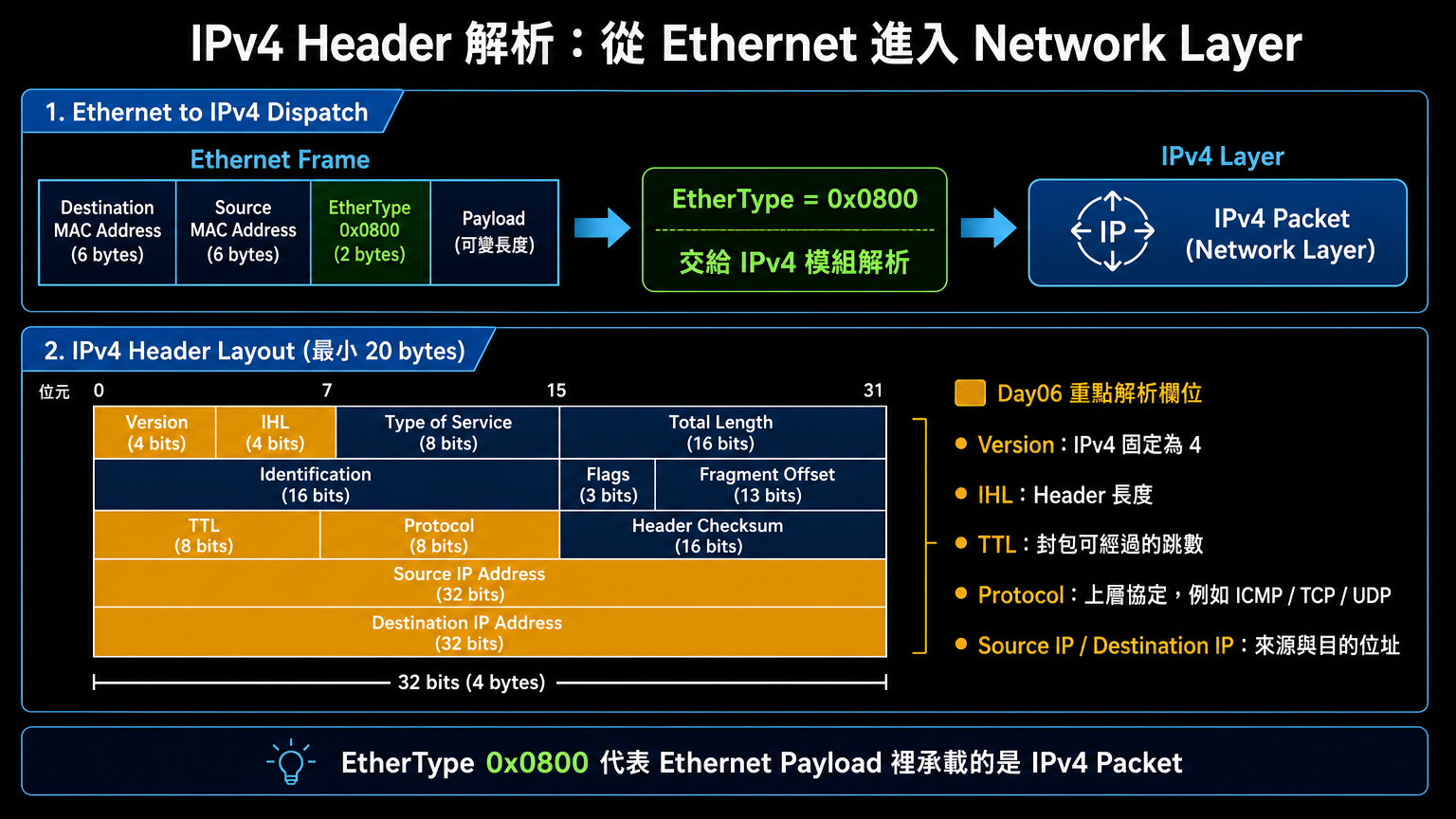
這張圖也標出了今天會優先解析的欄位:Version、IHL、TTL、Protocol,以及 Source / Destination IP。這些欄位會幫助我們確認封包是否真的是 IPv4、它還能經過幾個路由節點,以及下一層應該交給哪個協定處理。
完成以下內容:
include/ipv4.h
struct ipv4_hdr
sizeof(struct ipv4_hdr) == 20
目前我們的網路堆疊已經成長為:
Application
      ↑
IPv4
      ↑
Ethernet
      ↑
TAP Device
當 Linux 核心收到 Ethernet Frame 時:
Ethernet Frame
      ↓
EtherType
      ↓
0x0800 ?
      ↓
IPv4 Layer
只要 EtherType 為:
0x0800
就代表 Ethernet Payload 裡面裝的是:
IPv4 Packet
IPv4 Header 的最小長度為:
20 Bytes
結構如下:
┌─────────────────────────────┐
│ Version + IHL (1)           │
├─────────────────────────────┤
│ Type of Service (1)         │
├─────────────────────────────┤
│ Total Length (2)            │
├─────────────────────────────┤
│ Identification (2)          │
├─────────────────────────────┤
│ Flags + Fragment (2)        │
├─────────────────────────────┤
│ TTL (1)                     │
├─────────────────────────────┤
│ Protocol (1)                │
├─────────────────────────────┤
│ Header Checksum (2)         │
├─────────────────────────────┤
│ Source IP (4)               │
├─────────────────────────────┤
│ Destination IP (4)          │
└─────────────────────────────┘
今天先聚焦在最重要的五個欄位:
| 欄位 | 說明 |
|---|---|
| Version | IP 協定版本 |
| IHL | Header 長度 |
| TTL | 存活跳數 |
| Protocol | 上層協定 |
| Source / Destination IP | 來源與目的位址 |
IPv4 固定為:
4
IPv6 則為:
6
在 Header 中:
uint8_t version_ihl;
高 4 Bits 存放 Version。
因此:
version = ip->version_ihl >> 4;
低 4 Bits 代表 Header 長度。
取得方式:
ihl = ip->version_ihl & 0x0F;
單位不是 Byte,而是:
4 Bytes
因此:
ihl * 4
才是真正 Header 長度。
例如:
0x45
拆開後:
0100 0101

Version = 4
IHL     = 5
因此:
Header Length

5 × 4

=

20 Bytes
TTL 用來避免封包在網路中無限循環。
每經過一台 Router:
TTL - 1
當 TTL 變成:
0
封包會被丟棄。
常見數值:
| 作業系統 | TTL |
|---|---|
| Linux | 64 |
| Windows | 128 |
| Cisco | 255 |
IPv4 Header 中的:
uint8_t protocol;
代表上層協定類型。
常見值:
| 數值 | 協定 |
|---|---|
| 1 | ICMP |
| 6 | TCP |
| 17 | UDP |
因此:
Ethernet
    ↓
IPv4
    ↓
Protocol = 1
    ↓
ICMP
今天的測試程式會建立一個:
34 Bytes
的 Ethernet Frame。
組成如下:
14 Bytes Ethernet Header
+
20 Bytes IPv4 Header
=
34 Bytes
┌────────────────────────────────────┐
│ Ethernet Header (14 Bytes)         │
├────────────────────────────────────┤
│ Destination MAC                    │
│ Source MAC                         │
│ EtherType = 0x0800                 │
├────────────────────────────────────┤
│ IPv4 Header (20 Bytes)             │
├────────────────────────────────────┤
│ Version / IHL                      │
│ TTL                                │
│ Protocol                           │
│ Source IP                          │
│ Destination IP                     │
└────────────────────────────────────┘
因此:
struct ethernet_hdr *eth =
    (struct ethernet_hdr *)frame;

struct ipv4_hdr *ip =
    (struct ipv4_hdr *)(frame + ETH_HEADER_LEN);
即可直接定位到 IPv4 Header。
檔案:
include/ipv4.h
struct ipv4_hdr {

    uint8_t  version_ihl;
    uint8_t  tos;

    uint16_t total_length;
    uint16_t identification;
    uint16_t flags_fragment;

    uint8_t  ttl;
    uint8_t  protocol;

    uint16_t checksum;

    uint32_t src_ip;
    uint32_t dst_ip;

} __attribute__((packed));
printf("%lu\n",
       sizeof(struct ipv4_hdr));
輸出:
20
表示 Header 定義正確。
檔案:
src/ipv4.c
uint8_t version =
    ip->version_ihl >> 4;
uint8_t ihl =
    ip->version_ihl & 0x0F;
因為 IPv4 位址以 Network Byte Order 儲存:
ip = ntohl(ip);
之後再拆成:
A.B.C.D
格式輸出。
IPv4 Packet
------------------
Version       : 4
Header Length : 20 bytes
TTL           : 64
Protocol      : 1
Source IP     : 10.0.0.1
Destination IP: 10.0.0.2
檔案:
src/tap.c
新增:
case ETHERTYPE_IPV4:
分流邏輯。
Ethernet Frame
       │
       ▼
 EtherType
       │
 ┌─────┴─────┐
 │           │
 ▼           ▼
ARP         IPv4
程式:
switch (ntohs(eth->ethertype)) {

    case ETHERTYPE_ARP:
        arp_receive(
            payload,
            payload_len
        );
        break;

    case ETHERTYPE_IPV4:

        if (payload_len >=
            sizeof(struct ipv4_hdr)) {

            const struct ipv4_hdr *ip =
                (const struct ipv4_hdr *)payload;

            ipv4_print_header(ip);
        }

        break;
}
檔案:
tests/send_ipv4.c
今天我們第一次手動建立:
IPv4 Header
並送往:
tap0
來源:
10.0.0.1
目的:
10.0.0.2
協定:
ICMP
因此:
ip->protocol = IPPROTO_ICMP;
ip->version_ihl = 0x45;
代表:
Version = 4
IHL     = 5

5 × 4 = 20 bytes
gcc \
-Iinclude \
src/tap.c \
src/ethernet.c \
src/arp.c \
src/arp_table.c \
src/ipv4.c \
-o network

sudo ./network
gcc \
-Iinclude \
tests/send_ipv4.c \
src/ethernet.c \
src/arp.c \
src/arp_table.c \
src/ipv4.c \
-o send_ipv4

sudo ./send_ipv4
接收端輸出:
[ACCEPT]

Ethernet Frame
-------------------------
Destination : 02:00:00:00:00:01
Source      : 52:54:00:12:34:56
EtherType   : 0x0800

IPv4 Packet
------------------
Version       : 4
Header Length : 20 bytes
TTL           : 64
Protocol      : 1
Source IP     : 10.0.0.1
Destination IP: 10.0.0.2

Frame length: 34 bytes
Ethernet Header 中的:
EtherType
用來告訴接收端 Payload 的格式。
常見值:
| EtherType | 協定 |
|---|---|
| 0x0800 | IPv4 |
| 0x0806 | ARP |
| 0x86DD | IPv6 |
因此:
0x0800
代表:
接下來的資料是一個 IPv4 Packet。
IPv4 Header 為了節省空間:
4 Bits
+
4 Bits
=
1 Byte
因此:
Version = 高 4 Bits
IHL     = 低 4 Bits
代表:
ICMP
也就是:
Ping
Traceroute
Destination Unreachable
Time Exceeded
等網路控制訊息所使用的協定。
今天我們正式踏入:
OSI Layer 3
並成功完成:
Ethernet
      ↓
IPv4
的協定分流與解析。
目前的網路堆疊已經成長為:
TAP Device
      ↑
Ethernet
      ├── ARP
      │     └── ARP Table
      │
      └── IPv4
            └── Header Parser   ← 今天完成
換句話說,Ethernet 會透過 EtherType 分流:
EtherType 0x0806 → ARP
EtherType 0x0800 → IPv4
我們已經能夠:
這代表我們終於能夠看懂 Internet 世界中的 IP 封包了。
明天我們會補上 IPv4 Header Checksum,讓自製網路堆疊能夠驗證 IPv4 Header 是否在傳輸過程中被修改。
我們將實作:
ipv4_checksum()
IPv4 Header Checksum Verification
這是進入 ICMP / Ping Reply 前的重要準備。


 iThome鐵人賽
 看影片追技術