

在 Day 27 中,我們實作了 HTTP Response Builder,讓自製 TCP Stack 能夠回傳第一個靜態網頁(<h1>Hello World</h1>)。然而,不論客戶端請求什麼路徑,伺服器大多只能回傳固定內容。
Browser / curl
      ↓
TCP Stack (Handshake + Socket API)
      ↓
HTTP Parser
      ↓
HTTP Router (路徑分發)
      ↓
Controller (動態產生 JSON)
      ↓
HTTP Response (Content-Type: application/json)
      ↓
JSON API 回傳成功!
今天(Day 28),我們正式邁入現代後端架構的核心——Dynamic JSON API。我們不僅透過 C 標準函式庫動態產生即時 Unix Timestamp,更進一步將應用層業務邏輯自網卡主迴圈抽離,建立了清晰的 Route Handler(Controller 雛形) 架構。
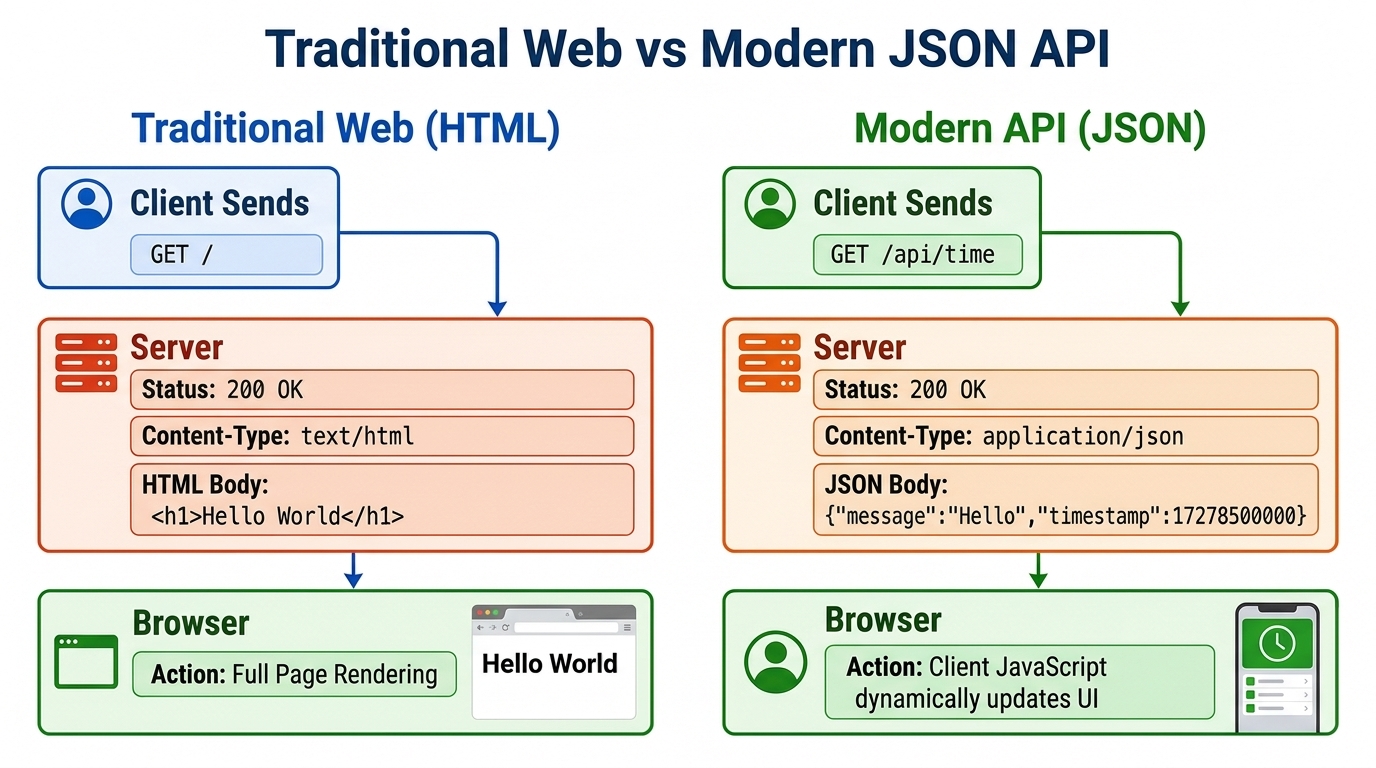
snprintf() 動態組裝 JSON 格式。Content-Type: application/json 與 text/html 的差異與客戶端解析行為。/api/time 端點,透過 <time.h> 取得系統時間並動態輸出 Unix Timestamp。/api/info 端點,回傳自製 TCP Stack 伺服器資訊。include/controller.h 與 src/controller.c,將 Route Handler / Controller 邏輯與網卡主迴圈完全解耦。curl -i 完整驗證狀態碼、Header 與動態 JSON 內容。早期傳統 Web 伺服器大多採用伺服器端渲染(SSR),直接產出完整 HTML 頁面給瀏覽器:
Server ──(HTML)──> Browser
但現代網站與行動 App(例如 Instagram、Discord、LINE、ChatGPT)則採用前後端分離架構:
Client (Web / Mobile / curl)
       ↓  API Request
Server (Dynamic JSON API)
       ↓  JSON Response
Client (JavaScript / Swift / Kotlin 渲染 UI)
後端專注於資料的運算與邏輯處理,並透過輕量且語言無關的 JSON(JavaScript Object Notation) 格式傳遞資料。
初學者常誤以為傳遞 JSON 需要非常複雜的二進位協定或龐大的第三方庫。但在底層網路傳輸視角:
{"message":"Hello","timestamp":1791010333}
其在 TCP Payload 中就是一連串符合 UTF-8 / ASCII 編碼的 bytes:
7B 22 6D 65 73 73 61 67 65 22 3A ... 7D 0A
因此在 C 語言中,只要格式字串符合規範,我們可以使用標準的 snprintf() 快速安全地格式化輸出。
Content-Type: application/jsonHTTP 協定是透過 Content-Type Header 指示客戶端該如何解讀收到的 Body:
| 格式 | Content-Type | 客戶端行為 |
|---|---|---|
| HTML 網頁 | text/html |
瀏覽器 DOM 引擎解析 HTML 標籤並排版渲染為網頁畫面 |
| JSON API | application/json |
前端 fetch().json() / Postman / curl 將其視為結構化資料物件 |
小提醒:
Content-Type並不會改變 TCP 傳送的 byte;它改變的是「接收端如何解讀這串 byte」。這也是 HTTP 能在同一條 TCP 連線上承載 HTML、JSON、圖片與任意二進位資料的關鍵。
if-else」到「Controller 架構」若將所有業務邏輯、路徑判斷與網卡收發混在 tap.c,會導致核心網路迴圈臃腫不堪。
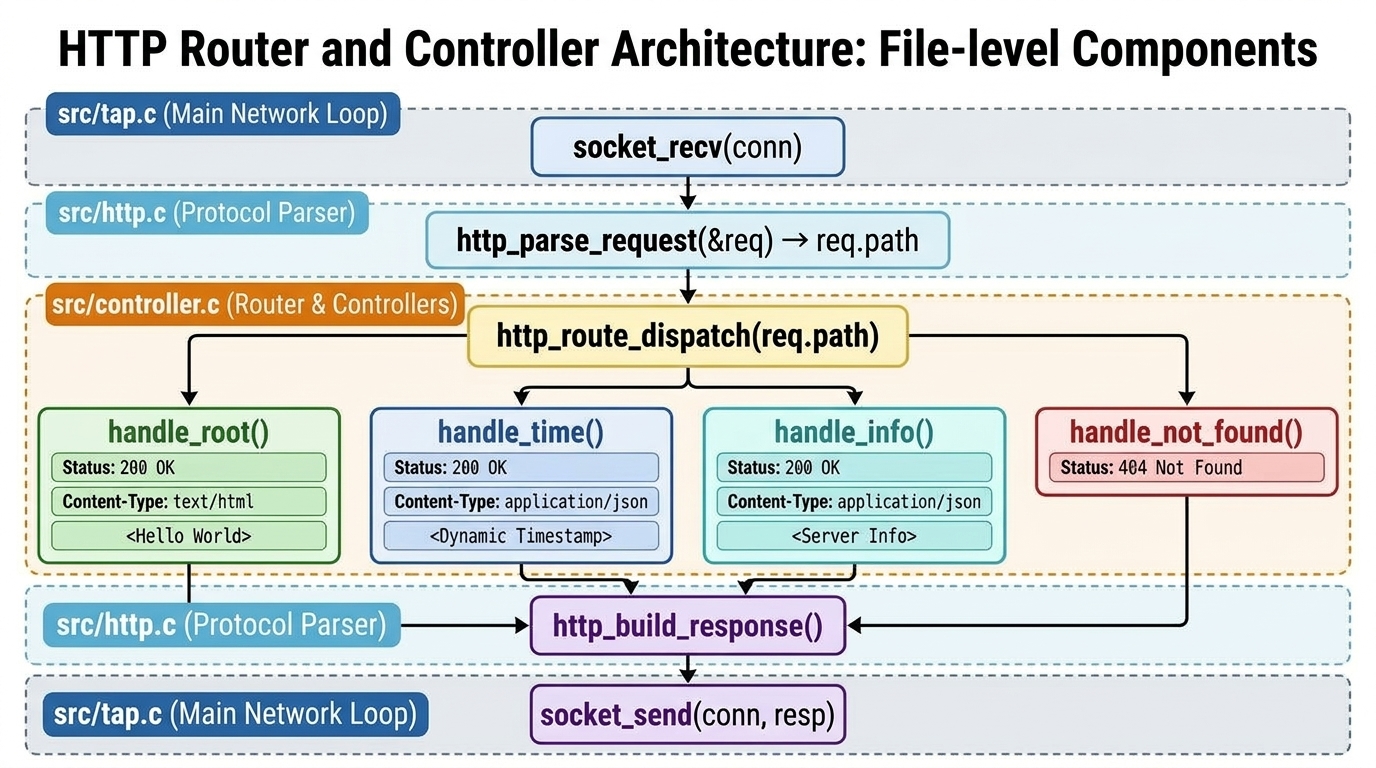
今天我們建立了職責分明的四層架構:
+-------------------------------------------------------------+
| 1. TAP 驅動與封包分發 (src/tap.c)                             |
|    - 專注底層網路連線生命週期 (socket_accept / recv / send)      |
+-------------------------------------------------------------+
                              ↓
+-------------------------------------------------------------+
| 2. 通用 HTTP 協定庫 (src/http.c / include/http.h)            |
|    - http_parse_request: 解析 Method, Path, Headers         |
|    - http_build_response: 組裝 Status Line, Headers, Body   |
+-------------------------------------------------------------+
                              ↓
+-------------------------------------------------------------+
| 3. 路由派送 Router (src/controller.c)                       |
|    - http_route_dispatch: 比對 req->path 決定執行哪個 Handler |
+-------------------------------------------------------------+
                              ↓
+-------------------------------------------------------------+
| 4. 具體業務 Controller (src/controller.c)                   |
|    - handle_root: 首頁 HTML                                  |
|    - handle_time: 動態時間 JSON (/api/time)                  |
|    - handle_info: 伺服器資訊 JSON (/api/info)                |
|    - handle_not_found: 404 Not Found                         |
+-------------------------------------------------------------+
include/controller.h)#ifndef CONTROLLER_H
#define CONTROLLER_H
#include <stddef.h>
#include "http.h"
/* 具體業務 Controller Handlers */
void handle_root(const struct http_request *req, char *resp, size_t resp_len);
void handle_time(const struct http_request *req, char *resp, size_t resp_len);
void handle_info(const struct http_request *req, char *resp, size_t resp_len);
void handle_not_found(const struct http_request *req, char *resp, size_t resp_len);
/* Router 總派送入口:根據 req->path 分流到對應 Handler */
void http_route_dispatch(const struct http_request *req, char *resp, size_t resp_len);
#endif
src/controller.c)#include "controller.h"
#include <stdio.h>
#include <string.h>
#include <time.h>
void handle_root(const struct http_request *req, char *resp, size_t resp_len) {
(void)req;
http_build_response(resp, resp_len,
200, "OK", "text/html", "<h1>Hello World</h1>\n");
}
void handle_time(const struct http_request *req, char *resp, size_t resp_len) {
(void)req;
time_t now = time(NULL);
char json[256];
snprintf(json, sizeof(json),
"{\"message\":\"Hello\",\"timestamp\":%ld}\n",
(long)now);
http_build_response(resp, resp_len,
200, "OK", "application/json", json);
}
void handle_info(const struct http_request *req, char *resp, size_t resp_len) {
(void)req;
const char *json = "{\"name\":\"My TCP Stack\",\"version\":\"1.0\"}\n";
http_build_response(resp, resp_len,
200, "OK", "application/json", json);
}
void handle_not_found(const struct http_request *req, char *resp, size_t resp_len) {
(void)req;
http_build_response(resp, resp_len,
404, "Not Found", "text/html", "<h1>404 Not Found</h1>\n");
}
void http_route_dispatch(const struct http_request *req, char *resp, size_t resp_len) {
if (strcmp(req->path, "/") == 0) {
handle_root(req, resp, resp_len);
} else if (strcmp(req->path, "/api/time") == 0) {
handle_time(req, resp, resp_len);
} else if (strcmp(req->path, "/api/info") == 0) {
handle_info(req, resp, resp_len);
} else {
handle_not_found(req, resp, resp_len);
}
}
教學版限制:Day 28 的 JSON 由
snprintf()手動組字串,適合固定欄位與短字串示範;若未來 JSON 內容來自使用者輸入,必須額外處理字串 escaping,例如雙引號、反斜線與換行,否則可能產生不合法 JSON。
src/tap.c)struct http_request req;
if (http_parse_request((char *)buf, &req) == 0) {
http_print_request(&req);
char resp[1024];
// 由 Controller 模組統一進行路由分流派送
http_route_dispatch(&req, resp, sizeof(resp));
socket_send(conn, (const uint8_t *)resp, strlen(resp));
}
make clean && make network
sudo ./network
/api/time(動態 JSON)curl -i http://10.0.0.2:8080/api/time
HTTP/1.1 200 OK
Content-Type: application/json
Content-Length: 43

{"message":"Hello","timestamp":1791010333}
/api/info(靜態 JSON)curl -i http://10.0.0.2:8080/api/info
HTTP/1.1 200 OK
Content-Type: application/json
Content-Length: 40

{"name":"My TCP Stack","version":"1.0"}
curl -i http://10.0.0.2:8080/unknown
HTTP/1.1 404 Not Found
Content-Type: text/html
Content-Length: 23

<h1>404 Not Found</h1>
if-else 分支,演化至現代後端框架(如 Gin、Chi、FastAPI)的 Router + Controller 模式。tap.c)只專注通訊,協定庫(http.c)只專注封包組裝,應用層(controller.c)專注商業邏輯。今天的 API Response 仍然是由 C 程式動態組出來的字串。明天(Day 29),我們會把 Web Server 往真實伺服器再推進一步:讓它能從磁碟讀取 www/ 目錄下的 HTML 與圖片檔。
這會帶出一個非常重要的工程問題:文字檔可以用 strlen(),但圖片、favicon、壓縮檔等二進位資源中間可能含有 0x00。因此 Day 29 的重點會是 Static File Server 與 Binary-Safe HTTP Response。


 iThome鐵人賽
 看影片追技術