
Framework 可以降低單次成本,但 Architecture 決定一次更新要處理多少範圍
Day 14 的 Component Storm 實驗,讓問題變得比較具體:Vue 3.6 即使能讓某些 Component Runtime 工作變得更便宜,如果一次更新仍然需要經過大量 Component,總工作量依然可能很高。
可以先用一個非常簡化的模型理解:
總成本 ≈ Update Scope × Unit Cost

Update Scope
→ 這次更新需要處理多少 Component?

Unit Cost
→ 每個 Component 被更新一次需要多少成本?
假設每個 Component 更新成本是 1:
5 Components
→ 5 × 1 = 5

500 Components
→ 500 × 1 = 500
即使 Framework 把單位成本降低一半:
5 Components
→ 5 × 0.5 = 2.5

500 Components
→ 500 × 0.5 = 250
這只是簡化模型,實際瀏覽器更新還會包含 JavaScript、DOM、Layout、Paint 等成本,但它可以幫助我們區分兩個不同問題:
Framework
    │
    └── 每一步做得有多快?
             ↓
         Unit Cost

Architecture
    │
    └── 一次需要做幾步?
             ↓
        Update Scope
Framework 優化的是單位成本;Architecture 影響的是一次更新的工作範圍。
而 Component Storm 真正值得注意的地方,就是後者。
以前開發一個新 Component,通常要自己建立檔案、命名、搬程式碼、處理 Props、確認引用,這些成本會迫使我們思考:這個東西真的值得拆出去嗎?
現在 AI Coding 改變了這個成本結構,只需一句:
幫我把這個 Dashboard 重構得更乾淨、更容易維護。
AI 很可能會快速產生,而且每個 Component 看起來都有自己的名字,每個檔案也可能只有幾十行。
Code Review 時甚至覺得很好,拆得很乾淨。
Dashboard
├── Header
│   ├── Title
│   ├── TitleIcon
│   └── TitleBadge
│
├── Toolbar
│   ├── SearchBar
│   ├── FilterButton
│   └── ExportButton
│
└── Table
    ├── TableHeader
    ├── TableBody
    │   └── Row
    │       └── Cell
    └── Pagination
但是,問題會出現在另一個層次,每個 Component 都合理,並不代表整棵 Component Tree 的結構合理。
Component 數量增加以後,還會進一步影響:
因此,這個 Component 看似合理並不足以成為建立 Boundary 的理由。
實際開發時,AI 很可能收到一個新的需求「幫我做一個分頁元件。」
如果只看這個需求,建立 displayedPages.vue 完全合理,但如果專案裡原本已經存在:
List.vue
└── displayedPages
而新的需求只是重新實作了一份非常相似的 pagination logic:
既有 Component
    │
    └── List.vue
          │
          └── pagination logic

                    AI

新需求 ────────────────→ displayedPages.vue
                              │
                              └── pagination logic
最後專案裡就出現兩份高度相似的實作,這正是我過去實際遇到的案例:
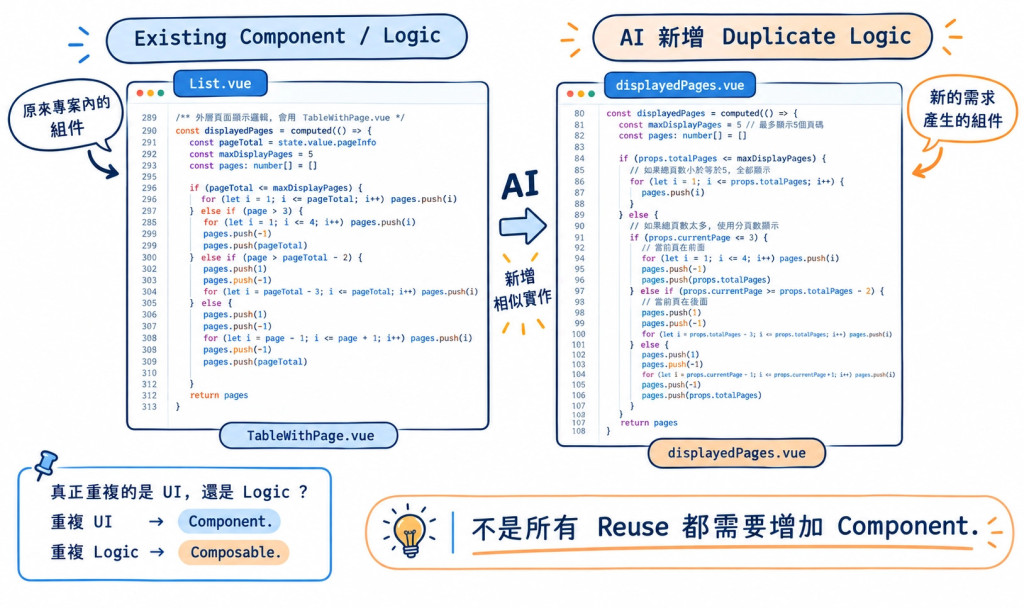
這張圖的重點其實不是 AI 寫錯,因為 displayedPages.vue 本身可能完全可以運作,真正的問題是:
AI 在建立新 Boundary 之前,有沒有先理解現有 Boundary?
這個問題比「AI 會不會寫 Component」更重要。
實務上很容易出現這種演進:
Button
  ↓
BaseButton
  ↓
ActionButton
  ↓
DangerButton
  ↓
DeleteButton
每次新增的 Component 都可能有一點差異:
這些差異本身沒有問題,只是:
這個差異是否值得建立一個新的 Boundary?
如果只是視覺或行為上的少量變化,可以先考慮:
<BaseButton
  variant="danger"
  icon="delete"
/>
或者利用組件的傳遞方法處理變化相對適合,這樣一來 Component Tree 不需要因為每一次需求的小差異持續增加。
Props
Slots
Configuration
看到兩個地方有相似程式碼,第一個反應很容易是抽成 Component,但相似程式碼需要先確認,它重複的是哪一層。
                Reuse
                  │
        ┌─────────┴─────────┐
        │                   │
       UI                  Logic
        │                   │
        ▼                   ▼
   Component            Composable
例如上圖的真實案例:
UserList.vue
OrderList.vue
兩個頁面都有:
currentPage
pageSize
next()
previous()
真正重複的是 pagination logic,這時候比較自然的抽象可能是:
const { page, next, previous } = usePagination()
而不是為了共用這段邏輯,再建立一個新的:
PaginationLogic.vue
反過來,如果兩個頁面真的共享相同的 UI 結構:
Pagination
├── Previous
├── Page Number
└── Next
那 Component 就有更充分的存在理由。
因此可以把這件事情簡化成:
重複的是 UI
→ 考慮 Component

重複的是 Reactive / Business Logic
→ 考慮 Composable
Reuse 的位置,決定抽象應該落在哪一層。
與其要求 AI 不要亂拆 Component,不如把判斷條件寫進 Coding Rule,通常我會讓 AI 在建立新 Component 前,先檢查三件事情:
              New Component?
                    │
       ┌────────────┼────────────┐
       ▼            ▼            ▼
     Reuse        Behavior     Boundary
       │            │            │
   真的會重用?   有獨立行為?   值得獨立嗎?
先搜尋現有 Component,確認:
這一步可以避免:
Existing Component
        +
AI 新 Component
        ↓
Duplicate UI
例如:
<BaseButton variant="danger" />
vs
<BaseButton variant="primary" />
只是參數不同,但如果新的元件開始擁有:
那就開始具備獨立 Component 的理由,因此可以讓 AI 區分:
Visual variation
→ Props / Slots / Config

Independent behavior
→ Component Boundary
這是最重要的一題,因為 Component 不只是把程式碼搬到另一個 .vue 檔案,它同時建立了一個新的:
因此建立 Component 的成本,不只是一個檔案,如果這個 Component:
只使用一次
沒有獨立狀態
沒有獨立行為
沒有明確 UI 邊界
只是包住幾行 HTML
那麼拆出去之前,就應該先說明理由。
因此,比起一句「請幫我把 Component 拆得乾淨一點」,更具體的 Prompt 可以要求 AI:
Before creating a new component:

1. Search existing components for reusable UI.
2. Check whether the difference can be handled by props,
   slots, or configuration.
3. Determine whether the repeated part is UI or logic.
4. Prefer a composable when the reusable part is reactive
   or business logic rather than UI.
5. Create a new component only when it provides a meaningful
   UI or behavioral boundary.
6. Explain why an existing component cannot be reused and
   why the new boundary is necessary.
**Prompt 不再只要求 AI 產生程式碼,而是要求 AI 在產生 Boundary 前先完成一次結構判斷,**這個另外產出的 Component 才有比較完整的工程理由。
前面的 Reactive Chain Hell,我們關注的是:
一次資料變動,Reactive Dependency 會往哪裡傳?
Component Storm 關注的是:
一次更新,Component Tree 需要處理多少範圍?
到了 AI Coding,問題再往前一步:
AI 建立一個新 Component 前,有沒有理由建立這個 Boundary?
所以這幾天其實可以串成:
Reactive Architecture
        │
        └── Reactive Graph
              ↓
       Update 傳到哪裡?

Component Architecture
        │
        └── Component Tree
              ↓
       Update 要碰多少?

AI Coding
        │
        └── Boundary Creation
              ↓
       為什麼要增加這個 Component?
Framework 可以降低每一步的成本;Architecture 影響一次更新的工作範圍;AI Coding 則讓建立這些 Boundary 變得更加容易。



 iThome鐵人賽
 看影片追技術