
RAG retrieves the information; vLLM generates the answer.
Over the past few days, we have looked at the core ideas behind efficient LLM inference: Self-Attention, KV Cache, and PagedAttention. Now it is time to put these ideas into practice. In Day 5, we will use vLLM to serve our first open-weight model, run it on a local GPU, and interact with it through a local inference API. This gives us our first complete LLM serving workflow and prepares us for later topics such as RAG and AI Agents.
we need to know why we started introduce the Vllm first, and what's different of others inference tool in term of pros and cons:

focuses on efficient LLM serving. It is designed for high-throughput inference, batching, and KV-cache management, making it suitable for APIs and multi-user applications.
Medium --- High-throughput LLM serving --- APIs, multi-user applications,production serving
focuses on NVIDIA-specific performance optimization. It is designed to take advantage of NVIDIA GPUs, optimized kernels, and quantization for high-performance production inference.
Medium --- High-throughput LLM serving --- APIs, multi-user production serving

focuses on simplicity. It is designed to make local LLMs easy to download and run, making it a good choice for personal use, quick demos, and local development.
Very Easy --- Easy local LLM usage --- Personal use, demos,local development
In short, Ollama prioritizes simplicity, vLLM prioritizes efficient serving, and TensorRT-LLM prioritizes NVIDIA-specific optimization.
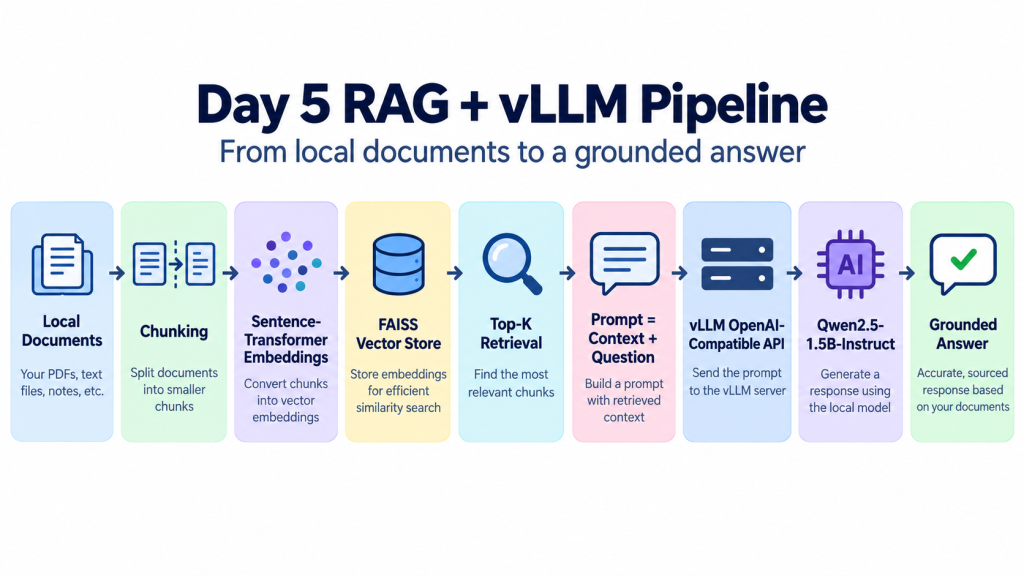
*Retrieval-Augmented Generation (RAG) is a technique that improves an LLM by giving it access to external knowledge at inference time. Instead of relying only on what the model learned during training, a RAG system first searches a knowledge source—such as local documents, PDFs, or a vector database—and retrieves the most relevant pieces of information for the user’s question.
A typical RAG pipeline contains several steps. Documents are first split into smaller chunks, converted into vector embeddings, and stored in a vector database such as FAISS. When a user asks a question, the query is also converted into an embedding, and the system retrieves the most similar chunks using Top-K search. Those retrieved chunks are then combined with the original question to create an augmented prompt.
The final prompt is sent to the LLM, which generates an answer based on both its pretrained knowledge and the retrieved context.
We need to setup a server by the model,and I'm choosing Qwen which is the model by alibaba
vllm serve Qwen/Qwen2.5-7B-Instruct \
    --host 127.0.0.1 \
    --port 8000
next, open another terminal to ask for the service:
    curl http://localhost:8000/v1/chat/completions \
      -H "Content-Type: application/json" \
      -d '{
        "model": "Qwen/Qwen2.5-1.5B-Instruct",
        "messages": [
          {
            "role": "user",
            "content": "Explain why the sky is blue."
          }
        ],
        "max_tokens": 100
      }'
Adding RAG in front of vLLM:
pip install sentence-transformers faiss-cpu openai
Then conceptually:
documents = [
"PagedAttention divides KV cache into fixed-size blocks.",
"KV Cache stores previous Key and Value tensors.",
"vLLM provides an OpenAI-compatible API server."]
Create embeddings:
from sentence_transformers import SentenceTransformer
import faiss
import numpy as np

embedder = SentenceTransformer("all-MiniLM-L6-v2")

documents = [
    "PagedAttention divides KV cache into fixed-size blocks.",
    "KV Cache stores previous Key and Value tensors.",
    "vLLM provides an OpenAI-compatible API server."
]

embeddings = embedder.encode(documents)
embeddings = np.array(embeddings).astype("float32")

index = faiss.IndexFlatL2(embeddings.shape[1])
index.add(embeddings)
Retrieve relevant context:
    query = "How does PagedAttention improve memory efficiency?"

    query_embedding = embedder.encode([query]).astype("float32")

    distances, indices = index.search(
        query_embedding,
        k=2
    )

    retrieved_docs = [
        documents[i]
        for i in indices[0]
    ]

    context = "\n".join(retrieved_docs

 Now send that context to your local vLLM server:

     from openai import OpenAI

client = OpenAI(
    base_url="http://localhost:8000/v1",
    api_key="local"
)

prompt = f"""
Use the following context to answer the question.

Context:
{context}

Question:
{query}
"""

response = client.chat.completions.create(
    model="Qwen/Qwen2.5-1.5B-Instruct",
    messages=[
        {
            "role": "user",
            "content": prompt
        }
    ],
    max_tokens=200
)

print(response.choices[0].message.content)
*** Conclusion:
In Day 5, we moved from understanding individual inference concepts to building a more complete local AI pipeline.
We started with local documents, split them into smaller chunks, converted those chunks into vector embeddings, stored them in FAISS, and retrieved the most relevant context for each question. That retrieved context was then combined with the user query and sent to our local vLLM OpenAI-compatible API, where Qwen2.5-7B-Instruct generated the final response.
References:



 iThome鐵人賽
 看影片追技術