
在軟體開發與系統運行時,很多錯誤具有高度的「重複性」:例如資料庫未啟動時連續發生的
ETIMEDOUT 5432、或是同一支腳本因語法錯誤被反覆執行。
如果相同的報錯每次都重新調用agy.exe,就會重複消耗算力並增加等待時間。
今天會在 Node-RED 中實作 MD5 特徵快取機制(Hash-based Response Caching):先對輸入文字產生雜湊指紋,命中快取時直接使用上次的分析結果。
本文同步發布於 GitHub: 2026-18th-it-ironman
| 比較項目 | ❌ 無快取(每次重新推理) | ✅ MD5 特徵快取機制 |
|---|---|---|
| 重複報錯耗時 | 每次固定消耗 1.5 ~ 2.0 秒 | 0 毫秒(0ms)即時秒回! |
| Token / 算力消耗 | 每次都重新呼叫模型 | 命中快取時不需再次呼叫模型 |
| 快取失效控制 | 無 | 支援 TTL(預設 1 小時過期自動重新評估) |
| 記憶體佔用 | 每次產生大量臨時物件 | 輕量 Key-Value 字典,佔用極低(幾 KB) |
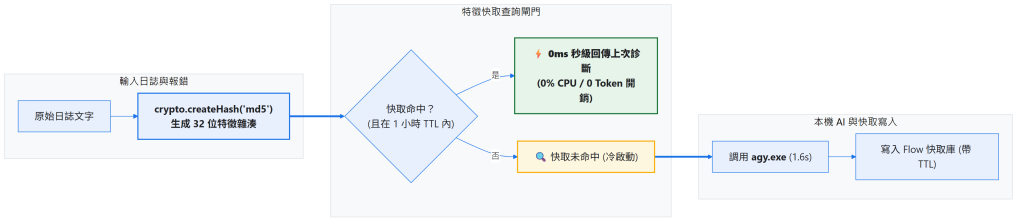
快取的判斷必須放在 AI 推理之前,流程才有機會在命中時完全跳過 agy.exe:
原始報錯 → 正規化文字 → MD5 指紋 → 查詢快取
                              ├─ 命中且未過期 → 直接回傳
                              └─ 未命中/已過期 → AI 推理 → 寫回快取
這裡的 MD5 不是用來保護機密資料,而是把「相同輸入」轉成穩定、易查詢的 Key。真正的快取正確性仍取決於輸入正規化、TTL 與寫入時機。
💡 Setup 設定提醒:請在 Function 節點「設定」頁籤中引入
crypto模組。
// Function 節點:計算 MD5 並查詢快取 (Setup 注入 crypto)
const text = typeof msg.payload === 'string' ? msg.payload : JSON.stringify(msg.payload);
const hash = crypto.createHash('md5').update(text.trim()).digest('hex');

const cache = flow.get('ai_cache') || {};
const cachedEntry = cache[hash];
const now = Date.now();

// 檢查快取是否存在且在 1 小時 TTL (3600秒) 內
if (cachedEntry && (now - cachedEntry.timestamp < 3600 * 1000)) {
    node.status({ fill: 'green', shape: 'dot', text: '⚡ 快取命中 (0ms)' });
    msg.payload = cachedEntry.data;
    msg.fromCache = true;
    msg.hash = hash;
    return [msg, null]; // 第 1 路: 快取秒回 (跳過 AI)
}

node.status({ fill: 'yellow', shape: 'ring', text: '🔍 快取未命中 (呼叫 AI)' });
msg.hash = hash;
msg.rawText = text;
return [null, msg]; // 第 2 路: 未命中,流向 AI 推理
agy 共用推理 Subflow快取未命中時,不在 Day 22 重新組裝 CLI 指令,而是把 Prompt 與輸出 Schema 交給 Day 14 建立的 🤖 agy 推理核心大腦。這樣快取只負責判斷「要不要推理」,推理細節仍由共用元件處理:
msg.prompt = `請簡述以下報錯的根因與修復方式:${msg.rawText}`;
msg.schema = {
  type: 'object',
  properties: {
    summary: { type: 'string' },
    recommended_action: { type: 'string' }
  },
  required: ['summary', 'recommended_action']
};
return msg;
當 agy.exe 推理完成後,將診斷結果與當前時間戳存入快取字典中:
// Function 節點:寫入快取庫
let parsed;
try {
    parsed = typeof msg.payload === 'string' ? JSON.parse(msg.payload) : msg.payload;
} catch (e) {
    parsed = { response: msg.payload };
}

const data = parsed.structured_output || parsed.response || parsed;
const hash = msg.hash;

if (hash) {
    const cache = flow.get('ai_cache') || {};
    cache[hash] = {
        data: data,
        timestamp: Date.now()
    };
    flow.set('ai_cache', cache);
    node.status({ fill: 'blue', shape: 'dot', text: '💾 已寫入快取' });
}

msg.payload = data;
msg.fromCache = false;
return msg;
相同錯誤不代表永遠有相同答案。服務已經重啟、設定檔已修改,或錯誤根因已經改變時,舊分析可能反而誤導使用者。因此快取項目必須同時保存結果與 timestamp,查詢時用目前時間減去寫入時間判斷是否過期。
此外,快取 Key 應建立在「實際會影響分析結果的輸入」上。如果只把錯誤摘要拿去雜湊,卻忽略進程名稱、版本或環境資訊,可能把不同情境誤判成同一筆事件。
若明明輸入相同卻一直未命中,優先檢查前後是否有多餘空白、換行或 JSON 欄位順序差異;若不希望這些差異造成不同 Key,就要在雜湊前做明確的正規化。
在 Node-RED 點擊「右上角選單」➔「匯入」即可一鍵部署:
本案例 flow
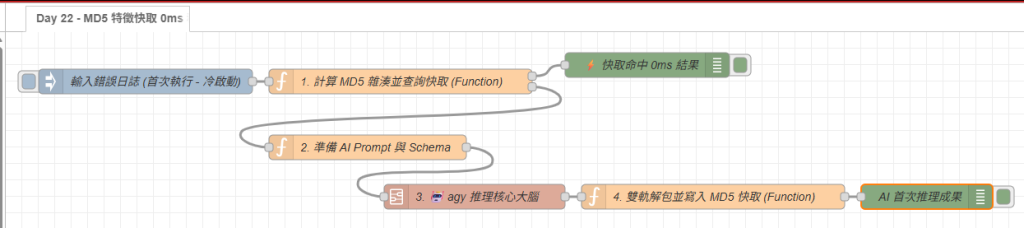
這篇加入了 MD5 特徵快取,讓相同輸入可以直接取用既有分析結果,避免重複呼叫 AI。



 iThome鐵人賽
 看影片追技術