
In Day 10, we rebuilt our RAG pipeline with LangChain, connecting document retrieval, FAISS, prompt construction, and our locally served Qwen model into a reusable workflow. However, the execution path was still fixed: retrieve relevant documents, build the context, generate an answer, and stop. Real AI applications often need more flexible workflows. They may need to maintain information between steps, choose different paths based on intermediate results, retry failed operations, or call additional tools when necessary. In Day 11, we will introduce LangGraph and transform our RAG pipeline into a stateful workflow, where each step becomes a node that reads from and updates a shared state. This gives us the foundation for moving from a simple RAG pipeline toward more complex AI Agent workflows.
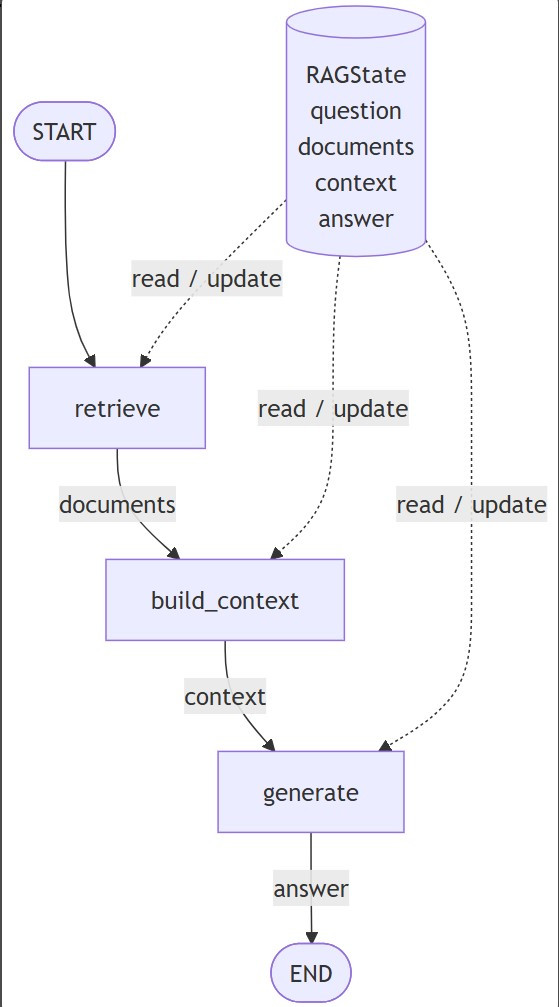
LangGraph is a low-level orchestration framework for building stateful workflows and AI agents. Instead of representing an AI application as a fixed sequence of function calls, LangGraph lets us describe the application as a graph, where individual operations become nodes and the transitions between them become edges. It can combine deterministic application logic with LLM-driven decisions, which makes it useful when a workflow needs branching, loops, persistence, or more control over how an agent behaves.
State = information moving through the workflow
Node  = something the system does
Edge  = where the system goes next
Here's my structure folder:
   day11-langgraph-rag/
│
├── data/
│   └── knowledge.txt
│
├── faiss_index/
│
├── config.py
├── build_index.py
├── rag_graph.py
├── main.py
├── requirements.txt
└── start_vllm.sh
My main script file:
    import uuid
    from rag_graph import graph


    def ask(question: str):

        thread_id = str(uuid.uuid4())

        config = {
            "configurable": {
                "thread_id": thread_id
            }
        }

        initial_state = {
            "question": question,
            "search_query": question,
            "retries": 0,
        }

        result = graph.invoke(
            initial_state,
            config=config,
        )

        return result


    def main():

        print("=" * 60)
        print("LangGraph RAG Demo")
        print("=" * 60)

        while True:

            question = input(
                "\nQuestion (or 'exit'): "
            ).strip()

            if question.lower() in {
                "exit",
                "quit",
            }:
                break

            result = ask(question)

            print("\nAnswer:")
            print(result["answer"])

            print("\nGraph state:")
            print(
                f"Search query: "
                f"{result.get('search_query')}"
            )

            print(
                f"Retries: "
                f"{result.get('retries', 0)}"
            )

            print(
                f"Context relevant: "
                f"{result.get('context_relevant')}"
            )


    if __name__ == "__main__":
        main()
And we also need to set up the vllm_server on qwen model:
    #!/usr/bin/env bash

    set -e

    MODEL="Qwen/Qwen2.5-7B-Instruct"

    vllm serve "$MODEL" \
        --host 0.0.0.0 \
        --port 8000
Then:
    chmod +x start_vllm.sh
    ./start_vllm.sh
We can start run the python main.py
Question (or 'exit'): What are the main components of LangGraph?
Here's the output:
    [retrieve] query = What are the main components of LangGraph?
    [retrieve] found 4 documents

    [grade] relevant = True

    [generate] answer generated

    Answer:
    LangGraph applications are built around state, nodes, and edges...
Conclusion:
Day 10 taught us how to build a RAG pipeline. Day 11 taught us how to turn that pipeline into a stateful workflow. The next step is to give that workflow more tools and more decisions—bringing us closer to an AI agent.



 iThome鐵人賽
 看影片追技術