
昨天用 kubectl run 一行就把 Pod 生出來,但因為那行指令跑完就沒了。過了幾天我也不會記得自己打了什麼參數,換一台電腦也可能重現不出同一個 Pod。K8s 真正的用法是把「我要什麼」寫成檔案,再叫它照著做,這叫宣告式,跟昨天那種直接下命令的命令式是兩種不同的思路
所以今天要做的事很單純,把昨天那個 Pod 用 YAML 重寫一次
先開個資料夾放這些檔案
ithome-lab/
  manifests/
    base/
      pod.yaml
pod.yaml
apiVersion: v1
kind: Pod
metadata:
  name: hello-pod
  namespace: ithome-lab
spec:
  containers:
    - name: nginx
      image: nginx:alpine
      ports:
        - containerPort: 80
最上層就四個欄位,而且幾乎每個 K8s 物件都是這四個。apiVersion 是這物件屬於哪個 API 版本,Pod 是最核心的資源所以只有 v1,之後會碰到的 Deployment 就變成 apps/v1。kind 是物件類型。metadata 放名字、namespace、Label 這些身分資訊。spec 才是「我想要它長什麼樣」的本體
寫完就套用
kubectl apply -f manifests/base/pod.yaml
kubectl get pods -n ithome-lab

apply 的回應會告訴你發生了什麼,第一次是 created,apply 比對現在的狀態跟你要的狀態,一樣就什麼都不做,和 kubectl create 不一樣,create 遇到已經存在的東西會直接噴錯
我寫的 YAML 跟 K8s 裡面實際存不一樣
kubectl get pod hello-pod -n ithome-lab -o yaml
輸入之後會看到很長的輸出
apiVersion: v1
kind: Pod
metadata:
  annotations:
    kubectl.kubernetes.io/last-applied-configuration: |
      {"apiVersion":"v1","kind":"Pod","metadata":{"annotations":{},"name":"hello-pod","namespace":"ithome-lab"},"spec":{"containers":[{"image":"nginx:alpine","name":"nginx","ports":[{"containerPort":80}]}]}}
  creationTimestamp: "2026-08-25T09:19:10Z"
  generation: 1
  name: hello-pod
  namespace: ithome-lab
  resourceVersion: "116928"
  uid: 4ea398e7-a2d2-4d80-b52b-73dcb2cad773
spec:
  containers:
  - image: nginx:alpine
    imagePullPolicy: IfNotPresent
    name: nginx
    ports:
    - containerPort: 80
      protocol: TCP
    resources: {}
    terminationMessagePath: /dev/termination-log
    terminationMessagePolicy: File
    volumeMounts:
    - mountPath: /var/run/secrets/kubernetes.io/serviceaccount
      name: kube-api-access-nnpdp
      readOnly: true
  dnsPolicy: ClusterFirst
  enableServiceLinks: true
  nodeName: ithome-lab-control-plane
  preemptionPolicy: PreemptLowerPriority
  priority: 0
  restartPolicy: Always
  schedulerName: default-scheduler
  securityContext: {}
  serviceAccount: default
  serviceAccountName: default
  terminationGracePeriodSeconds: 30
  tolerations:
  - effect: NoExecute
    key: node.kubernetes.io/not-ready
    operator: Exists
    tolerationSeconds: 300
  - effect: NoExecute
    key: node.kubernetes.io/unreachable
    operator: Exists
    tolerationSeconds: 300
  volumes:
  - name: kube-api-access-nnpdp
    projected:
      defaultMode: 420
      sources:
      - serviceAccountToken:
          expirationSeconds: 3607
          path: token
      - configMap:
          items:
          - key: ca.crt
            path: ca.crt
          name: kube-root-ca.crt
      - downwardAPI:
          items:
          - fieldRef:
              apiVersion: v1
              fieldPath: metadata.namespace
            path: namespace
status:
  conditions:
  - lastProbeTime: null
    lastTransitionTime: "2026-08-25T09:19:12Z"
    observedGeneration: 1
    status: "True"
    type: PodReadyToStartContainers
  - lastProbeTime: null
    lastTransitionTime: "2026-08-25T09:19:10Z"
    observedGeneration: 1
    status: "True"
    type: Initialized
  - lastProbeTime: null
    lastTransitionTime: "2026-08-25T09:19:12Z"
    observedGeneration: 1
    status: "True"
    type: Ready
  - lastProbeTime: null
    lastTransitionTime: "2026-08-25T09:19:12Z"
    observedGeneration: 1
    status: "True"
    type: ContainersReady
  - lastProbeTime: null
    lastTransitionTime: "2026-08-25T09:19:10Z"
    observedGeneration: 1
    status: "True"
    type: PodScheduled
  containerStatuses:
  - containerID: containerd://4e04d6e785548ad0416a41d484313276c544c286c70b723be922fd84337c0926
    image: docker.io/library/nginx:alpine
    imageID: docker.io/library/nginx@sha256:db35bfc6b2951e7f8a72db5db120288c127ffaeeb4a6d4b95a26fead017d5913
    lastState: {}
    name: nginx
    ready: true
    resources: {}
    restartCount: 0
    started: true
    state:
      running:
        startedAt: "2026-08-25T09:19:12Z"
    user:
      linux:
        gid: 0
        supplementalGroups:
        - 0
        - 1
        - 2
        - 3
        - 4
        - 6
        - 10
        - 11
        - 20
        - 26
        - 27
        uid: 0
    volumeMounts:
    - mountPath: /var/run/secrets/kubernetes.io/serviceaccount
      name: kube-api-access-nnpdp
      readOnly: true
      recursiveReadOnly: Disabled
  hostIP: 172.18.0.2
  hostIPs:
  - ip: 172.18.0.2
  observedGeneration: 1
  phase: Running
  podIP: 10.244.0.6
  podIPs:
  - ip: 10.244.0.6
  qosClass: BestEffort
  resources: {}
  startTime: "2026-08-25T09:19:10Z"
十行的檔案變成一長串。K8s 幫你補了一堆預設值跟系統欄位,像是 uid、creationTimestamp、restartPolicy、dnsPolicy,最後是 status 區塊。status 是 K8s 自己維護的,記錄 Pod 現在真實的狀況,你不用寫。spec 是願望,status 是現實,兩邊對不上的時候就是出事的時候
如果懶得從零手寫,可以 kubectl 幫你生草稿
kubectl run hello-pod -n ithome-lab --image=nginx:alpine --dry-run=client -o yaml
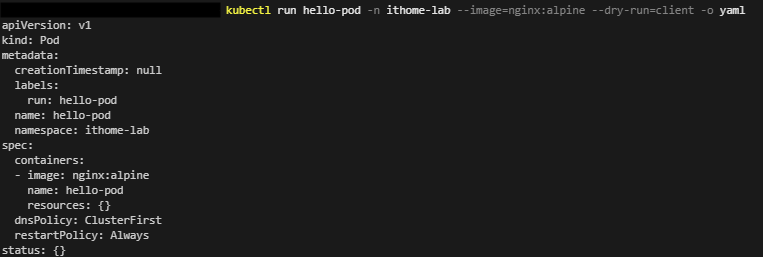
dry-run=client 的意思是不要真的送出去,只在本機算一遍給我看,配上 -o yaml 就會把昨天那行指令翻譯成 YAML 印出來
最後刪除
kubectl delete -f manifests/base/pod.yaml
kubectl get pods -n ithome-lab

明天見 :D




 iThome鐵人賽
 看影片追技術