
報告Day!!! 😧 有點可怕……
還記得 Day 6 那天,第一次打開 SysReptor 的 Report 看著一堆 TODO,心理 OS「這些是什麼!!!怎麼跟我想像的完全不一樣 QQ」,奮戰了很久才把 Lame 的報告寫完。
但這次 Bashed 更複雜——
Lame 的攻擊路徑很直接:Nmap 掃到版本 → 查 CVE → Metasploit 打進去 → root。一個 CVE,打完填報告。
Bashed 不一樣。這次是我自己第一次成功建立 Reverse Shell、修改了系統排程會跑的檔案的內容,一步一步從 www-data 走到 root。攻擊鏈更長,Finding 之間的關係更複雜——什麼該寫進 Finding,什麼該寫進 Attack Chain,怎麼把兩個 Finding 串起來說清楚,都是這次要好好釐清的事。
修補建議也是上次讓我覺得最挑戰的地方。找到漏洞跟說清楚「怎麼修」是兩種完全不同的能力——要夠清楚漏洞成因,才能寫出有價值、對症下藥的修補建議。
頭有點痛……
但回頭看看這幾天:Day 7 了解服務、找到隱藏目錄,Day 8 找到 phpbash,發現可以透過它跟 OS 互動,也發現了可以切換到 scriptmanager 的方法,Day 9 自己成功建立 Reverse Shell 拿到穩定的連線,Day 10 修改了 root 排程會跑的腳本,一路闖關拿到 root——這些我們都做到了!
寫 Bashed 的 Report,我們絕對沒問題的對吧(?)xdddd
那我們就開始寫報告啦!!!
我們在 Day 6 有完整走過 SysReptor 的 CPTS Report 框架,每個段落怎麼填、要注意什麼都有說明,可以參考 Day 6 — 從打靶到 Report:第一次用 SysReptor 寫滲透測試報告~
這裡就直接開始寫 Bashed 的報告!不過不用擔心,每個段落還是會做個簡單回顧,一起走整個Report的填寫邏輯!
我們在Day 6時有提到Meta欄位決定報告封面跟頁首會顯示什麼,而且它填的內容會自動帶入報告多個地方——包含測試者資訊、客戶名稱等,不只是封面而已,所以要填正確。
這是我們這次的目標機器Bashed報告的Meta資訊填寫
| 欄位 | 意思 | Bashed練習填什麼 |
|---|---|---|
| HTB Candidate | HTB 考試者資訊 | Kitty(你的名字) |
| Full Name | 執行測試人的姓名 | Kitty (真實在考試跟測試要用全名呦(這裡怕大家OSINT我><) |
| Title | 執行測試者職稱 | Security candidate(練習時的自行假設) |
| 執行測試者的 Email | Kitty@gmail.com | |
| Report Title | 這份報告的標題 | Bashed(目標機器名稱) |
| Customer | 委託測試的客戶名稱 | Bashed Lab Company(練習時的自行假設) |
| Customer (abbreviated) | 客戶名稱縮寫,用在頁首 | Bashed Lab Company(練習時的自行假設) |
| Pentest Approach | 測試方式 | Black Box(不用改,已填好) |
| Pentest Start | 測試開始日期 | 2026-9-21(Day 7) |
| Pentest End | 測試結束日期 | 2026-9-24(Day 10) |
| Report Date | 報告撰寫日期 | 2026-9-25(Day 11) |
| Version | 報告版本 | 1.0 |
填寫介面名稱: Document Control
PDF裡顯示: Engagement Contacts
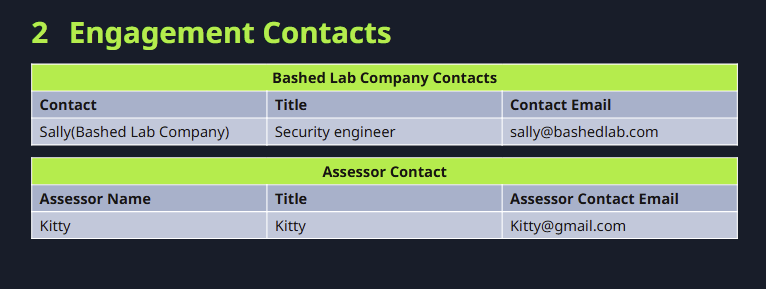
這段是什麼咧???:主要是要列出客戶窗口跟這次測試的相關聯絡人,讓報告有明確的負責對象~
要填什麼:
客戶窗口(我們手動填):
Customer Contacts(客戶聯絡人):
填寫介面名稱: Executive Summary
這塊的重點:
「我們現在發現了什麼問題?」
「這個問題可能造成什麼影響?」
「哪一個問題需要優先處理?」
這裡要把技術語言轉成比較容易理解的「實際影響」。
補充 Day 6 沒特別提到,但我覺得很重要的一件事:在開始講發現的問題之前,也可以先提一下 Target 做得好的地方。讓 target 在看報告時,比較不會覺得我們只是來找碴的 XD,也更願意好好看這份 Report!
3.1 Approach:說明這次測試的方式
Day 6有提到這裡主要是在說明:
我們是怎麼測的、什麼時候測、原本知道多少,以及這次測試的目的。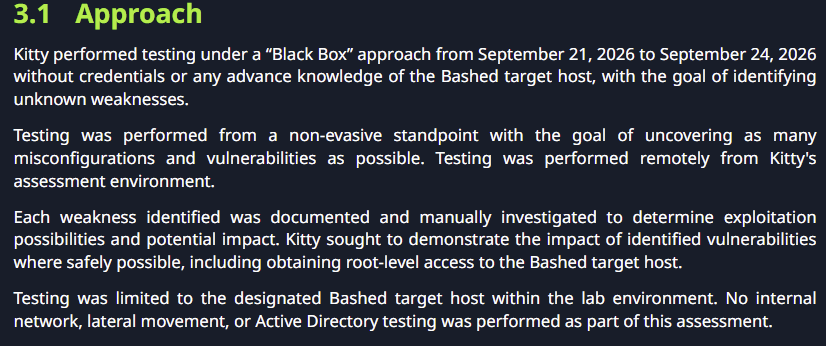
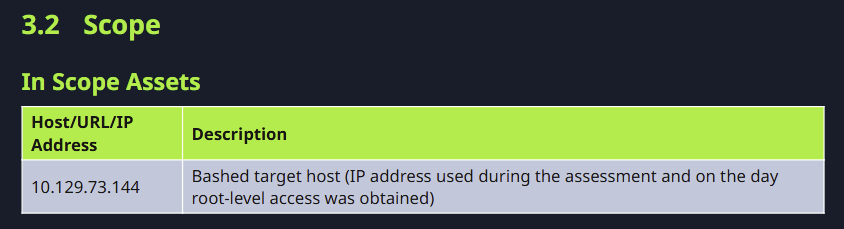
3.2 Scope(測試範圍)
這裡就是說:
「這次到底測哪裡?」
這裡我記錄的是成功取得 Root 當天,Bashed 實際分配給我的 IP。
因為 HTB Labs 的靶機 IP 可能會隨著重新取得靶機而變動,並不是我測試的 Target 不同 XD
3.3 Assessment Overview and Recommendations
整體發現了幾個問題、各自多嚴重、最優先做什麼。
所以在這個區塊,會先讓看Report知道:
「這次實際是怎麼攻進去的,以及最後取得了什麼權限。」
至於每個 Finding 是怎麼確認的、造成什麼影響,以及對應的 Evidence,就會放到後面的 Findings 裡~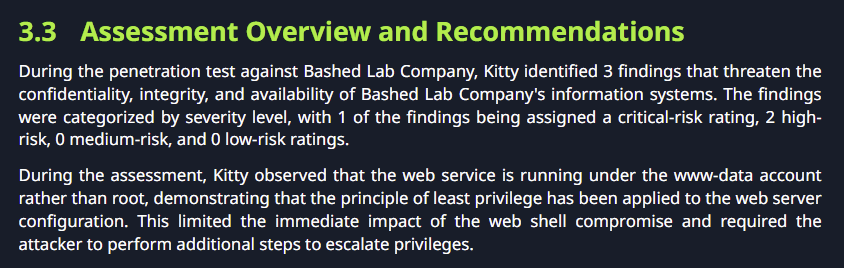
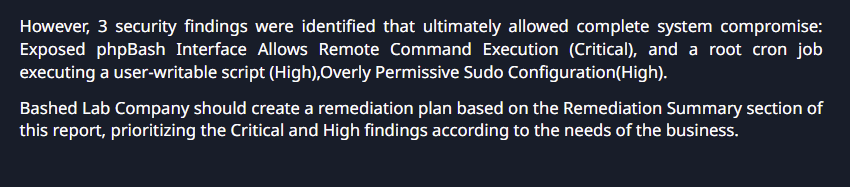
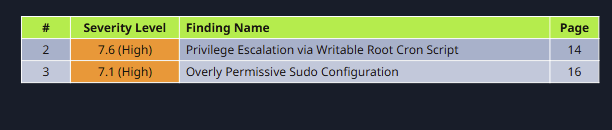
Finding 填寫完成後,這個 Summary 大部分就會自動生成;需要做的是確認自動產生的內容有沒有符合這次測試情境。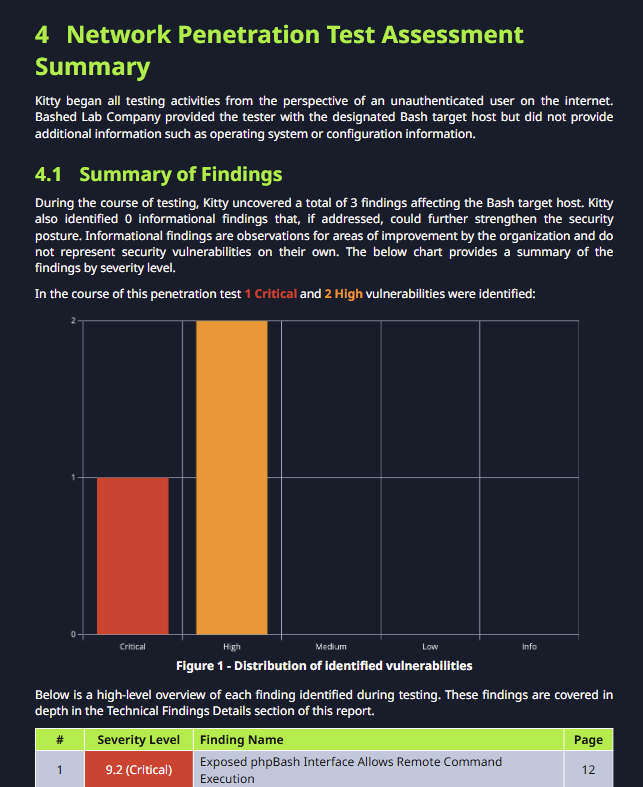
填寫介面名稱: Internal Network Compromise Walkthrough
這段在說什麼: 把從「什麼都不知道」到「拿到最高權限」的完整路徑,用說故事的方式串起來。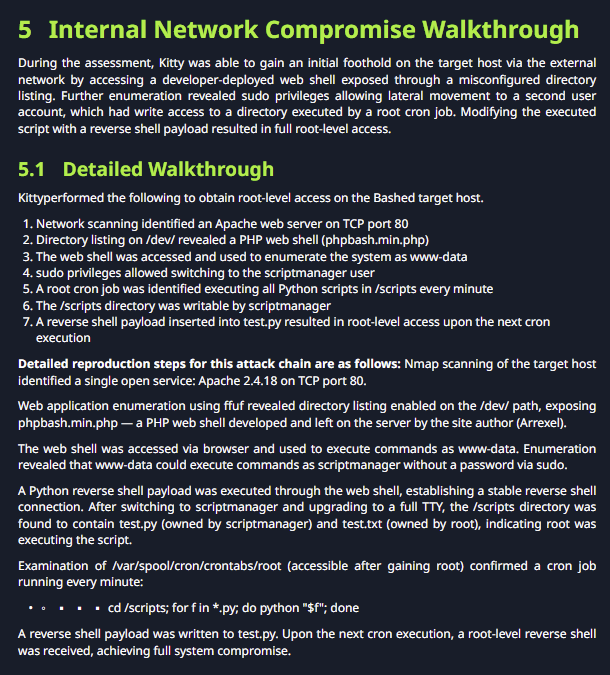
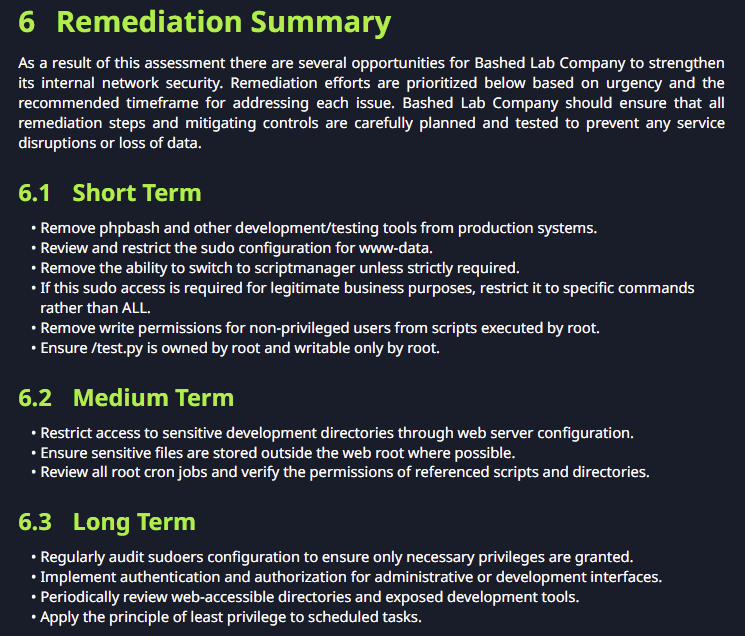
填寫介面名稱: Remediation Summary
這段在說什麼:
這裡是把這次測試發現的問題,以及可以進一步改善整體安全性的建議,整理成一份比較容易執行的行動清單。
填寫介面名稱: Findings(左邊選單的Findings區域,按+ ADD新增)
這段在說什麼: 每個漏洞的根因、影響、嚴重程度、如何修補等資訊
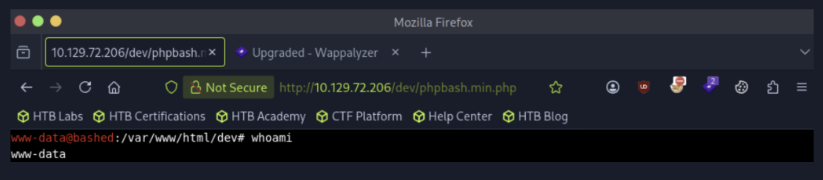
攻擊路徑: ffuf → /dev/ → phpbash → www-data shell
成因: Web Server 把不應該公開的開發/測試工具暴露在可存取路徑中,而且 >phpbash 沒有再做認證,又能執行 OS Command。
修補重點:
- 從正式環境移除 phpbash 等開發測試工具
- 透過 Web 伺服器設定限制敏感目錄的存取
CWE:CWE-284(Improper Access Control)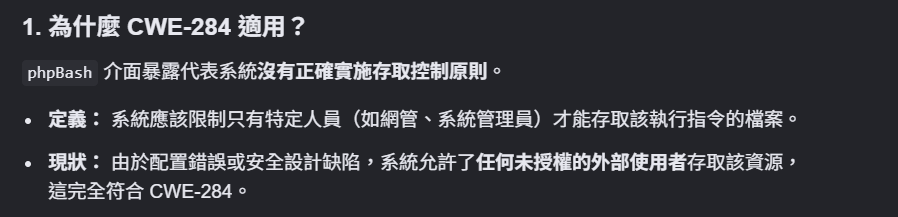
Severity:Critical (填完CVSS EDITOR 自動計算)
CVSS 3.1 — Base Metrics
| CVSS 指標 | 值 | 我們可以怎麼理解 |
|---|---|---|
| Attack Vector (AV) | Network (N) | 從網路上直接訪問,不需要靠近目標 |
| Attack Complexity (AC) | Low (L) | 不需要特殊條件,直接連就行 |
| Privileges Required (PR) | None (N) | 完全不需要帳號密碼 |
| User Interaction (UI) | None (N) | 不需要受害者做任何事 |
| Scope (S) | Changed ( C ) | 從 Web 層面突破,影響擴散到作業系統層 |
| Confidentiality ( C ) | High (H) | 可以讀取系統上的所有資料 |
| Integrity (I) | Low (L) | Integrity 這次沒有去驗證——我們沒有修改任何系統檔案。www-data 的寫入權限有限,所以 Integrity 選 Low |
| Availability (A) | Low (L) | Availability 這次沒有去驗證——我們沒有讓服務中斷。www-data 的權限也有限,所以Availability 選 Low |
這次不是cvss填寫初體驗惹!!!升級一下~
這次我們比 Day 6 要多填 Temporal !(非必要欄位,這次我們先挑一個挑戰看看!)
CVSS 3.1 — Temporal Metrics
Temporal 指標反映漏洞「現在這個時間點」的可利用程度,會隨時間變化——例如官方推出修補後分數會降低。
這裡是Temporal Metrics判斷大補帖+該finding的Temporal Metrics判斷~~~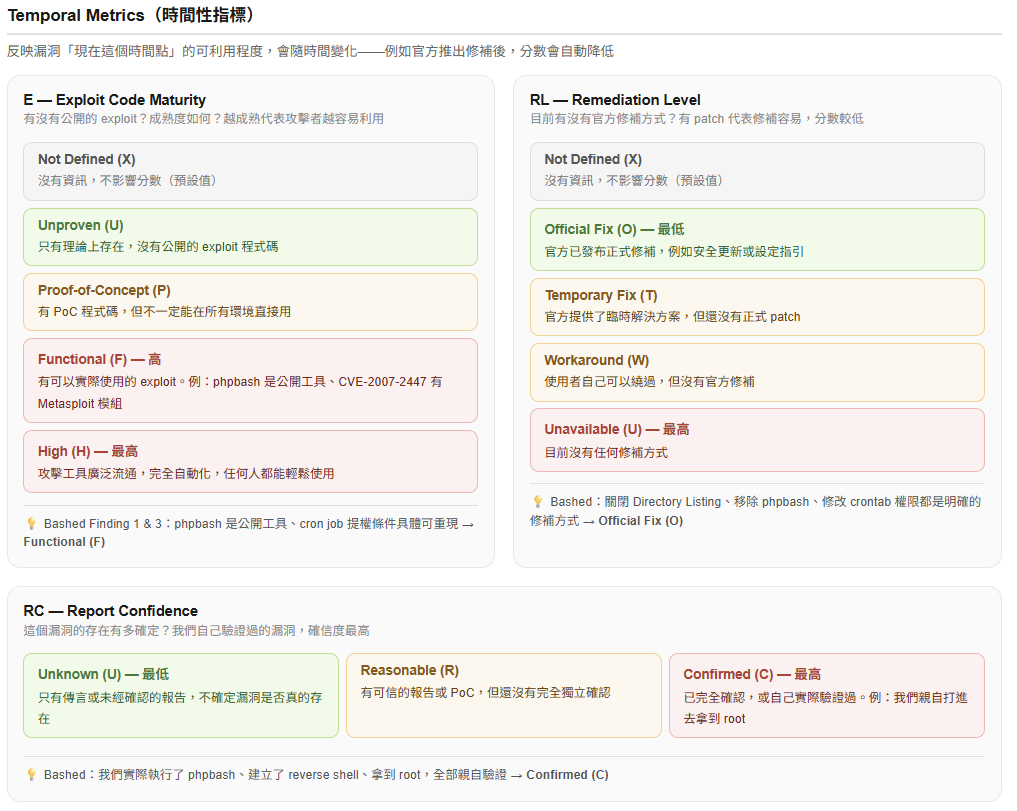
幫大家放大一下~~ 該finding的Temporal Metrics判斷
| CVSS 指標 | 值 | 我們可以怎麼理解 |
|---|---|---|
| Exploit Code Maturity (E) | Functional (F) | phpbash 是公開工具,可以直接用 |
| Remediation Level (RL) | Official Fix (O) | 有明確修補方式(關閉 Directory Listing、移除 webshell) |
| Report Confidence (RC) | Confirmed ( C ) | 我們實際訪問了 phpbash 並執行指令,完全確認 |
Root Cause
A sensitive development directory (/dev/) is exposed through the web server, allowing unauthenticated users to access phpbashmin.php.
Impact
An unauthenticated attacker who discovers the /dev/ directory can access
the phpbash web shell and execute arbitrary operating system commands as
www-data. This initial access serves as the entry point for further
exploitation, including privilege escalation to root-level access as
demonstrated in this assessment.
Remediation
- Remove phpBash and other development/testing tools from production systems.
- Restrict access to sensitive development directories through web server configuration.
- Implement authentication and authorization for administrative or development interfaces.
- Ensure sensitive files are stored outside the web root where possible.
- Periodically review web-accessible directories and exposed development tools.
Finding Evidence
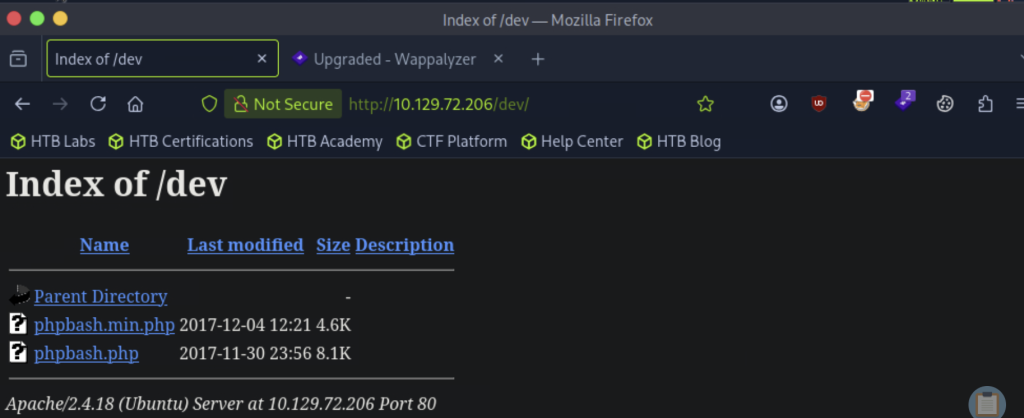

在匯出的報告~Finding 1的模樣><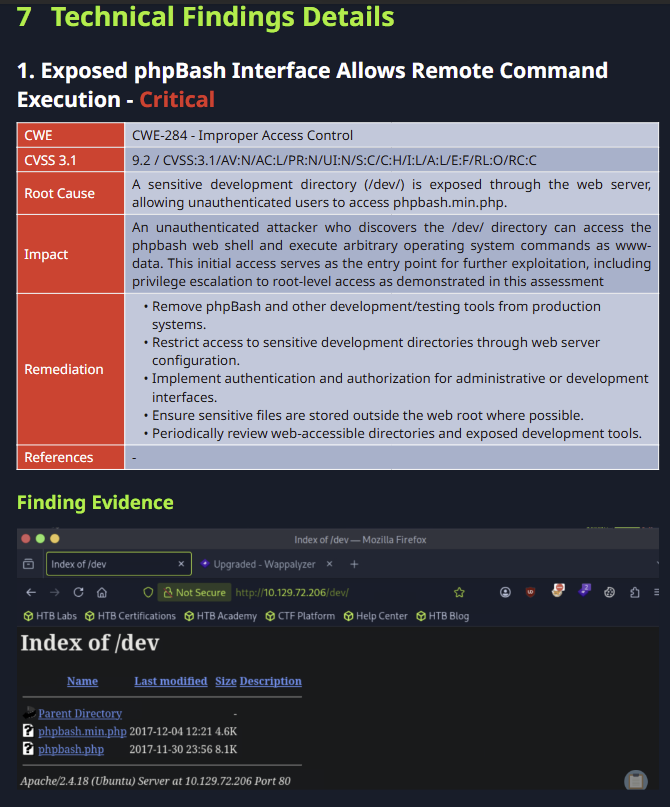
CWE:CWE-732: Incorrect Permission Assignment for Critical Resource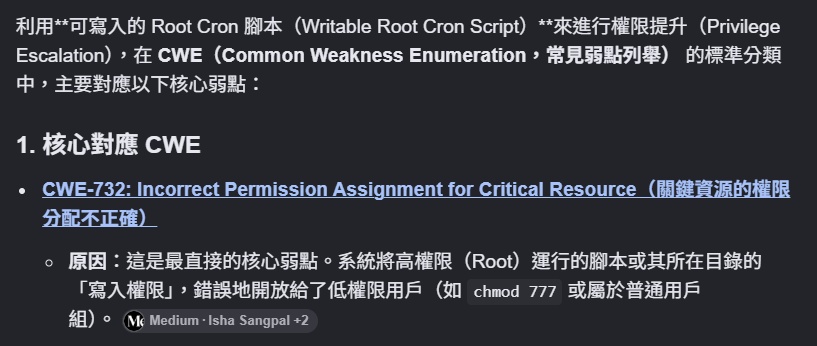
Severity:High
CVSS 3.1 — Base Metrics
| CVSS 指標 | 值 | 我們可以怎麼理解 |
|---|---|---|
| Attack Vector (AV) | Local (L) | 需要先在系統上有立足點(scriptmanager 身份),無法從Network直接觸發 |
| Attack Complexity (AC) | Low (L) | 不需要特殊條件,有 scriptmanager 身份就能做 |
| Privileges Required (PR) | Low (L) | 需要先有 scriptmanager 的身份 |
| User Interaction (UI) | None (N) | 不需要受害者配合,等 cron 自動跑就好 |
| Scope (S) | Unchanged (U) | 影響在同一台機器上 |
| Confidentiality ( C ) | High (H) | root 可以讀取所有資料 |
| Integrity (I) | High (H) | root 可以修改所有東西 |
| Availability (A) | High (H) | root 可以讓服務中斷 |
CVSS 3.1 — Temporal Metrics
| CVSS 指標 | 值 | 我們可以怎麼理解 |
|---|---|---|
| Exploit Code Maturity (E) | Functional (F) | 條件具體,不需要特殊工具,可以直接重現 |
| Remediation Level (RL) | Official Fix (O) | 有明確修補方式(限制 /scripts 寫入權限) |
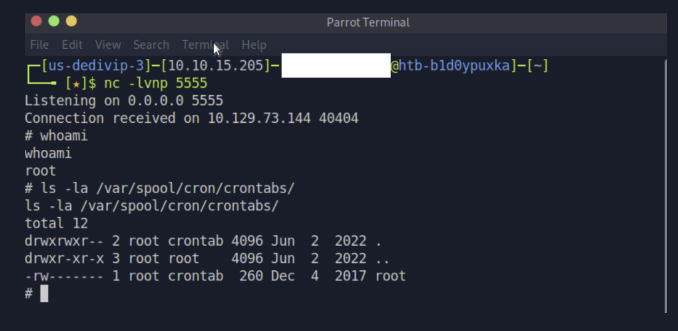
| Report Confidence (RC) | Confirmed ( C ) | 我們實際等 cron 跑、接到 root shell,完全確 |
Root Cause
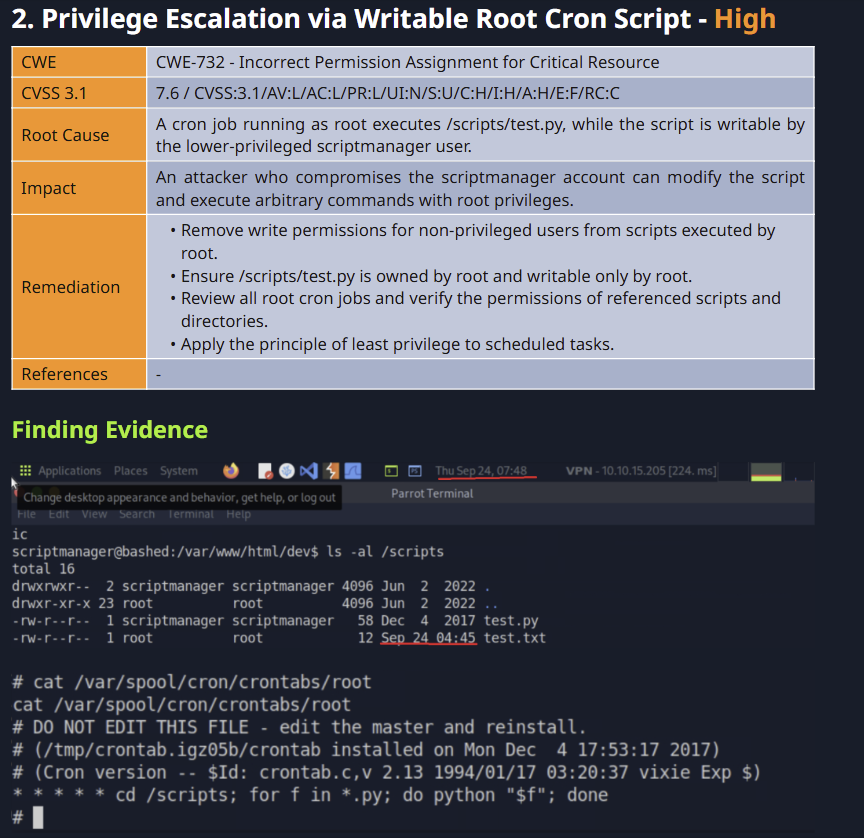
A cron job running as root executes /scripts/test.py, while the script is writable by the lower-privileged scriptmanager user.
Impact
An attacker who compromises the scriptmanager account can modify the script and execute arbitrary commands with root privileges.
Remediation
- Remove write permissions for non-privileged users from scripts executed by root.
- Ensure /scripts/test.py is owned by root and writable only by root.
- Review all root cron jobs and verify the permissions of referenced scripts and directories.
- Apply the principle of least privilege to scheduled tasks.
Finding Evidence
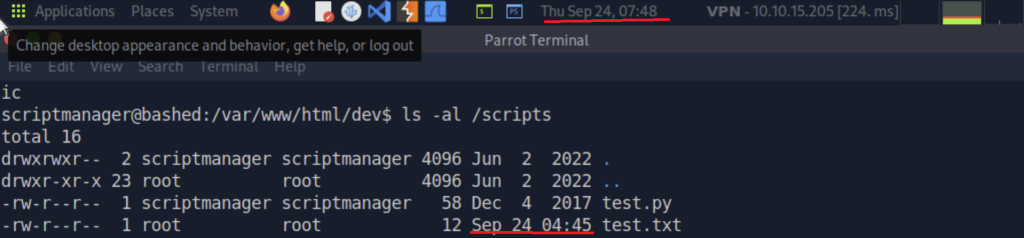
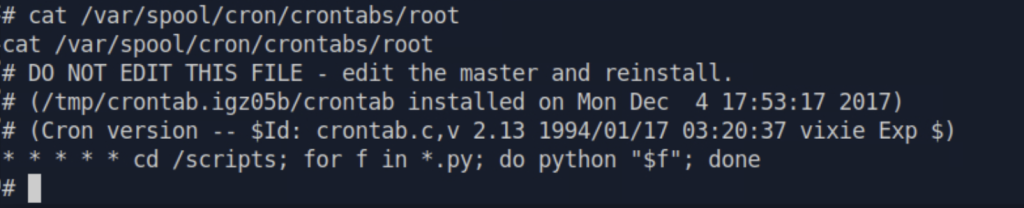
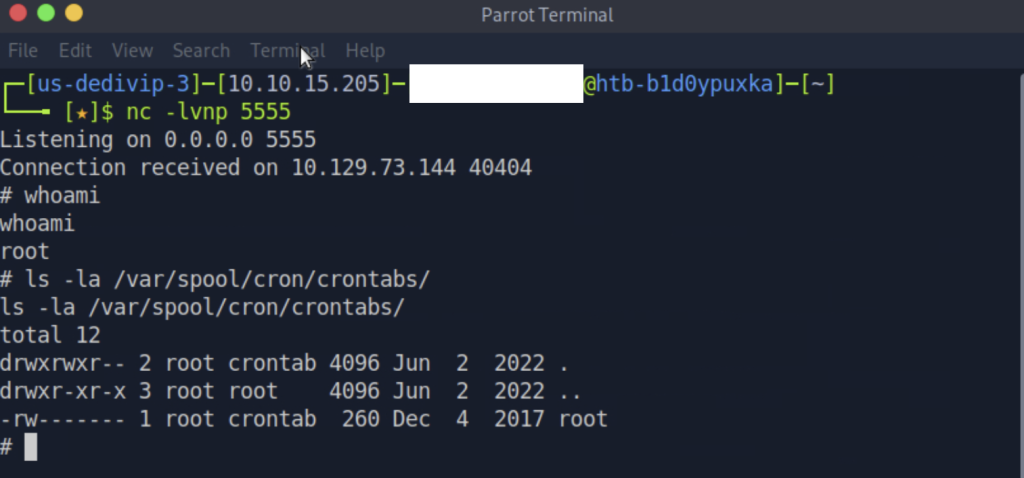
在匯出的報告~Finding 2的模樣><
💡 Web 服務帳號不應該有能力切換到其他使用者身份
CWE:CWE-269(Improper Privilege Management)
Severity:Medium(填完CVSS EDITOR 自動計算)
| CVSS 指標 | 值 | 我們可以怎麼理解 |
|---|---|---|
| Attack Vector (AV) | Network(N) | 需要先在目標系統上取得 www-data 身份,才能執行 sudo |
| Attack Complexity (AC) | Low (L) | 不需要特殊條件 |
| Privileges Required (PR) | Low (L) | 需要www-data |
| User Interaction (UI) | None (N) | 不需要受害者配合 |
| Scope (S) | Unchanged (U) | 影響在同一台機器上 |
| Confidentiality (C) | Low (L) | 切換到 scriptmanager 之後,可以讀取 scriptmanager 有權限讀的檔案,但還沒有到 root 等級,讀不到所有東西 |
| Integrity (I) | High (H) | scriptmanager 雖然不是 root,但可以修改 root 排程會執行的腳本內容 |
| Availability (A) | Low (L) | scriptmanager 本身不能直接讓服務掛掉,但因為可以修改 root 排程執行的腳本,如果寫進去的內容影響到系統運作,可用性就會受影響 |
CVSS 3.1 — Temporal Metrics
| CVSS 指標 | 值 | 我們可以怎麼理解 |
|---|---|---|
| Exploit Code Maturity (E) | Functional (F) | 利用條件明確,且我們已在實際環境中成功重現 |
| Remediation Level (RL) | Official Fix (O) | 有明確修補方式 |
| Report Confidence (RC) | Confirmed ( C ) | 我們實際執行了 sudo -u scriptmanager whoami,完全確認 |
Root Cause
The sudoers configuration grants www-data the ability to execute commands
as scriptmanager without a password.
Impact
An attacker with www-data access can  switch to the scriptmanager
account, expanding their access and enabling further privilege escalation
as demonstrated in this assessment.
Remediation
- Review and restrict the sudo configuration for www-data. Remove the
   ability to switch to scriptmanager unless strictly required.
- If this sudo access is required for legitimate business purposes,
   restrict it to specific commands rather than ALL.
- Regularly audit sudoers configuration to ensure only necessary
   privileges are granted.
Finding Evidence
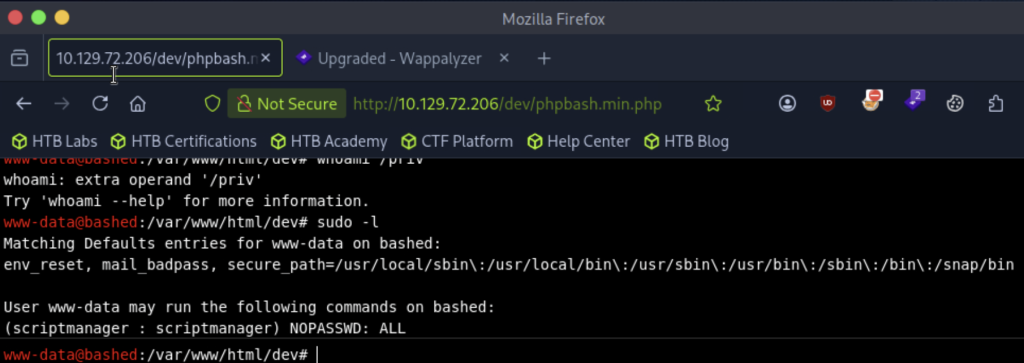
在匯出的報告~Finding 3的模樣><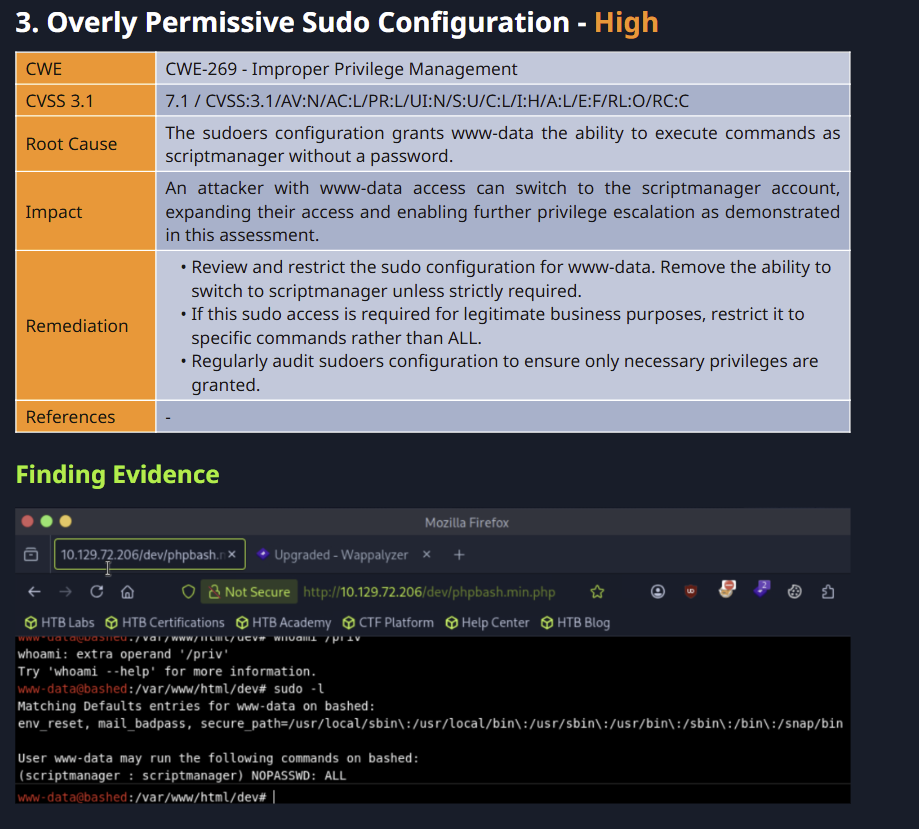
填寫介面名稱: Appendix
這段在說什麼: 放整個測試過程的原始記錄,補充前面段落沒有放完的細節。
A.2 Host & Service Discovery
我發現了哪些主機?這些主機又開了哪些 Port 和服務?
A.4 Exploited Hosts
我成功在哪台主機上完成 Exploitation?
A.5 Compromised Users
我成功取得或控制了哪些使用者帳號?
這裡要記錄的是實際被取得控制權的帳號,而不是 Enumeration 找到的所有使用者名稱。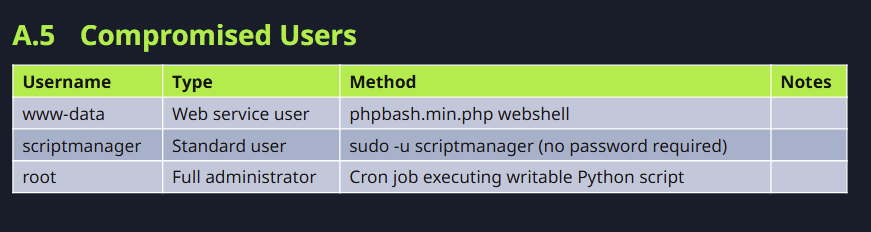
A.6 Changes / Cleanup
Changes / Cleanup = 測試過程中,我們對目標環境做了哪些改變,以及測試結束後是否需要清理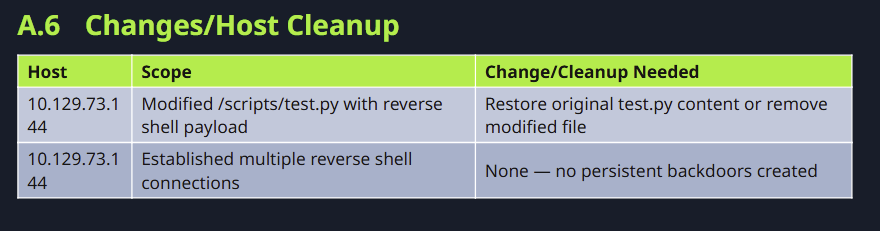
A.7 Flags Discovered
用來填寫我們找到的 flag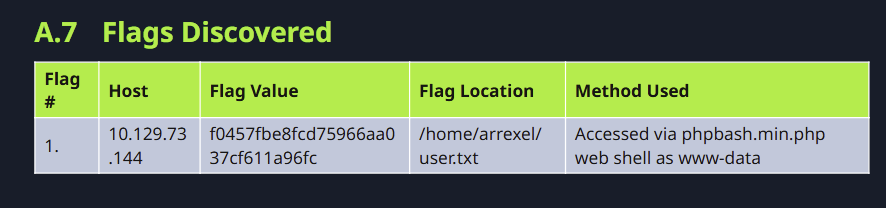
雖然 Day 6 撰寫第一份滲透測試報告之後,了解了邊打邊記錄 Finding 的重要性——
但鐵人賽我們每天都在前進,實際上還是很難做到 100%。還是會有「等等再整理」的情況 QQ
就跟實務狀況、CPTS 考試一樣——滲透測試工程師手上不可能只有一個案子,每個案子也都有時間壓力,考試也是。
知道應該怎麼做,跟真正做到,真的是兩件事。
不過,持續熟練就會越來越有效率,不管是寫報告還是打靶機~
從 Day 7 到今天,我們成功了解第二台目標主機 Bashed:
明天我們會針對 Web 常見、但我們還沒遇到的漏洞做探討,那我們明天見囉~~~



 iThome鐵人賽
 看影片追技術