
Day 16 已經可以直接在首頁修改任務狀態。
現在首頁上的每一筆任務都有:
狀態
標題
分類
截止日期
編輯
刪除
快速更新狀態
但任務一多,全部混在一起看就會開始不好找。
而且首頁上方原本的:
全部
待處理
進行中
已完成
之前都只是畫面,按了不會真的篩選。
所以 Day 17 的目標是:
讓首頁可以依照狀態和分類篩選任務。
今天要做兩種篩選:
狀態篩選
   +
分類篩選
例如:
狀態:待處理
分類:生活
首頁就只會顯示同時符合:
status = todo
category = 生活
的任務。
今天先不做:
分類 CRUD
搜尋
分頁
排序切換
services/
routes/
Claude API
我先把目前狀態和 Day 17 的範圍交給 Claude Code:
目前狀態:

 - Task CRUD 已完成
 - 首頁已經從 MySQL 顯示真正的 tasks
 - 任務可以在首頁直接修改 status
 - Task 有 todo / in_progress / done 三種狀態
 - Task 透過 category_id 關聯 Category
 - categories 目前已有「學習 / 專案 / 生活」
 - 首頁上方已有「全部 / 待處理 / 進行中 / 已完成」按鈕,但目前沒有功能

今天只做:
「任務狀態篩選 + 分類篩選」

需求:

1. 首頁的狀態按鈕要真的可以篩選:
   - 全部
   - 待處理 todo
   - 進行中 in_progress
   - 已完成 done

2. 加入分類篩選:
   - 全部分類
   - 其他分類從 categories 資料表產生

3. 使用 GET query string,不用 POST
4. 例如:
   /?status=todo
   /?category=專案
   /?status=todo&category=專案

5. 狀態和分類可以同時篩選
6. 沒有帶篩選條件時顯示全部任務
7. status 只允許 todo / in_progress / done
8. 分類名稱不要再手動寫死
9. 排序維持 created_at desc、id desc
10. 目前選中的狀態/分類要顯示 active
11. 篩選後沒有資料時顯示空狀態

今天不要:
 - 分類 CRUD
 - 搜尋
 - 分頁
 - services/
 - routes/
 - Claude API

請先規劃會修改哪些檔案,
不要直接修改程式。
最後 Day 17 主要修改:
app.py
templates/index.html
原本的篩選按鈕樣式可以繼續沿用。
前幾天新增、修改、刪除資料時,使用的是:
POST
因為那些操作會改變資料庫。
但 Day 17 的篩選只是:
決定要查看哪些資料。
不會修改 Task。
所以適合使用:
GET
例如:
/
代表全部任務。
/?status=todo
代表只看待處理。
/?category=生活
代表只看生活分類。
兩個也可以一起用:
/?status=todo&category=生活
以:
/?status=todo&category=生活
為例。? 後面的:
status=todo
category=生活
就是 Query String。
不同參數之間使用:
&
分隔。
Flask 可以透過:
request.args
讀取。
例如:
status_filter = request.args.get("status")
category_filter = request.args.get("category")
Day 17 的 index() 改成:
@app.route("/")
def index():
    status_filter = request.args.get("status")
    if status_filter not in Task.STATUS_LABELS:
        status_filter = None

    category_filter = request.args.get("category")
這裡先處理狀態。
目前合法的 status 只有:
todo
in_progress
done
而 Task Model 已經有:
STATUS_LABELS = {
    "todo": "待處理",
    "in_progress": "進行中",
    "done": "已完成",
}
所以可以直接拿它來驗證。
例如正常網址:
/?status=todo
會保留:
status_filter = "todo"
但如果自己輸入:
/?status=xxx
因為:
xxx
不在 Task.STATUS_LABELS 裡,所以:
status_filter = None
最後就會視為:
全部狀態
而不是讓程式出錯。
Day 13 原本是直接:
tasks = Task.query.order_by(
    Task.created_at.desc(),
    Task.id.desc(),
).all()
Day 17 改成:
query = Task.query
再依照目前的條件慢慢加篩選。
如果有合法的:
status_filter
就:
if status_filter:
    query = query.filter_by(status=status_filter)
例如:
status_filter = todo
概念上就是:
WHERE status = 'todo'
只留下待處理任務。
接著處理:
category_filter
實際程式是:
if category_filter:
    category = Category.query.filter_by(
        name=category_filter
    ).first()

    query = query.filter_by(
        category_id=category.id if category else -1
    )
例如:
category=生活
Flask 會先到 categories 找:
name = 生活
取得對應的 id,再用 category_id 篩選 Task。
例如:
/?category=不存在
這時:
category = None
程式會改查:
category_id = -1
正常資料不會有:
id = -1
所以查詢結果自然是空的。
頁面不會出現 500。
Day 17 的查詢會依序疊加:
query = Task.query

if status_filter:
    query = query.filter_by(status=status_filter)

if category_filter:
    ...
    query = query.filter_by(category_id=...)
所以:
/?status=todo&category=生活
會變成:
status = todo
     AND
category = 生活
也就是兩個條件的交集。
最後才執行:
tasks = query.order_by(
    Task.created_at.desc(),
    Task.id.desc(),
).all()
所以不管怎麼篩選,都還是:
最新建立的任務
	  ↓
較早建立的任務
Day 17 另外查:
categories = Category.query.order_by(Category.id).all()
再傳給 index.html。
完整概念:
return render_template(
    "index.html",
    tasks=tasks,
    categories=categories,
    current_status=status_filter,
    current_category=category_filter,
)
所以模板現在會知道:
tasks
→ 要顯示哪些任務

categories
→ 資料庫目前有哪些分類

current_status
→ 現在選哪個狀態

current_category
→ 現在選哪個分類
原本是:
<button>全部</button>
<button>待處理</button>
<button>進行中</button>
<button>已完成</button>
Day 17 改成 <a>:
<nav class="filter-tabs" aria-label="任務狀態篩選">
    <a
        class="filter-button{% if not current_status %} active{% endif %}"
        href="{{ url_for('index', category=current_category) }}">
        全部
    </a>

    <a
        class="filter-button{% if current_status == 'todo' %} active{% endif %}"
        href="{{ url_for('index', status='todo', category=current_category) }}">
        待處理
    </a>

    <a
        class="filter-button{% if current_status == 'in_progress' %} active{% endif %}"
        href="{{ url_for('index', status='in_progress', category=current_category) }}">
        進行中
    </a>

    <a
        class="filter-button{% if current_status == 'done' %} active{% endif %}"
        href="{{ url_for('index', status='done', category=current_category) }}">
        已完成
    </a>
</nav>
現在按:
待處理
網址就會變成:
/?status=todo
例如:
/?status=todo
這段:
{% if current_status == 'todo' %} active{% endif %}
就會讓:
待處理
變成紫色 active 狀態。
不再永遠只有「全部」亮著。
Day 17 這次沒有做 <select>,而是直接沿用首頁原本的按鈕樣式,增加第二排:
<nav class="filter-tabs" aria-label="分類篩選">
    <a
        class="filter-button{% if not current_category %} active{% endif %}"
        href="{{ url_for('index', status=current_status) }}">
        全部分類
    </a>

    {% for category in categories %}
    <a
        class="filter-button{% if current_category == category.name %} active{% endif %}"
        href="{{ url_for(
            'index',
            status=current_status,
            category=category.name
        ) }}">
        {{ category.name }}
    </a>
    {% endfor %}
</nav>
這裡最重要的是:
{% for category in categories %}
分類名稱不是重新寫:
學習
專案
生活
而是直接從 MySQL 的 categories 資料表產生。
這是 Day 17 很重要的一點。
例如先選:
生活
網址:
/?category=生活
再按:
待處理
因為狀態連結裡還有:
category=current_category
所以網址會變成:
/?status=todo&category=生活
分類不會消失。
反過來也一樣。
如果目前:
/?status=in_progress
再選:
生活
就會變成:
/?status=in_progress&category=生活
例如目前:
/?status=todo&category=生活
按:
全部
會使用:
href="{{ url_for('index', category=current_category) }}"
所以最後變成:
/?category=生活
意思是:
全部狀態
   +
生活分類
不會把分類一起清掉。
同樣地:
href="{{ url_for('index', status=current_status) }}"
例如原本:
/?status=todo&category=生活
按:
全部分類
就會變成:
/?status=todo
只清除分類條件。
按下:
待處理
網址變成:
/?status=todo
首頁只剩:
status = todo
的任務。
而「待處理」按鈕也會變成 active。
例如選:
生活
網址會帶:
/?category=生活
首頁就只會顯示生活分類的任務。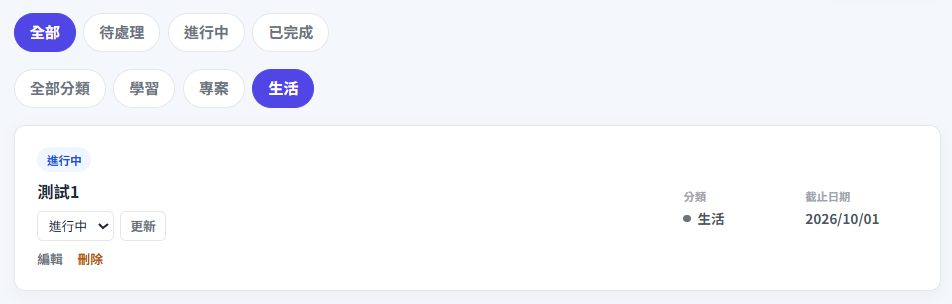
我也實際測試:
待處理
  +
 生活
畫面上可以看到兩個按鈕同時 active。
網址會是:
/?status=todo&category=生活
如果目前沒有任何任務同時符合這兩個條件,畫面就顯示空狀態。
這也證明:
status
 AND
category
的組合篩選有正常運作。
除了瀏覽器,我也可以用 Postman 測。
Method:
GET
Body 不需要填。
例如測全部:
http://127.0.0.1:5000/
測待處理:
http://127.0.0.1:5000/?status=todo
測生活:
http://127.0.0.1:5000/?category=生活
測組合條件:
http://127.0.0.1:5000/?status=todo&category=生活
也可以在 Postman 的 Params 裡輸入:
KEY       VALUE
status    todo
category  生活
Postman 會自動組出 Query String。
還可以自己輸入:
/?status=xxx
因為:
xxx
不是合法狀態,所以:
status_filter = None
最後會等同:
全部狀態
頁面不會出錯。
Day 16 的狀態更新是:
POST
→ 修改 Task
Day 17 則只是:
GET
→ 查詢 Task
所以不管按:
全部
待處理
進行中
已完成
學習
專案
生活
MySQL 裡的資料內容都不會改變。
Day 17 只是決定:
哪些 Task 要顯示在首頁
現在首頁已經可以:
查看全部任務
只看待處理
只看進行中
只看已完成
只看某個分類
狀態 + 分類一起篩選
而且篩選條件會直接保留在網址:
/?status=todo&category=生活
所以重新整理後,篩選條件仍然存在。
分類按鈕也已經是從:
categories
資料表動態產生,不需要在首頁再寫死分類名稱。
下篇不再增加新的篩選,而是開始處理程式發生錯誤時該怎麼看、怎麼找問題,以及怎麼讓 Claude Code 協助除錯。



 iThome鐵人賽
 看影片追技術