

在前面的章節中,我們分別探討了負責「資料機密性(Confidentiality)」的對稱加密(AES、ChaCha20),以及負責「資料完整性與真實性(Integrity & Authenticity)」的訊息鑑別碼(MAC)。
在過去,開發者如果需要同時保護資料不被偷看且不被竄改,必須手動將加密演算法與 MAC 結合。然而,這種手動組合的方式極易引發嚴重的密碼學安全漏洞。為了從根本解決這個問題,現代密碼學推出了認證加密(Authenticated Encryption with Associated Data,簡稱 AEAD)。
單純加密(如 AES)只能「防偷看」,不能「防篡改」。早期如果想同時達成這兩個目標,工程師必須手動把「加密演算法」與「MAC 演算法」組裝在一起。
然而,這兩種機制的執行順序至關重要,傳統上有三種組合方式,前兩種都藏有致命陷阱: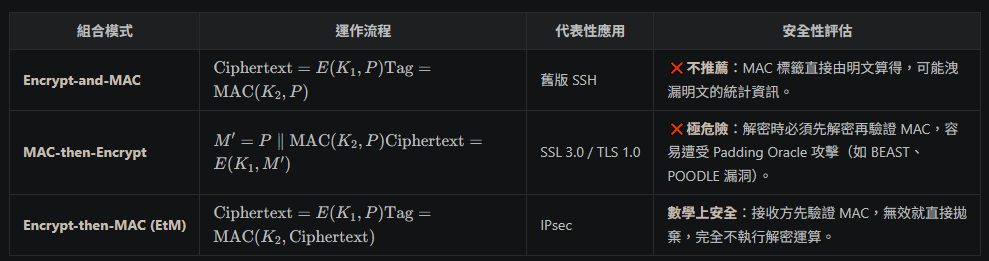
儘管 Encrypt-then-MAC (EtM) 在密碼學理論上被證明是安全的,但在實際工程開發中,手動組裝這套流程對一般工程師而言極度繁瑣且充滿陷阱:
String.equals() 或 Arrays.equals(),未採用固定時間比對(Constant-Time Comparison)。在實際的網路傳輸中,許多資料標頭(Header,如 IP 位址、通訊協定版本、封包序號)必須以明文傳輸(否則路由器無法轉發),但這些標頭絕不能被中間人竄改。
AAD 就是專門為這類「不需要保密,但需要驗證真實性」的資料設計的:
AEAD 的加密過程接收四個輸入,並產出兩個輸出:
               +-------------------------------------------+
  Plaintext -->|                                           |--> Ciphertext
        Key -->|              AEAD Encryption              |
      Nonce -->|                                           |
        AAD -->| (Additional Authenticated Data, 不加密)   |--> Auth Tag
               +-------------------------------------------+
(1) 原子化操作(Atomic Operation):
AEAD 將「加密」與「鑑別標籤(Auth Tag)計算」高度封裝在單一演算法(如 AES-GCM、ChaCha20-Poly1305)與 API 中。
在 Java 呼叫 cipher.doFinal() 時,底層保證:要麼成功還原明文,要麼驗證失敗直接拋出 AEADBadTagException**,中間不留任何供攻擊者利用的喘息空間。
(2) 原生支援附加資料認證(Associated Data, AAD):
在真實網路傳輸中,許多資料(例如 TCP/IP 標頭、HTTP Header、路由資訊)不能被加密(否則路由器無法傳送),但又絕對不能被篡改**。
AEAD 允許傳入 AAD(Associated Data):AAD 保持明文傳送,但會與密文一起被納入 Auth Tag 的計算中,完美解決了「公開標頭防篡改」的需求。
目前主流的 AEAD 演算法主要有兩款,分別代表了 NIST 與 RFC 體系:
在 Java 中,處理 AEAD 不需要額外的第三方套件(JDK 9+ 內建完整支援)。當呼叫 cipher.doFinal() 時,JCA 會自動將產出的 Auth Tag 附加在密文的最末端;解密時,JCA 也會自動從密文末端切出 Auth Tag 進行驗證。
import javax.crypto.Cipher;
import javax.crypto.KeyGenerator;
import javax.crypto.SecretKey;
import javax.crypto.spec.GCMParameterSpec;
import java.security.SecureRandom;
import java.util.Base64;

public class AesGcmExample {

    private static final String ALGORITHM = "AES/GCM/NoPadding";
    private static final int TAG_LENGTH_BITS = 128; // 推薦 128 bits (16 bytes) Auth Tag
    private static final int IV_LENGTH_BYTES = 12;  // GCM 推薦標準 IV 長度為 96 bits (12 bytes)

    public static byte[] encrypt(byte[] plaintext, SecretKey key, byte[] iv, byte[] aad) throws Exception {
        Cipher cipher = Cipher.getInstance(ALGORITHM);
        GCMParameterSpec parameterSpec = new GCMParameterSpec(TAG_LENGTH_BITS, iv);
        cipher.init(Cipher.ENCRYPT_MODE, key, parameterSpec);

        // 若有 AAD 資料,必須在 doFinal 前呼叫 updateAAD
        if (aad != null && aad.length > 0) {
            cipher.updateAAD(aad);
        }

        // 產出的 ciphertext 包含了:[密文內容] + [16 Bytes 的 Auth Tag]
        return cipher.doFinal(plaintext);
    }

    public static byte[] decrypt(byte[] cipherTextWithTag, SecretKey key, byte[] iv, byte[] aad) throws Exception {
        Cipher cipher = Cipher.getInstance(ALGORITHM);
        GCMParameterSpec parameterSpec = new GCMParameterSpec(TAG_LENGTH_BITS, iv);
        cipher.init(Cipher.DECRYPT_MODE, key, parameterSpec);

        if (aad != null && aad.length > 0) {
            cipher.updateAAD(aad);
        }

        // 若 AAD 被竄改或密文/Tag 不符,doFinal 會直接拋出 AEADBadTagException
        return cipher.doFinal(cipherTextWithTag);
    }

    public static void main(String[] args) {
        try {
            // 準備資料
            String plaintext = "敏感交易資料:轉帳 $5,000 至 Bob";
            String headerAAD = "Packet-Seq-No: 10042"; // 不需要加密但需要鑑別的 Header

            KeyGenerator keyGen = KeyGenerator.getInstance("AES");
            keyGen.init(256);
            SecretKey key = keyGen.generateKey();

            byte[] iv = new byte[IV_LENGTH_BYTES];
            new SecureRandom().nextBytes(iv); // 隨機生成 12-byte IV

            // 1. 加密
            byte[] ciphertext = encrypt(plaintext.getBytes(), key, iv, headerAAD.getBytes());
            System.out.println("密文 + Auth Tag (Base64): " + Base64.getEncoder().encodeToString(ciphertext));

            // 2. 正常解密
            byte[] decrypted = decrypt(ciphertext, key, iv, headerAAD.getBytes());
            System.out.println("解密結果: " + new String(decrypted));

            // 3. 模擬中間人竄改 AAD Header
            String tamperedAAD = "Packet-Seq-No: 10043";
            System.out.print("嘗試使用被竄改的 AAD 解密: ");
            decrypt(ciphertext, key, iv, tamperedAAD.getBytes()); // 將觸發例外

        } catch (javax.crypto.AEADBadTagException e) {
            System.out.println("驗證失敗!資料或 Header 遭到竄改 (AEADBadTagException)");
        } catch (Exception e) {
            e.printStackTrace();
        }
    }
}
在 Java 11+ 中,ChaCha20-Poly1305 的呼叫方式與 AES-GCM 非常相似,唯一的差異在於初始化參數使用的是 IvParameterSpec:
import javax.crypto.Cipher;
import javax.crypto.KeyGenerator;
import javax.crypto.SecretKey;
import javax.crypto.spec.IvParameterSpec;
import java.security.SecureRandom;

public class ChaChaPolyExample {

    public static void main(String[] args) throws Exception {
        KeyGenerator keyGen = KeyGenerator.getInstance("ChaCha20");
        keyGen.init(256);
        SecretKey key = keyGen.generateKey();

        byte[] nonce = new byte[12]; // RFC 8439 規定 12 Bytes Nonce
        new SecureRandom().nextBytes(nonce);

        String plaintext = "Hello ChaCha20-Poly1305!";
        byte[] aad = "Protocol-Version-2".getBytes();

        // 加密
        Cipher cipher = Cipher.getInstance("ChaCha20-Poly1305");
        cipher.init(Cipher.ENCRYPT_MODE, key, new IvParameterSpec(nonce));
        cipher.updateAAD(aad);
        byte[] cipherTextWithTag = cipher.doFinal(plaintext.getBytes());

        // 解密
        Cipher decryptCipher = Cipher.getInstance("ChaCha20-Poly1305");
        decryptCipher.init(Cipher.DECRYPT_MODE, key, new IvParameterSpec(nonce));
        decryptCipher.updateAAD(aad);
        byte[] decrypted = decryptCipher.doFinal(cipherTextWithTag);

        System.out.println("ChaCha20-Poly1305 解密結果: " + new String(decrypted));
    }
}


 iThome鐵人賽
 看影片追技術