
從 Build 到 Deploy 的信任鏈——確保進入叢集的每一個映像都是安全且已驗證的。
所有指令都在 koad 專案目錄下執行。如果還沒 clone,請先參考 Day 1 的 Step 0。
開始前請確認以下環境就緒。
# 主機終端
cosign version       # 需要 v2.0+
trivy --version      # 需要 v0.50+
如果未安裝:
> # Cosign
> go install github.com/sigstore/cosign/v2/cmd/cosign@latest
> # Trivy
> curl -sfL https://raw.githubusercontent.com/aquasecurity/trivy/main/contrib/install.sh | sh
# 主機終端
kubectl get pods -n kyverno | head -3
本日實作需要一個 registry 來推送已簽章的映像。可使用 Docker Hub、GitHub Container Registry,或本地 registry。
完成本日實作後,你將能夠:
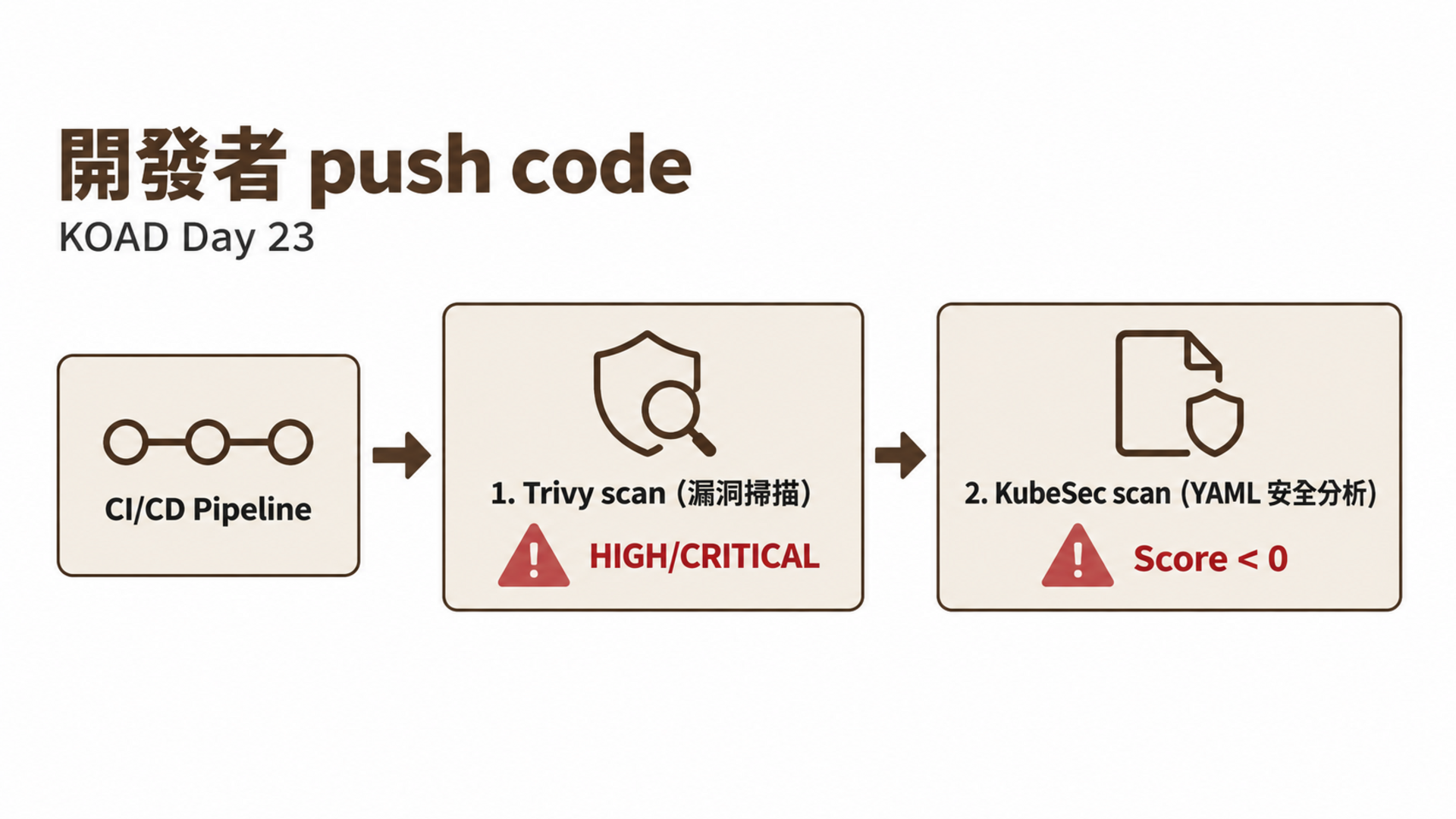
Day 22 展示了供應鏈攻擊的四個攻擊面。今天建立完整的防禦體系——從 CI/CD 到 K8s Admission,每一步都有安全檢查。
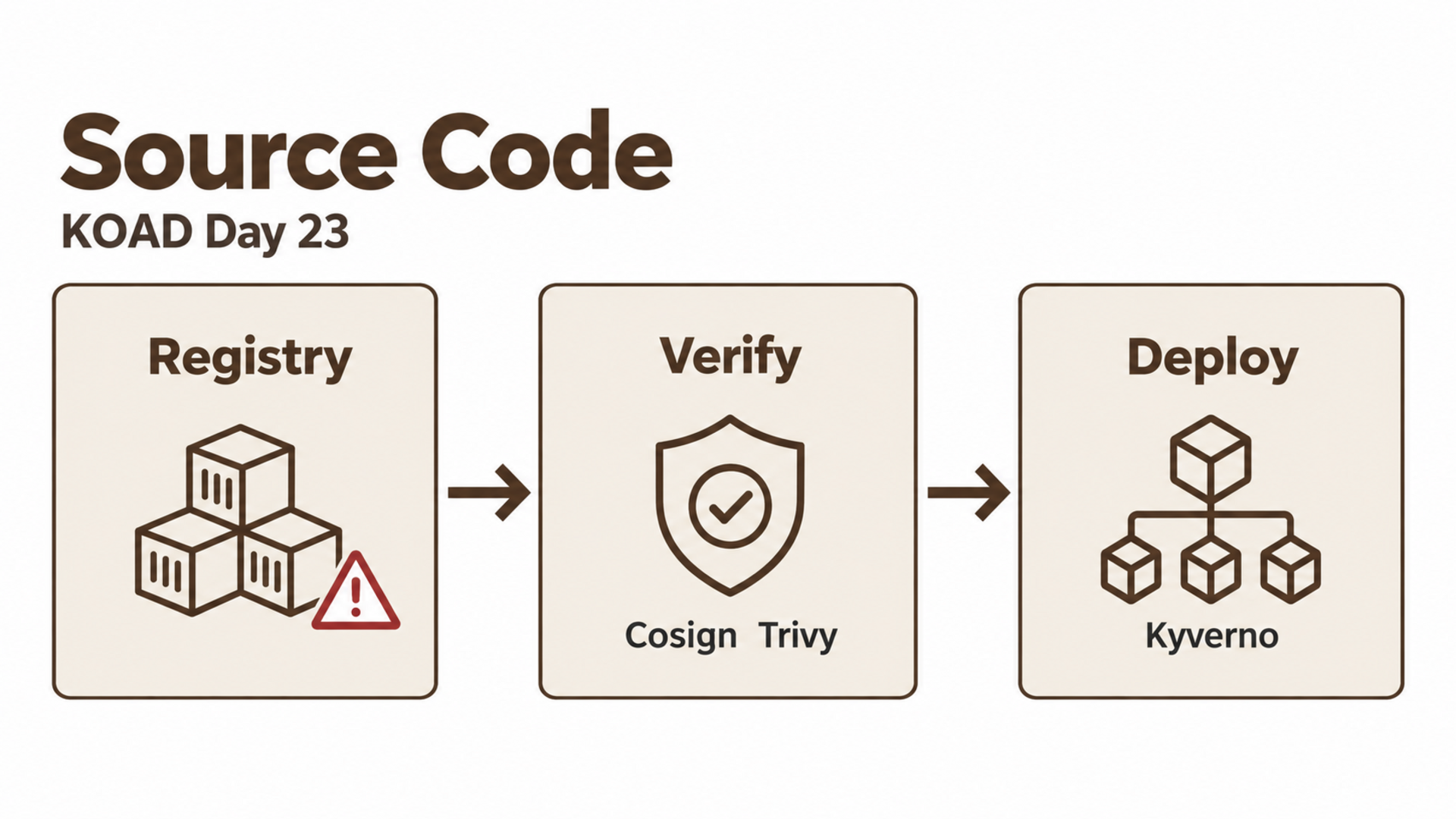
| 攻擊面 | 防禦措施 | 阻擋時機 |
|---|---|---|
| 映像竄改 | Cosign 簽章 + Kyverno 驗簽 | Admission |
| 已知漏洞 | Trivy 掃描 + CI/CD gate | Build |
| 非信任 Registry | Kyverno require-trusted-registry | Admission |
| 映像策略 | ImagePolicyWebhook | API Server |
| 依賴漏洞 | SBOM + grype | Build |
Cosign 是 Sigstore 專案的映像簽章工具,讓你可以用密碼學方式證明映像「確實是由信任的人/流程建構的」。
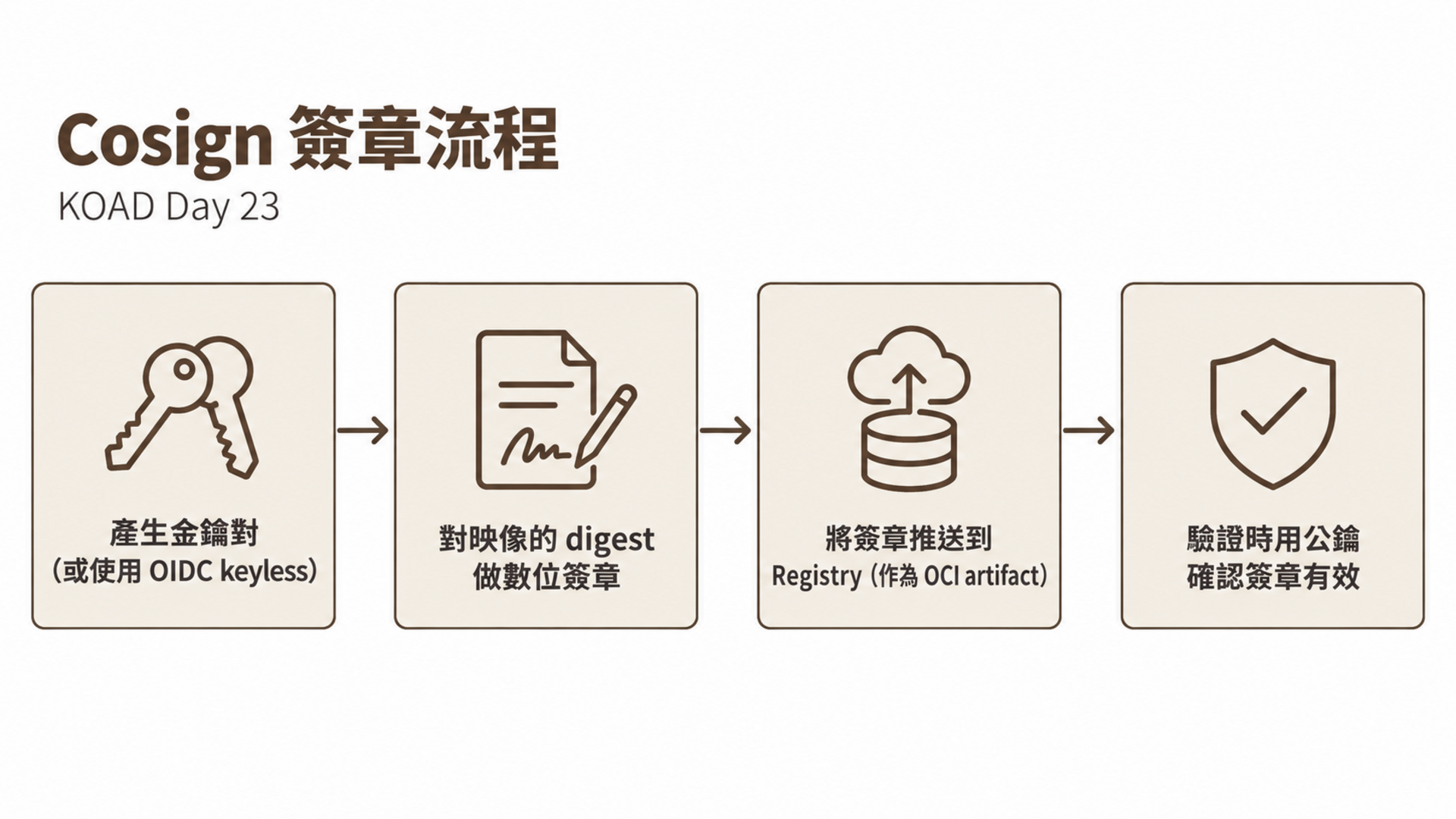
# 1. 產生金鑰對
$ cosign generate-key-pair
Enter password for private key: ********
Private key written to cosign.key
Public key written to cosign.pub

# 2. 簽署映像(對映像的 digest 簽章)
$ cosign sign --key cosign.key myregistry.io/myapp:v1.0
Pushing signature to: myregistry.io/myapp:sha256-abc123.sig

# 3. 驗證簽章
$ cosign verify --key cosign.pub myregistry.io/myapp:v1.0
Verification for myregistry.io/myapp:v1.0 --
The following checks were performed on each of these signatures:
  - The cosign claims were validated
  - The signatures were verified against the specified public key

[{"critical":{"identity":{"docker-reference":"myregistry.io/myapp"},
"image":{"docker-manifest-digest":"sha256:abc123..."},...}]
# Cosign 將簽章作為 OCI artifact 推送到 Registry
# 與映像放在同一個 Repository,但用特殊的 tag

# 映像:myregistry.io/myapp:v1.0
# 簽章:myregistry.io/myapp:sha256-<digest>.sig

# 這意味著:
# 1. 簽章跟映像在一起,不需要額外的儲存
# 2. push/pull 映像時,簽章一起移動
# 3. 任何支援 OCI 的 Registry 都能存放簽章
Cosign 支援 OIDC-based keyless 簽章——不需要管理金鑰,使用 CI/CD 的身份(GitHub Actions OIDC token)直接簽章:
# .github/workflows/build-and-sign.yaml
name: Build and Sign
on:
  push:
    tags: ['v*']

permissions:
  contents: read
  packages: write
  id-token: write         # ← 需要 OIDC token 權限

jobs:
  build:
    runs-on: ubuntu-latest
    steps:
      - uses: actions/checkout@v4

      - name: Install Cosign
        uses: sigstore/cosign-installer@v3

      - name: Login to Registry
        uses: docker/login-action@v3
        with:
          registry: ghcr.io
          username: ${{ github.actor }}
          password: ${{ secrets.GITHUB_TOKEN }}

      - name: Build and push
        id: build
        uses: docker/build-push-action@v5
        with:
          push: true
          tags: ghcr.io/${{ github.repository }}:${{ github.ref_name }}

      - name: Sign image (keyless)
        run: |
          cosign sign --yes \
            ghcr.io/${{ github.repository }}@${{ steps.build.outputs.digest }}
        env:
          COSIGN_EXPERIMENTAL: "true"
| 項目 | 金鑰對模式 | Keyless 模式 |
|---|---|---|
| 金鑰管理 | 需要保管私鑰 | 不需要 |
| 身份證明 | 金鑰持有者 | OIDC identity(GitHub/Google) |
| 離線使用 | 可以 | 不行(需要 Sigstore 服務) |
| 透明度 | 無公開記錄 | Rekor 透明度日誌 |
| 適用場景 | 離線/企業內部 | CI/CD 自動化 |
| CKS 考試 | 常考 | 了解即可 |
Cosign 不只能簽章,還能附加 attestations(證明)到映像:
# 附加 SBOM attestation
$ cosign attest --key cosign.key \
    --predicate sbom.spdx.json \
    --type spdxjson \
    myregistry.io/myapp:v1.0

# 附加 Trivy 掃描結果
$ trivy image --format cosign-vuln myregistry.io/myapp:v1.0 > vuln.json
$ cosign attest --key cosign.key \
    --predicate vuln.json \
    --type vuln \
    myregistry.io/myapp:v1.0

# 驗證 attestation
$ cosign verify-attestation --key cosign.pub \
    --type spdxjson \
    myregistry.io/myapp:v1.0
SLSA(Supply-chain Levels for Software Artifacts)是 Google 提出的供應鏈安全框架。Cosign attestation 是達到 SLSA Level 2+ 的關鍵工具。
# defense/kyverno-verify-images.yaml
apiVersion: kyverno.io/v1
kind: ClusterPolicy
metadata:
  name: verify-image-signature
spec:
  validationFailureAction: Enforce    # ← 阻擋未簽章映像
  background: false
  rules:
    - name: verify-cosign
      match:
        any:
          - resources:
              kinds: ["Pod"]
      verifyImages:
        - imageReferences:
            - "myregistry.io/*"
          attestors:
            - entries:
                - keys:
                    publicKeys: |
                      -----BEGIN PUBLIC KEY-----
                      MFkwEwYHKoZIzj0CAQYIKoZIzj0DAQcDQgAE...
                      -----END PUBLIC KEY-----
# 未簽章的映像 → 被阻擋
$ kubectl run test --image=myregistry.io/unsigned-app:latest
Error from server: admission webhook "mutate.kyverno.svc-fail" denied the request:
  image verification failed for myregistry.io/unsigned-app:latest:
  signature not found

# 已簽章的映像 → 正常部署
$ kubectl run test --image=myregistry.io/signed-app:v1.0
pod/test created
# 只允許來自信任 Registry 的映像
apiVersion: kyverno.io/v1
kind: ClusterPolicy
metadata:
  name: require-trusted-registry
spec:
  validationFailureAction: Enforce
  rules:
    - name: trusted-registry-only
      match:
        any:
          - resources:
              kinds: ["Pod"]
      validate:
        message: "Only images from trusted registries are allowed"
        pattern:
          spec:
            containers:
              - image: "gcr.io/myproject/* | ghcr.io/myorg/* | myregistry.io/*"
            =(initContainers):
              - image: "gcr.io/myproject/* | ghcr.io/myorg/* | myregistry.io/*"
# 禁止使用 :latest tag,要求使用 digest
apiVersion: kyverno.io/v1
kind: ClusterPolicy
metadata:
  name: require-image-digest
spec:
  validationFailureAction: Enforce
  rules:
    - name: no-latest-tag
      match:
        any:
          - resources:
              kinds: ["Pod"]
      validate:
        message: "Images must use digest (@sha256:), not :latest"
        deny:
          conditions:
            any:
              - key: "{{ images.containers.*.tag || '' }}"
                operator: AnyIn
                value: ["latest", ""]
# 掃描映像漏洞
$ trivy image nginx:1.25
nginx:1.25 (debian 12.4)

Total: 142 (UNKNOWN: 0, LOW: 85, MEDIUM: 40, HIGH: 15, CRITICAL: 2)
| Library | Vulnerability | Severity | Fixed Version |
|---|---|---|---|
| libssl3 | CVE-2024-XXX | CRITICAL | 3.0.13-1~deb12u1 |
| openssl | CVE-2024-XXX | CRITICAL | 3.0.13-1~deb12u1 |
| curl | CVE-2024-XXX | HIGH | 7.88.1-10+deb12u5 |
# 只顯示 HIGH + CRITICAL
$ trivy image --severity HIGH,CRITICAL nginx:1.25

# 掃描 KOAD 自訂映像
$ trivy image koad/vulnerable-webapp:latest

# 掃描 K8s YAML 的安全配置
$ trivy config scenarios/privilege-escalation/
# 掃描 Dockerfile(靜態分析)
$ trivy config --policy my-policies/ Dockerfile

# 掃描 Helm chart
$ trivy config --helm-values values.yaml mychart/

# 掃描本機檔案系統
$ trivy fs --scanners vuln,secret .

# 產生 SARIF 格式(GitHub Code Scanning)
$ trivy image --format sarif -o results.sarif nginx:1.25

# 用自訂 .trivyignore 忽略特定 CVE
$ cat .trivyignore
CVE-2024-XXXX    # 已確認不影響我們的使用場景
CVE-2024-YYYY    # 上游尚未修復,暫時忽略
# GitHub Actions
- name: Trivy scan
  uses: aquasecurity/trivy-action@master
  with:
    image-ref: ${{ env.IMAGE }}
    severity: 'CRITICAL,HIGH'
    exit-code: '1'              # 發現漏洞時 CI 失敗
    format: 'sarif'
    output: 'trivy-results.sarif'

- name: Upload Trivy results
  uses: github/codeql-action/upload-sarif@v3
  with:
    sarif_file: 'trivy-results.sarif'
# 掃描 K8s YAML 的安全性
$ kubesec scan scenarios/privilege-escalation/S13-privileged-escape.yaml

[
  {
    "object": "Pod/privileged-pod.koad",
    "valid": true,
    "score": -30,
    "scoring": {
      "critical": [
        {"id": "Privileged", "reason": "Privileged pods can escalate to root"},
        {"id": "HostPID", "reason": "Sharing host PID namespace"}
      ]
    }
  }
]
Score -30 表示安全配置極差——KOAD 的攻擊場景當然如此。
ImagePolicyWebhook 是 K8s 原生的映像准入控制,在 API Server 層級驗證映像。與 Kyverno 不同,它是 API Server 內建的 admission plugin。
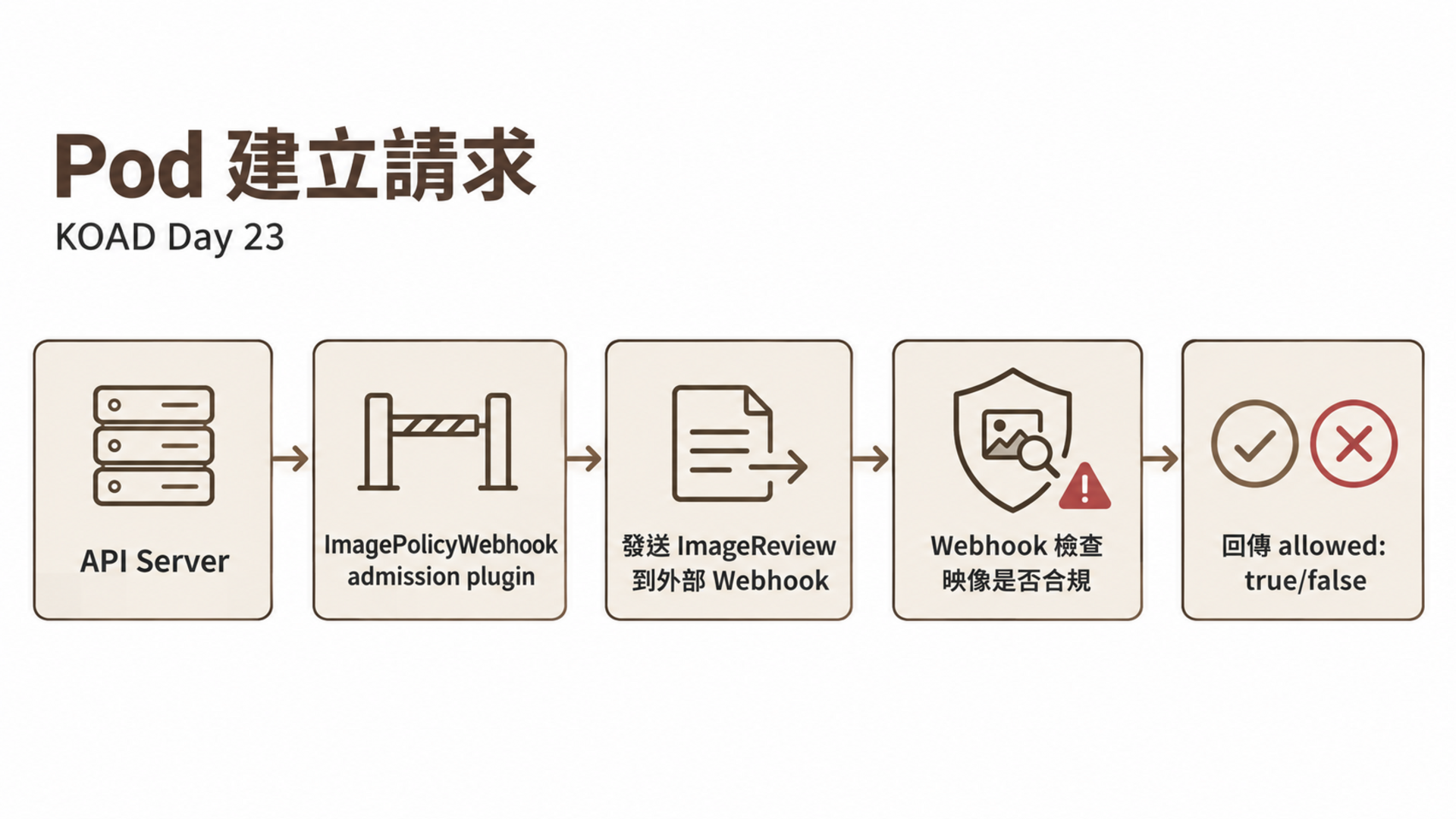
# 1. /etc/kubernetes/admission-config.yaml
apiVersion: apiserver.config.k8s.io/v1
kind: AdmissionConfiguration
plugins:
  - name: ImagePolicyWebhook
    configuration:
      imagePolicy:
        kubeConfigFile: /etc/kubernetes/image-policy-webhook.kubeconfig
        allowTTL: 50          # 通過的快取時間(秒)
        denyTTL: 50           # 拒絕的快取時間(秒)
        retryBackoff: 500     # 重試間隔(毫秒)
        defaultAllow: false   # ← 預設拒絕(安全)
# 2. /etc/kubernetes/image-policy-webhook.kubeconfig
apiVersion: v1
kind: Config
clusters:
  - name: image-policy
    cluster:
      server: https://image-policy-webhook.svc:443
      certificate-authority: /etc/kubernetes/pki/webhook-ca.crt
users:
  - name: api-server
    user:
      client-certificate: /etc/kubernetes/pki/webhook-client.crt
      client-key: /etc/kubernetes/pki/webhook-client.key
contexts:
  - name: default
    context:
      cluster: image-policy
      user: api-server
current-context: default
# 3. API Server flag
--admission-plugins=...,ImagePolicyWebhook
--admission-control-config-file=/etc/kubernetes/admission-config.yaml
| 設定 | 行為 | 風險 |
|---|---|---|
defaultAllow: true |
Webhook 不可用時允許所有映像 | 安全風險:Webhook 故障 = 無防禦 |
defaultAllow: false |
Webhook 不可用時拒絕所有映像 | 可用性風險:Webhook 故障 = 無法部署 |
CKS 考試通常要求設 defaultAllow: false(安全優先)。
| 項目 | ImagePolicyWebhook | Kyverno |
|---|---|---|
| 類型 | K8s 內建 | 第三方 CRD |
| 配置位置 | API Server flag + 外部檔案 | ClusterPolicy CRD |
| 需要外部服務 | 是(Webhook server) | 否(自帶) |
| 功能 | 只驗證映像 | 驗證 + 變異 + 產生 |
| 修改 API Server | 需要 | 不需要 |
| CKS 考試 | 常考 | 也常考 |
| 生產環境推薦 | 適合已有 webhook 基礎設施 | 更靈活,推薦 |
Cosign 簽章和 SBOM 確保了「映像來自信任來源」和「映像包含哪些元件」,但還有兩個問題需要解決:
VEX 是一種機器可讀的聲明格式,用來表達「某個 CVE 是否真的影響特定產品」。漏洞掃描工具常產生大量誤報——例如映像中有 OpenSSL 的漏洞,但該漏洞只影響 DTLS,而你的應用根本不用 DTLS。VEX 讓你正式聲明這種判斷:
# 產生 VEX attestation 並附加到映像
cosign attest --key cosign.key \
    --predicate vex-statement.json \
    --type vuln \
    myregistry.io/myapp:v1.0
VEX 狀態值:
| 狀態 | 意義 |
|---|---|
not_affected |
CVE 存在於元件中,但不影響此產品 |
affected |
CVE 確實影響此產品 |
fixed |
已修復 |
under_investigation |
調查中 |
in-toto 為軟體供應鏈的每一步(source、build、test、package、deploy)產生簽章的 attestation,確保沒有步驟被跳過或竄改:
Source Code → [attestation] → Build → [attestation] → Test → [attestation] → Package → [attestation] → Deploy
每個步驟由指定的角色執行,產生的 attestation 包含輸入/輸出的 hash 和執行者的簽章。最終驗證時,比對所有 attestation 是否符合預定義的 layout(供應鏈規格)。
Notary v2(CLI 工具名為 notation)是另一個映像簽章工具,由 CNCF Notary 專案維護。與 Cosign 的差異:
| 面向 | Cosign | Notary v2 (notation) |
|---|---|---|
| 簽章儲存 | OCI artifact(tag-based) | OCI artifact(referrers API) |
| 標準 | Sigstore 生態系 | OCI 1.1 Referrers 標準 |
| Cloud 支援 | 廣泛 | AWS ECR、Azure ACR 原生支援 |
| Keyless | 支援(Fulcio + Rekor) | 不支援 |
| 適用場景 | 開源 / CI/CD 自動化 | 企業 / 合規要求 |
VEX + in-toto 補完了 Day 23 已覆蓋的供應鏈安全體系:
| 層級 | 工具 | 解決的問題 |
|---|---|---|
| 映像完整性 | Cosign 簽章 | 映像是否被竄改 |
| 元件清單 | SBOM (Syft/Trivy) | 映像包含哪些套件 |
| 漏洞掃描 | Trivy | 有哪些已知 CVE |
| 漏洞評估 | VEX | CVE 是否真的影響此產品 |
| 建構驗證 | in-toto | 建構過程是否可信 |
| 合規等級 | SLSA | 達到哪個供應鏈安全等級 |
# Audit 模式只記錄違規,不阻擋
validationFailureAction: Audit    # ← 不會阻擋

# 要真的阻擋必須用 Enforce
validationFailureAction: Enforce  # ← 會阻擋

# 建議:先 Audit 觀察一段時間,確認沒有誤報後再切 Enforce
# 修改 API Server 參數後需要重啟
# 在 kubeadm 叢集中,修改 /etc/kubernetes/manifests/kube-apiserver.yaml
# kubelet 會自動偵測變更並重啟 API Server

# 如果 API Server 沒有啟動,檢查日誌:
$ crictl logs $(crictl ps -a | grep kube-apiserver | head -1 | awk '{print $1}')
# 如果攻擊者能替換 cosign.pub,就能用自己的私鑰簽章惡意映像
# 公鑰應該:
# 1. 存在安全的 Secret Management(HashiCorp Vault)
# 2. 透過 ConfigMap 掛載(受 RBAC 保護)
# 3. 或直接寫在 Kyverno ClusterPolicy 中
# 首次執行 Trivy 需要下載 ~30MB 的漏洞資料庫
# 在離線環境需要預先下載
$ trivy image --download-db-only
$ trivy image --skip-db-update nginx:1.25    # 使用本地 DB
| 考點 | 本日內容 | 權重 |
|---|---|---|
| 映像簽章 | Cosign 簽署和驗證 | Supply Chain 20% |
| 映像掃描 | Trivy 漏洞掃描 | Supply Chain 20% |
| ImagePolicyWebhook | API Server 配置 | Supply Chain 20% |
| 准入控制 | Kyverno verifyImages | Supply Chain 20% |
供應鏈安全佔 CKS 考試 20% 的權重,是最重要的領域之一。
# 主機終端 — 移除測試用的映像驗簽策略
kubectl delete clusterpolicy koad-verify-images 2>/dev/null

# 如果配置了 ImagePolicyWebhook,還原 API Server 設定
# 移除 --admission-control-config-file 和 --enable-admission-plugins 中的 ImagePolicyWebhook
Kyverno 的映像白名單策略(
koad-require-trusted-registry)是 Audit 模式,不影響攻擊場景,不需要移除。
--severity CRITICAL --exit-code 1)明天 Day 24 是全系列的高潮——KOAD Kill Chain:35 場景端到端全自動攻擊演練。



 iThome鐵人賽
 看影片追技術